Missing display options

Tommy87

New member
Local time
5:33 AM
Messages
3
Hi there

would appreciate some help on this.
I have a toshiba laptop, bout year and half old, is running windows 7 x64.
I had some problems with it a while back so my mate formatted it for me.

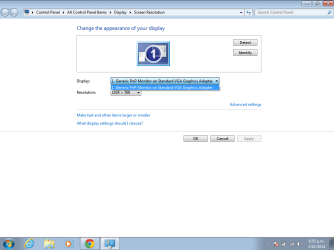
the computer now runs good again but when i go to play a movie from my laptop onto my tv via HDMI cable like i used to, my computer does not let me change the display options in the resolution menu, to be able to transfer image to secondary minitor ie. tv screen.

I have suplied a screen print of what comes up.

please could someone help

cheers
 

Attachments
  • desktop display settings.png
    desktop display settings.png
    21.4 KB · Views: 2

My Computer

Computer type
Laptop
Computer Manufacturer/Model Number
toshiba
OS
Windows 7 Ultimate x64
Hard Drives
750gb
Antivirus
none
Browser
google
Go to Toshiba website and download the correct display adapter driver for your specific model laptop.
 

My Computer

Computer type
Laptop
Computer Manufacturer/Model Number
HP
OS
Windows 7 Home Premium 64 bit
CPU
Intel
Memory
6GB
Graphics Card(s)
Intel
Hard Drives
240 GB SSD (Kingston)
Antivirus
Avast
Browser
IE 11
thanks for the reply
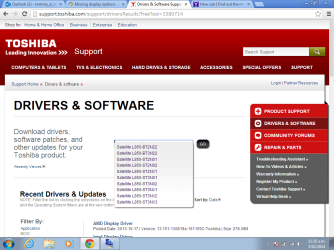
i have gone there but dont know the exact model of laptop, have tried to find and it just says "System Model Satellite L850
" but theres 10 different types of that model, i have supplied picture.

how do i know which mine is...

cheers
 

Attachments

  • toshiba models.png
    toshiba models.png
    48.9 KB · Views: 0

My Computer

Computer type
Laptop
Computer Manufacturer/Model Number
toshiba
OS
Windows 7 Ultimate x64
Hard Drives
750gb
Antivirus
none
Browser
google
Try WIN+P
 

My Computer

Computer Manufacturer/Model Number
HP, Dell, Gateway, Toshiba - 4 laptops and 2 desktops
OS
Vista, Windows7, Mint Mate, Zorin, Windows 8
CPU
from 1.6GHz Duo to i7
Monitor(s) Displays
2x HP w2207
Hard Drives
5x HDD, 7x SSD, 12x Externals
Keyboard
with trackball - no mices
Mouse
Trackball mice
Internet Speed
DSL 6000
I typed win+p in the search box but nothing......
 

My Computer

Computer type
Laptop
Computer Manufacturer/Model Number
toshiba
OS
Windows 7 Ultimate x64
Hard Drives
750gb
Antivirus
none
Browser
google
Don't type, just press the keys on your keyboard together. WIN is the Start key, the one with the funny flag.
 

My Computer

Computer Manufacturer/Model Number
HP, Dell, Gateway, Toshiba - 4 laptops and 2 desktops
OS
Vista, Windows7, Mint Mate, Zorin, Windows 8
CPU
from 1.6GHz Duo to i7
Monitor(s) Displays
2x HP w2207
Hard Drives
5x HDD, 7x SSD, 12x Externals
Keyboard
with trackball - no mices
Mouse
Trackball mice
Internet Speed
DSL 6000
thanks for the reply
i have gone there but dont know the exact model of laptop, have tried to find and it just says "System Model Satellite L850
" but theres 10 different types of that model, i have supplied picture.

how do i know which mine is...

cheers

I don't have a Toshiba, but from their website (and from most other manufacturers as well) there should be a sticker on your laptop that gives you the exact model number. Go to the website, select the correct region (country), enter your correct model number, and find the correct display adapter driver. If you look, and if you have the sticker on your laptop, it should not be too difficult. If the sticker is not on your laptop, there is probably other ways to identify the correct model number.
 

My Computer

Computer type
Laptop
Computer Manufacturer/Model Number
HP
OS
Windows 7 Home Premium 64 bit
CPU
Intel
Memory
6GB
Graphics Card(s)
Intel
Hard Drives
240 GB SSD (Kingston)
Antivirus
Avast
Browser
IE 11
I don't have a Toshiba, but from their website (and from most other manufacturers as well) there should be a sticker on your laptop that gives you the exact model number. Go to the website, select the correct region (country), enter your correct model number, and find the correct display adapter driver. If you look, and if you have the sticker on your laptop, it should not be too difficult. If the sticker is not on your laptop, there is probably other ways to identify the correct model number.
Often with Toshiba the only place you'll find the full model number is on the sticker on the box it came in (at least in Canada). My old work laptop needed drivers and it was a good thing I didn't throw the box away...
 

My Computer

Computer type
PC/Desktop
Computer Manufacturer/Model Number
Mellon Labs (custom build)
OS
Win 7 Pro x64/Win 10 Pro x64 dual boot
CPU
AMD FX 8350 Vishera @ 4200
Motherboard
ASUS M5A97 R2.0
Memory
16 GB Mushkin Blackline DDR3-2400 @ 1866 (9-10-10-10-31)
Graphics Card(s)
XFX Radeon R9 280 Double D Black Edition
Sound Card
Realtek HD Audio on MB. Sounds great.
Monitor(s) Displays
Acer 24", Acer 22"
Screen Resolution
3840 x 1080
Hard Drives
1 x Mushkin Chronos 120 GB SSD (Win 10)
1 x Samsung 850 EVO 250 GB SSD (Win 7)
1 x WD 1TB SATA Blue
1 x WD 1TB SATA Green
PSU
Corsair TX-750
Case
CoolerMaster HAF 912+
Cooling
Coolermaster Seidon 240M Liquid AIO. 6 case fans
Keyboard
Logitech G710+
Mouse
Logitech G500s
Internet Speed
Much better since I got fiber, but still way overpriced.
Antivirus
MSE, Malware Bytes for scanning
Browser
Firefox
Other Info
Corsair VOID USB headphones.

A Mellon Labs X-1 - LCD Smartie driven system status display.

Brought to you by the letter E
On my Toshiba laptop there is a sticker on the bottom that shows the model number. But easiest is to run Belarc Advisor. That gives you all the details.
 

My Computer

Computer Manufacturer/Model Number
HP, Dell, Gateway, Toshiba - 4 laptops and 2 desktops
OS
Vista, Windows7, Mint Mate, Zorin, Windows 8
CPU
from 1.6GHz Duo to i7
Monitor(s) Displays
2x HP w2207
Hard Drives
5x HDD, 7x SSD, 12x Externals
Keyboard
with trackball - no mices
Mouse
Trackball mice
Internet Speed
DSL 6000
Back
Top