Missing files from pictures library

Randox1

New member
Local time
4:17 PM
Messages
6
Hi,
A large number of files has disappeared from my computer and I can't find them anywhere:

I have a folder within the Pictures library entitled "To be printed" - it's where I dump all my photos from my phone initially before I sort through them to decide what to keep.

I had around 500 files in this folder (mostly JPEGS and a couple of MOV files). A few weeks ago I added 95 new photos to this folder. The next time I looked in the folder it was acting strangely. The new 95 photos didn't appear to be there and only the 500 or so old files were there. The files are arranged by day. When I clicked arrange by folder however the 95 new photos appeared and the other 500 disappeared - when arranged by day the folder told me I had 500 items in the folder and when I clicked arrange by folder I was told I had 95 files in the folder. I shut the computer down and the next time I logged on the folder only had the new 95 files and there was no sign of the 500 or so older files, no matter what I arrange the folder by. I've searched the whole computer for JPEG and MOV files and there is no sign anywhere.
Any ideas? I've hit a brick wall and can't think of anything else - the missing files are holiday pics and videos of my kids and I'd be gutted to lose them.
Thanks,
Steve
 

My Computer My Computer

Computer type
PC/Desktop
OS
Windows 7 Home
Did you try opening a command prompt to that folder and doing dir command? As Groucho would say "This is the most ridiculous thing I eva' hoid." I don't recall hearing quite this problem ever.
 

My Computer My Computer

Computer Manufacturer/Model Number
HP Media Center
OS
Windows 7 32 bit
CPU
AMD 5200+ dual core
Memory
2 GB
Graphics Card(s)
NVidia GeForce 6150SE 128 MB
Monitor(s) Displays
CRT
Screen Resolution
1280x1024
Hard Drives
500 GB Sata internal :

SIIG USB 3.0 docking stations w/WD Caviar Black 6 Gb/s drives
Keyboard
PS/2
Mouse
PS/2 Wheel Mouse
Other Info
SIIG USB 3.0 PCIexpress card.

My Computer My Computer

Computer Manufacturer/Model Number
HP Media Center
OS
Windows 7 32 bit
CPU
AMD 5200+ dual core
Memory
2 GB
Graphics Card(s)
NVidia GeForce 6150SE 128 MB
Monitor(s) Displays
CRT
Screen Resolution
1280x1024
Hard Drives
500 GB Sata internal :

SIIG USB 3.0 docking stations w/WD Caviar Black 6 Gb/s drives
Keyboard
PS/2
Mouse
PS/2 Wheel Mouse
Other Info
SIIG USB 3.0 PCIexpress card.
Hi,
Sorry for late reply - I've tried all that and still can't find my missing files. No similar problems since but I want my holiday pics/videos back!
 

My Computer My Computer

Computer type
PC/Desktop
OS
Windows 7 Home
What does tghe Library entry Pictures\To be printed resolve to?

It should be C:\Users\youraccountname\To be printed
Did you look there?
 

My Computer My Computer

Computer type
PC/Desktop
Computer Manufacturer/Model Number
Lenovo IdeaCenter 450
OS
Windows 10 Pro X64
CPU
Intel Quad Core i7-4770 @ 3.4Ghz
Memory
16.0GB PC3-12800 DDR3 SDRAM 1600 MHz
Graphics Card(s)
Intel Integrated HD Graphics
Sound Card
Realtek HD Audio
Monitor(s) Displays
HP 22" LCD
Screen Resolution
1680 x 1050
Hard Drives
250GB Samsung EVO SATA-3 SSD
2TB Seagate ST2000DM001 SATA-2
1.5TB Seagate ST3150041AS SATA
Keyboard
Dell USB
Mouse
Lenovo USB
Internet Speed
Cable via Road Runner 3MB Upload, 30MB Download
Antivirus
Windows Defender, MBAM Pro, MBAE
Browser
Seamonkey
Other Info
UEFI/GPT
PLDS DVD-RW DH16AERSH
Yes I did - unfortunately it just shows the 95new pics - the hundreds of old ones and the MOV files aren't there. I've searched the entire c drive for them with no luck. I've also opened quicktime which I used previously to view some of the MOV files before they disappearednand although it has some of the MOV files in the history, when I try and open them I get an error message saying file isn't there
 

My Computer My Computer

Computer type
PC/Desktop
OS
Windows 7 Home
It sounds like you're looking in the Pictures Library.
The new 95 photos didn't appear to be there and only the 500 or so old files were there.

The files are arranged by day.

When I clicked arrange by folder however the 95 new photos appeared and the other 500 disappeared

- when arranged by day the folder told me I had 500 items in the folder and when I clicked
arrange by folder I was told I had 95 files in the folder.

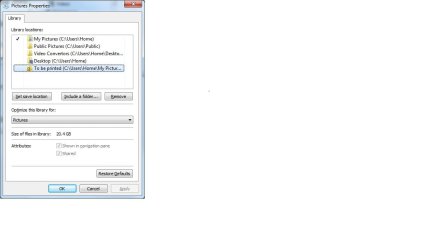
Right click on the Pictures Library in the Explorer Navigation Pane
Select Properties

Post a screen shot of the window showing Library Locations:
See: http://www.sevenforums.com/tutorials/9733-screenshots-files-upload-post-seven-forums.html
 

My Computer My Computer

Computer type
Laptop
Computer Manufacturer/Model Number
HP Pavilion dv6-6c10us
OS
x64 (6.3.9600) Win8.1 Pro & soon dual boot x64 (6.1.7601) Win7_SP1 HomePrem
CPU
AMD A6-3420M APU with Radeon(tm) HD Graphics
Motherboard
Hewlett-Packard 1805
Memory
6.00 GB
Graphics Card(s)
AMD Radeon(TM) HD 6520G
Sound Card
(1) AMD High Definition Audio Device (2) IDT High Definiti
Monitor(s) Displays
HP W2072a 20" LCD (1600 x 900) @ 60 Hz
Screen Resolution
1366 x 768 x 32 bits (4294967296 colors) @ 60 Hz
Hard Drives
ST640LM0 00 HM641JI SATA Disk Device
Keyboard
Logitech k520 wireless KB
Mouse
Logitech m320 wireless mouse (bundled with KB)
Internet Speed
15/5 | 54 MB Wireless 'n'
Antivirus
Realtime: Defender or Avast | On-demand: Malwarebytes, ESET
Browser
IE 11 on Win8, IE 10 on win 7
Other Info
Media: [Gimp, Audacity, VLC] || Comm: [WEmail 2012, Skype] || Productivity: [OpenOffice,| Textpad] || Utils: [Sysinternals, cCleaner, Speccy, Defraggler]
Screen shot as requested.
 

Attachments

  • Untitled.jpg
    Untitled.jpg
    32.6 KB · Views: 1

My Computer My Computer

Computer type
PC/Desktop
OS
Windows 7 Home
Thanks,

Libraries are a bit odd when you change the arrange by, view, sort, and group.
It's easier to look in the actual folder when things go awry.

Take a look in each of the actual folders

C:\Users\Home\Pictures
C:\Users\Home\Pictures\To be printed
(might be My Pictures)

C:\Users\Home\Desktop
C:\Users\Home\Desktop\Video Converters

C:\Users\Public\Public Pictures

Are your files in the folders?
:note: Note: To be printed has a different security setting (the lock icon). I'm not sure how you transfer the photos from your phone to the PC, some sync software might set security.

There's also an off chance that a sync program processes deletions as well as additions. I don't know if this is true for your setup. I don't think it is because you mentioned that changing the arrange by showed either the ~95 new pics or the 500 old pics. Then after a restart you couldn't get one set to display. This seems more like a Libraries display setting.

I had a similar experience with mp3 files and album covers when I first started using Win7 - now I just leave them as arrange by Folder.

Bill
.
 

My Computer My Computer

Computer type
Laptop
Computer Manufacturer/Model Number
HP Pavilion dv6-6c10us
OS
x64 (6.3.9600) Win8.1 Pro & soon dual boot x64 (6.1.7601) Win7_SP1 HomePrem
CPU
AMD A6-3420M APU with Radeon(tm) HD Graphics
Motherboard
Hewlett-Packard 1805
Memory
6.00 GB
Graphics Card(s)
AMD Radeon(TM) HD 6520G
Sound Card
(1) AMD High Definition Audio Device (2) IDT High Definiti
Monitor(s) Displays
HP W2072a 20" LCD (1600 x 900) @ 60 Hz
Screen Resolution
1366 x 768 x 32 bits (4294967296 colors) @ 60 Hz
Hard Drives
ST640LM0 00 HM641JI SATA Disk Device
Keyboard
Logitech k520 wireless KB
Mouse
Logitech m320 wireless mouse (bundled with KB)
Internet Speed
15/5 | 54 MB Wireless 'n'
Antivirus
Realtime: Defender or Avast | On-demand: Malwarebytes, ESET
Browser
IE 11 on Win8, IE 10 on win 7
Other Info
Media: [Gimp, Audacity, VLC] || Comm: [WEmail 2012, Skype] || Productivity: [OpenOffice,| Textpad] || Utils: [Sysinternals, cCleaner, Speccy, Defraggler]
Bill,

Thanks for that - unfortunately the files are not in any of those folders. I don't think they are anywhere on the C drive at the moment. I know one of the files was a video (MOV file) titled 204 - it is still showing in the recently viewed list in quicktime, although I can no longer open it from that list. I've done a full search of the C drive for 204.MOV but had no results.

Steve
 

My Computer My Computer

Computer type
PC/Desktop
OS
Windows 7 Home
Download Everything Search Engine. Install and run it and have it search all your drives. Then look for 204 or *204*, see what it tells you.
 

My Computer My Computer

Computer type
PC/Desktop
Computer Manufacturer/Model Number
Lenovo IdeaCenter 450
OS
Windows 10 Pro X64
CPU
Intel Quad Core i7-4770 @ 3.4Ghz
Memory
16.0GB PC3-12800 DDR3 SDRAM 1600 MHz
Graphics Card(s)
Intel Integrated HD Graphics
Sound Card
Realtek HD Audio
Monitor(s) Displays
HP 22" LCD
Screen Resolution
1680 x 1050
Hard Drives
250GB Samsung EVO SATA-3 SSD
2TB Seagate ST2000DM001 SATA-2
1.5TB Seagate ST3150041AS SATA
Keyboard
Dell USB
Mouse
Lenovo USB
Internet Speed
Cable via Road Runner 3MB Upload, 30MB Download
Antivirus
Windows Defender, MBAM Pro, MBAE
Browser
Seamonkey
Other Info
UEFI/GPT
PLDS DVD-RW DH16AERSH

My Computer My Computer

Computer Manufacturer/Model Number
BGC (Bob's Garage Crew)
OS
win 7 X64 Ultimate SP1
CPU
I3770K
Motherboard
Asus P8Z77-V Deluxe
Memory
G Skill F3-14900CL9-4GBXL x 4
Graphics Card(s)
NVIDIA GeForce GTX670 + Intel 4000
Sound Card
Realtek HD 5.1 (MOB)
Monitor(s) Displays
Asus VW224T (1)
Screen Resolution
1920 x 1080
Hard Drives
SATA Corsair Force GT 2.5" 180GB (System) Sata 3
OCZ Vertex3 120GB
OCZ Vertex 2 120GB 2.5" SATA II
ST31000524AS 1000.2GB
WD15EARS (External)
PSU
CoolerMaster 1000 Watt
Case
CoolerMaster HAF X
Cooling
CPU -- CoolerMaster 520N
Keyboard
MS Wireless 3000 V2
Mouse
MS Wireless 3000 V2
Internet Speed
Cable
Antivirus
Norton Internet Security
Browser
IE9
Other Info
AMI Bios 1805
OC'd 3%

My Computer My Computer

Computer type
Laptop
Computer Manufacturer/Model Number
HP Pavilion dv6-6c10us
OS
x64 (6.3.9600) Win8.1 Pro & soon dual boot x64 (6.1.7601) Win7_SP1 HomePrem
CPU
AMD A6-3420M APU with Radeon(tm) HD Graphics
Motherboard
Hewlett-Packard 1805
Memory
6.00 GB
Graphics Card(s)
AMD Radeon(TM) HD 6520G
Sound Card
(1) AMD High Definition Audio Device (2) IDT High Definiti
Monitor(s) Displays
HP W2072a 20" LCD (1600 x 900) @ 60 Hz
Screen Resolution
1366 x 768 x 32 bits (4294967296 colors) @ 60 Hz
Hard Drives
ST640LM0 00 HM641JI SATA Disk Device
Keyboard
Logitech k520 wireless KB
Mouse
Logitech m320 wireless mouse (bundled with KB)
Internet Speed
15/5 | 54 MB Wireless 'n'
Antivirus
Realtime: Defender or Avast | On-demand: Malwarebytes, ESET
Browser
IE 11 on Win8, IE 10 on win 7
Other Info
Media: [Gimp, Audacity, VLC] || Comm: [WEmail 2012, Skype] || Productivity: [OpenOffice,| Textpad] || Utils: [Sysinternals, cCleaner, Speccy, Defraggler]
Hi, Thanks for all that, but the files were not turned up by recuva. I've no idea where they are nor what happened to them...
 

My Computer My Computer

Computer type
PC/Desktop
OS
Windows 7 Home
Back
Top