
Hi Everyone,
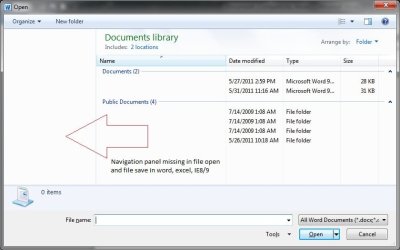
I am experience an odd issue in Windows 7 Pro SP1 running IE 9 with Office 2010 Standard. When opening a document in Word/Excel I cannot see the folder tree list on the left hand side. I have attached a screen shot as reference. The problem also occurs in IE 9 when hitting the save as.
Here what I have done so far. I figured it was setting somewhere in group policy like Remove the Folder Options, but that policy is set to not configured. Then messed with the registry in regards to the NoFolderOption that didn't help either.
I figured it might be a problem with IE or Office. So one by one un-installed and tested still no folder list.
I took a shot in the dark and called HP maybe they have seen this before, HP answer do a system restore thanks guys . . . 25 mins on hold to hear that. HP goes on to say I can call Microsoft because they will support me. I figure what the hell do I have to lose, call MS there answer sure we can help you for the low low price of 250 bucks an hour . . . sigh.
At this point I'm just stuck if anyone has any suggestions or any idea's aside from re-install Windows I'm open.
Thanks Chris
I am experience an odd issue in Windows 7 Pro SP1 running IE 9 with Office 2010 Standard. When opening a document in Word/Excel I cannot see the folder tree list on the left hand side. I have attached a screen shot as reference. The problem also occurs in IE 9 when hitting the save as.
Here what I have done so far. I figured it was setting somewhere in group policy like Remove the Folder Options, but that policy is set to not configured. Then messed with the registry in regards to the NoFolderOption that didn't help either.
I figured it might be a problem with IE or Office. So one by one un-installed and tested still no folder list.
I took a shot in the dark and called HP maybe they have seen this before, HP answer do a system restore thanks guys . . . 25 mins on hold to hear that. HP goes on to say I can call Microsoft because they will support me. I figure what the hell do I have to lose, call MS there answer sure we can help you for the low low price of 250 bucks an hour . . . sigh.
At this point I'm just stuck if anyone has any suggestions or any idea's aside from re-install Windows I'm open.
Thanks Chris
Attachments
My Computer
At a glance
Windows 7
- OS
- Windows 7


