Solved Missing hard drive space after upgrading to Windows 7

mnemonikos82

New member
Local time
6:36 PM
Messages
5
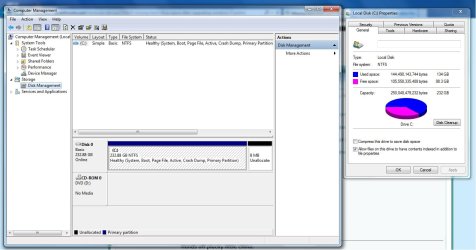
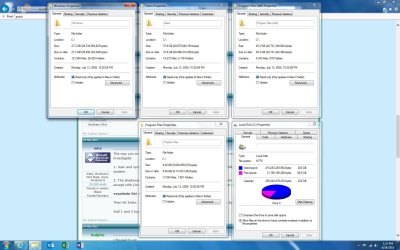
Good afternoon all, first, thanks in advance for any help you guys can give. I recently upgraded my 10 year old custom built PC to Windows 7 and now I am missing roughly 100gigs of space from my hard drive. I am attaching the two pictures, one is the expanded disk management screen and the other is a properties look at my C drive and the top 4 folders on the C drive (by far).

The top folders consume about 110 gigs of space and the listed used space is 200 gigs (the next 3 largest folders don't add up to 5 gigs combined). I also don't show a hidden partition from the old OS in the disk management screen, so I have no idea where that 90 gigs went.

I know with the age of the system it's possible the HD is dying, but my HD test didn't come up with any errors. I've also gone through defrag and system cleanups.

Any ideas of where to look would be greatly appreciated. Thank you!

Case
 

Attachments
  • Current Space.jpg
    Current Space.jpg
    167.1 KB · Views: 4
  • Paritions.jpg
    Paritions.jpg
    63.4 KB · Views: 2

My Computer My Computer

Computer type
PC/Desktop
Computer Manufacturer/Model Number
Custom build
OS
Windows 7 64-bit
CPU
Core 2 Duo
Hard Drives
Seegate Barracuda 250gig
Have you checked in the Windows folder for a Windows.old folder? If you performed an Upgrade Install then you'll have a Windows.old folder which holds the previous operating system, if you performed a clean install of Windows 7 this won't be applicable.

Download and run WinDirStat to see what's taking up the space.
 

My Computer My Computer

Computer type
PC/Desktop
Computer Manufacturer/Model Number
Custom Build
OS
W7 Pro x64 SP1 | W10 Pro IP x64 | W8.1 Pro x64 VM | Linux Mint VM
CPU
i7-4790k @ 4GHz (4.4GHz Boost)
Motherboard
ASUS Sabertooth Z87 (BIOS Rev 2004)
Memory
16GB DDR3 Kingston HyperX Fury @ 1600MHz CL 9-9-9-27
Graphics Card(s)
EVGA GTX 980 Classified
Sound Card
Realtek Onboard
Monitor(s) Displays
Samsung S27D390
Screen Resolution
1920 x 1080
Hard Drives
240GB Intel 520 Series SSD |
Samsung 850 EVO 120GB SSD |
2TB WD Caviar Black |
2TB WD Caviar Green
PSU
Corsair HX850-80 Gold Modular
Case
Cooler Master Silencio 650
Cooling
Corsair H80i w/2 x Corsair SP120 | 2 x 120mm Noctua NF-S12B
Keyboard
Microsoft Sidewinder X4
Mouse
Gigabyte M6900 optical
Internet Speed
152mb
Antivirus
F-Secure
Browser
Firefox 38.0
Other Info
Backup Rig: Win 7 Pro 64-bit | AMD A10-5800k | ASUS F2A85-V Pro | 8GB Samsung DDR3 @1600MHz | 120GB Toshiba SDD | 2TB Seagate HDD | Cooler Master Silencio 550
TreeSize Free - Quickly Scan Directory Sizes and Find Space Hogs

Download and run tree size free from the above link. It should show you what is using the space.

This is a common problem with many possible causes.

You can't simply add up the space used by your folders as shown in properties or in Explorer and expect it to equal the total space occupied on C.

How much RAM do you have installed?

What are your settings for System Restore, hibernation, and page file?
 

My Computer My Computer

Computer type
PC/Desktop
Computer Manufacturer/Model Number
Ignatz Special; 4 speed manual gearbox; factory air conditioning; one of one
OS
Windows 7 Home Premium SP1, 64-bit
CPU
Intel Skylake i5-6600K, not overclocked
Motherboard
AsRock Z170M Extreme 4, micro ATX
Memory
8 GB HyperX DDR4-2666 (2 x 4 GB)
Graphics Card(s)
none; graphics are integrated on CPU
Sound Card
onboard: Realtek ALC1150; external: USB Behringer UF0-202
Monitor(s) Displays
Dell S2340M 23 inch IPS
Screen Resolution
1600 x 900
Hard Drives
System: Crucial MX100 series SSD, 128 GB;
Data: Samsung Spinpoint 103SJ, 1 TB;
Backup: WD Caviar Green WD30EZRX-00D8PB0, 3 TB
PSU
Rosewill SilentNight 500 watt fanless, semi-modular
Case
Antec Solo II
Cooling
Noctua NH-U12S; Noctua F12 intake, Noctua S12A exhaust
Keyboard
Microsoft 200 6JH-00001 USB
Mouse
Dell or Microsoft optical wired; USB
Antivirus
Microsoft Security Essentials and Malwarebytes Premium
Browser
Pale Moon
Other Info
All fans PWM; speeds at idle: CPU circa 500 rpm; intake circa 600 rpm; exhaust circa 600 rpm; CPU temps 27 idle and 47 C load in a warm room (27 C/81 F) when running Intel Extreme Tuning Utility stress test.
Thank you for the quick responses folks you're awesome! Wow that was interesting. First to answer your questions ignatzatsonic: 4 gigs of ram, and I'm not savvy enough to know how to check for system restore, hibernation or page file settings. Now on with the show:

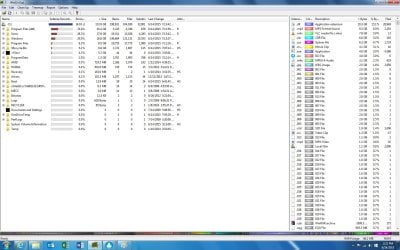
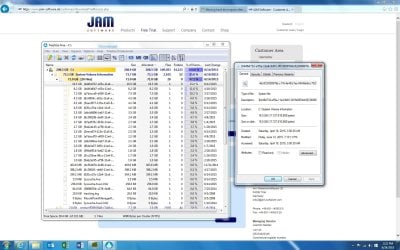
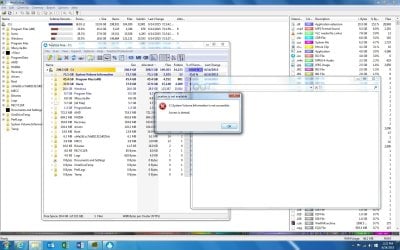
According to WinDirStat my HD was only 130 gigs in size (which is about what everthing else adds up to), so I tried TreeSize Free and got the first part of my answer immediately, so thanks for recommending that app. I've attached a few pictures of both apps. The answer to my issue appears to be a folder called "System Volume Information" which I'm guessing is a part of my system restore. According to TreeSize, it's eating up 70 gigs of space which explains almost all of the missing space (the rest I'm sure is just interspersed throughout a million different locations). Now If I had to further guess, I would say that when I did the install, which was an upgrade (not clean), even though I tried to delete all the old stuff such as windows.old I didn't delete the old restores. So I'm guessing 10 years of system backups takes up a lot of space!

So the question now is, how do I clean this up? I'm not sure any of the restore data is important to be honest but I leave that to more experienced people. Your continued assistance is very very appreciated, thanks folks!
 

Attachments

  • WinDirStat results.jpg
    WinDirStat results.jpg
    186.2 KB · Views: 1
  • System volume information.jpg
    System volume information.jpg
    197.1 KB · Views: 1
  • Not accessible.jpg
    Not accessible.jpg
    199.1 KB · Views: 0

My Computer My Computer

Computer type
PC/Desktop
Computer Manufacturer/Model Number
Custom build
OS
Windows 7 64-bit
CPU
Core 2 Duo
Hard Drives
Seegate Barracuda 250gig
Yeah, it looks like you have a wad of System Restore points.

Go here:

control panel/system/system protection and poke the "configure" button.

You can control how much space System Restore uses there, with that slider.

I set mine at about 7 GB; that's good enough for at least 10 restore points on my system.

Do you ever use System Restore or have any interest in it?

Do you use Avast anti-virus?
 

My Computer My Computer

Computer type
PC/Desktop
Computer Manufacturer/Model Number
Ignatz Special; 4 speed manual gearbox; factory air conditioning; one of one
OS
Windows 7 Home Premium SP1, 64-bit
CPU
Intel Skylake i5-6600K, not overclocked
Motherboard
AsRock Z170M Extreme 4, micro ATX
Memory
8 GB HyperX DDR4-2666 (2 x 4 GB)
Graphics Card(s)
none; graphics are integrated on CPU
Sound Card
onboard: Realtek ALC1150; external: USB Behringer UF0-202
Monitor(s) Displays
Dell S2340M 23 inch IPS
Screen Resolution
1600 x 900
Hard Drives
System: Crucial MX100 series SSD, 128 GB;
Data: Samsung Spinpoint 103SJ, 1 TB;
Backup: WD Caviar Green WD30EZRX-00D8PB0, 3 TB
PSU
Rosewill SilentNight 500 watt fanless, semi-modular
Case
Antec Solo II
Cooling
Noctua NH-U12S; Noctua F12 intake, Noctua S12A exhaust
Keyboard
Microsoft 200 6JH-00001 USB
Mouse
Dell or Microsoft optical wired; USB
Antivirus
Microsoft Security Essentials and Malwarebytes Premium
Browser
Pale Moon
Other Info
All fans PWM; speeds at idle: CPU circa 500 rpm; intake circa 600 rpm; exhaust circa 600 rpm; CPU temps 27 idle and 47 C load in a warm room (27 C/81 F) when running Intel Extreme Tuning Utility stress test.
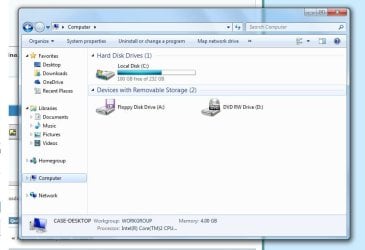
That did the trick, thank you so much. I would have never figured that out via my usual troubleshooting methods (IE Google).

Attached is the end (and accurate) result.

I can honestly say that in 10 years of owning this PC I've never used the system restore except once, and I can't even remember why it was soooooo long ago. I do use Avast though.
 

Attachments

  • Fin.jpg
    Fin.jpg
    47.8 KB · Views: 0

My Computer My Computer

Computer type
PC/Desktop
Computer Manufacturer/Model Number
Custom build
OS
Windows 7 64-bit
CPU
Core 2 Duo
Hard Drives
Seegate Barracuda 250gig
Post a screen shot of Windows Disk Management like you did in post 1, last picture shown--so we can confirm what you did.

Avast has a "bug" that is known to cause System Restore to go out of control. Not yet fixed as far as I know.

Keep an eye on your System Restore in case the Avast bug rears its head. That may be what has been going on.

System Restore is handy in my experience. Not perfect, but plenty good enough to keep around.

Avast may or may not eventually fix that bug. You can switch to something less buggy or live with it.
 

My Computer My Computer

Computer type
PC/Desktop
Computer Manufacturer/Model Number
Ignatz Special; 4 speed manual gearbox; factory air conditioning; one of one
OS
Windows 7 Home Premium SP1, 64-bit
CPU
Intel Skylake i5-6600K, not overclocked
Motherboard
AsRock Z170M Extreme 4, micro ATX
Memory
8 GB HyperX DDR4-2666 (2 x 4 GB)
Graphics Card(s)
none; graphics are integrated on CPU
Sound Card
onboard: Realtek ALC1150; external: USB Behringer UF0-202
Monitor(s) Displays
Dell S2340M 23 inch IPS
Screen Resolution
1600 x 900
Hard Drives
System: Crucial MX100 series SSD, 128 GB;
Data: Samsung Spinpoint 103SJ, 1 TB;
Backup: WD Caviar Green WD30EZRX-00D8PB0, 3 TB
PSU
Rosewill SilentNight 500 watt fanless, semi-modular
Case
Antec Solo II
Cooling
Noctua NH-U12S; Noctua F12 intake, Noctua S12A exhaust
Keyboard
Microsoft 200 6JH-00001 USB
Mouse
Dell or Microsoft optical wired; USB
Antivirus
Microsoft Security Essentials and Malwarebytes Premium
Browser
Pale Moon
Other Info
All fans PWM; speeds at idle: CPU circa 500 rpm; intake circa 600 rpm; exhaust circa 600 rpm; CPU temps 27 idle and 47 C load in a warm room (27 C/81 F) when running Intel Extreme Tuning Utility stress test.
Thank you for the advice, is there an alternative free anti-virus that you recommend?
 

Attachments

  • Check.jpg
    Check.jpg
    99.6 KB · Views: 1

My Computer My Computer

Computer type
PC/Desktop
Computer Manufacturer/Model Number
Custom build
OS
Windows 7 64-bit
CPU
Core 2 Duo
Hard Drives
Seegate Barracuda 250gig
To tame Avast:
- go to control panel-> programs and features -> Avast -> change
- remove the component NG (may also be called-Secure Virtual Machines or Sandbox).
- change system restore % back to 10% (windows default) or whatever you like it
- restart
- check if % is what you set
- check restore points (seems this NG delete old restore points when run out of space)
- manually create a restore point if there are none
- open command prompt ->vssadmin list shadowstorage
- see how much space it takes.
 

My Computer My Computer

Computer type
PC/Desktop
Computer Manufacturer/Model Number
Custom Build
OS
Windows 7 Ultimate x64 SP1
CPU
AMD Phenom 2 1090T
Motherboard
Gigabyte GA-890FXA-UD5
Memory
2x8GB Kingston HyperX Fury Black 1600Mhz Unganged
Graphics Card(s)
MSI GTX 970 Gaming 4G
Sound Card
Realtek On-Board HD 7.1 Audio / Logitech G35
Monitor(s) Displays
3xAcer GD245HQ
Screen Resolution
1920x1080
Hard Drives
Samsung 850 Pro 512GB SSD - OS /
WD Caviar Black SATA 3 - 1 TBx2 - Dynamic RAID 0 /
WD Caviar Green SATA 2 - 640GBx2 - Dynamic RAID 0 /
WD Caviar Green SATA 2 - 640GB - Internal Backup /
Seagate Barracude SATA 3 - 3TB - External Backup/ Sync
PSU
HighPower 1000W
Case
Cooler Master HAF 932
Cooling
Noctua NH-D14
Keyboard
Logitech G19
Mouse
Logitech G500
Internet Speed
100/4 Mbit Cable (100GB quota)
Antivirus
ZoneAlarm Extreme Security / MBAM Pro / MBAE Free / SAS Free
Browser
IE 11 - Firefox - Chrome
Other Info
Logitech F710/ G27/ G940/ Z5500 // TrackIR 5 // Nvidia 3D Surround Vision
That Disk Management looks good.

Anti-virus choice has had many discussions on this forum, with very few minds changed. Just as a Methodist wouldn't have a lot of luck trying to convert a Catholic or a heathen. People have to come to their own decision and tend to be very protective of that decision.

Microsoft Security Essentials is probably the most commonly used free antivirus on this forum. Avast may have been second until the bug upheaval.

If you want to pay, Kaspersky is a common choice.

You can Google for anti-virus reviews and will immediately run into the semi-religious arguments to which I referred. Lots of complaining about the validity of the reviews.

Personally: I use Microsoft Security Essentials (free) and a paid version of Malwarebytes (Malwarebytes Premium). They do different things.

Malwarebytes is highly regarded, with few complaints.
 

My Computer My Computer

Computer type
PC/Desktop
Computer Manufacturer/Model Number
Ignatz Special; 4 speed manual gearbox; factory air conditioning; one of one
OS
Windows 7 Home Premium SP1, 64-bit
CPU
Intel Skylake i5-6600K, not overclocked
Motherboard
AsRock Z170M Extreme 4, micro ATX
Memory
8 GB HyperX DDR4-2666 (2 x 4 GB)
Graphics Card(s)
none; graphics are integrated on CPU
Sound Card
onboard: Realtek ALC1150; external: USB Behringer UF0-202
Monitor(s) Displays
Dell S2340M 23 inch IPS
Screen Resolution
1600 x 900
Hard Drives
System: Crucial MX100 series SSD, 128 GB;
Data: Samsung Spinpoint 103SJ, 1 TB;
Backup: WD Caviar Green WD30EZRX-00D8PB0, 3 TB
PSU
Rosewill SilentNight 500 watt fanless, semi-modular
Case
Antec Solo II
Cooling
Noctua NH-U12S; Noctua F12 intake, Noctua S12A exhaust
Keyboard
Microsoft 200 6JH-00001 USB
Mouse
Dell or Microsoft optical wired; USB
Antivirus
Microsoft Security Essentials and Malwarebytes Premium
Browser
Pale Moon
Other Info
All fans PWM; speeds at idle: CPU circa 500 rpm; intake circa 600 rpm; exhaust circa 600 rpm; CPU temps 27 idle and 47 C load in a warm room (27 C/81 F) when running Intel Extreme Tuning Utility stress test.
I'll look into it, thank you very much for all your help!
 

My Computer My Computer

Computer type
PC/Desktop
Computer Manufacturer/Model Number
Custom build
OS
Windows 7 64-bit
CPU
Core 2 Duo
Hard Drives
Seegate Barracuda 250gig
Back
Top