Solved Missing Hard Drive Space After Using Windows 7 Disk Management Tool

xladieexo

New member
Local time
4:31 PM
Messages
17
SOLVED Missing Hard Drive Space After Using Windows 7

THIS HAS BEEN SOLVED.


I used windows 7 disk management tool to make a new partition.
It didn't work and I kept receiving an invalid parameters error.
I restarted my computer to find that my hard drive was partitioned.
I extended the drive back and rebooted.
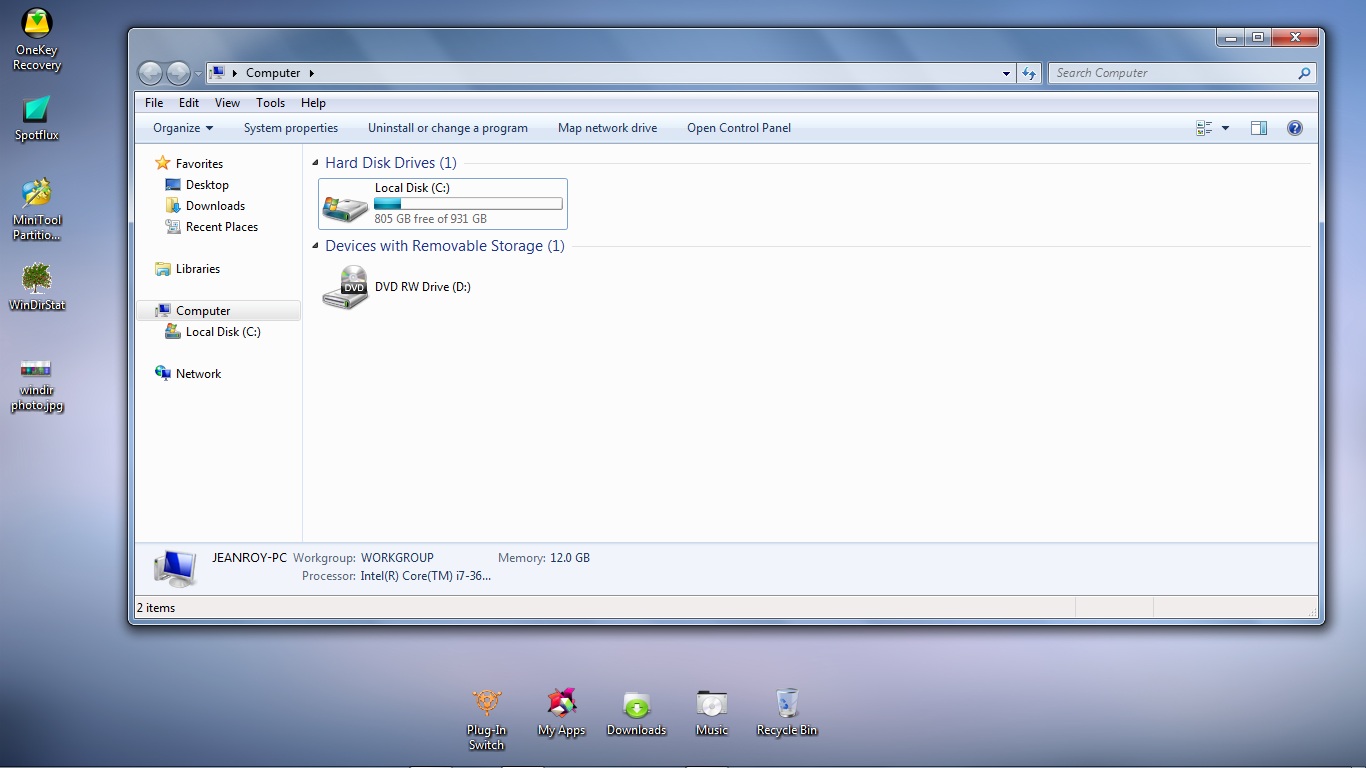
Now in windows explorer I am at a loss of about 200 gb of space.
The space is apparently missing.
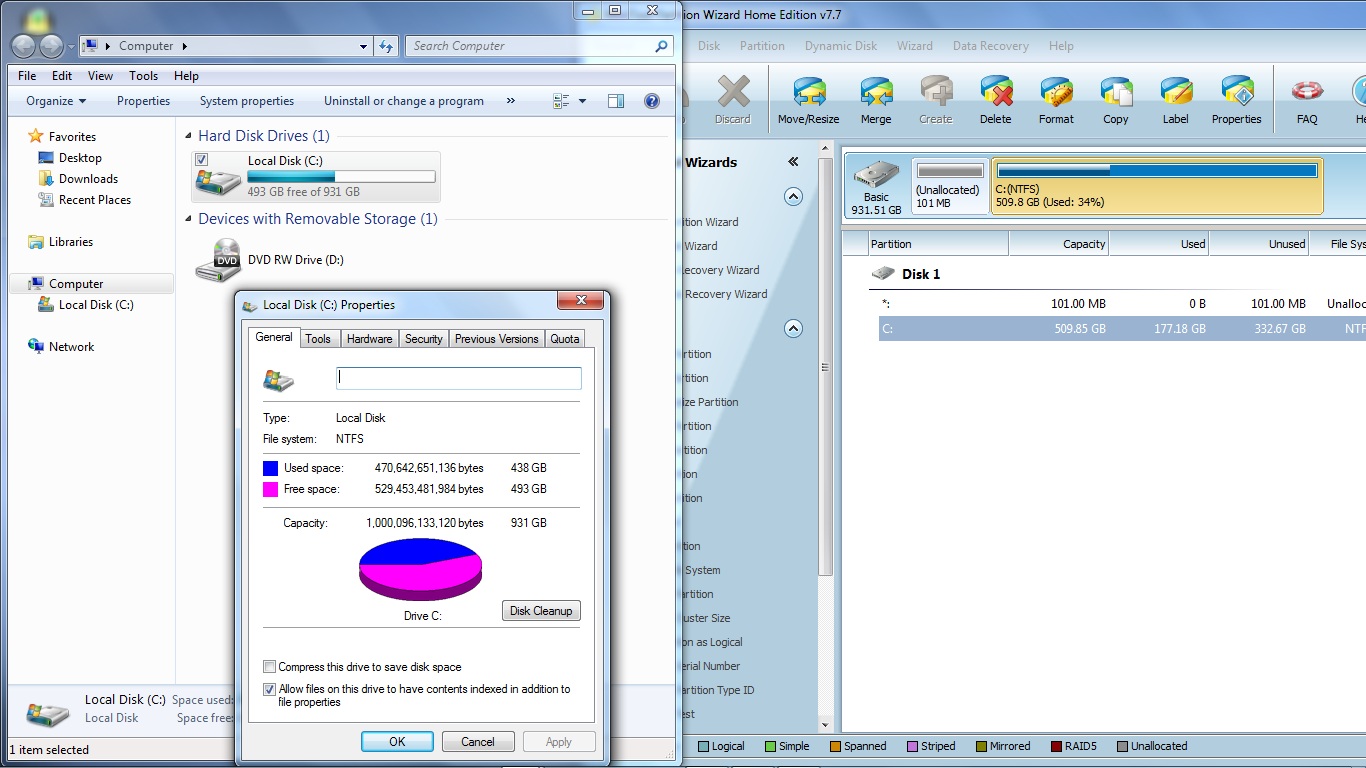
I will attach two pictures.
One of the Windows explorer and the other of a tool I used called partition wizard.
jMNIoGT.jpg

and here is partition wizard
Zke9qmr.jpg

Partition clearly shows that I have all the space I originally had, but windows explorer doesnt.:sarc:
How can I fix this?
Thank you for everyone's time in advance.
All help and info will be greatly appreciated.
 
Last edited:

My Computer

OS
Windows 7 Ultimate
Hello xlad mate have a look see in DISKPART at the drive there - take the SD out first to stop it being listed.

In PW right click on the C: and > Explore see what there is listed too.
 

My Computer

Computer type
PC/Desktop
Computer Manufacturer/Model Number
Own build (new) Desk1 / Asus ROG Win 7 / Desk2 1st build
OS
Desk1 7 Home Prem / Desk2 10 Pro / Main lap Asus ROG 10 Pro 2 laptop Toshiba 7 Pro Asus P2520 7 & 10
CPU
Desk1 i5 3750K / Laptop i7 GTX 860M / Desk2 i5 2500
Motherboard
Desk1 Asus P877-V / Desk2 Gigabyte H67 UD3H / Laptop ?
Memory
Desk1 8GB (1866) / Desk2 16GB (1333) / Laptop 8Gb DDR3
Graphics Card(s)
Desk 1& 2NVidia GTX 650 & Laptops on board Intel
Sound Card
Desk 1 & 2 -XONAR DG Realtek High Def audio Laptop
Monitor(s) Displays
Desk 1 Benq HD 2450 / Desk2 Philips 24" / Laptop 17.5"
Screen Resolution
1920x1080 D1 & D2 & Laptop 1
Hard Drives
Desk1 Samsung 120GB 830 SSD
Asus ROG 256GB 850 Pro SSD
Desk2 Samsung 840 256 SSD
Toshiba 120GB EVO
PSU
Desk 1 Corsair HX 1050/ Laptop ? / Desk 2 Corsair HX 650
Case
Desk 1 Cooler HAF XM ? Toshiba laptop / Desk2 Coolermaster
Cooling
Fans on all Desk1 -2 Desk2 - all Coolermasters 5 Laptop ?
Keyboard
Desk 1 MS Sidewinder X6 Desk 2 MS Sidewinder X 4
Mouse
Desk 1&2 - Gigabyte MS 900 gamer - laptop - Logitec wireless
Internet Speed
ADSL2+
Other Info
One other Desktop (tester) and spare Toshba laptop both with SSD's
Running Kaspersky 2016 ISS on all machines config'd identically
Logitec audio stereo systems on each machine (x3)
Canon MG5250MFC
Router/modem TP-Link running WPA2SK
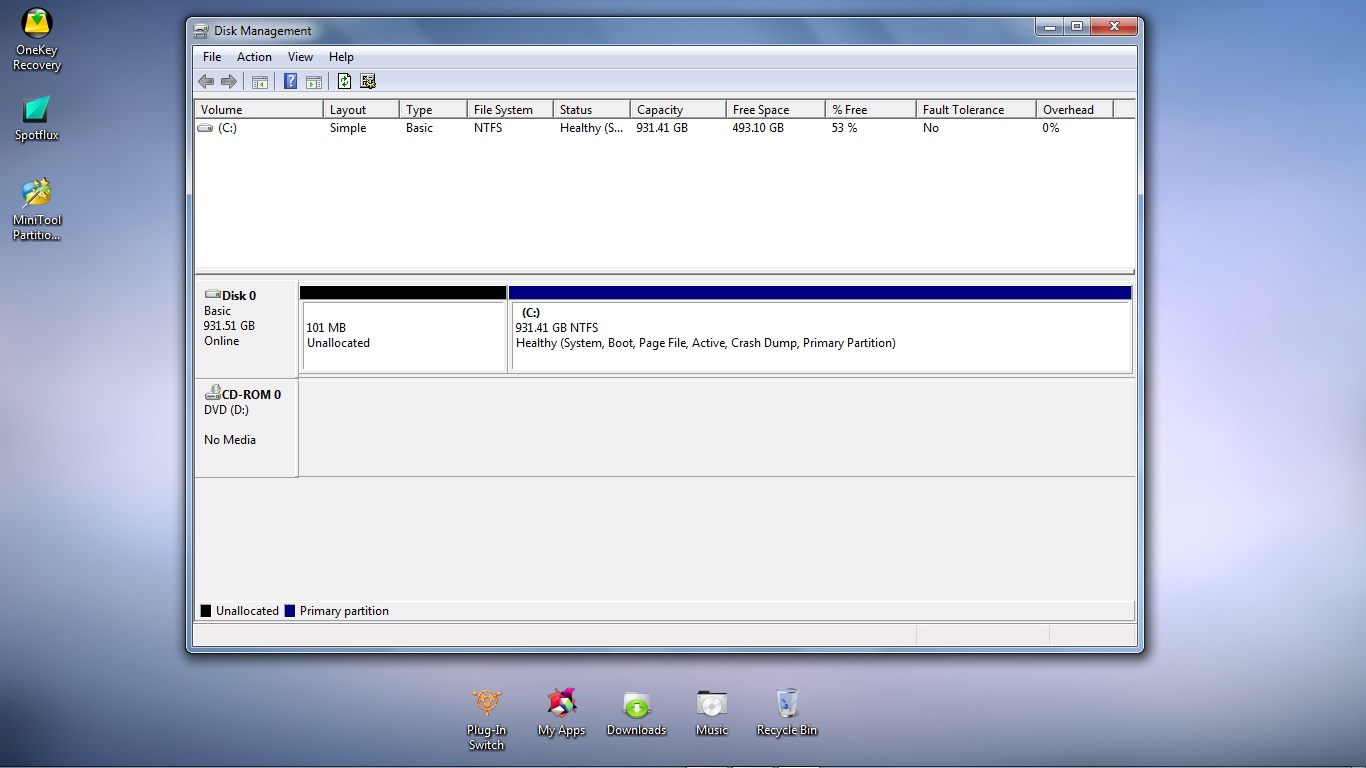
Hello ICit2lol I have removed my SD card. This is what I got when I checked DISKPART
Bvqws1G.jpg

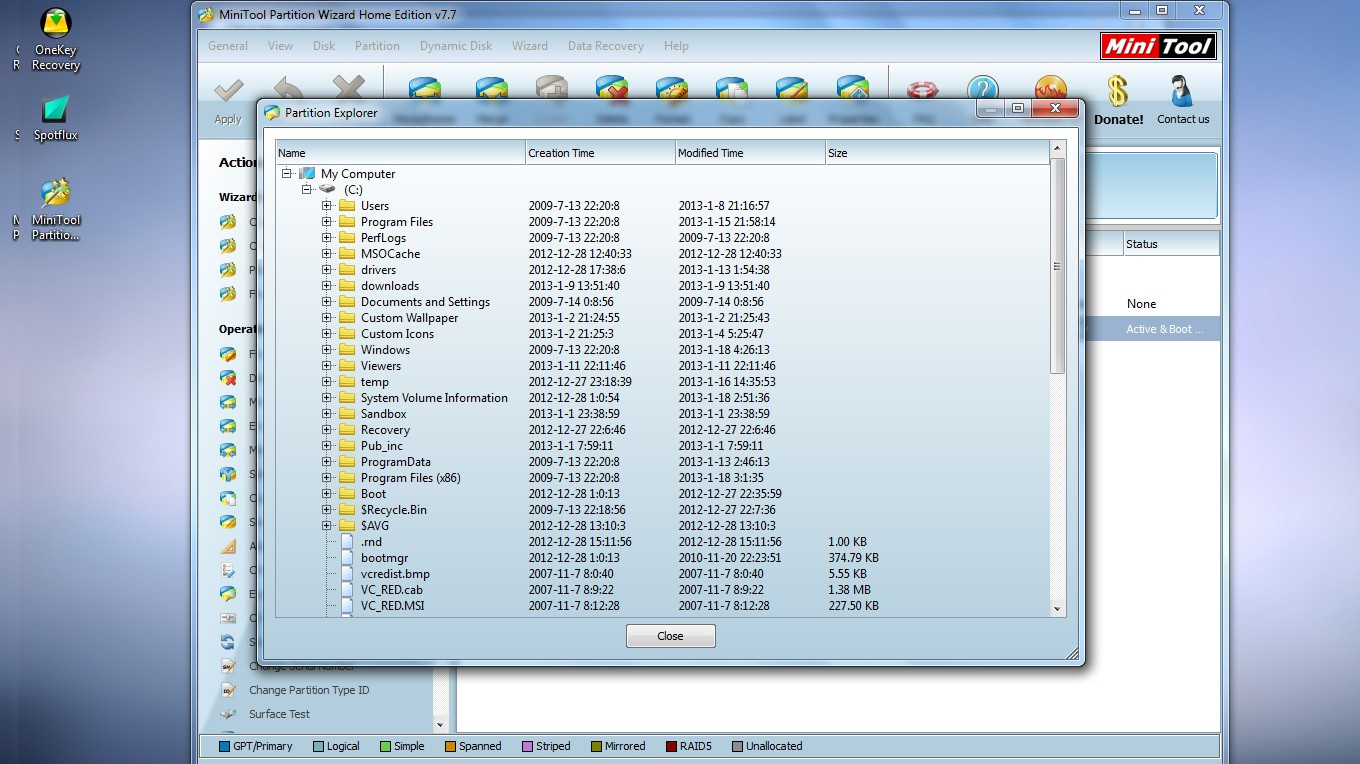
When I went inside partition wizard and clicked explore, I got this.
uJTr3TN.jpg

As you can see here:
354VGmR.jpg
I subtracted the amount of space that PW sees being used from what windows explorer says I am using and I am missing 255.82 GB of hard drive space.
 

My Computer

OS
Windows 7 Ultimate
also before Partition wizard said my drives capacity was 831.4 now it says 509.8 gb? Is it shrinking?
 

My Computer

OS
Windows 7 Ultimate
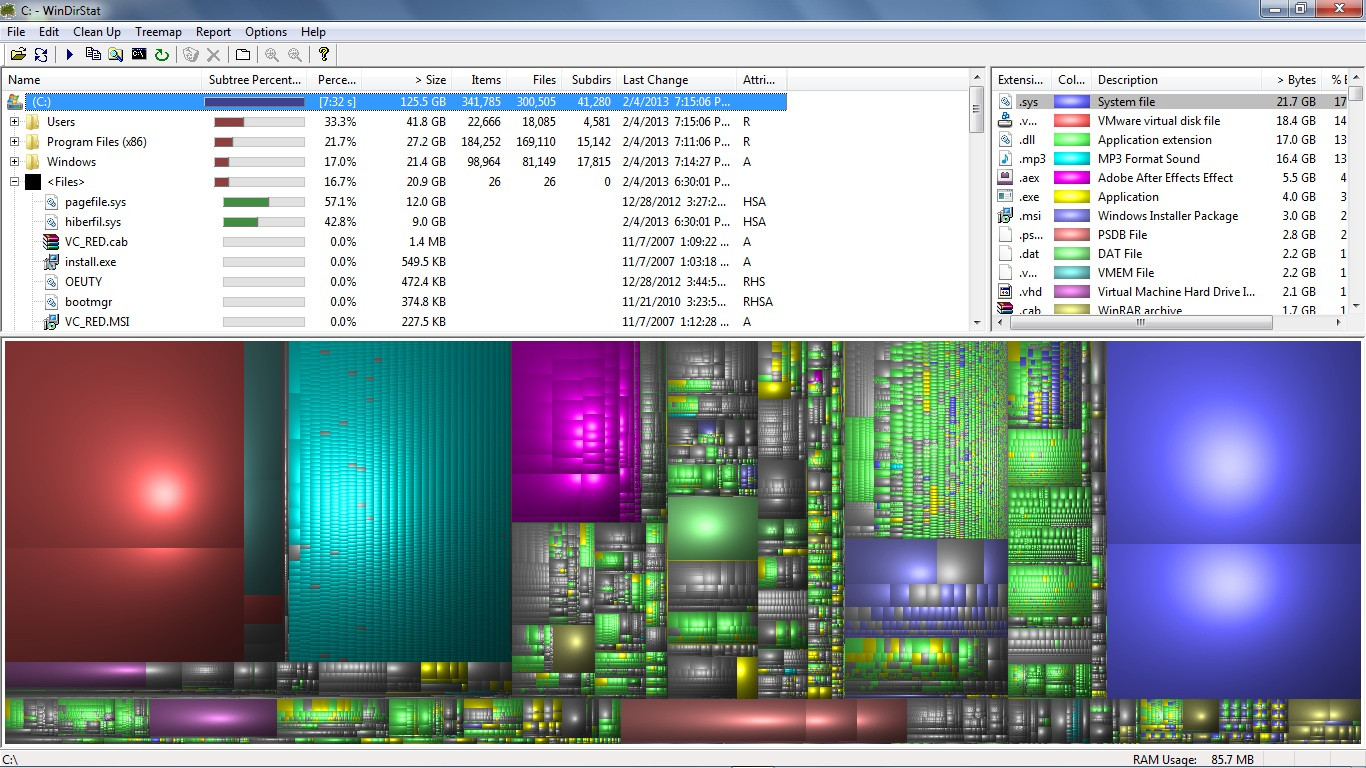
Here is also my hard drive info with WINDIRSTAT
FcX2r68.jpg
 

My Computer

OS
Windows 7 Ultimate
I found the culprit and solved my own problem.
I had defragmented my hard drive and found out the majority of the space was being taken up by my backup program Rollback Rx.
I defragmented my snapshots from my hard drive and i received all my hidden space back.
WkY5wPa.jpg
 

My Computer

OS
Windows 7 Ultimate
The Explorer shows the correct number. Something is wrong with PW. Try the bootable CD version of PW.
 

My Computer

Computer Manufacturer/Model Number
HP, Dell, Gateway, Toshiba - 4 laptops and 2 desktops
OS
Vista, Windows7, Mint Mate, Zorin, Windows 8
CPU
from 1.6GHz Duo to i7
Monitor(s) Displays
2x HP w2207
Hard Drives
5x HDD, 7x SSD, 12x Externals
Keyboard
with trackball - no mices
Mouse
Trackball mice
Internet Speed
DSL 6000
If I'm out of hand hit me beat me.
It doesn't matter what a 3rd party program sees just what Windows 7 sees. Windows 7 has to work with the used and unused space it sees.
 

My Computer

Computer type
PC/Desktop
Computer Manufacturer/Model Number
Home made Desktop
OS
Windows 10 Pro. 64/ version 1709 Windows 7 Pro/64
CPU
Intel i7-6800K @ 4.3
Motherboard
ASUS X-99 Deluxe II
Memory
Corsair Platinum 16 gig @2400
Graphics Card(s)
EVGA GTX 1070 OC
Monitor(s) Displays
Asus 27" LED LCD/VE278Q
Screen Resolution
1920-1080 or 1280-720 HDMI
Hard Drives
INTEL SSD 730-240 Gb Sata 3.0/
PSU
EVGA Platium 1200W
Case
Phanteks Luxe Tempered Glass 8 fans/ one radiator
Cooling
XSPC/ Water Cooled CPU
Keyboard
Das 4 Professional
Mouse
Logitech M705/MX Anywhere 2-S
Internet Speed
100 mbits
Antivirus
Microsoft Security Essentials/ Malwarebytes Premium 3.0/ SAS
Browser
I.E. 11 default/Firefox/ ISP Time Warner Cable/Spectrum
Other Info
LG BluRay Burner/
Sound system-KLipsch-THX/
Icy Dock ssd Hot Swap bays.
I found the culprit and solved my own problem.
I had defragmented my hard drive and found out the majority of the space was being taken up by my backup program Rollback Rx.
I defragmented my snapshots from my hard drive and i received all my hidden space back.
WkY5wPa.jpg
Glad it is fixed mate and by the way DISKPART you do through the command prompt :D

Start > type cmd > in the small window at the top of the Start up menu block > right click and run as admin > at the prompt - type DISKPART (upper or lower case) you will get a screen like mine you will see what I have listed with the various commands
 

Attachments

  • PART.PNG
    PART.PNG
    22.8 KB · Views: 12

My Computer

Computer type
PC/Desktop
Computer Manufacturer/Model Number
Own build (new) Desk1 / Asus ROG Win 7 / Desk2 1st build
OS
Desk1 7 Home Prem / Desk2 10 Pro / Main lap Asus ROG 10 Pro 2 laptop Toshiba 7 Pro Asus P2520 7 & 10
CPU
Desk1 i5 3750K / Laptop i7 GTX 860M / Desk2 i5 2500
Motherboard
Desk1 Asus P877-V / Desk2 Gigabyte H67 UD3H / Laptop ?
Memory
Desk1 8GB (1866) / Desk2 16GB (1333) / Laptop 8Gb DDR3
Graphics Card(s)
Desk 1& 2NVidia GTX 650 & Laptops on board Intel
Sound Card
Desk 1 & 2 -XONAR DG Realtek High Def audio Laptop
Monitor(s) Displays
Desk 1 Benq HD 2450 / Desk2 Philips 24" / Laptop 17.5"
Screen Resolution
1920x1080 D1 & D2 & Laptop 1
Hard Drives
Desk1 Samsung 120GB 830 SSD
Asus ROG 256GB 850 Pro SSD
Desk2 Samsung 840 256 SSD
Toshiba 120GB EVO
PSU
Desk 1 Corsair HX 1050/ Laptop ? / Desk 2 Corsair HX 650
Case
Desk 1 Cooler HAF XM ? Toshiba laptop / Desk2 Coolermaster
Cooling
Fans on all Desk1 -2 Desk2 - all Coolermasters 5 Laptop ?
Keyboard
Desk 1 MS Sidewinder X6 Desk 2 MS Sidewinder X 4
Mouse
Desk 1&2 - Gigabyte MS 900 gamer - laptop - Logitec wireless
Internet Speed
ADSL2+
Other Info
One other Desktop (tester) and spare Toshba laptop both with SSD's
Running Kaspersky 2016 ISS on all machines config'd identically
Logitec audio stereo systems on each machine (x3)
Canon MG5250MFC
Router/modem TP-Link running WPA2SK
@ ICit2lol Thank you for the advice and your help. I will deff use the DISKPART for future reference. I hope this helps anyone going through the same problem.
 

My Computer

OS
Windows 7 Ultimate
No probs mate all you need to do is now get your specs entered in X that makes helping a whole heap easier.

Not having a go because there are so many that only put their OS in the specs and I wish they would make it something one needs to do when a member it does save a lot of time. Just simple stuff like machine model and if you need the specs you only have to run that Speccy app it will give them all and in some detail too.

Speccy - Download < download from piriform

one last thing if you want a little more performance from your machine and don't mind losing a bit of the "bling" such as transparency work through this it is my Bible

http://www.sevenforums.com/tutorials/11728-optimize-windows-7-a.html - just ask if you don't understand anything and Brink is such a nice fellow and always more than ready to help out - he says "the only stupid question is the one that doesn't get asked" that speaks reams of the man.

You can ask anyone you like in fact but just post in that tutorial / thread what you want to know.

Enjoy!!

John
 

My Computer

Computer type
PC/Desktop
Computer Manufacturer/Model Number
Own build (new) Desk1 / Asus ROG Win 7 / Desk2 1st build
OS
Desk1 7 Home Prem / Desk2 10 Pro / Main lap Asus ROG 10 Pro 2 laptop Toshiba 7 Pro Asus P2520 7 & 10
CPU
Desk1 i5 3750K / Laptop i7 GTX 860M / Desk2 i5 2500
Motherboard
Desk1 Asus P877-V / Desk2 Gigabyte H67 UD3H / Laptop ?
Memory
Desk1 8GB (1866) / Desk2 16GB (1333) / Laptop 8Gb DDR3
Graphics Card(s)
Desk 1& 2NVidia GTX 650 & Laptops on board Intel
Sound Card
Desk 1 & 2 -XONAR DG Realtek High Def audio Laptop
Monitor(s) Displays
Desk 1 Benq HD 2450 / Desk2 Philips 24" / Laptop 17.5"
Screen Resolution
1920x1080 D1 & D2 & Laptop 1
Hard Drives
Desk1 Samsung 120GB 830 SSD
Asus ROG 256GB 850 Pro SSD
Desk2 Samsung 840 256 SSD
Toshiba 120GB EVO
PSU
Desk 1 Corsair HX 1050/ Laptop ? / Desk 2 Corsair HX 650
Case
Desk 1 Cooler HAF XM ? Toshiba laptop / Desk2 Coolermaster
Cooling
Fans on all Desk1 -2 Desk2 - all Coolermasters 5 Laptop ?
Keyboard
Desk 1 MS Sidewinder X6 Desk 2 MS Sidewinder X 4
Mouse
Desk 1&2 - Gigabyte MS 900 gamer - laptop - Logitec wireless
Internet Speed
ADSL2+
Other Info
One other Desktop (tester) and spare Toshba laptop both with SSD's
Running Kaspersky 2016 ISS on all machines config'd identically
Logitec audio stereo systems on each machine (x3)
Canon MG5250MFC
Router/modem TP-Link running WPA2SK
Back
Top