Solved Missing HD space on laptop

nkaufman

New member
Member
VIP
Local time
6:11 PM
Messages
116
Hello,

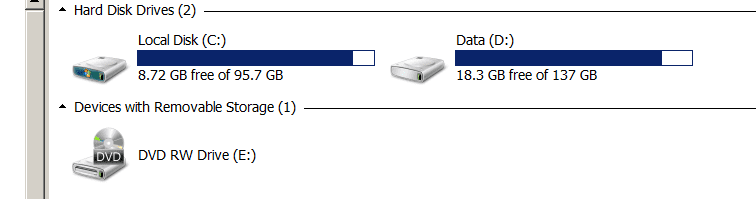
Have a HP laptop that has 95.7Gb on C:\ partition. Explorer shows that only 9Gb is free. However, selecting c:\ in left pane, selecting all items in right pane, right clicking 'Properties' shows only 58Gb being used.

Ran CCleaner, did DriveWipe, no effect

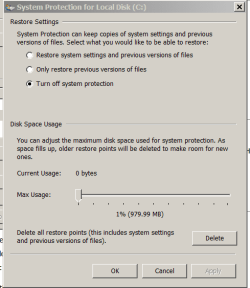
Deleted and disabled all restore points - No effect

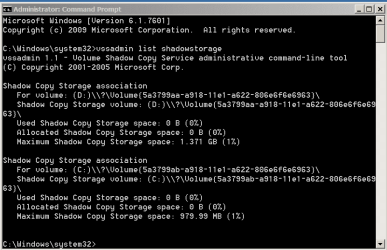
Ran vssadmin and delete all shadows - No effect

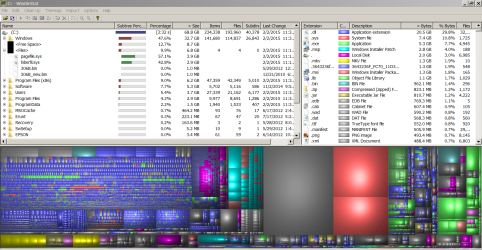
Ran WinDirStat and it shows 58Gb being used.

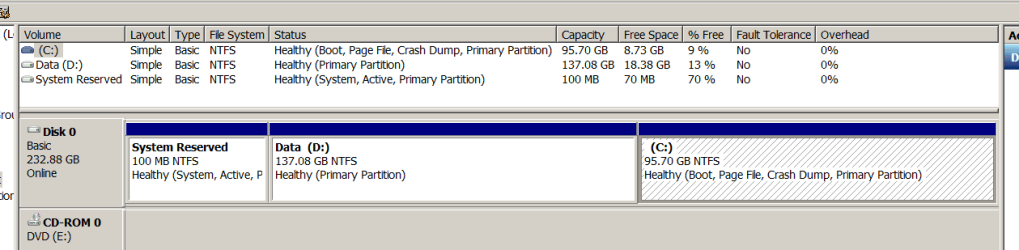
Diskpart shows volume having 97Gb approx.

Where is the rest of the space of HD hiding? Thanks for your assistance.

Edit - Forgot to mention that I also ran chkdsk and no issues were found
 
Last edited:

My Computer

Computer type
PC/Desktop
OS
Win-7 Prof 64bit

My Computer

Computer type
PC/Desktop
Computer Manufacturer/Model Number
Home made Desktop
OS
Windows 10 Pro. 64/ version 1709 Windows 7 Pro/64
CPU
Intel i7-6800K @ 4.3
Motherboard
ASUS X-99 Deluxe II
Memory
Corsair Platinum 16 gig @2400
Graphics Card(s)
EVGA GTX 1070 OC
Monitor(s) Displays
Asus 27" LED LCD/VE278Q
Screen Resolution
1920-1080 or 1280-720 HDMI
Hard Drives
INTEL SSD 730-240 Gb Sata 3.0/
PSU
EVGA Platium 1200W
Case
Phanteks Luxe Tempered Glass 8 fans/ one radiator
Cooling
XSPC/ Water Cooled CPU
Keyboard
Das 4 Professional
Mouse
Logitech M705/MX Anywhere 2-S
Internet Speed
100 mbits
Antivirus
Microsoft Security Essentials/ Malwarebytes Premium 3.0/ SAS
Browser
I.E. 11 default/Firefox/ ISP Time Warner Cable/Spectrum
Other Info
LG BluRay Burner/
Sound system-KLipsch-THX/
Icy Dock ssd Hot Swap bays.
Could be the shadowstorage. Run this command in elevated command prompt and tell us what it says under Allocated and Maximum.

vssadmin list shadowstorage
 

My Computer

Computer Manufacturer/Model Number
HP, Dell, Gateway, Toshiba - 4 laptops and 2 desktops
OS
Vista, Windows7, Mint Mate, Zorin, Windows 8
CPU
from 1.6GHz Duo to i7
Monitor(s) Displays
2x HP w2207
Hard Drives
5x HDD, 7x SSD, 12x Externals
Keyboard
with trackball - no mices
Mouse
Trackball mice
Internet Speed
DSL 6000
Could be the shadowstorage. Run this command in elevated command prompt and tell us what it says under Allocated and Maximum.

vssadmin list shadowstorage

I did run vssadmin as I mentioned in my original thread. However, following are the details

Used P1-0 B; P2-0 B
Allocated P1-0 B; P2-0 B
Max P1-1.371GB; P2-979.99MB

P1 and P2 are the 2 partitions.
 

My Computer

Computer type
PC/Desktop
OS
Win-7 Prof 64bit

Will do as soon as I get back to that machine.

However, I did check and there was no unallocated partition etc.

Also, I'm wondering why you think a partition is an issue. In my case Disk Mgt does display approx 95Gb partition for C:\ But WinDirStat shows only approx 58 GB. Please let me know if I'm missing something here.

Initially I thought that WinDirStat was not showing pagefil and hiberfil file usage but that is not the case. I see them under <Files> in WindDirStat.
 

My Computer

Computer type
PC/Desktop
OS
Win-7 Prof 64bit
Run this program. Highlight C and then OK. Post a picture of the output once the pokemen are done
 

My Computer

Computer Manufacturer/Model Number
HP, Dell, Gateway, Toshiba - 4 laptops and 2 desktops
OS
Vista, Windows7, Mint Mate, Zorin, Windows 8
CPU
from 1.6GHz Duo to i7
Monitor(s) Displays
2x HP w2207
Hard Drives
5x HDD, 7x SSD, 12x Externals
Keyboard
with trackball - no mices
Mouse
Trackball mice
Internet Speed
DSL 6000
nkaufman I recommend you follow whs suggestions. He is old but Wise.

One question.
What anti virus do you use?

This pokeman will watch.
 

My Computer

Computer type
PC/Desktop
Computer Manufacturer/Model Number
Home made Desktop
OS
Windows 10 Pro. 64/ version 1709 Windows 7 Pro/64
CPU
Intel i7-6800K @ 4.3
Motherboard
ASUS X-99 Deluxe II
Memory
Corsair Platinum 16 gig @2400
Graphics Card(s)
EVGA GTX 1070 OC
Monitor(s) Displays
Asus 27" LED LCD/VE278Q
Screen Resolution
1920-1080 or 1280-720 HDMI
Hard Drives
INTEL SSD 730-240 Gb Sata 3.0/
PSU
EVGA Platium 1200W
Case
Phanteks Luxe Tempered Glass 8 fans/ one radiator
Cooling
XSPC/ Water Cooled CPU
Keyboard
Das 4 Professional
Mouse
Logitech M705/MX Anywhere 2-S
Internet Speed
100 mbits
Antivirus
Microsoft Security Essentials/ Malwarebytes Premium 3.0/ SAS
Browser
I.E. 11 default/Firefox/ ISP Time Warner Cable/Spectrum
Other Info
LG BluRay Burner/
Sound system-KLipsch-THX/
Icy Dock ssd Hot Swap bays.
Hey Jack, I am neither old nor wise. I am mature and maybe a wise guy, LOL.
 

My Computer

Computer Manufacturer/Model Number
HP, Dell, Gateway, Toshiba - 4 laptops and 2 desktops
OS
Vista, Windows7, Mint Mate, Zorin, Windows 8
CPU
from 1.6GHz Duo to i7
Monitor(s) Displays
2x HP w2207
Hard Drives
5x HDD, 7x SSD, 12x Externals
Keyboard
with trackball - no mices
Mouse
Trackball mice
Internet Speed
DSL 6000
Mature was the word I was looking for.
 

My Computer

Computer type
PC/Desktop
Computer Manufacturer/Model Number
Home made Desktop
OS
Windows 10 Pro. 64/ version 1709 Windows 7 Pro/64
CPU
Intel i7-6800K @ 4.3
Motherboard
ASUS X-99 Deluxe II
Memory
Corsair Platinum 16 gig @2400
Graphics Card(s)
EVGA GTX 1070 OC
Monitor(s) Displays
Asus 27" LED LCD/VE278Q
Screen Resolution
1920-1080 or 1280-720 HDMI
Hard Drives
INTEL SSD 730-240 Gb Sata 3.0/
PSU
EVGA Platium 1200W
Case
Phanteks Luxe Tempered Glass 8 fans/ one radiator
Cooling
XSPC/ Water Cooled CPU
Keyboard
Das 4 Professional
Mouse
Logitech M705/MX Anywhere 2-S
Internet Speed
100 mbits
Antivirus
Microsoft Security Essentials/ Malwarebytes Premium 3.0/ SAS
Browser
I.E. 11 default/Firefox/ ISP Time Warner Cable/Spectrum
Other Info
LG BluRay Burner/
Sound system-KLipsch-THX/
Icy Dock ssd Hot Swap bays.
nkaufman I recommend you follow whs suggestions. He is old but Wise.

One question.
What anti virus do you use?

This pokeman will watch.

Did no think that I questioned what whs is suggesting :-)

Antivirus - AVG Free version
 

My Computer

Computer type
PC/Desktop
OS
Win-7 Prof 64bit
Run this program. Highlight C and then OK. Post a picture of the output once the pokemen are done

WinDirStat - I did run that and informed in my Initial post about 58GB usage but will run again tonight and post the screenshot.
 

My Computer

Computer type
PC/Desktop
OS
Win-7 Prof 64bit
So we are looking for appr. 37GBs that is neither in the files nor on the shadowstorage. That will be an interesting chase for an elephant. Let's see the WinDirStat picture.
 

My Computer

Computer Manufacturer/Model Number
HP, Dell, Gateway, Toshiba - 4 laptops and 2 desktops
OS
Vista, Windows7, Mint Mate, Zorin, Windows 8
CPU
from 1.6GHz Duo to i7
Monitor(s) Displays
2x HP w2207
Hard Drives
5x HDD, 7x SSD, 12x Externals
Keyboard
with trackball - no mices
Mouse
Trackball mice
Internet Speed
DSL 6000
Ok. Here are the files that show the issue.

Explorer, Disk Mgmt, Restore, VSSAdmin and WinDirStat

Ran WinDirStat as admin.
Also had run chkdsk and no issues were found

Machine has 3 users set up and I logged in as Admin.
Win-7 Prof 64 bit
AVG Anti-Virus
Use Erunt for Registry backups
Use Auslogics for defrag
 

Attachments

  • 01-Explorer.PNG
    01-Explorer.PNG
    17.7 KB · Views: 0
  • 02-DiskMgt.PNG
    02-DiskMgt.PNG
    29.4 KB · Views: 1
  • 03-Restore.PNG
    03-Restore.PNG
    24.2 KB · Views: 12
  • 04-VSSAdmin.PNG
    04-VSSAdmin.PNG
    35.6 KB · Views: 0
  • 05-WinDirStat.PNG
    05-WinDirStat.PNG
    866.7 KB · Views: 3
Last edited:

My Computer

Computer type
PC/Desktop
OS
Win-7 Prof 64bit
On the WinDirStat picture, the two big red areas are probably your pagefile and your hiberfile. If you do not use hibernation, you can get rid of the hiberfile with this command:

powecfg -h off

That will save you 3GBs. The pagefile could be reduced to 2GBs. Saves another 2GB.

But what is that big grey area in the middle. I cannot quite tell. Click on it and it should tell you in the upper pane.

But none of that explains the 37GBs that are missing. Open the C partition and look whether you see anything big and suspicious in there. You will have to open the folders or look at the properties of the folders in order to see the size. Anything "log" would catch my attention.
 

My Computer

Computer Manufacturer/Model Number
HP, Dell, Gateway, Toshiba - 4 laptops and 2 desktops
OS
Vista, Windows7, Mint Mate, Zorin, Windows 8
CPU
from 1.6GHz Duo to i7
Monitor(s) Displays
2x HP w2207
Hard Drives
5x HDD, 7x SSD, 12x Externals
Keyboard
with trackball - no mices
Mouse
Trackball mice
Internet Speed
DSL 6000
On the WinDirStat picture, the two big red areas are probably your pagefile and your hiberfile. If you do not use hibernation, you can get rid of the hiberfile with this command:

powecfg -h off

That will save you 3GBs. The pagefile could be reduced to 2GBs. Saves another 2GB.

True. Since I use hibernate (to keep battery usage low when compared to Sleep), I do not mind keeping the hibernate file as is. Can definitely reduce the pagefile size.


But what is that big grey area in the middle. I cannot quite tell. Click on it and it should tell you in the upper pane.

That is the free space ~ 10GB

But none of that explains the 37GBs that are missing. Open the C partition and look whether you see anything big and suspicious in there. You will have to open the folders or look at the properties of the folders in order to see the size. Anything "log" would catch my attention.

Yes, that is the issue that I'm facing right now. More than pagefile or hibernate file. Instead of 37GB, I think it is more around 27GB. You might be adding the 10GB of free space in there as missing.

will try and search for *log* and see what it returns.

thanks,
 
Last edited:

My Computer

Computer type
PC/Desktop
OS
Win-7 Prof 64bit
Searched for *log* on C:\

Did not find anything suspiciously large. The suspense is killing me :-)
 

My Computer

Computer type
PC/Desktop
OS
Win-7 Prof 64bit
That is the free space ~ 10GB
That is strange. Normally WinDirStat lists only files/folders. That must be a file too.

will try and search for *log* and see what it returns.
Don't only search for log stuff but for anything that could be big and suspicious. You have to do that 'manually',.
 

My Computer

Computer Manufacturer/Model Number
HP, Dell, Gateway, Toshiba - 4 laptops and 2 desktops
OS
Vista, Windows7, Mint Mate, Zorin, Windows 8
CPU
from 1.6GHz Duo to i7
Monitor(s) Displays
2x HP w2207
Hard Drives
5x HDD, 7x SSD, 12x Externals
Keyboard
with trackball - no mices
Mouse
Trackball mice
Internet Speed
DSL 6000
Don't only search for log stuff but for anything that could be big and suspicious. You have to do that 'manually',.

Do you mean, open Windows Explorer and look at all the folders manually OR is this something that can be done from WinDirStat?
 

My Computer

Computer type
PC/Desktop
OS
Win-7 Prof 64bit
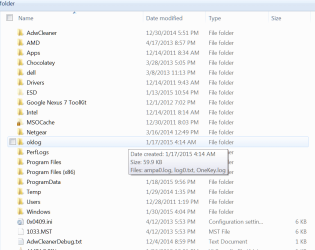
No, go to Computer and double click on the C partition. Then you see all the folders and files in your system. It will look something like in my picture. For the files, the size is on the right side but folders you have to open or look at the properties (which is easier). If you see a big chunk, look further.
 

Attachments

  • 2015-02-02_1547.png
    2015-02-02_1547.png
    104.7 KB · Views: 0

My Computer

Computer Manufacturer/Model Number
HP, Dell, Gateway, Toshiba - 4 laptops and 2 desktops
OS
Vista, Windows7, Mint Mate, Zorin, Windows 8
CPU
from 1.6GHz Duo to i7
Monitor(s) Displays
2x HP w2207
Hard Drives
5x HDD, 7x SSD, 12x Externals
Keyboard
with trackball - no mices
Mouse
Trackball mice
Internet Speed
DSL 6000
No, go to Computer and double click on the C partition. Then you see all the folders and files in your system. It will look something like in my picture. For the files, the size is on the right side but folders you have to open or look at the properties (which is easier). If you see a big chunk, look further.

Quick question. if I have to look at Folder-Properties to check for size, How is it different from selecting all folders of C:\ and checking their size at one go?
 

My Computer

Computer type
PC/Desktop
OS
Win-7 Prof 64bit
Back
Top