
Missing Iconcache.db

Ztruker

New member
Guru
Gold Member
VIP
Local time
10:25 PM
Messages
6,285
Location
Space Coast of Florida
Some of my folders are very slow opening. I thought I would rebuild my Icon cache, but when I look, there is no Iconcache.db file in:

%userprofile%\AppData\Local

I have all the appropriate settings selected or unchecked to show all hidden files:
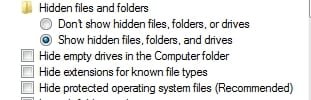
ShowAllFiles.jpg

Where is it? Why is it not where it's supposed to be? Is it being deleted for some reason? If so, I must have changed something to make this happen, anyone remember what this could be?

Thanks,
 
Last edited by a moderator:

My Computer

Computer type
PC/Desktop
Computer Manufacturer/Model Number
Lenovo IdeaCenter 450
OS
Windows 10 Pro X64
CPU
Intel Quad Core i7-4770 @ 3.4Ghz
Memory
16.0GB PC3-12800 DDR3 SDRAM 1600 MHz
Graphics Card(s)
Intel Integrated HD Graphics
Sound Card
Realtek HD Audio
Monitor(s) Displays
HP 22" LCD
Screen Resolution
1680 x 1050
Hard Drives
250GB Samsung EVO SATA-3 SSD
2TB Seagate ST2000DM001 SATA-2
1.5TB Seagate ST3150041AS SATA
Keyboard
Dell USB
Mouse
Lenovo USB
Internet Speed
Cable via Road Runner 3MB Upload, 30MB Download
Antivirus
Windows Defender, MBAM Pro, MBAE
Browser
Seamonkey
Other Info
UEFI/GPT
PLDS DVD-RW DH16AERSH
You have the right path, that is where the file should be. Try this, it may just recreate the file, it will reset it if present.

Right click desktop> Screen resolution> Advanced settings> On Monitor tab, change the colors setting from True color (32 bit) to High color (16 bit) and apply.

Your icons will flash. Repeat the steps and choose 32 bit color again. Check to see if Iconcache.db is now present in C:\users\(User name)\AppData\Local

A Guy
 

My Computer

Computer type
PC/Desktop
OS
Windows 10 Home x64
CPU
INTEL Core i5-750 Quad-Core 3.37GHz
Motherboard
ASUS P7P55D
Memory
HyperX Fury Black Series 8GB (2 x 4GB) 1866Mhz
Graphics Card(s)
EVGA GeForce GTX 750 Superclocked 1GB 128-Bit GDDR5
Monitor(s) Displays
LG 32MA68HY 32" IPS
Screen Resolution
1920 x 1080
Hard Drives
Samsung 840 Evo 120GB, SEAGATE 500GB Barracuda® 7200.12, SATA 3 Gb/s, 7200 RPM, 16MB cache
PSU
ANTEC TruePower New TP-550, 80 PLUS, 550W
Case
ANTEC Three Hundred Illusion
Cooling
COOLER MASTER Hyper 212 Plus, 4 x 120mm 1 x 140mm Noctua's
Internet Speed
85 + Mbps
Antivirus
Avast
Browser
Vivaldi
Neither one of those worked, still not there. The weird thing is, it's being backed up. I have a copy dated 01/07/2011

Ah, found it! I run CCleaner and one of it's choices is to delete Thumbnail Cache which I believe really means Iconcache.db. I've unchecked it and will see what happens.

I restore the copy I found in a backup before running CCleaner. I'll see what happens over the next few days.

Still don't understand why neither of the above procedures recreated the file.
 

My Computer

Computer type
PC/Desktop
Computer Manufacturer/Model Number
Lenovo IdeaCenter 450
OS
Windows 10 Pro X64
CPU
Intel Quad Core i7-4770 @ 3.4Ghz
Memory
16.0GB PC3-12800 DDR3 SDRAM 1600 MHz
Graphics Card(s)
Intel Integrated HD Graphics
Sound Card
Realtek HD Audio
Monitor(s) Displays
HP 22" LCD
Screen Resolution
1680 x 1050
Hard Drives
250GB Samsung EVO SATA-3 SSD
2TB Seagate ST2000DM001 SATA-2
1.5TB Seagate ST3150041AS SATA
Keyboard
Dell USB
Mouse
Lenovo USB
Internet Speed
Cable via Road Runner 3MB Upload, 30MB Download
Antivirus
Windows Defender, MBAM Pro, MBAE
Browser
Seamonkey
Other Info
UEFI/GPT
PLDS DVD-RW DH16AERSH
Back
Top