Missing manifests - error 80070490

squiff

New member
Local time
2:01 AM
Messages
8
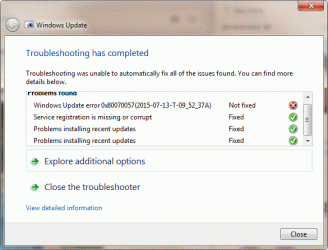
Hi. Your site is a real breath of fresh air after the dozens of unhelpful sites that have been leading me round in circles for the past few days! I wonder if you can help me please? I have not been able to install Windows updates for many weeks now. It is possibly the result of a memory card that went kaput, and my subsequent amateur efforts to clean up afterwards :confused:. Anyway, the error code that keeps coming up is 80070490. I have attached the necessary files (I think). Thanks in advance, Squiff.
 

Attachments

  • error.gif
    error.gif
    15.7 KB · Views: 16
  • update.gif
    update.gif
    38.3 KB · Views: 16
  • CheckSUR.log
    CheckSUR.log
    1.5 KB · Views: 3
Last edited:

My Computer

Computer type
PC/Desktop
Computer Manufacturer/Model Number
Dell XPS 8300
OS
Windows 7 Home Premium (x64) Service Pack 1 (build 7601)
CPU
2.90 Intel Core i5-2310
Motherboard
Dell Inc. 0Y2MRG A00
Memory
6128 MB
Graphics Card(s)
AMD Radeon HD 6700
Hard Drives
2 x WDC WD10EALX-759BA1 1000.20 GB
Antivirus
Avast
Browser
Chrome
First we'll deal with the Manifests...
Code:
Unavailable repair files:
	winsxs\manifests\amd64_microsoft-windows-installer-engine_31bf3856ad364e35_6.1.7601.22843_none_62089d5be35b3777.manifest
	winsxs\manifests\amd64_microsoft-windows-ie-setup-support_31bf3856ad364e35_11.2.9600.17041_none_a855a9d4736487be.manifest

Then we'll worry about the missing payload files.

I'll post a fix protocol for the manifests a little later.
 

My Computer

Computer type
Laptop
Computer Manufacturer/Model Number
Asus K52F or Lenovo B51-80
OS
Win 7 x64 Home Premium (and x86 VirtualBox VM)/Win10
CPU
i3 370M/i7 6500U
Motherboard
Asus/Lenovo
Memory
8GB - finally :)/8GB
Graphics Card(s)
it's an i3, dude!/dual Intel&nVidia
Sound Card
onboard
Monitor(s) Displays
15.6" built-in
Screen Resolution
1366x768/1920x1080
Hard Drives
750GB Seagate internal
Sundry external drives attached to other computers on the local network
1TB SSD on the Lenovo
PSU
n/a
Internet Speed
as much as I can get - usually on a dongle/phone, so <1MB/s
Antivirus
MSE/Defender
Browser
IE11/12/Edge/Chrome/FF(if I must)
Many thanks, Noel. Very much appreciated.
 

My Computer

Computer type
PC/Desktop
Computer Manufacturer/Model Number
Dell XPS 8300
OS
Windows 7 Home Premium (x64) Service Pack 1 (build 7601)
CPU
2.90 Intel Core i5-2310
Motherboard
Dell Inc. 0Y2MRG A00
Memory
6128 MB
Graphics Card(s)
AMD Radeon HD 6700
Hard Drives
2 x WDC WD10EALX-759BA1 1000.20 GB
Antivirus
Avast
Browser
Chrome
I've uploaded a file - sqfaa.zip - to my OneDrive at Noel's OneDrive
Please download and save it.
Right-click on the downloaded file, and select Extract all…
Extract to the default location - which will create a new folder sqfaa in the same place.
Open this folder - there should be one folder inside it (Manifests)

Copy the content of the Manifests folder (.manifest files) into this folder:

C:\Windows\Temp\CheckSur\Winsxs\Manifests

Now run the CheckSUR tool again (it may take a while)

Post the new CheckSUR.log file, and the CheckSUR.persist.log file.
 

My Computer

Computer type
Laptop
Computer Manufacturer/Model Number
Asus K52F or Lenovo B51-80
OS
Win 7 x64 Home Premium (and x86 VirtualBox VM)/Win10
CPU
i3 370M/i7 6500U
Motherboard
Asus/Lenovo
Memory
8GB - finally :)/8GB
Graphics Card(s)
it's an i3, dude!/dual Intel&nVidia
Sound Card
onboard
Monitor(s) Displays
15.6" built-in
Screen Resolution
1366x768/1920x1080
Hard Drives
750GB Seagate internal
Sundry external drives attached to other computers on the local network
1TB SSD on the Lenovo
PSU
n/a
Internet Speed
as much as I can get - usually on a dongle/phone, so <1MB/s
Antivirus
MSE/Defender
Browser
IE11/12/Edge/Chrome/FF(if I must)
I can't see a lot of difference. Am I doing something wrong? Files attached...
 

Attachments

My Computer

Computer type
PC/Desktop
Computer Manufacturer/Model Number
Dell XPS 8300
OS
Windows 7 Home Premium (x64) Service Pack 1 (build 7601)
CPU
2.90 Intel Core i5-2310
Motherboard
Dell Inc. 0Y2MRG A00
Memory
6128 MB
Graphics Card(s)
AMD Radeon HD 6700
Hard Drives
2 x WDC WD10EALX-759BA1 1000.20 GB
Antivirus
Avast
Browser
Chrome
There's a world of difference - CheckSUR has now fixed the two Manifest problems, so all we have to worry about is the missing payload files, which we have to deal with in a different way.

Please run another SFC /SCANNOW, and post the new CBS.log file, in case the fixed manifests bring new errors to light.
Then we can fix the errors it finds.
 

My Computer

Computer type
Laptop
Computer Manufacturer/Model Number
Asus K52F or Lenovo B51-80
OS
Win 7 x64 Home Premium (and x86 VirtualBox VM)/Win10
CPU
i3 370M/i7 6500U
Motherboard
Asus/Lenovo
Memory
8GB - finally :)/8GB
Graphics Card(s)
it's an i3, dude!/dual Intel&nVidia
Sound Card
onboard
Monitor(s) Displays
15.6" built-in
Screen Resolution
1366x768/1920x1080
Hard Drives
750GB Seagate internal
Sundry external drives attached to other computers on the local network
1TB SSD on the Lenovo
PSU
n/a
Internet Speed
as much as I can get - usually on a dongle/phone, so <1MB/s
Antivirus
MSE/Defender
Browser
IE11/12/Edge/Chrome/FF(if I must)
Okay, here we go...
 

My Computer

Computer type
PC/Desktop
Computer Manufacturer/Model Number
Dell XPS 8300
OS
Windows 7 Home Premium (x64) Service Pack 1 (build 7601)
CPU
2.90 Intel Core i5-2310
Motherboard
Dell Inc. 0Y2MRG A00
Memory
6128 MB
Graphics Card(s)
AMD Radeon HD 6700
Hard Drives
2 x WDC WD10EALX-759BA1 1000.20 GB
Antivirus
Avast
Browser
Chrome
SFC found just the one error...
Code:
	Line 138441: 2015-07-14 07:27:35, Info                  CSI    0000035a [SR] Repairing 1 components
	Line 138442: 2015-07-14 07:27:35, Info                  CSI    0000035b [SR] Beginning Verify and Repair transaction
	Line 138443: 2015-07-14 07:27:35, Info                  CSI    0000035c [SR] Cannot repair member file [l:24{12}]"mfc80JPN.dll" of Microsoft.VC80.MFCLOC, Version = 8.0.50727.762, pA = PROCESSOR_ARCHITECTURE_AMD64 (9), Culture neutral, VersionScope neutral, PublicKeyToken = {l:8 b:1fc8b3b9a1e18e3b}, Type = [l:10{5}]"win32", TypeName neutral, PublicKey neutral in the store, file is missing
I'll post a fix protocol for that later, as well as the ones from CheckSUR.

Code:
(f)	CSI Payload File Missing	0x00000000	mshtmlmedia.dll	amd64_microsoft-windows-ie-htmlrenderingmedia_31bf3856ad364e35_11.2.9600.17207_none_a0eb76266e4bb104	
(f)	CSI Payload File Missing	0x00000000	mfc80JPN.dll	amd64_microsoft.vc80.mfcloc_1fc8b3b9a1e18e3b_8.0.50727.762_none_fc42961a63b5a82b
 

My Computer

Computer type
Laptop
Computer Manufacturer/Model Number
Asus K52F or Lenovo B51-80
OS
Win 7 x64 Home Premium (and x86 VirtualBox VM)/Win10
CPU
i3 370M/i7 6500U
Motherboard
Asus/Lenovo
Memory
8GB - finally :)/8GB
Graphics Card(s)
it's an i3, dude!/dual Intel&nVidia
Sound Card
onboard
Monitor(s) Displays
15.6" built-in
Screen Resolution
1366x768/1920x1080
Hard Drives
750GB Seagate internal
Sundry external drives attached to other computers on the local network
1TB SSD on the Lenovo
PSU
n/a
Internet Speed
as much as I can get - usually on a dongle/phone, so <1MB/s
Antivirus
MSE/Defender
Browser
IE11/12/Edge/Chrome/FF(if I must)
Again, many thanks
 

My Computer

Computer type
PC/Desktop
Computer Manufacturer/Model Number
Dell XPS 8300
OS
Windows 7 Home Premium (x64) Service Pack 1 (build 7601)
CPU
2.90 Intel Core i5-2310
Motherboard
Dell Inc. 0Y2MRG A00
Memory
6128 MB
Graphics Card(s)
AMD Radeon HD 6700
Hard Drives
2 x WDC WD10EALX-759BA1 1000.20 GB
Antivirus
Avast
Browser
Chrome
I've uploaded a file - sqfab.zip - to my OneDrive at Noel's OneDrive
Please download and save it.

Right-click on the saved file and select Extract all...
Change the target to C:\ and click on Extract
Close all windows (it would be a good idea to print these instructions!)

Now reboot to the Repair Environment - as soon as the machine restarts, start tapping F8 - this should bring up the Advanced Boot Menu, at the top of which should be the option 'Repair my Computer'
Pick that
You'll have to log in with your username and password.

Pick the option to use a Command Prompt
At the prompt type
DIR C:\sqfab
hit the enter key - if you get a 'Not Found' error try
DIR D:\sqfab
or
DIR E:\sqfab

The drive letter in use when you find the folder will need to be substituted (for<drive>) into the following command...

XCOPY <drive>:\sqfab <drive>:\windows\winsxs /y /i /s /v /h

(e.g. XCOPY P:\wfire P:\windows\winsxs /y /i /s /v /h )

run the command (it should take almost no time) and when the prompt returns, type
EXIT
and hit the Enter key to exit Command Prompt - reboot to Normal Mode Windows.

Now run SFC /SCANNOW in an Elevated Command Prompt
then reboot and upload the new CBS.log file to your reply
 

My Computer

Computer type
Laptop
Computer Manufacturer/Model Number
Asus K52F or Lenovo B51-80
OS
Win 7 x64 Home Premium (and x86 VirtualBox VM)/Win10
CPU
i3 370M/i7 6500U
Motherboard
Asus/Lenovo
Memory
8GB - finally :)/8GB
Graphics Card(s)
it's an i3, dude!/dual Intel&nVidia
Sound Card
onboard
Monitor(s) Displays
15.6" built-in
Screen Resolution
1366x768/1920x1080
Hard Drives
750GB Seagate internal
Sundry external drives attached to other computers on the local network
1TB SSD on the Lenovo
PSU
n/a
Internet Speed
as much as I can get - usually on a dongle/phone, so <1MB/s
Antivirus
MSE/Defender
Browser
IE11/12/Edge/Chrome/FF(if I must)
CBS.log attached
 

My Computer

Computer type
PC/Desktop
Computer Manufacturer/Model Number
Dell XPS 8300
OS
Windows 7 Home Premium (x64) Service Pack 1 (build 7601)
CPU
2.90 Intel Core i5-2310
Motherboard
Dell Inc. 0Y2MRG A00
Memory
6128 MB
Graphics Card(s)
AMD Radeon HD 6700
Hard Drives
2 x WDC WD10EALX-759BA1 1000.20 GB
Antivirus
Avast
Browser
Chrome
SFC is now also happy ;)
With any luck...
Do a check for Updates, and attempt to install ONLY the oldest update found.
If it goes in OK, try the rest.
If it fails, post the C:\Windows\windowsupdate.log file.
 

My Computer

Computer type
Laptop
Computer Manufacturer/Model Number
Asus K52F or Lenovo B51-80
OS
Win 7 x64 Home Premium (and x86 VirtualBox VM)/Win10
CPU
i3 370M/i7 6500U
Motherboard
Asus/Lenovo
Memory
8GB - finally :)/8GB
Graphics Card(s)
it's an i3, dude!/dual Intel&nVidia
Sound Card
onboard
Monitor(s) Displays
15.6" built-in
Screen Resolution
1366x768/1920x1080
Hard Drives
750GB Seagate internal
Sundry external drives attached to other computers on the local network
1TB SSD on the Lenovo
PSU
n/a
Internet Speed
as much as I can get - usually on a dongle/phone, so <1MB/s
Antivirus
MSE/Defender
Browser
IE11/12/Edge/Chrome/FF(if I must)
Ok, so the earliest update it found was KB3004375 from 10/02/15. Sadly, the install failed with the same error code.

windowsupdate.log attached
 

Attachments

My Computer

Computer type
PC/Desktop
Computer Manufacturer/Model Number
Dell XPS 8300
OS
Windows 7 Home Premium (x64) Service Pack 1 (build 7601)
CPU
2.90 Intel Core i5-2310
Motherboard
Dell Inc. 0Y2MRG A00
Memory
6128 MB
Graphics Card(s)
AMD Radeon HD 6700
Hard Drives
2 x WDC WD10EALX-759BA1 1000.20 GB
Antivirus
Avast
Browser
Chrome
Update: After a number of shut downs and restarts, the auto update has been trying to do its stuff, and has succeeded in installing one or two updates. However, most are still failing, according to the update history. I attach today's version of WindowsUpdate.log
 

My Computer

Computer type
PC/Desktop
Computer Manufacturer/Model Number
Dell XPS 8300
OS
Windows 7 Home Premium (x64) Service Pack 1 (build 7601)
CPU
2.90 Intel Core i5-2310
Motherboard
Dell Inc. 0Y2MRG A00
Memory
6128 MB
Graphics Card(s)
AMD Radeon HD 6700
Hard Drives
2 x WDC WD10EALX-759BA1 1000.20 GB
Antivirus
Avast
Browser
Chrome
There's a few odd entries in the wu log...
Code:
2015-07-16	10:24:31:792	 636	11c4	Report	***********  Report: Initializing static reporting data  ***********
2015-07-16	10:24:31:792	 636	11c4	Report	  * OS Version = 6.1.7601.1.0.66304
2015-07-16	10:24:31:792	 636	11c4	Report	  * OS Product Type = 0x00000003
2015-07-16	10:24:31:792	 636	11c4	Report	WARNING: Failed to load reporting information from Win32_ComputerSystem with hr = 80041010.
2015-07-16	10:24:31:792	 636	11c4	Report	WARNING: Failed to load reporting information from Win32_BiosProperties with hr = 80041010.
2015-07-16	10:24:31:792	 636	11c4	Report	  * Locale ID = 2057
2015-07-16	10:24:32:057	 636	b2c	DnldMgr	Download manager restoring 0 downloads

I suspect that this arises from a corrupt WMI repository.

Open an Elevated Command Prompt
type the following command

net stop winmgmt
(hit the Y key and enter, to respond to the confirmation - repeat the command if you get an error)
now you can copy and paste the rest -

sc config winmgmt start= disabled
cd %windir%\system32\wbem
for /f %s in ('dir /b *.dll') do regsvr32 /s %s
for /f %s in ('dir /b *.mof') do mofcomp %s
wmiprvse /regserver
sc config winmgmt start= auto


WAIT for it to finish - it could be a couple of minutes

Now reboot.

Try windows update again, and post the new windowsupdate.log file
 

My Computer

Computer type
Laptop
Computer Manufacturer/Model Number
Asus K52F or Lenovo B51-80
OS
Win 7 x64 Home Premium (and x86 VirtualBox VM)/Win10
CPU
i3 370M/i7 6500U
Motherboard
Asus/Lenovo
Memory
8GB - finally :)/8GB
Graphics Card(s)
it's an i3, dude!/dual Intel&nVidia
Sound Card
onboard
Monitor(s) Displays
15.6" built-in
Screen Resolution
1366x768/1920x1080
Hard Drives
750GB Seagate internal
Sundry external drives attached to other computers on the local network
1TB SSD on the Lenovo
PSU
n/a
Internet Speed
as much as I can get - usually on a dongle/phone, so <1MB/s
Antivirus
MSE/Defender
Browser
IE11/12/Edge/Chrome/FF(if I must)
Back
Top