Missing memory

sheldonlg

New member
Local time
6:38 PM
Messages
13
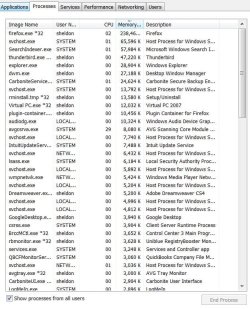
I have 4GB of memory for my machine. When I run a virtual PC, it is set up to have 1Gb of the four. Even when first starting, it shows usage of about 2.5GB in the "Perfomance" tab of the Task Manager. After not too long, it grows to a little over 3GB with the Virtual PC on. When I sum all the memory usage that is displayed in the "Processes" tab of the Task Manager (sorted in descending order of usage), I get only about 600MB being used. Where is all the missing memory? It really slows my machine. Here is a snapshot of [most of] the Task Manager screen.
 

Attachments

  • TaskManagerMemory.JPG
    TaskManagerMemory.JPG
    104.3 KB · Views: 61

My Computer

Computer Manufacturer/Model Number
Dell/Vostro
OS
Windows 7 Professional 64 bit
Memory
4GB
Have a look into Resource Monitor > Memory tab. The colored bar will give you a better view. If you post a snip of this color bar, we can help you decypher it.
 

My Computer

Computer Manufacturer/Model Number
HP, Dell, Gateway, Toshiba - 4 laptops and 2 desktops
OS
Vista, Windows7, Mint Mate, Zorin, Windows 8
CPU
from 1.6GHz Duo to i7
Monitor(s) Displays
2x HP w2207
Hard Drives
5x HDD, 7x SSD, 12x Externals
Keyboard
with trackball - no mices
Mouse
Trackball mice
Internet Speed
DSL 6000
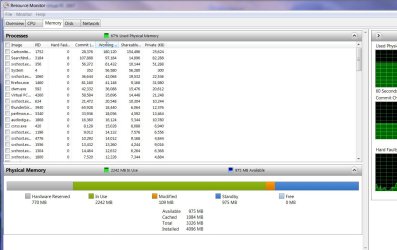
Here is the bar:

I used Registry Mechanic and I went through the cleaning and compaction. That required a reboot, so now more is showing as free as I just brought the system up and started the virtual machine. However, even though not maxed out yet, there still seems to be a lot of memory missing. I have the memory ordered in descending order by "Working". I also see 770MB in "Hardware Reserved".
 

Attachments

  • ResourceMonitor.JPG
    ResourceMonitor.JPG
    117.3 KB · Views: 74

My Computer

Computer Manufacturer/Model Number
Dell/Vostro
OS
Windows 7 Professional 64 bit
Memory
4GB
The Hardware reserved could be from an on-board graphics card. For the rest, there is no accurate way to count the beans. You may try WinDirStat. Make sure you highlight the drive you want to inspect before you say OK. But that does not show the shadowstorage. For that you have to issue this command in elevated Command Prompt: vssadmin list shadowstorage

The shadowstorage plus what WinDirStat shows should add up to the 2.24MBs shown by the green line.
 

My Computer

Computer Manufacturer/Model Number
HP, Dell, Gateway, Toshiba - 4 laptops and 2 desktops
OS
Vista, Windows7, Mint Mate, Zorin, Windows 8
CPU
from 1.6GHz Duo to i7
Monitor(s) Displays
2x HP w2207
Hard Drives
5x HDD, 7x SSD, 12x Externals
Keyboard
with trackball - no mices
Mouse
Trackball mice
Internet Speed
DSL 6000
The list shadow storage came up with statistics for drive C. The windirstat said it was utility to look at directories. My problem is that my RAM is being used to the max. I have 4GB of ram. the list shadowstorage said that 9.2GB (0%) had been allocated.

Are we talking about the same thing?
 

My Computer

Computer Manufacturer/Model Number
Dell/Vostro
OS
Windows 7 Professional 64 bit
Memory
4GB
The list shadow storage came up with statistics for drive C. The windirstat said it was utility to look at directories. My problem is that my RAM is being used to the max. I have 4GB of ram. the list shadowstorage said that 9.2GB (0%) had been allocated.

Are we talking about the same thing?
I am awfully sorry. I was sidetracked and posted the wrong thing. Nevertheless, that can be useful for the disk - LOL.
 

My Computer

Computer Manufacturer/Model Number
HP, Dell, Gateway, Toshiba - 4 laptops and 2 desktops
OS
Vista, Windows7, Mint Mate, Zorin, Windows 8
CPU
from 1.6GHz Duo to i7
Monitor(s) Displays
2x HP w2207
Hard Drives
5x HDD, 7x SSD, 12x Externals
Keyboard
with trackball - no mices
Mouse
Trackball mice
Internet Speed
DSL 6000
Can anyone else offer a suggestion? I have no idea why, even after allowing for a full 1Gb for the virtual machine and the 770MB for the hardware, why the rest shows an additional 2.2 GB as opposed to the sum of all the processes which add up to about 500MB.

Could it be bad memory and if I were to replace the memory it might be better?
 

My Computer

Computer Manufacturer/Model Number
Dell/Vostro
OS
Windows 7 Professional 64 bit
Memory
4GB
Look into Resource Monitor > Memory tab. That gives you a better picture of the RAM usage. Adding processes up is not going to tell you anything.
 

My Computer

Computer Manufacturer/Model Number
HP, Dell, Gateway, Toshiba - 4 laptops and 2 desktops
OS
Vista, Windows7, Mint Mate, Zorin, Windows 8
CPU
from 1.6GHz Duo to i7
Monitor(s) Displays
2x HP w2207
Hard Drives
5x HDD, 7x SSD, 12x Externals
Keyboard
with trackball - no mices
Mouse
Trackball mice
Internet Speed
DSL 6000
I already posted the results from the resource monitor. It is the third post in this thread.
 

My Computer

Computer Manufacturer/Model Number
Dell/Vostro
OS
Windows 7 Professional 64 bit
Memory
4GB
So, you have 770MB reserved, which we're going to guess is an onboard video card (can you confirm?). It's not unheard of for the OS to take ~1-1.3GB of memory (mine does, consistently) plus the 1 GB you allocated for your VM. That comes within a couple hundred MB of the 3GB it's showing as taken. I'm not seeing much wrong here.
 

My Computer

OS
XP / Win7 x64 Pro
CPU
Intel Quad-Core Q9450 @ 3.2GHz
Motherboard
Asus P5-E
Memory
2x2GB GSkill DDR2
Graphics Card(s)
NVIDIA GeForce 8600 GTS (EVGA)
Monitor(s) Displays
Dell 2408WFP
Screen Resolution
1920x1200
I have 4GB. 1GB is allocated for the Virtual Machine. So, there still is a missing 1GB or so.
 

My Computer

Computer Manufacturer/Model Number
Dell/Vostro
OS
Windows 7 Professional 64 bit
Memory
4GB
Looking at your Resource Monitor picture, I don't see a missing 1GB. 700MB hardware, 2.3GB used somehow and 1GB (in blue) cached adds to 4GB in my book.
 

My Computer

Computer Manufacturer/Model Number
HP, Dell, Gateway, Toshiba - 4 laptops and 2 desktops
OS
Vista, Windows7, Mint Mate, Zorin, Windows 8
CPU
from 1.6GHz Duo to i7
Monitor(s) Displays
2x HP w2207
Hard Drives
5x HDD, 7x SSD, 12x Externals
Keyboard
with trackball - no mices
Mouse
Trackball mice
Internet Speed
DSL 6000
I have 4GB. 1GB is allocated for the Virtual Machine. So, there still is a missing 1GB or so.

And, as I stated earlier, the OS can take ~1-1.4GB, which you're still not accounting for. So, again, it all adds up just fine. 700 MB + 1 GB VM + 1.3GB for OS = 3GB used with 1GB remaining. For all intents and purposes, that is what your numbers are showing. Nothing is wrong.
 

My Computer

OS
XP / Win7 x64 Pro
CPU
Intel Quad-Core Q9450 @ 3.2GHz
Motherboard
Asus P5-E
Memory
2x2GB GSkill DDR2
Graphics Card(s)
NVIDIA GeForce 8600 GTS (EVGA)
Monitor(s) Displays
Dell 2408WFP
Screen Resolution
1920x1200
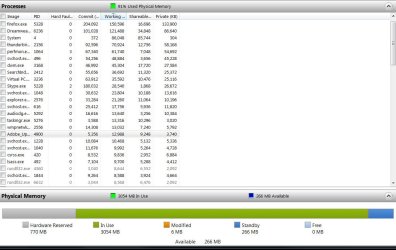
Here is an updated resource monitor after it has been running for a while. I sorted the list by working memory in descenting order. Adding all those totals gives about 800MB, not the 2.8GB that the "In Use" says. Even discounting the 1GB that is for Virtual PC (which only shows 32MB), that would leave 1.8GB. So, where is that last 1GB?
 

Attachments

  • ResourceMonitor.JPG
    ResourceMonitor.JPG
    101.8 KB · Views: 21

My Computer

Computer Manufacturer/Model Number
Dell/Vostro
OS
Windows 7 Professional 64 bit
Memory
4GB
Oh, are you saying the the OS of 1GB doesn't show in any of the processes, and that is what the missing 1GB is?
 

My Computer

Computer Manufacturer/Model Number
Dell/Vostro
OS
Windows 7 Professional 64 bit
Memory
4GB
It's a little tough to explain and show what the OS does behind the scenes. You just have to understand that process list doesn't show all memory allocated in the system. There's a disconnect between the process list of what memory is being used and what is actually being allocated across the entire system for use

This link does a very good job of explaining some of this:

Investigate memory usage with Windows 7 Resource Monitor | Microsoft Windows | TechRepublic.com

This is the real take-home point of the article:

"The question of Free memory

Now that you have a good idea of how the memory manager in Windows 7 works on a global level, let’s take a few minutes to discuss a common misconception with Windows 7’s memory management scheme. As you can see in Figure C, Free memory is the second smallest list in the graph. The misconception is to look at that small value and think that Windows 7 is a memory hog and that a system cannot run effectively when there is hardly any Free memory.
But just the opposite is true, in the case of Windows 7’s memory management scheme, Free memory is wasted memory. The more memory that Windows 7 keeps in play, the better. By keeping memory full and juggling pages between the various lists along with using its Standby priority system, Windows 7 improves efficiency and does its best to keep memory pages from hitting the page file where Hard Faults and sluggish performance are more likely to occur."


However, understanding how it all works is only the first step, and you still may have a runaway process that is leaking memory (it never frees any of the memory it doesn't need anymore so it just perpetually takes up memory on the system that becomes useless to anything else).

 

My Computer

OS
XP / Win7 x64 Pro
CPU
Intel Quad-Core Q9450 @ 3.2GHz
Motherboard
Asus P5-E
Memory
2x2GB GSkill DDR2
Graphics Card(s)
NVIDIA GeForce 8600 GTS (EVGA)
Monitor(s) Displays
Dell 2408WFP
Screen Resolution
1920x1200
Yes, I understand that you want memory to avoid reading/writing to the pagefile as much as possible. What I didn't know was that the system functions for the OS do not show up in the process list.

So, bottom line, since my computer is limited to 4GB max, what can I do to improve performance?
 

My Computer

Computer Manufacturer/Model Number
Dell/Vostro
OS
Windows 7 Professional 64 bit
Memory
4GB
Can you screenshot the memory tab again when VirtualPC is not running?
 

My Computer

OS
XP / Win7 x64 Pro
CPU
Intel Quad-Core Q9450 @ 3.2GHz
Motherboard
Asus P5-E
Memory
2x2GB GSkill DDR2
Graphics Card(s)
NVIDIA GeForce 8600 GTS (EVGA)
Monitor(s) Displays
Dell 2408WFP
Screen Resolution
1920x1200
I just did a Belarc check on my system. Two things of interest came up.

Under memory it listed 4 1GB modules but said "3328 Megabytes Usable Installed Memory".

It also showed under display "NVIDIA GeForce 8600 GT [Display adapter]". Could this be what is using that other 770MB?
 

My Computer

Computer Manufacturer/Model Number
Dell/Vostro
OS
Windows 7 Professional 64 bit
Memory
4GB

My Computer

Computer Manufacturer/Model Number
HP, Dell, Gateway, Toshiba - 4 laptops and 2 desktops
OS
Vista, Windows7, Mint Mate, Zorin, Windows 8
CPU
from 1.6GHz Duo to i7
Monitor(s) Displays
2x HP w2207
Hard Drives
5x HDD, 7x SSD, 12x Externals
Keyboard
with trackball - no mices
Mouse
Trackball mice
Internet Speed
DSL 6000
Back
Top