Solved missing menu bar in Firefox

skeazle

New member
Local time
1:00 PM
Messages
3
Hi guys, I'm new to this forum and not too smart when it comes to the PC. I have had Windows 7 since the beginning '10 and its never been as fast an operating system as my XP was. I don't know why but my system has had a couple glitches lately. The main one being my tool bar up in the top left of screen that should be File, Edit, View, History, Bookmarks, Tools and Help has disappeared. I tried logging off and back on a few times but no help. I use these features many times but now there is nothing there. Has anyone else had this kind of problem? thanks, Jim
 

My Computer

OS
Windows 7 Professional x32
Hi guys, I'm new to this forum and not too smart when it comes to the PC. I have had Windows 7 since the beginning '10 and its never been as fast an operating system as my XP was. I don't know why but my system has had a couple glitches lately. The main one being my tool bar up in the top left of screen that should be File, Edit, View, History, Bookmarks, Tools and Help has disappeared. I tried logging off and back on a few times but no help. I use these features many times but now there is nothing there. Has anyone else had this kind of problem? thanks, Jim

Are you talking about the toolbars of Internet Explorer or Windows Explorer?

If you're talking about Windows Explorer, try this:

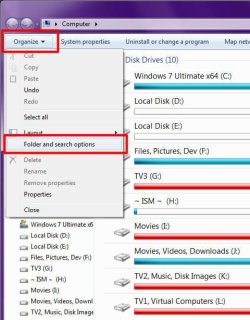
1) Click "Organize"
2) Click "Folder and searhc Options"
Image1.jpg

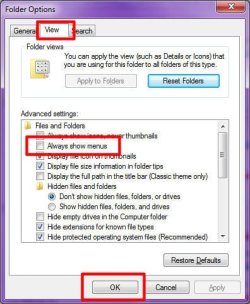
3) Click "View"
4) Add a checkmark by clicking "Always show menus"
5) Click "OK":
Image2.jpg

There doesn't seem to be a way in Internet Explorer 9 BETA (which I'm using) to permanently display the menu bar. Although pressing the <ALT> key on your keyboard will show it, from which you can select the appropriate menus.

Pressing <ALT> in Windows Explorer will also show the menu if you have it hidden. It will disappear again after using a command.
 

My Computer

Computer type
PC/Desktop
Computer Manufacturer/Model Number
Virtual Machine
OS
Windows 7 Professional 32-bit SP1
CPU
AMD A4/A6
Motherboard
Intel Corporation 440BX Desktop Reference Platform
Memory
3.00GB EDO
Graphics Card(s)
VMware SVGA 3D
Sound Card
High Definition Audio Device
Monitor(s) Displays
Generic Non-PnP Monitor on VMware SVGA 3D
Screen Resolution
1440x900
Hard Drives
1 x 60GB VMware Virtual SATA Hard Drive ATA Device
Antivirus
Kaspersky Total Security
I am talking about Mozilla Firefox display I guess. I don't use Internet Explorer.
 

My Computer

OS
Windows 7 Professional x32
Right click the tiny white arrow, over on the right, next to the star. (in the address bar) Select menu bar
 

My Computer

Computer Manufacturer/Model Number
Three desktops and one laptop with good specs..
OS
Vista and now 7 in 32 and 64 bit.
Hey Davehc, that did the trick! :D:) thanks so much.
 

My Computer

OS
Windows 7 Professional x32
Back
Top