Solved missing operating system

capricorn64

New member
Local time
6:14 PM
Messages
11
Location
pittsburgh Pa.
upon starting my computer it informs me of a missing operating system, my system is a dell xps, I have no system image disks. I have purchased a recovery usb from dell, now that does not work. I have also tried a system repair disk and that lists no operating system. I have no idea of what drivers to load and from where.
 

My Computer

Computer type
PC/Desktop
Computer Manufacturer/Model Number
Dell XPS 8300
OS
windows 7 home premium
CPU
intel (R) Core (TM) i7-2600 CPU @ 3.40GHz
Hard Drives
two ST3500413AS drives (500.1GB)
Keyboard
Dell KM632 wireless
Mouse
Dell wireless
Antivirus
norton

My Computer

Computer type
PC/Desktop
Computer Manufacturer/Model Number
Custom assembled by me :}
OS
Win-7-Pro64bit 7-H-Prem-64bit
CPU
i7-5930K 2nd i9-9940x both water blocked VRM's too
Motherboard
ASUS SABERTOOTH X99 2nd ASUS x299 Apex
Memory
Trident-z 3200C14 2nd Trident-z 3600C16
Graphics Card(s)
EVGA 1080ti ftw3 2nd Titan Xp both water blocked
Sound Card
Built-in Realtek
Monitor(s) Displays
1-AOC G2460PG 24"G-Sync 144Hz/ 2nd 1-ASUS VG248QE 24" 144Hz
Screen Resolution
1920 x 1080 144Hz
Hard Drives
2-Samsung M.2 Evo & Evo Plus
2-Samsung 850 EVO 500GB SSD's/ 3-2.5 W.D. Black 1tb-&3-1tb/3-3.5 WD Black 1tb hdd's
PSU
EVGA SuperNOVA 1000-P2 2nd 1200-P2
Case
2-Corsair Obsidian Series 450D Black ATX Mid Tower
Cooling
Custom water loops
Keyboard
Logitech G710+/ 2nd Logitech G910
Mouse
2-RedDragon M901 Perdition 16400 dpi Gaming mouse = wired
Internet Speed
Comcast Ping 19ms 89.31mbps download speed 6.12mbps upload
Antivirus
Malwarebytes Pro/ Superantispyware Pro
Browser
FireFox & Pale moon
Other Info
2nd ASUS X299 Apex/Intel i9-9940x with Custom water loop/7H-Prem-x64/Corsair 450D case/Ram Trident-z 3600C16 4x8gb / Samsung970Evo plus 500gb SSD/Dual ssd EZ swap evo/PSU EVGA SuperNova 1200w-P2 80+Platinum/GPU Titan Xp /8-ML-140 on push-pull on 2-280GTX rads
I have no screenshot other than a black screen that says missing operating system
 

My Computer

Computer type
PC/Desktop
Computer Manufacturer/Model Number
Dell XPS 8300
OS
windows 7 home premium
CPU
intel (R) Core (TM) i7-2600 CPU @ 3.40GHz
Hard Drives
two ST3500413AS drives (500.1GB)
Keyboard
Dell KM632 wireless
Mouse
Dell wireless
Antivirus
norton
upon starting my computer it informs me of a missing operating system, my system is a dell xps, I have no system image disks. I have purchased a recovery usb from dell, now that does not work. I have also tried a system repair disk and that lists no operating system. I have no idea of what drivers to load and from where.

I suspect that you have somehow lost Windows boot manager or ruined MBR.

My advice is this: Do not try to load drivers; it's pointless. A very simple way of restoring your machine to life, assuming that it is not a hardware problem and that you have not deleted the system by accident, is as follows: a) using GParted, check the layout of your hard drive, to make sure that you have an empty space available on any of the drives (sda, sdb, etc.). Incidentally, using the same GParted you can see if your Windows files are still present.

b) Using a friend's computer, download and burn a disk with ANY current Linux distribution - Ubuntu, or LinuxMint, for example. Install it, using the "do something else" option at the partitoning stage - choose an empty space on any available disk, and allow the bootloader to be installed to the default device.

Follow prompts and allow installation to proceed. Once it is complete, restart the computer; you should see a boot menu with choices of OS's. Windows should be one of them. Choose the Windows entry to log into - this should bring you to your familiar Windows screen. Again, the assumption is that your Win OS is not damaged and only the boot manager is missing. If you are comfortable with having Windows and Linux side by side on your machine, that's all you need to do.

Otherwise,

If Windows starts, you can rebuild boot and MBR using the system repair disk command line
bootrec /rebuildbcd
bootrec /fixmbr
bootrec /fixboot

Reboot the machine.
When you rebuild Windows MBR, you will no longer have access to Linux.

 

My Computer

Computer type
PC/Desktop
Computer Manufacturer/Model Number
Dell
OS
Windows 7 Ultimate 64 bit
CPU
i7 Intel
Memory
8 GB
Graphics Card(s)
nVidia GeForce
Hard Drives
Seagate; WesternDigital
Antivirus
Panda
Browser
Firefox
what is and how do I use gparted
 

My Computer

Computer type
PC/Desktop
Computer Manufacturer/Model Number
Dell XPS 8300
OS
windows 7 home premium
CPU
intel (R) Core (TM) i7-2600 CPU @ 3.40GHz
Hard Drives
two ST3500413AS drives (500.1GB)
Keyboard
Dell KM632 wireless
Mouse
Dell wireless
Antivirus
norton
GParted is free software that allows one to partition and modify disks regardless of whether there is a functioning OS present. Download it from GParted -- A free application for graphically managing disk device partitions

The iso file gparted-live-0.25.0-3-i686.iso should be burned to a CD - it is not to be installed on the computer. The CD willl be used to start the computer and perform the necessary manipulations.
 

My Computer

Computer type
PC/Desktop
Computer Manufacturer/Model Number
Dell
OS
Windows 7 Ultimate 64 bit
CPU
i7 Intel
Memory
8 GB
Graphics Card(s)
nVidia GeForce
Hard Drives
Seagate; WesternDigital
Antivirus
Panda
Browser
Firefox
I have downloaded and burned gparted to disk, do I start my pc with the disc in?
 

My Computer

Computer type
PC/Desktop
Computer Manufacturer/Model Number
Dell XPS 8300
OS
windows 7 home premium
CPU
intel (R) Core (TM) i7-2600 CPU @ 3.40GHz
Hard Drives
two ST3500413AS drives (500.1GB)
Keyboard
Dell KM632 wireless
Mouse
Dell wireless
Antivirus
norton
Yes; the disk is "live" - it should boot without problem assuming that your BIOS allows booting from CD. The boot order in BIOS is best set to 1-CD; 2-Disk 1; 3-Disk 2...etc. Most computers are set up in this way.
 

My Computer

Computer type
PC/Desktop
Computer Manufacturer/Model Number
Dell
OS
Windows 7 Ultimate 64 bit
CPU
i7 Intel
Memory
8 GB
Graphics Card(s)
nVidia GeForce
Hard Drives
Seagate; WesternDigital
Antivirus
Panda
Browser
Firefox
it does not boot from the gparted disc
 

My Computer

Computer type
PC/Desktop
Computer Manufacturer/Model Number
Dell XPS 8300
OS
windows 7 home premium
CPU
intel (R) Core (TM) i7-2600 CPU @ 3.40GHz
Hard Drives
two ST3500413AS drives (500.1GB)
Keyboard
Dell KM632 wireless
Mouse
Dell wireless
Antivirus
norton
That surprises me - I have never had GParted fail to boot. Does your machine boot from ANY cd at all? Are there any messages on the screen?

By the way, how did you make the GParted disk? did you just copy the downloaded file onto cd, or did you burn it using something like ImgBurn? Just copying the iso file won't do the trick.

I won't be around tonight - try tomorrow.
 

My Computer

Computer type
PC/Desktop
Computer Manufacturer/Model Number
Dell
OS
Windows 7 Ultimate 64 bit
CPU
i7 Intel
Memory
8 GB
Graphics Card(s)
nVidia GeForce
Hard Drives
Seagate; WesternDigital
Antivirus
Panda
Browser
Firefox
I downloaded it straight from the download to disc, my machine boots the repair disc and a repair disc I made from a Compaq laptop.
 

My Computer

Computer type
PC/Desktop
Computer Manufacturer/Model Number
Dell XPS 8300
OS
windows 7 home premium
CPU
intel (R) Core (TM) i7-2600 CPU @ 3.40GHz
Hard Drives
two ST3500413AS drives (500.1GB)
Keyboard
Dell KM632 wireless
Mouse
Dell wireless
Antivirus
norton
This is not how to do it - the iso file has to be decompressed in the process of burning; that's why there is specialized program like ImgBurn. I suggest you redo the action.

Again:

1. Locate the downloaded file, Gparted....iso.
2. Using SPECIALIZED burning program (ImgBurn.exe - it is free and reliable) burn the file to a CD
3. Boot from the newly made CD.
 

My Computer

Computer type
PC/Desktop
Computer Manufacturer/Model Number
Dell
OS
Windows 7 Ultimate 64 bit
CPU
i7 Intel
Memory
8 GB
Graphics Card(s)
nVidia GeForce
Hard Drives
Seagate; WesternDigital
Antivirus
Panda
Browser
Firefox
I solved this myself by switching system configuration from SATA to RAID, now I am not sure if it is safe to switch back or not. also when I click on computer there is no "recovery" listed next to the OS(C). How do I make one.
 

My Computer

Computer type
PC/Desktop
Computer Manufacturer/Model Number
Dell XPS 8300
OS
windows 7 home premium
CPU
intel (R) Core (TM) i7-2600 CPU @ 3.40GHz
Hard Drives
two ST3500413AS drives (500.1GB)
Keyboard
Dell KM632 wireless
Mouse
Dell wireless
Antivirus
norton
I am not competent to offer RAID advice.

As to Recovery partition, I don't think there's a simple way to recreate one, and I would not try. If data security is important to you, use any of the available backup software programs. I use Acronis Home TrueImage, but free software is available as well - EASEUS, for example. Store backups on an external drive, for added safety.
 

My Computer

Computer type
PC/Desktop
Computer Manufacturer/Model Number
Dell
OS
Windows 7 Ultimate 64 bit
CPU
i7 Intel
Memory
8 GB
Graphics Card(s)
nVidia GeForce
Hard Drives
Seagate; WesternDigital
Antivirus
Panda
Browser
Firefox
One other thing is that my dell offers no "erase this disk" option, why? and can I fix this or is there another option for erasing CDs?
 

My Computer

Computer type
PC/Desktop
Computer Manufacturer/Model Number
Dell XPS 8300
OS
windows 7 home premium
CPU
intel (R) Core (TM) i7-2600 CPU @ 3.40GHz
Hard Drives
two ST3500413AS drives (500.1GB)
Keyboard
Dell KM632 wireless
Mouse
Dell wireless
Antivirus
norton
If a CD is rewritable, yes, you can erase; but most CD's are not. There is no option for erasing a once-written CD.
 

My Computer

Computer type
PC/Desktop
Computer Manufacturer/Model Number
Dell
OS
Windows 7 Ultimate 64 bit
CPU
i7 Intel
Memory
8 GB
Graphics Card(s)
nVidia GeForce
Hard Drives
Seagate; WesternDigital
Antivirus
Panda
Browser
Firefox
Norton will not let me download imgburn
 

My Computer

Computer type
PC/Desktop
Computer Manufacturer/Model Number
Dell XPS 8300
OS
windows 7 home premium
CPU
intel (R) Core (TM) i7-2600 CPU @ 3.40GHz
Hard Drives
two ST3500413AS drives (500.1GB)
Keyboard
Dell KM632 wireless
Mouse
Dell wireless
Antivirus
norton
Norton will not let me download imgburn

That's because ImgBurn has had OpenCandy bundled with it since the latest release (2.5.8.0) 3 years ago. A lot of Antivirus and Antimalware programs flag OpenCandy as malware.

Best way to download and install ImgBurn (and many other programs) is from here:

https://ninite.com/

Under Utilities. Download the installer and run it. No OpenCandy or any other 'undesirables' are installed.
 

My Computer

Computer type
PC/Desktop
Computer Manufacturer/Model Number
Custom Build
OS
Win 7 Professional 64 (Main PC)/Win 7 Home Premium 32 (Laptop)
CPU
Intel Core i3 4160 @ 3.60GHz
Motherboard
ASUSTeK COMPUTER INC. H81M-PLUS (SOCKET 1150)
Memory
8.00GB Dual-Channel DDR3 @ 799MHz
Graphics Card(s)
2047MB NVIDIA GeForce GT 610 (Gigabyte)
Monitor(s) Displays
BenQ GL2460
Screen Resolution
1920x1080
Hard Drives
232GB Samsung SSD 840 EVO 250GB ATA Device (SSD) x3
2 external spinners - 4TB and 2TB
Antivirus
MSE
Browser
Pale Moon
Thats because it is bundled with OpenCandy, which some anti-malware software flags as a virus.

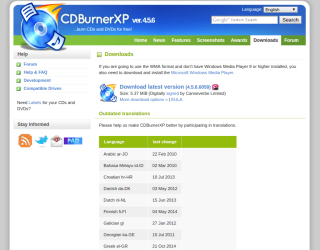
Try the OpenCandy-free version of CDBurnerXP:
https://cdburnerxp.se/en/download

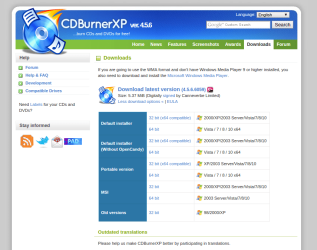
On this page, select More Download Options:

1.png

Select the one labelled Without Open Candy

2.png
 

My Computer

Computer type
PC/Desktop
Computer Manufacturer/Model Number
Golden Mk. I.4
OS
Windows 10 Pro x64 ; Xubuntu x64
CPU
Intel i7 860 @ 2.80 GHz O/C'ed to 4.0GHz
Motherboard
Gigabyte P55A-UD3R Rev.1. Award BIOS F13
Memory
16GB Corsair Vengance DDR3 @ 661 MHz Dual Channel (9-9-9-24)
Graphics Card(s)
EVGA NVidia GTX 560 1024MB
Sound Card
Realtek Integrated
Monitor(s) Displays
Dual Samsung SyncMaster 2494HS
Screen Resolution
1920*1080 and 1920*1080
Hard Drives
1*Samsung 840 EVO 120GB SSD;
1*OCZ Vertex 2 60GB SSD;
2*Samsung F3 SpinPoint 1TB in RAID0;
1*Samsung F1 SpinPoint 1TB;
2*Western Digital 1TB External USB 3.0
1*Western Digital 500GB External USB 3.0
1*Seagate 500GB External USB 2.0
PSU
Thermaltake ToughPower QFan 750W
Case
Thermaltake Element S VK60001W2Z
Cooling
Corsair H60 Water Cooling, 2*230mm and 2*80mm case fans
Keyboard
Logitech G110
Mouse
Logitech MX518
was able to download cd burnerxp, thank you
 

My Computer

Computer type
PC/Desktop
Computer Manufacturer/Model Number
Dell XPS 8300
OS
windows 7 home premium
CPU
intel (R) Core (TM) i7-2600 CPU @ 3.40GHz
Hard Drives
two ST3500413AS drives (500.1GB)
Keyboard
Dell KM632 wireless
Mouse
Dell wireless
Antivirus
norton
Back
Top