No Operating System Listed in MSConfig. Can't boot into Safe Mode

Halevant41

New member
Local time
12:38 AM
Messages
12
Hello

I just noticed this problem recently now. I cannot boot into safe mode (F8 or Shift + F8 doesn't work). I remember being able to do it using those keys. I then tried going to MSConfig > Boot tab but all the options are greyed out. There is no Operating System Listed.

I'm still able to reboot and be back in my pc. I tried typing bcdedit and it gives me
"The boot configuration data store could not be opened"
"The requested system device cannot be found"

I can't use any command that involves bcdedit. I'm not very familiar with fixing this problem, any expertise would be greatly appreciated.
 

My Computer My Computer

At a glance

Windows 7
Computer type
PC/Desktop
OS
Windows 7
Are you using an Admin cmd prompt
 

My Computers My Computers

  • At a glance

    7 X64i5 84002x8gb 3200mhz
    Computer type
    PC/Desktop
    OS
    7 X64
    CPU
    i5 8400
    Motherboard
    gigabyte b365m ds3h
    Memory
    2x8gb 3200mhz
    Hard Drives
    various
    PSU
    pure power 11 400w cm
    Case
    Coolermaster
    Cooling
    cryorig m9i
  • At a glance

    7x64g54008gb ddr4 2400
    Computer type
    PC/Desktop
    OS
    7x64
    CPU
    g5400
    Motherboard
    ga b365m ds3h
    Memory
    8gb ddr4 2400
    PSU
    xfx pro 450w
Was just typing when you posted SIW2.
OP was having issues using Admin CMD, believes Malwarebytes Anti-Exploit Premium stand alone was blocking it.
 

My Computer My Computer

At a glance

Win 10 x64, Linux Lite, Win 7 x64, BlackArch,...
Computer type
PC/Desktop
Computer Manufacturer/Model Number
HP Desktop & Compaq Laptop
OS
Win 10 x64, Linux Lite, Win 7 x64, BlackArch, & Kali
Hard Drives
Samsung 850 Pro 256Gb,
Hitachi HDD 1Tb,
Crucial MX SSD 250Gb
Segate 3Tb USB 3.0 Ext. Backup HDD
Internet Speed
150Mbps dn, 20Mbps up
Antivirus
Avast Free, Malwarebytes Anti-Exploit & Anti-Ransomware
Browser
Firefox, Chrome, Opera, & VPN
Yes i am using command prompt as admin

bcdedit
If i didnt run cmd as admin it will return the following error:
"The Boot Configuration data store could not be opened"
"Access is denied"

However I tried running bcdedit as admin and it gives:
"The boot configuration data store could not be opened"
"The requested system device cannot be found"

I've turned off Malwarebytes Anti-Exploit Premium already.

I think this issue is related to me not being able to boot into safe mode despite pressing F8 and also why there is no OS listed under MSConfig > Boot tab. After the Motherboard screen when booting, it just goes straight to Windows Logo > Then Windows 7 Login screen.
 

My Computer My Computer

At a glance

Windows 7
Computer type
PC/Desktop
OS
Windows 7
I would use boot media to install mbr and pbr , then create boot files on the active partition.

Tools to do that are all in this
17514x64v24.iso


the above iso should be extracted to create bootable usb stick using this or similar View attachment Usb7ice.zip

Then boot from that usb stick and have fun.
 

My Computers My Computers

  • At a glance

    7 X64i5 84002x8gb 3200mhz
    Computer type
    PC/Desktop
    OS
    7 X64
    CPU
    i5 8400
    Motherboard
    gigabyte b365m ds3h
    Memory
    2x8gb 3200mhz
    Hard Drives
    various
    PSU
    pure power 11 400w cm
    Case
    Coolermaster
    Cooling
    cryorig m9i
  • At a glance

    7x64g54008gb ddr4 2400
    Computer type
    PC/Desktop
    OS
    7x64
    CPU
    g5400
    Motherboard
    ga b365m ds3h
    Memory
    8gb ddr4 2400
    PSU
    xfx pro 450w
My apologies, I am unsure what to do next. I made the bootable usb stick using rufus and then booted into a live, desktop environment.

How do i "install mbr and pbr , then create boot files on the active partition." from here?
This is my first time tackling problem about mbr, pbr, bcd, etc as I have only encountered this problem as of now so I'm a greenhorn to these parts.
 

My Computer My Computer

At a glance

Windows 7
Computer type
PC/Desktop
OS
Windows 7
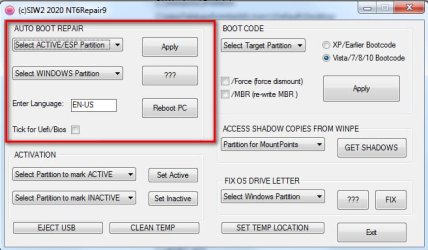
You could use nt6repair, which is on the desktop.


autobootrep-nt6repair9.jpg
 

My Computers My Computers

  • At a glance

    7 X64i5 84002x8gb 3200mhz
    Computer type
    PC/Desktop
    OS
    7 X64
    CPU
    i5 8400
    Motherboard
    gigabyte b365m ds3h
    Memory
    2x8gb 3200mhz
    Hard Drives
    various
    PSU
    pure power 11 400w cm
    Case
    Coolermaster
    Cooling
    cryorig m9i
  • At a glance

    7x64g54008gb ddr4 2400
    Computer type
    PC/Desktop
    OS
    7x64
    CPU
    g5400
    Motherboard
    ga b365m ds3h
    Memory
    8gb ddr4 2400
    PSU
    xfx pro 450w
You can check which is the currently active partition, and what the drive letters are by using any of the included partition mangers.

windows disk management, or aomei partition assistant, or ( for more advanced users diskgenius )
 

My Computers My Computers

  • At a glance

    7 X64i5 84002x8gb 3200mhz
    Computer type
    PC/Desktop
    OS
    7 X64
    CPU
    i5 8400
    Motherboard
    gigabyte b365m ds3h
    Memory
    2x8gb 3200mhz
    Hard Drives
    various
    PSU
    pure power 11 400w cm
    Case
    Coolermaster
    Cooling
    cryorig m9i
  • At a glance

    7x64g54008gb ddr4 2400
    Computer type
    PC/Desktop
    OS
    7x64
    CPU
    g5400
    Motherboard
    ga b365m ds3h
    Memory
    8gb ddr4 2400
    PSU
    xfx pro 450w
Ok I applied the fix and then rebooted back to desktop, but it didn't work.

BCDedit still yields the same error and there are no OS listed in msconfig > Boot tab; Effectively I still cant boot into safe mode.

At this point I've already made backup of my data because knowing that if something goes wrong with my PC and I can't boot into safe mode, chances are quite slim.
 

My Computer My Computer

At a glance

Windows 7
Computer type
PC/Desktop
OS
Windows 7
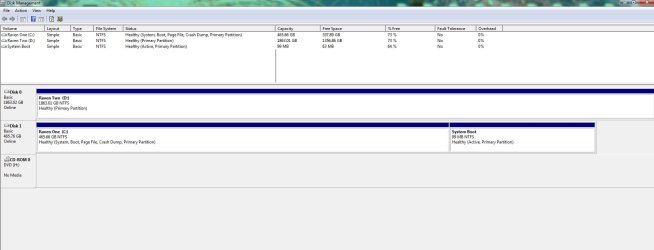
Please post a full screen of Disk Manager (C:\Windows\System32\diskmgmt.msc)
Expand the columns so we can read them and take a snapshot with the snipping tool. Post it here using the paper clip on the Quick Reply window (browse to the snipping tool image file, upload)
 

My Computers My Computers

  • At a glance

    Windows 7 HP 64i5 6600K - 800MHz to 4200MHz4+4G GSkill DDR4 3000IG - Intel 530
    Computer type
    PC/Desktop
    Computer Manufacturer/Model Number
    custom build
    OS
    Windows 7 HP 64
    CPU
    i5 6600K - 800MHz to 4200MHz
    Motherboard
    GA-Z170-HD3P
    Memory
    4+4G GSkill DDR4 3000
    Graphics Card(s)
    IG - Intel 530
    Monitor(s) Displays
    Samsung 226BW
    Screen Resolution
    1680x1050
    Hard Drives
    (1) -1 SM951 – 128GB M.2 AHCI PCIe SSD drive for Windows 7 and Lubuntu
    (2) -1 WD SATA 3 - 1T for Data
    (3) -1 WD SATA 3 - 1T for backup
    PSU
    Thermaltake 450W TR2 gold
    Keyboard
    Old and good Chicony mechanical keyboard
    Mouse
    Logitech mX performance - 9 buttons (had to disable some)
    Internet Speed
    500Mb/s
    Browser
    Firefox 64
    Other Info
    TinyWall firewall
  • At a glance

    Windows 7 Proi7-4500U 800MHz to 3.0GHz(4+4)G DDR3 1600IG intel 4400 + NVIDIA GeForce GT 745M
    Computer type
    Laptop
    System Manufacturer/Model Number
    Asus Q550LF
    OS
    Windows 7 Pro
    CPU
    i7-4500U 800MHz to 3.0GHz
    Motherboard
    Asus Q550LF
    Memory
    (4+4)G DDR3 1600
    Graphics Card(s)
    IG intel 4400 + NVIDIA GeForce GT 745M
    Sound Card
    Realtek
    Monitor(s) Displays
    LG Display LP156WF4-SPH1
    Screen Resolution
    1920 x 1080
    Hard Drives
    BX500 120G SSD for Windows and programs +
    1T HDD for data
    Internet Speed
    500 Mb/s
    Browser
    Firefox
    Other Info
    TinyWall firewall
Disk 1 is where my Windows 7 is installed. Disk 0 is just a secondary drive. I only have one operating system installed (which is Windows 7). The system boot is the active partition in NTFS format.
 

Attachments

  • Z1.jpg
    Z1.jpg
    74.2 KB · Views: 5

My Computer My Computer

At a glance

Windows 7
Computer type
PC/Desktop
OS
Windows 7
It is a bit unusual to have the active partition at the end of the disk. That is the partition you have labelled "system boot".
In theory it shouldn't cause any major issues, but if it is a mechanical disk, that is the slowest part.

I would mark disk 1 partition 1 active and create the boot critical files on there. You could also ensure disk1 is first in bios boot order, which saves the bios looking through other devices first.

You can do that from within windows with cmd prompt:
diskpart
sel vol c:
act
exi
bcdboot c:\windows
close cmd prompt

then in explorer rt click partition c and select properties > tools >check now and it will schedule chkdsk on reboot.

Reboot
 

My Computers My Computers

  • At a glance

    7 X64i5 84002x8gb 3200mhz
    Computer type
    PC/Desktop
    OS
    7 X64
    CPU
    i5 8400
    Motherboard
    gigabyte b365m ds3h
    Memory
    2x8gb 3200mhz
    Hard Drives
    various
    PSU
    pure power 11 400w cm
    Case
    Coolermaster
    Cooling
    cryorig m9i
  • At a glance

    7x64g54008gb ddr4 2400
    Computer type
    PC/Desktop
    OS
    7x64
    CPU
    g5400
    Motherboard
    ga b365m ds3h
    Memory
    8gb ddr4 2400
    PSU
    xfx pro 450w
Please edit your profile with ALL your hardware specs. It will help us to help you.
System Info - See Your System Specs

Some OEM computers (HP, Dell, Sony etc) has some maintenance tools on the System partition. These tools (disk check, memory check etc) are accessed before loading windows. It is important to us to know your hardware.
 

My Computers My Computers

  • At a glance

    Windows 7 HP 64i5 6600K - 800MHz to 4200MHz4+4G GSkill DDR4 3000IG - Intel 530
    Computer type
    PC/Desktop
    Computer Manufacturer/Model Number
    custom build
    OS
    Windows 7 HP 64
    CPU
    i5 6600K - 800MHz to 4200MHz
    Motherboard
    GA-Z170-HD3P
    Memory
    4+4G GSkill DDR4 3000
    Graphics Card(s)
    IG - Intel 530
    Monitor(s) Displays
    Samsung 226BW
    Screen Resolution
    1680x1050
    Hard Drives
    (1) -1 SM951 – 128GB M.2 AHCI PCIe SSD drive for Windows 7 and Lubuntu
    (2) -1 WD SATA 3 - 1T for Data
    (3) -1 WD SATA 3 - 1T for backup
    PSU
    Thermaltake 450W TR2 gold
    Keyboard
    Old and good Chicony mechanical keyboard
    Mouse
    Logitech mX performance - 9 buttons (had to disable some)
    Internet Speed
    500Mb/s
    Browser
    Firefox 64
    Other Info
    TinyWall firewall
  • At a glance

    Windows 7 Proi7-4500U 800MHz to 3.0GHz(4+4)G DDR3 1600IG intel 4400 + NVIDIA GeForce GT 745M
    Computer type
    Laptop
    System Manufacturer/Model Number
    Asus Q550LF
    OS
    Windows 7 Pro
    CPU
    i7-4500U 800MHz to 3.0GHz
    Motherboard
    Asus Q550LF
    Memory
    (4+4)G DDR3 1600
    Graphics Card(s)
    IG intel 4400 + NVIDIA GeForce GT 745M
    Sound Card
    Realtek
    Monitor(s) Displays
    LG Display LP156WF4-SPH1
    Screen Resolution
    1920 x 1080
    Hard Drives
    BX500 120G SSD for Windows and programs +
    1T HDD for data
    Internet Speed
    500 Mb/s
    Browser
    Firefox
    Other Info
    TinyWall firewall
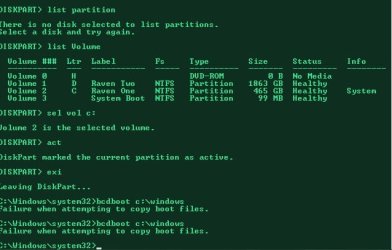
I managed to execute all the commands up until bcdboot c:\windows
It gives me error:

"Failure when attempting to copy boot files"

I didn't reboot the PC yet, not sure if it will make my PC unbootable. Should I set the active partition back to the system reserved partition? (and if so how would i do it?)
 

Attachments

  • Z1111.jpg
    Z1111.jpg
    35.1 KB · Views: 7

My Computer My Computer

At a glance

Windows 7
Computer type
PC/Desktop
OS
Windows 7
Ok before rebooting, I used diskpart again to select the system reserved partition as the active partition (phew)

list disk
sel disk 1
list partition
sel partition 2
act
exi

Then I rebooted and I'm back.
Still No OS Listed under MSConfig and cant boot into safe mode, I think its just better off I do a reformat because this problem is hard to fix.
I have already tried the "startup repair" via booting from Windows Installation disk before, but it didn't work
nor did booting from Windows Installation USB disk as well.

I would have tried using the command prompt to repair bcd using bootrec, but seeing that bcdedit and bcdboot commands don't even work, I doubt it will work: How To Fix The Windows Bootloader - TweakHound

I have a question however - If I am to reinstall Windows 7 again, how should I reinstall Windows Updates?
Should i follow this article: How to Update Windows 7 All at Once with Microsoft’s Convenience Rollup

(Involves installing the Install the April 2015 “Servicing Stack” Update and then Download and Install the Windows 7 SP1 Convenience Rollup)

or I should just straight up download and install the Simplix UpdatePack 7? Download Simplix UpdatePack 7 - MajorGeeks

I am confused as to which Windows update should be installed in what order. Not sure if the April 2015 “Servicing Stack” Update and the Windows 7 SP1 Convenience Rollup is included in the Simplix UpdatePack 7

Oh and as for my Windows 7 PC, its custom built. But ill edit my profile later
 

My Computer My Computer

At a glance

Windows 7
Computer type
PC/Desktop
OS
Windows 7
Put the net framework.wa file next to the simplix updatepack7r2.exe and it will also install net framework 4.8 correctly for you.

Release v2020.10.13 . abbodi1406/dotNetFx4xW7A . GitHub

Then just run simplix. It scans the system and installs updates your system needs. It will restart a couple of times and cleanup.
 

My Computers My Computers

  • At a glance

    7 X64i5 84002x8gb 3200mhz
    Computer type
    PC/Desktop
    OS
    7 X64
    CPU
    i5 8400
    Motherboard
    gigabyte b365m ds3h
    Memory
    2x8gb 3200mhz
    Hard Drives
    various
    PSU
    pure power 11 400w cm
    Case
    Coolermaster
    Cooling
    cryorig m9i
  • At a glance

    7x64g54008gb ddr4 2400
    Computer type
    PC/Desktop
    OS
    7x64
    CPU
    g5400
    Motherboard
    ga b365m ds3h
    Memory
    8gb ddr4 2400
    PSU
    xfx pro 450w
Ok i will go for the simplix update package route, because it doesn't include Microsoft's Telemetry nonsense updates (I think the convenience rollup does?) Hopefully it also includes the patch for Wannacry ransomware too.

Thanks for the help. Anyhow for those who are curious how I got to this point, I needed to uninstall Avast Anti Virus, I used the
cleanup tool that Avast specifically provides in their website. It involves booting me into safe mode, which I successfully did and
it uninstalled without a hitch. After that, I thought something had went wrong when I couldn't run cmd as admin (but nothing was actually wrong), but it was to a point prior to Avast being Installed, so after the system restore avast was Installed again by itself.

I think it was either uninstalling Avast or System restore that did the damage to MSConfig not listing any OS and me not being able to boot in safe mode anymore. Either way, lesson learned. Avast has been getting pesky lately installing their Avast Safe Browser forcefully without user prompt or consent (It just installs itself magically like spyware). I'm looking forward to a reformat , trying another AV and I didn't bite more than what I can chew by trying to fix this any further. At the very least I was able to backup all my data. Just seeing that there's no OS listed in MSConfig and not being able to boot into safemode is a redflag to start backing up data. Although I have seen some able to fix this problem, its only on the presumption that the bcdedit and the bcdboot commands are working for them.
 

My Computer My Computer

At a glance

Windows 7
Computer type
PC/Desktop
OS
Windows 7
Back
Top