Solved Missing option in Windows update

belikexp

New member
Power User
Local time
12:41 PM
Messages
222
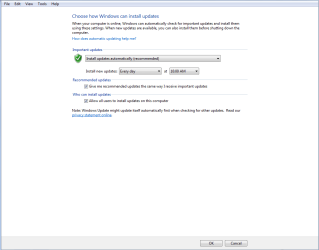
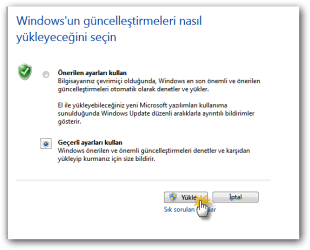
I' m missing the setting for Give me updates for Microsoft products.
Is there setting for this?
 

Attachments

  • Capture.PNG
    Capture.PNG
    14.1 KB · Views: 130

My Computer

Computer Manufacturer/Model Number
Built by Mark
OS
Windows 7 x64
CPU
Intel Core i7 930
Motherboard
Gigabyte GA-X58A-UD3R Bios F5
Memory
OCZ 6GBkit OCZ3G1600LV6GK 8-8-8-24-2T 1.65V
Graphics Card(s)
(2) HIS ATI Radeon HD 5770 CROSSFIRE (H577QT1GD)
Sound Card
On board Realtek HD
Monitor(s) Displays
Samsung SyncMaster 2343 22" Wide Screen
Screen Resolution
2048x1152
Hard Drives
Two Western Digital 320 Gig Blue series WDC WD3200AAKS-00L9A0
PSU
Corsiar 750 watts TX750W
Case
Antec NINE Hundred Two (air filters & adjustable fan speed)
Cooling
Cooler Master Hyper 212 Plus CPU cooler
Keyboard
Logitech
Mouse
Logitech MX310
Internet Speed
20 meg down/ 5 meg up
Other Info
Hewlett Packard Deskjet 932C printer
Epson 4990 Photo scanner
Do you have any other Microsoft products installed, like Office?
 

My Computer

Computer Manufacturer/Model Number
Dell XPS 15 L502x
OS
Windows 7 Ultimate x64 SP1
CPU
Core i7-2670QM
Memory
8GB DDR3 PC3-10600
Graphics Card(s)
Intel HD Graphics 3000 + GeForce GT 540M
Screen Resolution
1920x1080
Hard Drives
1TB 5400RPM Seagate
Yes I do. Windows 2003 and Microsoft Visual Studio 2008.
 

My Computer

Computer Manufacturer/Model Number
Built by Mark
OS
Windows 7 x64
CPU
Intel Core i7 930
Motherboard
Gigabyte GA-X58A-UD3R Bios F5
Memory
OCZ 6GBkit OCZ3G1600LV6GK 8-8-8-24-2T 1.65V
Graphics Card(s)
(2) HIS ATI Radeon HD 5770 CROSSFIRE (H577QT1GD)
Sound Card
On board Realtek HD
Monitor(s) Displays
Samsung SyncMaster 2343 22" Wide Screen
Screen Resolution
2048x1152
Hard Drives
Two Western Digital 320 Gig Blue series WDC WD3200AAKS-00L9A0
PSU
Corsiar 750 watts TX750W
Case
Antec NINE Hundred Two (air filters & adjustable fan speed)
Cooling
Cooler Master Hyper 212 Plus CPU cooler
Keyboard
Logitech
Mouse
Logitech MX310
Internet Speed
20 meg down/ 5 meg up
Other Info
Hewlett Packard Deskjet 932C printer
Epson 4990 Photo scanner
I believe that after I installed Office, I went to the Office website and clicked on the Microsoft Update link. IIRC, I was prompted to install the Microsoft update; after that, Windows started checking for Microsoft product updates.
 

My Computer

Computer Manufacturer/Model Number
Dell XPS 15 L502x
OS
Windows 7 Ultimate x64 SP1
CPU
Core i7-2670QM
Memory
8GB DDR3 PC3-10600
Graphics Card(s)
Intel HD Graphics 3000 + GeForce GT 540M
Screen Resolution
1920x1080
Hard Drives
1TB 5400RPM Seagate

My Computer

Computer Manufacturer/Model Number
Built by Mark
OS
Windows 7 x64
CPU
Intel Core i7 930
Motherboard
Gigabyte GA-X58A-UD3R Bios F5
Memory
OCZ 6GBkit OCZ3G1600LV6GK 8-8-8-24-2T 1.65V
Graphics Card(s)
(2) HIS ATI Radeon HD 5770 CROSSFIRE (H577QT1GD)
Sound Card
On board Realtek HD
Monitor(s) Displays
Samsung SyncMaster 2343 22" Wide Screen
Screen Resolution
2048x1152
Hard Drives
Two Western Digital 320 Gig Blue series WDC WD3200AAKS-00L9A0
PSU
Corsiar 750 watts TX750W
Case
Antec NINE Hundred Two (air filters & adjustable fan speed)
Cooling
Cooler Master Hyper 212 Plus CPU cooler
Keyboard
Logitech
Mouse
Logitech MX310
Internet Speed
20 meg down/ 5 meg up
Other Info
Hewlett Packard Deskjet 932C printer
Epson 4990 Photo scanner

Attachments

  • Capture.PNG
    Capture.PNG
    16.8 KB · Views: 105

My Computer

Computer Manufacturer/Model Number
Built by Mark
OS
Windows 7 x64
CPU
Intel Core i7 930
Motherboard
Gigabyte GA-X58A-UD3R Bios F5
Memory
OCZ 6GBkit OCZ3G1600LV6GK 8-8-8-24-2T 1.65V
Graphics Card(s)
(2) HIS ATI Radeon HD 5770 CROSSFIRE (H577QT1GD)
Sound Card
On board Realtek HD
Monitor(s) Displays
Samsung SyncMaster 2343 22" Wide Screen
Screen Resolution
2048x1152
Hard Drives
Two Western Digital 320 Gig Blue series WDC WD3200AAKS-00L9A0
PSU
Corsiar 750 watts TX750W
Case
Antec NINE Hundred Two (air filters & adjustable fan speed)
Cooling
Cooler Master Hyper 212 Plus CPU cooler
Keyboard
Logitech
Mouse
Logitech MX310
Internet Speed
20 meg down/ 5 meg up
Other Info
Hewlett Packard Deskjet 932C printer
Epson 4990 Photo scanner
if you reinstalled them, make sure that you activate again. If this was mentioned, I apologize, I just read through quickly.
 

My Computer

Computer type
PC/Desktop
Computer Manufacturer/Model Number
Dell XPS 420
OS
Windows 10, Home Clean Install
CPU
Intel Core2 processsor Q8200(2.33Ghz 1333FSB) Quad Core Tech
Motherboard
Dell
Memory
6 gb
Graphics Card(s)
ATI Radeon 256MB HD3650
Sound Card
Intergrated 7.1 Channel Audio
Monitor(s) Displays
Dell SP2009W 20"
Hard Drives
640 GB Serial ATA Hard drive
Cooling
Fan
Keyboard
Dell USB Keyboard
Mouse
Dell Premium Optical USB
Internet Speed
DSL 2.85
It's been too long time but maybe somebody can google this :D
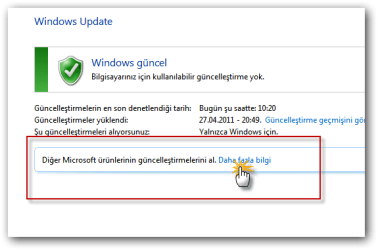
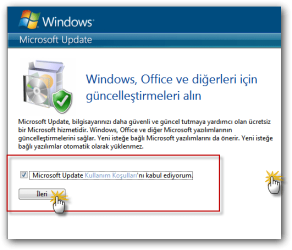
Here is the solution;

sshot-11.png


sshot-9.png


sshot-10.png
 

My Computer

Computer Manufacturer/Model Number
asus f3sv240dr
OS
vista
CPU
t7700
Memory
2 gb
Graphics Card(s)
8600M
Hard Drives
250 GB
*solved*

***PLEASE READ***:

This fix is for people that are familiar with registry editing using Regedit only. If you do not have experience using Regedit, I recommend that you do some reading first as you could cause some serious problems on your computer if you modify the wrong keys or values.

1-Close all running Microsoft Office components.
2-Open Regedit
3-Go to: HKEY_CURRENT_USER\Software\Microsoft\Office\12.0\Common\General
4-Modify the "ShownOptIn" value from 1 to 0
5-Launch a Microsoft Office component, it will give you the option to download the updates, make sure you select it.
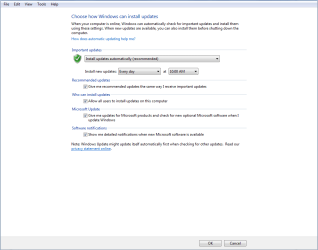
6-Done. If you go back to "Windows Update", then "Change Settings", you will see the "Microsoft Update" and "Software notifications" sections are available again (until the Microsoft Update check box is unchecked again).

 

My Computer

Computer type
PC/Desktop
Computer Manufacturer/Model Number
CUstom
OS
Windows 7
it was this pop up
Welcome-to-Microsoft-Office-2010-ShownFirstRunOptin.PNG
 

My Computer

Computer type
PC/Desktop
Computer Manufacturer/Model Number
homebuilt & dell & sgi
OS
Windows 7 x64, ultimate/pro/home, SLES x86 & ia64
CPU
intel & amd
Motherboard
yes
Memory
yes
Graphics Card(s)
gtx970
Sound Card
same as memory
Monitor(s) Displays
benq 27"
Screen Resolution
2560*1440
Hard Drives
many
eh it might not have worked. now i'm not seeing office in the check settings windows again.
 

My Computer

Computer type
PC/Desktop
Computer Manufacturer/Model Number
homebuilt & dell & sgi
OS
Windows 7 x64, ultimate/pro/home, SLES x86 & ia64
CPU
intel & amd
Motherboard
yes
Memory
yes
Graphics Card(s)
gtx970
Sound Card
same as memory
Monitor(s) Displays
benq 27"
Screen Resolution
2560*1440
Hard Drives
many
If you mean in the Windows Update settings, note that the option is called Microsoft Update and not Office.
 

My Computer

Computer type
Laptop
Computer Manufacturer/Model Number
HP Elitebook 8540p
OS
Windows 7 Pro 32
CPU
Intel(R) Core(TM) i5 CPU M 540 @ 2.53GHz
Motherboard
Hewlett-Packard 1521
Memory
4,00 GB (Usable 2,98)
Graphics Card(s)
NVIDIA NVS 5100M
Sound Card
NVIDIA High Definition Audio
Screen Resolution
1600x900
Hard Drives
INTEL SSDSA2CW120G3
Antivirus
F-Secure Internet Security
Browser
IE, Firefox, Opera
Other Info
Sandboxie,
SRP (Software Restriction Policy),
EMET (Enhanced Mitigation Experience Toolkit),
WFC (Windows Firewall Control by BiniSoft),
Malwarebytes Premium
***PLEASE READ***:

This fix is for people that are familiar with registry editing using Regedit only. If you do not have experience using Regedit, I recommend that you do some reading first as you could cause some serious problems on your computer if you modify the wrong keys or values.

1-Close all running Microsoft Office components.
2-Open Regedit
3-Go to: HKEY_CURRENT_USER\Software\Microsoft\Office\12.0\Common\General
4-Modify the "ShownOptIn" value from 1 to 0
5-Launch a Microsoft Office component, it will give you the option to download the updates, make sure you select it.
6-Done. If you go back to "Windows Update", then "Change Settings", you will see the "Microsoft Update" and "Software notifications" sections are available again (until the Microsoft Update check box is unchecked again).

Thank you!! This fixed it for me! ...finally!
 

My Computer

Computer type
PC/Desktop
Computer Manufacturer/Model Number
Custom
OS
Windows 7 64 Home Premium
Thanks for that fix

The registry fix did the trick on this system. Thanks!
 

My Computer

Computer type
PC/Desktop
Computer Manufacturer/Model Number
Dell Precision T5500
OS
Windows 7 64-bit Professional
CPU
dual Xeon X5570 @2.93GHz (4 cores each with hyperthreading)
Memory
64GB
Graphics Card(s)
Nvidia Quadro 2000
Hard Drives
256GB Samsung SSD; 1GB internal HDD
Antivirus
Microsoft Security Essentials
Browser
Firefox; Chrome
I had the same problem. After installing Office 2003 PRO, Windows Update doesn't search any update for Office 2003 and the checkbox Microsoft update was missing too.
I just installed another app from Microsoft, Silverlight player and voala. Checkbox showed up and Windows update searched all Office 2003 updates :) .
 

My Computer

Computer type
Laptop
Computer Manufacturer/Model Number
Lenovo Y50-70 (20378)
OS
Windows 7 Professional x64
CPU
Intel Core i5-4210H
Memory
2x Kingston 8GB DDR3 1600 CL11
Graphics Card(s)
Nvidia GeForce GTX960M 4GB
Sound Card
Sound Blaster PLAY! 3
Monitor(s) Displays
2
Screen Resolution
2x 1920x1080
Hard Drives
Vi560 S3 M.2 SSD 1TB
Cooling
Deepcool Multi Core X6
Keyboard
Yenkee YKB 1002 CS USB
Mouse
Crono CM645 Wired optical mouse
Internet Speed
95 Mb/s Down 95 Mb/s Up
Antivirus
MSE
Browser
Firefox 115.36.0esr x64bit
I had the same problem. After installing Office 2003 PRO, Windows Update doesn't search any update for Office 2003 and the checkbox Microsoft update was missing too.
I just installed another app from Microsoft, Silverlight player and voala. Checkbox showed up and Windows update searched all Office 2003 updates :) .
Wow, Silverlight player did trick!! Thanks a lot.
 

My Computer

Computer type
PC/Desktop
OS
Windows 7 Ultimate x64
Back
Top