
Solved Missing option to enable 7.1 surround sound. Only shows Stereo

motamedn

New member
Local time
11:31 AM
Messages
6
After power cycling my receiver, I only have the option to select stereo under speaker setup. When Irestart my PC or log off/log on, it shows the option to select 7.1 surround sound. I am looking at this by right clicking the volume systray icon and selecting playback devices, right clicking my playback device and selecting configure speakers.

My set-up: I have 2 monitors and a TV / AVR receiver combo plugged into a XFX 7870. My receiver is connected with HDMI to my PC and has 7.1 surround out.

I have tried blocking pin 19 on the PC end of my HDMI cable with electric tape but that has not fixed my issue. This happens every time I turn off my TV and receiver and then turn them back on. I shut off my reciever and TV at night but not my PC so this is a bit annoying.

Thanks in advance for the help!
 

Attachments
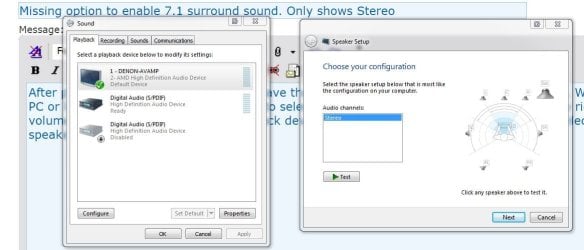
  • Capture.JPG
    Capture.JPG
    71.4 KB · Views: 0

My Computer My Computer

At a glance

California
Computer type
PC/Desktop
OS
California
Does it correct if you switch to the 2nd device in list and back to HDMI? It wouldn't be a solution though even if that worked.
 

My Computer My Computer

At a glance

Windows 7 Ultimate x64 SP1AMD Phenom 2 1090T2x8GB Kingston HyperX Fury Black 1600Mhz Unga...MSI GTX 970 Gaming 4G
Computer type
PC/Desktop
Computer Manufacturer/Model Number
Custom Build
OS
Windows 7 Ultimate x64 SP1
CPU
AMD Phenom 2 1090T
Motherboard
Gigabyte GA-890FXA-UD5
Memory
2x8GB Kingston HyperX Fury Black 1600Mhz Unganged
Graphics Card(s)
MSI GTX 970 Gaming 4G
Sound Card
Realtek On-Board HD 7.1 Audio / Logitech G35
Monitor(s) Displays
3xAcer GD245HQ
Screen Resolution
1920x1080
Hard Drives
Samsung 850 Pro 512GB SSD - OS /
WD Caviar Black SATA 3 - 1 TBx2 - Dynamic RAID 0 /
WD Caviar Green SATA 2 - 640GBx2 - Dynamic RAID 0 /
WD Caviar Green SATA 2 - 640GB - Internal Backup /
Seagate Barracude SATA 3 - 3TB - External Backup/ Sync
PSU
HighPower 1000W
Case
Cooler Master HAF 932
Cooling
Noctua NH-D14
Keyboard
Logitech G19
Mouse
Logitech G500
Internet Speed
100/4 Mbit Cable (100GB quota)
Antivirus
ZoneAlarm Extreme Security / MBAM Pro / MBAE Free / SAS Free
Browser
IE 11 - Firefox - Chrome
Other Info
Logitech F710/ G27/ G940/ Z5500 // TrackIR 5 // Nvidia 3D Surround Vision
That's a great question, but it does not. I also tried right click->disable -> enable to no avail. I can unplug the HDMI cable and plug it back in to fix it, restart the CPU or log off and log in again. At one point, I randomly got the option back with a convoluted set of steps. I started by changing the default device, then turning off the display from display manager, then power cycling the TV / Receiver, then re-enabling the display and changing it back to default. I forgot the order of operations though.

I wish there was a batch file that I could run to "reset" the HDMI connection. I wonder if it is an EDID issue?
 

My Computer My Computer

At a glance

California
Computer type
PC/Desktop
OS
California
Hmm, does it work if you disable/enable in Device Manager?

windows - Create .bat file to deactivate device - Super User last post
Enabling or disabling a network device in the Network Devices list is identical to enabling or disabling it in the Device Manager. You can use the Microsoft tool devcon to do this from the command-line.
  1. Download the file, extract it, and put it somewhere (we’ll use c:\tools for the example below).
  2. Now you need to determine the device ID. You can do it in two ways:
    • With the Device Manager
      1. Open the Device Manager (devmgmt.msc)
      2. Expand the Network adapters branch
      3. Locate and select the device
      4. Open its Properties dialog (double-click or [Alt+]Enter or right-click→Properties or Action→​Properties)
      5. Switch to the Details tab
      6. Select the Matching Device Id field
      7. Copy the ID (e.g., PCI\VEN_1337&DEV_2600&SUBSYS_DEADCAFE)
    • With devcon
      1. Open a command-prompt
      2. Run this command:
        devcon findall * | find /i "speedtouch" > "%temp%\devcon.txt"
      3. Open the file %temp%\devcon.txt and find your device
        • If you don’t find your device, try leaving out the filter:
          devcon findall * > "%temp%\devcon.txt"`
      4. Copy the ID (you only need up until the end of the SUBSYS field)
  3. Test it (replace the path and ID with your own, and make sure to put the ID in quotes):
    devcon disable "PCI\VEN_1337&DEV_2600&SUBSYS_DEADCAFE"
  4. Copy it to a batch-file (make sure to include the path if you are storing the batch-file somewhere different than devcon.exe). For example:
    c:\tools\devcon disable "PCI\VEN_1337&DEV_2600&SUBSYS_DEADCAFE"
You can then create a shortcut to the batch-file and set it to run minimized. If you don’t need to run other commands (the batch-file only contains the single line), then you can make a shortcut to run the command directly and forgo the batch-file altogether.
You can also make a batch-file/shortcut to enable the device as well (writing one to toggle the device is a little more complicated). You can even use this to enable or disable other devices (years ago I wrote one to toggle my old gameport gamepad when running DOSBox to work around a bug).

Edit: Wanted to add this too, check post 2.

Enable/disable Windows 7 device via command line - Super User
DevManView is another way to do this - and it's a lot easier to acquire than devcon.exe, but still free.
I use the following command in a batch file to use disable/enable a device on my wife's laptop when we need it:
devmanview.exe /disable_enable "SDA Standard Compliant SD Host Controller"You can also create a regular shortcut, edit its properties and add the parameters in the Target field.
 

My Computer My Computer

At a glance

Windows 7 Ultimate x64 SP1AMD Phenom 2 1090T2x8GB Kingston HyperX Fury Black 1600Mhz Unga...MSI GTX 970 Gaming 4G
Computer type
PC/Desktop
Computer Manufacturer/Model Number
Custom Build
OS
Windows 7 Ultimate x64 SP1
CPU
AMD Phenom 2 1090T
Motherboard
Gigabyte GA-890FXA-UD5
Memory
2x8GB Kingston HyperX Fury Black 1600Mhz Unganged
Graphics Card(s)
MSI GTX 970 Gaming 4G
Sound Card
Realtek On-Board HD 7.1 Audio / Logitech G35
Monitor(s) Displays
3xAcer GD245HQ
Screen Resolution
1920x1080
Hard Drives
Samsung 850 Pro 512GB SSD - OS /
WD Caviar Black SATA 3 - 1 TBx2 - Dynamic RAID 0 /
WD Caviar Green SATA 2 - 640GBx2 - Dynamic RAID 0 /
WD Caviar Green SATA 2 - 640GB - Internal Backup /
Seagate Barracude SATA 3 - 3TB - External Backup/ Sync
PSU
HighPower 1000W
Case
Cooler Master HAF 932
Cooling
Noctua NH-D14
Keyboard
Logitech G19
Mouse
Logitech G500
Internet Speed
100/4 Mbit Cable (100GB quota)
Antivirus
ZoneAlarm Extreme Security / MBAM Pro / MBAE Free / SAS Free
Browser
IE 11 - Firefox - Chrome
Other Info
Logitech F710/ G27/ G940/ Z5500 // TrackIR 5 // Nvidia 3D Surround Vision
Thanks, GoKay I'll give that a go and report back the next time the problem arises. But still overall this is still less than ideal to solve the problem. Something is going wrong with Windows reading the HDMI device and not recognizing it is surround-capable. I gotta believe other people have ran into this problem in the past...
 

My Computer My Computer

At a glance

California
Computer type
PC/Desktop
OS
California
Yeah, it would only be a workaround rather than a solution. You are the only one I know that uses a 7.1 system over HDMI :) I use a digital (optical) to connect to 5.1 system, and in the past used the analog 5.1 too.

Ok, searched some and found speakers - Preventing Windows 7 from reverting to stereo? - Super User
maybe you saw it too?

The last option seems doable, MilesAhead as far as I know is the AutoHotKey guru over here. Maybe he can help you write the script.

Also another thread: *Workaround * Nvidia HDMI audio ?Not Plugged In? after resume from sleep (S3) or turning TV off then on - AVS | Home Theater Discussions And Reviews
End of first post there is the batch file option again.
 

My Computer My Computer

At a glance

Windows 7 Ultimate x64 SP1AMD Phenom 2 1090T2x8GB Kingston HyperX Fury Black 1600Mhz Unga...MSI GTX 970 Gaming 4G
Computer type
PC/Desktop
Computer Manufacturer/Model Number
Custom Build
OS
Windows 7 Ultimate x64 SP1
CPU
AMD Phenom 2 1090T
Motherboard
Gigabyte GA-890FXA-UD5
Memory
2x8GB Kingston HyperX Fury Black 1600Mhz Unganged
Graphics Card(s)
MSI GTX 970 Gaming 4G
Sound Card
Realtek On-Board HD 7.1 Audio / Logitech G35
Monitor(s) Displays
3xAcer GD245HQ
Screen Resolution
1920x1080
Hard Drives
Samsung 850 Pro 512GB SSD - OS /
WD Caviar Black SATA 3 - 1 TBx2 - Dynamic RAID 0 /
WD Caviar Green SATA 2 - 640GBx2 - Dynamic RAID 0 /
WD Caviar Green SATA 2 - 640GB - Internal Backup /
Seagate Barracude SATA 3 - 3TB - External Backup/ Sync
PSU
HighPower 1000W
Case
Cooler Master HAF 932
Cooling
Noctua NH-D14
Keyboard
Logitech G19
Mouse
Logitech G500
Internet Speed
100/4 Mbit Cable (100GB quota)
Antivirus
ZoneAlarm Extreme Security / MBAM Pro / MBAE Free / SAS Free
Browser
IE 11 - Firefox - Chrome
Other Info
Logitech F710/ G27/ G940/ Z5500 // TrackIR 5 // Nvidia 3D Surround Vision
Happy to report back that disabling and enabling my Display Adapter (AMD Radeon 7800 series) worked. The unfortunate thing is the screen flashes and 2nd/3rd monitors are emptied when I disable the adapter and they turn back on when I reenable it--but they are empty. All windows are dumped on the primary display. Things that were sized to span displays are resized to only the primary display.

I'm going to work to see if I can make a batch file to automatically do this for me but in the meantime: Is there a way to target just that HDMI port I am connecting to the receiver and leave the rest of the display adapter running?? There has to be a better solution to this problem, right?
 

My Computer My Computer

At a glance

California
Computer type
PC/Desktop
OS
California
OK So I found a way to shorten the steps. I downloaded a devcon 64 bit version (attached) and extracted it to C:\windows\system32. I made a batch file with the following single line:

C:\windows\system32\devcon restart =display

I didn't need any device ID or anything else since that is my only display device. The screen blacks out for a second and resets and the speakers work fine. Hopefully this helps anyone else with the problem. Thanks for your help GoKay.

Next step is to try to take this a step further and solve the problem. I might try to block pin 19 on both HDMI cables on both sides. Currently I believe only the end that is in the PC is blocked. Maybe just getting rid of all hotplug detection will fix it. I'll probably wait until I can give it a go on Win10 to see if the upgrade resolves the issue. Has anyone had this issue with the releases currently available? Definitely would be worth upgrading if it resolves this headache.
 

Attachments

My Computer My Computer

At a glance

California
Computer type
PC/Desktop
OS
California

My Computer My Computer

At a glance

Windows 7 Ultimate x64 SP1AMD Phenom 2 1090T2x8GB Kingston HyperX Fury Black 1600Mhz Unga...MSI GTX 970 Gaming 4G
Computer type
PC/Desktop
Computer Manufacturer/Model Number
Custom Build
OS
Windows 7 Ultimate x64 SP1
CPU
AMD Phenom 2 1090T
Motherboard
Gigabyte GA-890FXA-UD5
Memory
2x8GB Kingston HyperX Fury Black 1600Mhz Unganged
Graphics Card(s)
MSI GTX 970 Gaming 4G
Sound Card
Realtek On-Board HD 7.1 Audio / Logitech G35
Monitor(s) Displays
3xAcer GD245HQ
Screen Resolution
1920x1080
Hard Drives
Samsung 850 Pro 512GB SSD - OS /
WD Caviar Black SATA 3 - 1 TBx2 - Dynamic RAID 0 /
WD Caviar Green SATA 2 - 640GBx2 - Dynamic RAID 0 /
WD Caviar Green SATA 2 - 640GB - Internal Backup /
Seagate Barracude SATA 3 - 3TB - External Backup/ Sync
PSU
HighPower 1000W
Case
Cooler Master HAF 932
Cooling
Noctua NH-D14
Keyboard
Logitech G19
Mouse
Logitech G500
Internet Speed
100/4 Mbit Cable (100GB quota)
Antivirus
ZoneAlarm Extreme Security / MBAM Pro / MBAE Free / SAS Free
Browser
IE 11 - Firefox - Chrome
Other Info
Logitech F710/ G27/ G940/ Z5500 // TrackIR 5 // Nvidia 3D Surround Vision
I did and it did not fix the problem
 

My Computer My Computer

At a glance

California
Computer type
PC/Desktop
OS
California
Ok, it was worth a try.
Maybe the program in my last post will help with Windows positions getting reset when you disable the GPU.
 

My Computer My Computer

At a glance

Windows 7 Ultimate x64 SP1AMD Phenom 2 1090T2x8GB Kingston HyperX Fury Black 1600Mhz Unga...MSI GTX 970 Gaming 4G
Computer type
PC/Desktop
Computer Manufacturer/Model Number
Custom Build
OS
Windows 7 Ultimate x64 SP1
CPU
AMD Phenom 2 1090T
Motherboard
Gigabyte GA-890FXA-UD5
Memory
2x8GB Kingston HyperX Fury Black 1600Mhz Unganged
Graphics Card(s)
MSI GTX 970 Gaming 4G
Sound Card
Realtek On-Board HD 7.1 Audio / Logitech G35
Monitor(s) Displays
3xAcer GD245HQ
Screen Resolution
1920x1080
Hard Drives
Samsung 850 Pro 512GB SSD - OS /
WD Caviar Black SATA 3 - 1 TBx2 - Dynamic RAID 0 /
WD Caviar Green SATA 2 - 640GBx2 - Dynamic RAID 0 /
WD Caviar Green SATA 2 - 640GB - Internal Backup /
Seagate Barracude SATA 3 - 3TB - External Backup/ Sync
PSU
HighPower 1000W
Case
Cooler Master HAF 932
Cooling
Noctua NH-D14
Keyboard
Logitech G19
Mouse
Logitech G500
Internet Speed
100/4 Mbit Cable (100GB quota)
Antivirus
ZoneAlarm Extreme Security / MBAM Pro / MBAE Free / SAS Free
Browser
IE 11 - Firefox - Chrome
Other Info
Logitech F710/ G27/ G940/ Z5500 // TrackIR 5 // Nvidia 3D Surround Vision
Back
Top