Missing Realtek PCIe GBE Family Controller Ver.7.48.823.2011

QT2014

New member
Local time
1:43 AM
Messages
19
Please help

I recently had problems with my local network connection. Sony tried to help me fix this problem by reinstalling the original driver- REDETH-00265707-0042.EXE, however, this did not work. I have lost the realtek PCIeGBE completly from my laptop. Since I have tried to have my laptop fully recovered to its original state twice, but it has not seemed to work. I have contacted Sony on five ocassions but they don't seem to know what is going on. Please help me!

By the way I do a recovery on my laptop I have a message that “the following program did not install completely: Ethernet Driver ( Realtek) “

Thanks
Thai
 

Attachments

Last edited:

My Computer My Computer

At a glance

window 7 home preium 64 bit
Computer type
Laptop
Computer Manufacturer/Model Number
Sony Vaio
OS
window 7 home preium 64 bit
Have you tried updating the driver from Device Manager?
Network Adapters > Realtek >Update driver >Search automatically
 

My Computer My Computer

At a glance

7 x64 UltimateAMD Ryzen 516GB DDR4Radeon R7 360
Computer type
PC/Desktop
Computer Manufacturer/Model Number
Custom
OS
7 x64 Ultimate
CPU
AMD Ryzen 5
Motherboard
Gigabyte GA-AB350-Gaming
Memory
16GB DDR4
Graphics Card(s)
Radeon R7 360
Monitor(s) Displays
2 x Dell U2518D
Screen Resolution
2560x1440 2560x1440
Hard Drives
WD 500GB x2
Samsung SSD 128MB (OS)
XPG SX8200 Pro M.2 2280 1TB
PSU
Antec 500
Cooling
Hyper 212 EVO
Keyboard
Logitech cordless K800
Mouse
Logitech M510
Antivirus
Avira
Hi Roger

I did exactly what you have suggested but nothing show up. Down load the original from Sony website 5 times and every time it said successfully download but when I go to the device manager it isn’t there.
Thanks
Thai
 

My Computer My Computer

At a glance

window 7 home preium 64 bit
Computer type
Laptop
Computer Manufacturer/Model Number
Sony Vaio
OS
window 7 home preium 64 bit
Hi Roger

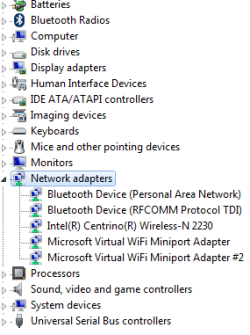
This the screen shots of the Device manager and the network adapter.

Cheers
Thai
 

Attachments

  • Device manager.png
    Device manager.png
    8.8 KB · Views: 32
  • Network Adapter.png
    Network Adapter.png
    16.6 KB · Views: 0

My Computer My Computer

At a glance

window 7 home preium 64 bit
Computer type
Laptop
Computer Manufacturer/Model Number
Sony Vaio
OS
window 7 home preium 64 bit
Check in the BIOS to see if the Network Controller is enabled ...
 

My Computer My Computer

At a glance

windows 7 home 64bitINTEL-CORE I716GB
Computer Manufacturer/Model Number
W530-3630QM1
OS
windows 7 home 64bit
CPU
INTEL-CORE I7
Memory
16GB
Hard Drives
750GB
Browser
Chrome
Hi Maxie

How do I check the BIOS and where can I find this BIOS function?
Thank You Very Much
Cheers
Thai
 

My Computer My Computer

At a glance

window 7 home preium 64 bit
Computer type
Laptop
Computer Manufacturer/Model Number
Sony Vaio
OS
window 7 home preium 64 bit
Turn on or restart your Sony VAIO computer, allowing it to show its initial splash screen or main logo. Press the “F2” key on your keyboard to enter the BIOS. Press the key several times if necessary before the operating system loads. Modify the required BIOS settings should be under the Advanced Tab ....
 

My Computer My Computer

At a glance

windows 7 home 64bitINTEL-CORE I716GB
Computer Manufacturer/Model Number
W530-3630QM1
OS
windows 7 home 64bit
CPU
INTEL-CORE I7
Memory
16GB
Hard Drives
750GB
Browser
Chrome
Hi Maxie
Thanks for your advice. I will give it a go and let you know how I go.
Thank You Very Much !
Cheers
Thai
 

My Computer My Computer

At a glance

window 7 home preium 64 bit
Computer type
Laptop
Computer Manufacturer/Model Number
Sony Vaio
OS
window 7 home preium 64 bit
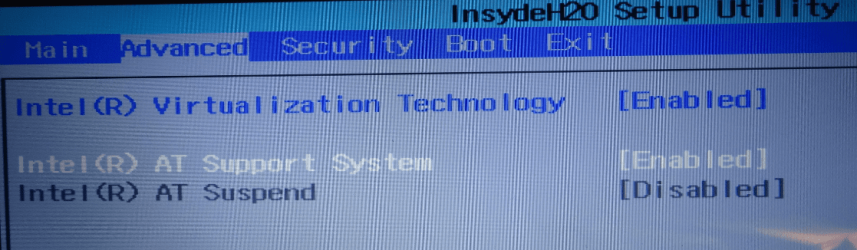
I did as you suggested, but I cannot see any BIOS on the screen. Please see my screen shot.
Wondering if I am in the right place?
Thanks
Cheers
Thai
 

Attachments

  • F2 Advance.png
    F2 Advance.png
    219.5 KB · Views: 0

My Computer My Computer

At a glance

window 7 home preium 64 bit
Computer type
Laptop
Computer Manufacturer/Model Number
Sony Vaio
OS
window 7 home preium 64 bit
Please retry, seems you are not in the Bios yet. post results of a retry . If not. in BIOS. you may not be pressing F2 at proper time. It can be tricky. look for splash screen,, then tap F2 key .
 

My Computer My Computer

At a glance

Win 7 Home Premium SP1 32 bitAMD Athlon 64 X2 5000B4.00 GB Dual-Channel DDR2 @ 370MHz (6-6-6-18)Acer E181H (1366x768@60Hz) 64MB GeForce 6150 ...
Computer type
PC/Desktop
Computer Manufacturer/Model Number
Dell optiplex 740
OS
Win 7 Home Premium SP1 32 bit
CPU
AMD Athlon 64 X2 5000B
Motherboard
Dell Inc. 0YP696 (Socket M2 )
Memory
4.00 GB Dual-Channel DDR2 @ 370MHz (6-6-6-18)
Graphics Card(s)
Acer E181H (1366x768@60Hz) 64MB GeForce 6150 LE (Dell)
Sound Card
SigmaTel High Definition Audio CODEC
Monitor(s) Displays
Acer E181H (1366x768@60Hz) 64MB GeForce 6150 LE (Dell)
Hard Drives
699GB Seagate ST375064 0NS SCSI Disk Device (ATA)
Case
Mini tower
Internet Speed
Ping 36 ms, Download 57.71 mbps , Upload 11.79mbps
Antivirus
Free Avast. Pro paid Mbam , Free Sas
Browser
Palemoon .
Hi Yard Dog

Thanks for the advice. Hope it works out this time. I'll keep you posted.

Thanks
Cheers
Thai
 

My Computer My Computer

At a glance

window 7 home preium 64 bit
Computer type
Laptop
Computer Manufacturer/Model Number
Sony Vaio
OS
window 7 home preium 64 bit
Hi Yard Dog

No luck ...the same screen keep popping up.

:confused:

Thanks
Cheers
Thai
 

My Computer My Computer

At a glance

window 7 home preium 64 bit
Computer type
Laptop
Computer Manufacturer/Model Number
Sony Vaio
OS
window 7 home preium 64 bit
Please retry, seems you are not in the Bios yet. post results of a retry . If not. in BIOS. you may not be pressing F2 at proper time. It can be tricky. look for splash screen,, then tap F2 key .

@yarddog : That is a InsydeH20 BIOS screen.

@QT2014 : I'm a bit confused though by your statement; Down load the original from Sony website 5 times and every time it said successfully download but when I go to the device manager it isn’t there.

Did you launch the install after downloading it?

If the install fails, try launching the install one more time, but stop at the screen just before the install begins.
Navigate to your Temp folder and peek inside a few of the most recent folders - you're looking for the expanded install files.

Copy that folder to a safe location (not in temp)
Launch Device manager and update the Ethernet driver there
Select browse computer
in the driver location field, type the folder name and location that you copied (you might have to hit the "Have Disk" button, I can't remember.
Device manager should find the .inf file and place the files in the correct locations.
 

My Computer My Computer

At a glance

x64 (6.3.9600) Win8.1 Pro & soon dual boot x6...AMD A6-3420M APU with Radeon(tm) HD Graphics6.00 GBAMD Radeon(TM) HD 6520G
Computer type
Laptop
Computer Manufacturer/Model Number
HP Pavilion dv6-6c10us
OS
x64 (6.3.9600) Win8.1 Pro & soon dual boot x64 (6.1.7601) Win7_SP1 HomePrem
CPU
AMD A6-3420M APU with Radeon(tm) HD Graphics
Motherboard
Hewlett-Packard 1805
Memory
6.00 GB
Graphics Card(s)
AMD Radeon(TM) HD 6520G
Sound Card
(1) AMD High Definition Audio Device (2) IDT High Definiti
Monitor(s) Displays
HP W2072a 20" LCD (1600 x 900) @ 60 Hz
Screen Resolution
1366 x 768 x 32 bits (4294967296 colors) @ 60 Hz
Hard Drives
ST640LM0 00 HM641JI SATA Disk Device
Keyboard
Logitech k520 wireless KB
Mouse
Logitech m320 wireless mouse (bundled with KB)
Internet Speed
15/5 | 54 MB Wireless 'n'
Antivirus
Realtime: Defender or Avast | On-demand: Malwarebytes, ESET
Browser
IE 11 on Win8, IE 10 on win 7
Other Info
Media: [Gimp, Audacity, VLC] || Comm: [WEmail 2012, Skype] || Productivity: [OpenOffice,| Textpad] || Utils: [Sysinternals, cCleaner, Speccy, Defraggler]
Please post the Model Number of your Laptop ... It is not a good sign that the Network Controller does not even show in the BIOS ....
 

My Computer My Computer

At a glance

windows 7 home 64bitINTEL-CORE I716GB
Computer Manufacturer/Model Number
W530-3630QM1
OS
windows 7 home 64bit
CPU
INTEL-CORE I7
Memory
16GB
Hard Drives
750GB
Browser
Chrome
Hi Maxie

FYI

Thanks
Thai
 

Attachments

  • System Information.png
    System Information.png
    12.5 KB · Views: 12
  • Ehternet Driver From Website.png
    Ehternet Driver From Website.png
    16.5 KB · Views: 12

My Computer My Computer

At a glance

window 7 home preium 64 bit
Computer type
Laptop
Computer Manufacturer/Model Number
Sony Vaio
OS
window 7 home preium 64 bit
Hi Slartybart

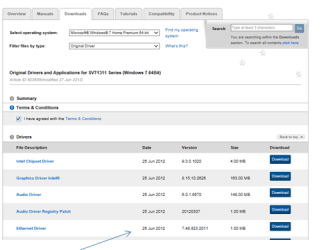
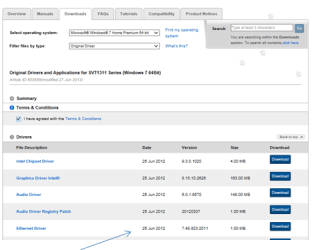
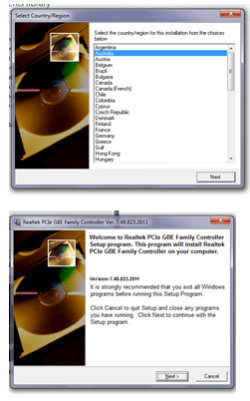
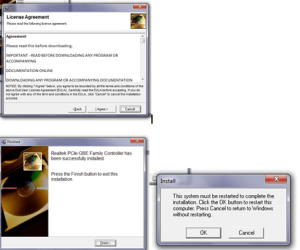
Thanks for the advice. Please see the screen shots of how I downloaded the new Ethernet driver from the Sony website. I am not sure what else I need to do besides downloading the file and following the instructions.
Thank You Very Much
Cheers
Thai
 

Attachments

  • Ehternet Driver From Website.png
    Ehternet Driver From Website.png
    16.5 KB · Views: 12
  • Pt1.png
    Pt1.png
    24 KB · Views: 12
  • Pt2.png
    Pt2.png
    24.2 KB · Views: 12
  • Pt3.png
    Pt3.png
    27.5 KB · Views: 12

My Computer My Computer

At a glance

window 7 home preium 64 bit
Computer type
Laptop
Computer Manufacturer/Model Number
Sony Vaio
OS
window 7 home preium 64 bit
Thanks QT,

Are those old screenshots or did you try to install again?

The actual installation files are wrapped in the installer package, when you install the software (driver in this case) the files have to be 'unwarapped'. Then you can use Device Manager to install from the 'unwrapped' location (usually your TEMP folder, but could be under C:\ or C:\Windows. The trick is finding the 'unwrapped' folder. I look in those three folders and sort by date - if the folder was created about the same time as I started the install, that I look in the folder to confirm it is indeed the install files.

The other trick is making a copy of that folder before the install package cleans up (usually when you press finish-so don't press finish until you copy the driver files).

Once you have the 'unwrapped' install folder copied, launch Device manager and update driver - select browse, not search.
Enter the location of the 'unwrapped' install folder in the location box (it should be looking for a .inf file)

It might also help members if you provided a system report, I'm partial to Speccy
Please follow this tutorial to provide the current operating environment of your machine.
http://www.sevenforums.com/tutorials/311593-speccy-publish-snapshot-your-system-specs.html

Thanks
 

My Computer My Computer

At a glance

x64 (6.3.9600) Win8.1 Pro & soon dual boot x6...AMD A6-3420M APU with Radeon(tm) HD Graphics6.00 GBAMD Radeon(TM) HD 6520G
Computer type
Laptop
Computer Manufacturer/Model Number
HP Pavilion dv6-6c10us
OS
x64 (6.3.9600) Win8.1 Pro & soon dual boot x64 (6.1.7601) Win7_SP1 HomePrem
CPU
AMD A6-3420M APU with Radeon(tm) HD Graphics
Motherboard
Hewlett-Packard 1805
Memory
6.00 GB
Graphics Card(s)
AMD Radeon(TM) HD 6520G
Sound Card
(1) AMD High Definition Audio Device (2) IDT High Definiti
Monitor(s) Displays
HP W2072a 20" LCD (1600 x 900) @ 60 Hz
Screen Resolution
1366 x 768 x 32 bits (4294967296 colors) @ 60 Hz
Hard Drives
ST640LM0 00 HM641JI SATA Disk Device
Keyboard
Logitech k520 wireless KB
Mouse
Logitech m320 wireless mouse (bundled with KB)
Internet Speed
15/5 | 54 MB Wireless 'n'
Antivirus
Realtime: Defender or Avast | On-demand: Malwarebytes, ESET
Browser
IE 11 on Win8, IE 10 on win 7
Other Info
Media: [Gimp, Audacity, VLC] || Comm: [WEmail 2012, Skype] || Productivity: [OpenOffice,| Textpad] || Utils: [Sysinternals, cCleaner, Speccy, Defraggler]
Could you Please Post a Link to the Toshiba Website for your Drivers ? ....
 

My Computer My Computer

At a glance

windows 7 home 64bitINTEL-CORE I716GB
Computer Manufacturer/Model Number
W530-3630QM1
OS
windows 7 home 64bit
CPU
INTEL-CORE I7
Memory
16GB
Hard Drives
750GB
Browser
Chrome

My Computer My Computer

At a glance

window 7 home preium 64 bit
Computer type
Laptop
Computer Manufacturer/Model Number
Sony Vaio
OS
window 7 home preium 64 bit
Hi SlartyBart

By the way the screen shots are new.
Thanks
Thai
 

My Computer My Computer

At a glance

window 7 home preium 64 bit
Computer type
Laptop
Computer Manufacturer/Model Number
Sony Vaio
OS
window 7 home preium 64 bit
Back
Top