Missing start menu icons

Surgikill

New member
Member
VIP
Local time
1:41 AM
Messages
143
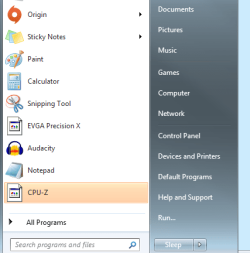
Hi guys so I have been having a few problems recently. First off is that my start menu icons won't appear fr the correct program (see attached picture) Second is that my desktop icon size always resets on a restart. I have tried finding resolutions to these problems and do not know how to fix them, if you could help em I would greatly appreciate it.
 

Attachments

  • Untitled.png
    Untitled.png
    38.8 KB · Views: 25

My Computer

Computer Manufacturer/Model Number
Custom built by me
OS
Windows 7 64 bit
CPU
Core i5 750
Motherboard
EVGA P55 SLI
Memory
G SKILL DDR3 1333 FC310666 8GB
Graphics Card(s)
GALAXY GTX 460 SUPER OC+EVGA GTX460 in SLI
Sound Card
none
Monitor(s) Displays
eMachines 21.5in. display+Viewsonic 19in. display
Screen Resolution
1920x1080
Hard Drives
Seagate Barracuda 500 gig C: drive
Hitachi 320 gig
WD Caviar Blue 2.5inch 320 gig
Seagate external 250 gig
Toshiba external esata 250 gig
Seagate Barracuda 160 gig
Seagate Barracuda 80 gig
PSU
Corsair 850hx
Case
NZXT M59
Cooling
Air
Mouse
Cyborg R.A.T. 7
Thank you, it has worked for my start menu icons, now I am still wondering about the desktop icon size resetting after I shut down.
 

My Computer

Computer Manufacturer/Model Number
Custom built by me
OS
Windows 7 64 bit
CPU
Core i5 750
Motherboard
EVGA P55 SLI
Memory
G SKILL DDR3 1333 FC310666 8GB
Graphics Card(s)
GALAXY GTX 460 SUPER OC+EVGA GTX460 in SLI
Sound Card
none
Monitor(s) Displays
eMachines 21.5in. display+Viewsonic 19in. display
Screen Resolution
1920x1080
Hard Drives
Seagate Barracuda 500 gig C: drive
Hitachi 320 gig
WD Caviar Blue 2.5inch 320 gig
Seagate external 250 gig
Toshiba external esata 250 gig
Seagate Barracuda 160 gig
Seagate Barracuda 80 gig
PSU
Corsair 850hx
Case
NZXT M59
Cooling
Air
Mouse
Cyborg R.A.T. 7
This is what I have to do with my computer to stop the problem I understand you have with desktop icons. I have to turn on the screen first. Just for a few seconds and then start the computer. If I start the computer first and then the screen all the icons are changed and rearranged. I have no idea why. I use different surge protectors to turn different things on. I this case I turn the screen surge protector on then the screen. Next surge protector to the PC and then the PC and all works well. I have tried many things and so far I haven't out the cause.
 

My Computer

Computer type
PC/Desktop
Computer Manufacturer/Model Number
Home made Desktop
OS
Windows 10 Pro. 64/ version 1709 Windows 7 Pro/64
CPU
Intel i7-6800K @ 4.3
Motherboard
ASUS X-99 Deluxe II
Memory
Corsair Platinum 16 gig @2400
Graphics Card(s)
EVGA GTX 1070 OC
Monitor(s) Displays
Asus 27" LED LCD/VE278Q
Screen Resolution
1920-1080 or 1280-720 HDMI
Hard Drives
INTEL SSD 730-240 Gb Sata 3.0/
PSU
EVGA Platium 1200W
Case
Phanteks Luxe Tempered Glass 8 fans/ one radiator
Cooling
XSPC/ Water Cooled CPU
Keyboard
Das 4 Professional
Mouse
Logitech M705/MX Anywhere 2-S
Internet Speed
100 mbits
Antivirus
Microsoft Security Essentials/ Malwarebytes Premium 3.0/ SAS
Browser
I.E. 11 default/Firefox/ ISP Time Warner Cable/Spectrum
Other Info
LG BluRay Burner/
Sound system-KLipsch-THX/
Icy Dock ssd Hot Swap bays.
That doesn't work, i just tried it. I will just have to live with it.
 

My Computer

Computer Manufacturer/Model Number
Custom built by me
OS
Windows 7 64 bit
CPU
Core i5 750
Motherboard
EVGA P55 SLI
Memory
G SKILL DDR3 1333 FC310666 8GB
Graphics Card(s)
GALAXY GTX 460 SUPER OC+EVGA GTX460 in SLI
Sound Card
none
Monitor(s) Displays
eMachines 21.5in. display+Viewsonic 19in. display
Screen Resolution
1920x1080
Hard Drives
Seagate Barracuda 500 gig C: drive
Hitachi 320 gig
WD Caviar Blue 2.5inch 320 gig
Seagate external 250 gig
Toshiba external esata 250 gig
Seagate Barracuda 160 gig
Seagate Barracuda 80 gig
PSU
Corsair 850hx
Case
NZXT M59
Cooling
Air
Mouse
Cyborg R.A.T. 7
Thank you, it has worked for my start menu icons, now I am still wondering about the desktop icon size resetting after I shut down.

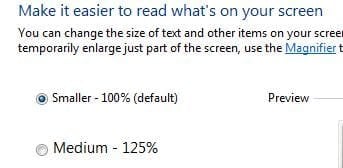
Are you talking about these settings?
DPI.JPG

If so, then there are still some things that you can try.
1) backup registry
http://www.sevenforums.com/tutorials/4230-registry-backup-restore.html

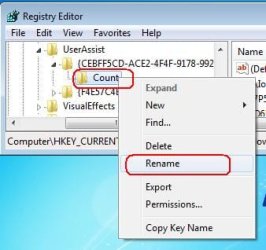
2) rename this key
reg1.JPG
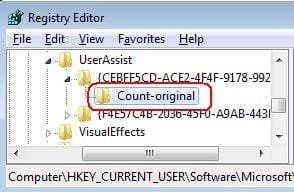
...to something like this
reg2.JPG

3) reset your DPI preferences

4) log off and log back on to see if they hold

If that does not solve the issue, then there is still a few more things to try... like updating or reapplying the video drivers - and/or preventing changes to that reg key via the permissions settings.
 

My Computer

Computer type
Laptop
Computer Manufacturer/Model Number
Employer provided Dell Latitude
OS
W7 Pro SP1 64bit
CPU
i7
Memory
8GB
Graphics Card(s)
Intel HD Graphics
Hard Drives
crappy SSD
Antivirus
Employer mandated Symantec Endpoint Protection
Browser
Pale Moon 64bit, IE11 64bit & Chrome 64bit
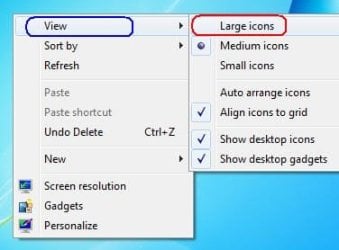
Nope, I am talking about the icons on the desktop. If you right click the desktop and go to view you can choose large medium or small icons. well I want large but it will only use medium, the default size.
 

My Computer

Computer Manufacturer/Model Number
Custom built by me
OS
Windows 7 64 bit
CPU
Core i5 750
Motherboard
EVGA P55 SLI
Memory
G SKILL DDR3 1333 FC310666 8GB
Graphics Card(s)
GALAXY GTX 460 SUPER OC+EVGA GTX460 in SLI
Sound Card
none
Monitor(s) Displays
eMachines 21.5in. display+Viewsonic 19in. display
Screen Resolution
1920x1080
Hard Drives
Seagate Barracuda 500 gig C: drive
Hitachi 320 gig
WD Caviar Blue 2.5inch 320 gig
Seagate external 250 gig
Toshiba external esata 250 gig
Seagate Barracuda 160 gig
Seagate Barracuda 80 gig
PSU
Corsair 850hx
Case
NZXT M59
Cooling
Air
Mouse
Cyborg R.A.T. 7
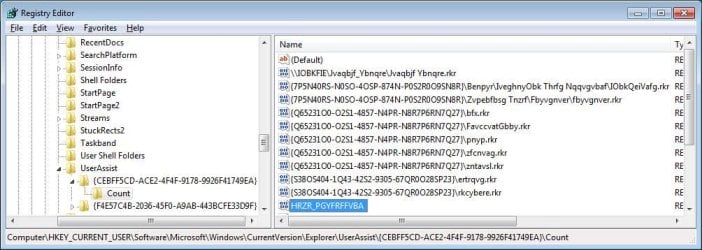
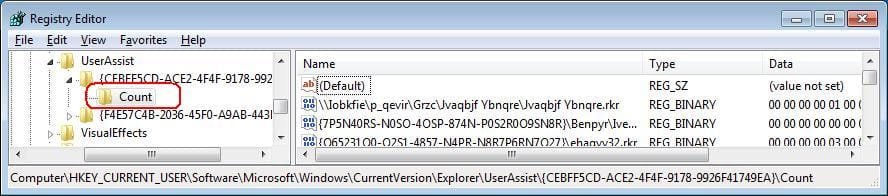
Here is where that info is stored:
(at least that is where it is for my default theme)

reg.JPG

The same steps apply - you can:
backup things
rename the key named count
set your desktop icon size
restart and see if it holds

You can use process monitor to find where the info is stored on your computer.
 

My Computer

Computer type
Laptop
Computer Manufacturer/Model Number
Employer provided Dell Latitude
OS
W7 Pro SP1 64bit
CPU
i7
Memory
8GB
Graphics Card(s)
Intel HD Graphics
Hard Drives
crappy SSD
Antivirus
Employer mandated Symantec Endpoint Protection
Browser
Pale Moon 64bit, IE11 64bit & Chrome 64bit
I'm sorry but I am still missing what you want me to do. I am at the directory in the registry but I have no clue what I need to edit.
 

My Computer

Computer Manufacturer/Model Number
Custom built by me
OS
Windows 7 64 bit
CPU
Core i5 750
Motherboard
EVGA P55 SLI
Memory
G SKILL DDR3 1333 FC310666 8GB
Graphics Card(s)
GALAXY GTX 460 SUPER OC+EVGA GTX460 in SLI
Sound Card
none
Monitor(s) Displays
eMachines 21.5in. display+Viewsonic 19in. display
Screen Resolution
1920x1080
Hard Drives
Seagate Barracuda 500 gig C: drive
Hitachi 320 gig
WD Caviar Blue 2.5inch 320 gig
Seagate external 250 gig
Toshiba external esata 250 gig
Seagate Barracuda 160 gig
Seagate Barracuda 80 gig
PSU
Corsair 850hx
Case
NZXT M59
Cooling
Air
Mouse
Cyborg R.A.T. 7
Sorry - it is I that should apologize for being too brief.

Keep in mind that working in the registry is dangerous.

I'm working inside a virtual machine - so I have nothing to lose.

I cannot even be positive that these steps will resolve your issue. I'll explain how I found that area of the registry and let you decide if you want to give my steps a try.

Backup up the registry:
http://www.sevenforums.com/tutorials/4230-registry-backup-restore.html

There is a key named count

That key can be renamed.

W7 will recreate it and will rebuild some of the info inside of it.

When I changed the icon view from small to medium or from large to medium, Process Monitor showed info inside that count key being set. When I changed the icon view from medium to large or from medium to small, info inside that count key was being deleted by Explorer.

So --- I figured --- that is the key to play with. And that is one of the nice things about virtual machines: you can mess with stuff all you want and then tell them to revert back to the state that they were in before you messed with them,


This shows Explorer via a Process Monitor window (bottom of screenshot and in the background) setting some info in that count key.
0.JPG


So - rename that count key to count-original or anything that you want to call it.
2.JPG
3.JPG


Change the icon view:
4.JPG


Close regedit
log off
log back on
open regedit
5.JPG

Notice that a lot of info has not been rebuilt into that newly created count key. More info will be put in there as you change stuff that pertains to User Assistance (Ease of Access features).

If you don't like the idea of not having all of the other info inside of that count key - then don't rename it... rename the applicable objects under the Name column in the right pane... if you can figure out what they are.

This video is an attempt to show that most of the original info will get put into the new count key as you make use of User Assistance (Ease of Access features).


Let's hope that this work for you :-)
 

Attachments

  • 1.JPG
    1.JPG
    38.7 KB · Views: 2
Last edited:

My Computer

Computer type
Laptop
Computer Manufacturer/Model Number
Employer provided Dell Latitude
OS
W7 Pro SP1 64bit
CPU
i7
Memory
8GB
Graphics Card(s)
Intel HD Graphics
Hard Drives
crappy SSD
Antivirus
Employer mandated Symantec Endpoint Protection
Browser
Pale Moon 64bit, IE11 64bit & Chrome 64bit
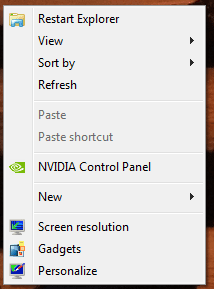
Still not working for me, logged back on and they were small again. Could it be because I have added a restart explorer shortcut to my desktop as seen here? Also, how do I get that diagnostic window on the bottom like yours that shows changes when I change the icon view size?
 

Attachments

  • Untitled.png
    Untitled.png
    5.8 KB · Views: 251

My Computer

Computer Manufacturer/Model Number
Custom built by me
OS
Windows 7 64 bit
CPU
Core i5 750
Motherboard
EVGA P55 SLI
Memory
G SKILL DDR3 1333 FC310666 8GB
Graphics Card(s)
GALAXY GTX 460 SUPER OC+EVGA GTX460 in SLI
Sound Card
none
Monitor(s) Displays
eMachines 21.5in. display+Viewsonic 19in. display
Screen Resolution
1920x1080
Hard Drives
Seagate Barracuda 500 gig C: drive
Hitachi 320 gig
WD Caviar Blue 2.5inch 320 gig
Seagate external 250 gig
Toshiba external esata 250 gig
Seagate Barracuda 160 gig
Seagate Barracuda 80 gig
PSU
Corsair 850hx
Case
NZXT M59
Cooling
Air
Mouse
Cyborg R.A.T. 7
If you are talking about the Process Monitor window - then take a look at my post again. Each place where I mentioned Process Monitor is blue text. That blue text is a link to the website where you can get Process Monitor.

Here is the link to Process Monitor posted another way:
http://technet.microsoft.com/en-us/sysinternals/bb896645.aspx

Download the zipped (compressed) file
Open the zipped (compressed) file (folder)
Copy the files somewhere
Run the exe
Agree to the EULA

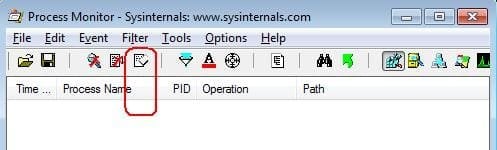
When it starts for the first time, it automatically starts gathering data.
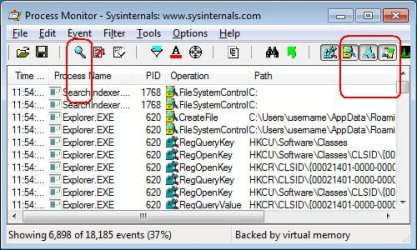
You can stop that via the button/icon with the magnifying glass.
Then de-select the buttons/icons shown in the right part of this image:
PM1.JPG


Clear the screen:
PM2.JPG


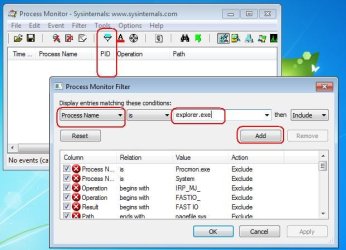
Add a filter for the Windows (file) Explorer:
PM3.JPG


Start the data collection process.
(Use the same button/icon that you see in screenshot #1.)
Make the changes to the desktop icons.
Stop the data collection process.
Happy reading :-)

Notice the column with the time stamps.
(You might need to widen that column.)
You can:
...clear any data in the Process Monitor window
...right click on the desktop
...select view
...wait for the computer's time to change one minute
...(e.g from 12:20 to 12:21)
...then select then option for large icons
...stop the data collection process

Scroll thru the data until you see the place where the minute changed - most of the entries after that point should be the ones of interest.

I'm sure that there are people in these forums who know how to use the Process Monitor app better than I do.
 
Last edited:

My Computer

Computer type
Laptop
Computer Manufacturer/Model Number
Employer provided Dell Latitude
OS
W7 Pro SP1 64bit
CPU
i7
Memory
8GB
Graphics Card(s)
Intel HD Graphics
Hard Drives
crappy SSD
Antivirus
Employer mandated Symantec Endpoint Protection
Browser
Pale Moon 64bit, IE11 64bit & Chrome 64bit
Well, this problem is showing up again. I have used the icon rebuild prompt before and it worked fine but now it is not affecting bit. Any ideas guys?
 

My Computer

Computer Manufacturer/Model Number
Custom built by me
OS
Windows 7 64 bit
CPU
Core i5 750
Motherboard
EVGA P55 SLI
Memory
G SKILL DDR3 1333 FC310666 8GB
Graphics Card(s)
GALAXY GTX 460 SUPER OC+EVGA GTX460 in SLI
Sound Card
none
Monitor(s) Displays
eMachines 21.5in. display+Viewsonic 19in. display
Screen Resolution
1920x1080
Hard Drives
Seagate Barracuda 500 gig C: drive
Hitachi 320 gig
WD Caviar Blue 2.5inch 320 gig
Seagate external 250 gig
Toshiba external esata 250 gig
Seagate Barracuda 160 gig
Seagate Barracuda 80 gig
PSU
Corsair 850hx
Case
NZXT M59
Cooling
Air
Mouse
Cyborg R.A.T. 7
Well, this problem is showing up again. I have used the icon rebuild prompt before and it worked fine but now it is not affecting bit. Any ideas guys?
There were two problems in the original post. Which one has come back?

Are the shortcuts with icon problems pointing to apps on an external drive or a network drive?
 

My Computer

Computer type
Laptop
Computer Manufacturer/Model Number
Employer provided Dell Latitude
OS
W7 Pro SP1 64bit
CPU
i7
Memory
8GB
Graphics Card(s)
Intel HD Graphics
Hard Drives
crappy SSD
Antivirus
Employer mandated Symantec Endpoint Protection
Browser
Pale Moon 64bit, IE11 64bit & Chrome 64bit
The start menu icons are missing again, as seen in the picture below. Using a .bat file to rebuild the icon cache used to work, now it doesn't. All the programs are on the C:\ drive.
 

Attachments

  • screenshot.png
    screenshot.png
    17.4 KB · Views: 81

My Computer

Computer Manufacturer/Model Number
Custom built by me
OS
Windows 7 64 bit
CPU
Core i5 750
Motherboard
EVGA P55 SLI
Memory
G SKILL DDR3 1333 FC310666 8GB
Graphics Card(s)
GALAXY GTX 460 SUPER OC+EVGA GTX460 in SLI
Sound Card
none
Monitor(s) Displays
eMachines 21.5in. display+Viewsonic 19in. display
Screen Resolution
1920x1080
Hard Drives
Seagate Barracuda 500 gig C: drive
Hitachi 320 gig
WD Caviar Blue 2.5inch 320 gig
Seagate external 250 gig
Toshiba external esata 250 gig
Seagate Barracuda 160 gig
Seagate Barracuda 80 gig
PSU
Corsair 850hx
Case
NZXT M59
Cooling
Air
Mouse
Cyborg R.A.T. 7
What happens when you manually try to correct one icon by pointing it to a different (wrong) icon and then pointing it back to the correct one? I've seen desktop shortcuts lose their icon info, but I've never bothered to chase down a reason. Maybe others in the forum have a clue :-)
 

My Computer

Computer type
Laptop
Computer Manufacturer/Model Number
Employer provided Dell Latitude
OS
W7 Pro SP1 64bit
CPU
i7
Memory
8GB
Graphics Card(s)
Intel HD Graphics
Hard Drives
crappy SSD
Antivirus
Employer mandated Symantec Endpoint Protection
Browser
Pale Moon 64bit, IE11 64bit & Chrome 64bit
What happens when you manually try to correct one icon by pointing it to a different (wrong) icon and then pointing it back to the correct one? I've seen desktop shortcuts lose their icon info, but I've never bothered to chase down a reason. Maybe others in the forum have a clue :-)

I'm not quite sure how I would go about doing that. Sorry for the late response. My house has been crazy the past ten days and I haven't been able to get behind a computer.

 

My Computer

Computer Manufacturer/Model Number
Custom built by me
OS
Windows 7 64 bit
CPU
Core i5 750
Motherboard
EVGA P55 SLI
Memory
G SKILL DDR3 1333 FC310666 8GB
Graphics Card(s)
GALAXY GTX 460 SUPER OC+EVGA GTX460 in SLI
Sound Card
none
Monitor(s) Displays
eMachines 21.5in. display+Viewsonic 19in. display
Screen Resolution
1920x1080
Hard Drives
Seagate Barracuda 500 gig C: drive
Hitachi 320 gig
WD Caviar Blue 2.5inch 320 gig
Seagate external 250 gig
Toshiba external esata 250 gig
Seagate Barracuda 160 gig
Seagate Barracuda 80 gig
PSU
Corsair 850hx
Case
NZXT M59
Cooling
Air
Mouse
Cyborg R.A.T. 7
Try the steps shown in the video below:

(You might want to watch it in the full screen mode and at 720p.)


It does not matter which icon you change it to - since you are going to change it back.

You might want to consider making a new user profile and seeing if the start menu icon problem and the desktop icon size issue shows up there too.
 

My Computer

Computer type
Laptop
Computer Manufacturer/Model Number
Employer provided Dell Latitude
OS
W7 Pro SP1 64bit
CPU
i7
Memory
8GB
Graphics Card(s)
Intel HD Graphics
Hard Drives
crappy SSD
Antivirus
Employer mandated Symantec Endpoint Protection
Browser
Pale Moon 64bit, IE11 64bit & Chrome 64bit
Changing it back and forth worked fine. Thank you.
 

My Computer

Computer Manufacturer/Model Number
Custom built by me
OS
Windows 7 64 bit
CPU
Core i5 750
Motherboard
EVGA P55 SLI
Memory
G SKILL DDR3 1333 FC310666 8GB
Graphics Card(s)
GALAXY GTX 460 SUPER OC+EVGA GTX460 in SLI
Sound Card
none
Monitor(s) Displays
eMachines 21.5in. display+Viewsonic 19in. display
Screen Resolution
1920x1080
Hard Drives
Seagate Barracuda 500 gig C: drive
Hitachi 320 gig
WD Caviar Blue 2.5inch 320 gig
Seagate external 250 gig
Toshiba external esata 250 gig
Seagate Barracuda 160 gig
Seagate Barracuda 80 gig
PSU
Corsair 850hx
Case
NZXT M59
Cooling
Air
Mouse
Cyborg R.A.T. 7
You are welcome - but it might not last.

I've seen this problem before:
...rebuilding the icon cache stops working
...changing each icon and then changing it back works*

*but you may have to keep doing it over and over whenever the correct icon goes missing

I wish I knew the cause and a permanent solution.
 

My Computer

Computer type
Laptop
Computer Manufacturer/Model Number
Employer provided Dell Latitude
OS
W7 Pro SP1 64bit
CPU
i7
Memory
8GB
Graphics Card(s)
Intel HD Graphics
Hard Drives
crappy SSD
Antivirus
Employer mandated Symantec Endpoint Protection
Browser
Pale Moon 64bit, IE11 64bit & Chrome 64bit
Back
Top