missing temp internet files

Leslie45

New member
Local time
7:36 AM
Messages
4
Hi all:
With Windows XP whenever I played a streamed tune on the web it was stored in
Temp Internet Files..IE/Tools/Internet Options/Temp Files.

This doesn't seem to be happening with 7.....any suggestions please.
 

My Computer

Computer Manufacturer/Model Number
gateway mv73
OS
windows 7 premium 64 bit
Memory
4gb
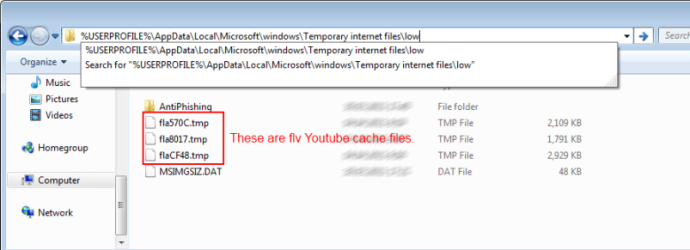
If you are looking for youtube cache and stuff like that, you just need to go one folder deeper.

It opens you something like this:
C:\Users\USERNAME\AppData\Local\Microsoft\Windows\Temporary Internet Files
Simply add "\LOW" to the address bar and hit ENTER.

You would get to the folder like that
C:\Users\USERNAME\AppData\Local\Microsoft\Windows\Temporary Internet Files\LOW\

or just type
%USERPROFILE%\AppData\Local\Microsoft\windows\Temporary internet files\low

Files like fla***.tmp should be youtube cache in FLV format.
 

My Computer

Computer type
PC/Desktop
OS
Windows 8.1 ; Windows 7 x86 (Dec2008-Jan2013)
Other Info
"The scale icon at the top right of a post or tutorial is how you can give rep to the member."
neither one works...first is incorrect route and typed search says "not found"
IE8
 

My Computer

Computer Manufacturer/Model Number
gateway mv73
OS
windows 7 premium 64 bit
Memory
4gb
By disabling Protected Mode under Internet Options/Security all streamed
material is displayed in Temp Int Files.
 

My Computer

Computer Manufacturer/Model Number
gateway mv73
OS
windows 7 premium 64 bit
Memory
4gb
neither one works...first is incorrect route and typed search says "not found"
IE8

Of course, it would not work if you copy/paste first two links directly.
I said "like that". You would have to substitute word USERNAME for your windows username.

But third link works on any Windows from Vista to 7, because it is not user-related.

I would recommend to enable Protected mode back on and use the third link instead.
%USERPROFILE%\AppData\Local\Microsoft\windows\Temporary internet files\low
 

My Computer

Computer type
PC/Desktop
OS
Windows 8.1 ; Windows 7 x86 (Dec2008-Jan2013)
Other Info
"The scale icon at the top right of a post or tutorial is how you can give rep to the member."
i'm sorry but nothing you gave me works.
 

My Computer

Computer Manufacturer/Model Number
gateway mv73
OS
windows 7 premium 64 bit
Memory
4gb
I have just checked it twice on Windows 7 and Windows Vista, both on ie9 and ie8.
Everything is working perfectly.

You need to copy the link,
Code:
%USERPROFILE%\AppData\Local\Microsoft\windows\Temporary internet files\low
then open any window, paste the link in the address bar and hit enter. Check out screenshot.
 

Attachments

  • temp.png
    temp.png
    26.1 KB · Views: 220

My Computer

Computer type
PC/Desktop
OS
Windows 8.1 ; Windows 7 x86 (Dec2008-Jan2013)
Other Info
"The scale icon at the top right of a post or tutorial is how you can give rep to the member."
Back
Top