missing temp internet files

Leslie45

New member
Local time
12:18 AM
Messages
4
Hi all:
With Windows XP whenever I played a streamed tune on the web it was stored in
Temp Internet Files..IE/Tools/Internet Options/Temp Files.

This doesn't seem to be happening with 7.....any suggestions please.
 

My Computer My Computer

Computer Manufacturer/Model Number
gateway mv73
OS
windows 7 premium 64 bit
Memory
4gb
If you are looking for youtube cache and stuff like that, you just need to go one folder deeper.

It opens you something like this:
C:\Users\USERNAME\AppData\Local\Microsoft\Windows\Temporary Internet Files
Simply add "\LOW" to the address bar and hit ENTER.

You would get to the folder like that
C:\Users\USERNAME\AppData\Local\Microsoft\Windows\Temporary Internet Files\LOW\

or just type
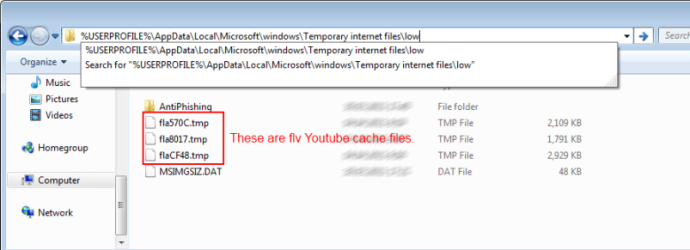
%USERPROFILE%\AppData\Local\Microsoft\windows\Temporary internet files\low

Files like fla***.tmp should be youtube cache in FLV format.
 

My Computer My Computer

Computer type
PC/Desktop
OS
Windows 8.1 ; Windows 7 x86 (Dec2008-Jan2013)
Other Info
"The scale icon at the top right of a post or tutorial is how you can give rep to the member."
neither one works...first is incorrect route and typed search says "not found"
IE8
 

My Computer My Computer

Computer Manufacturer/Model Number
gateway mv73
OS
windows 7 premium 64 bit
Memory
4gb
By disabling Protected Mode under Internet Options/Security all streamed
material is displayed in Temp Int Files.
 

My Computer My Computer

Computer Manufacturer/Model Number
gateway mv73
OS
windows 7 premium 64 bit
Memory
4gb
neither one works...first is incorrect route and typed search says "not found"
IE8

Of course, it would not work if you copy/paste first two links directly.
I said "like that". You would have to substitute word USERNAME for your windows username.

But third link works on any Windows from Vista to 7, because it is not user-related.

I would recommend to enable Protected mode back on and use the third link instead.
%USERPROFILE%\AppData\Local\Microsoft\windows\Temporary internet files\low
 

My Computer My Computer

Computer type
PC/Desktop
OS
Windows 8.1 ; Windows 7 x86 (Dec2008-Jan2013)
Other Info
"The scale icon at the top right of a post or tutorial is how you can give rep to the member."
i'm sorry but nothing you gave me works.
 

My Computer My Computer

Computer Manufacturer/Model Number
gateway mv73
OS
windows 7 premium 64 bit
Memory
4gb
I have just checked it twice on Windows 7 and Windows Vista, both on ie9 and ie8.
Everything is working perfectly.

You need to copy the link,
Code:
%USERPROFILE%\AppData\Local\Microsoft\windows\Temporary internet files\low
then open any window, paste the link in the address bar and hit enter. Check out screenshot.
 

Attachments

  • temp.png
    temp.png
    26.1 KB · Views: 220

My Computer My Computer

Computer type
PC/Desktop
OS
Windows 8.1 ; Windows 7 x86 (Dec2008-Jan2013)
Other Info
"The scale icon at the top right of a post or tutorial is how you can give rep to the member."
Back
Top