MKLINK – Create and Use Links in Windows

MKLINK – Create and Use Links in Windows

How to Create and Use Links with MKLINK in Windows

   Information
As so many other things in computing, Windows Links seem more complicated to understand and use than what they really are in reality.

This tutorial will tell you how to create and use links using MKLINK to redirect system queries made to a local or network storage location to another location.

In this tutorial we will concentrate on the most important link type, a Directory Junction. A junction is a very practical way to customize your file handling and procedures.


A Link is basically nothing more than a shortcut. Its purpose is to get Windows to think that a file or folder which is physically located in folder Real on drive A is in fact in folder Fake on drive B by creating a link between B:\Fake (a link or junction) and A:\Real (a target folder). Opening the link for instance in Explorer shows contents of target, saving a document to link actually saves it on target.

As Windows now gets a query from user to open B:\Fake this query is sent to A:\Real. In reality the location B:\Fake does not exist but system answers this query as it was a real folder instead of just a symbolic link and presents user the contents of A:\Real as if it was contents of B:\Fake. Sounds complicated? Don’t worry, it’s quite easy in fact.


Part 1: What is a Link?

   Note
A Link in Windows is a virtual object that points to a real physical location. It can be compared to Windows desktop shortcut, doing essentially the same thing in redirecting user to a physical storage location.


A Link can be so called Hard Link linking one file to a target file, or a Soft Link linking a folder to a target folder. Soft Links are also called Symbolic Links. Third link type is Junction, basically a hard link but as hard links can only link files we need to use junctions to link folders.

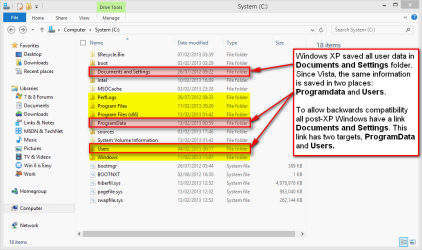
If you are using Windows Vista or later you have most probably used links without ever noticing it. In Windows XP all user data was saved in a folder called C:\Documents and Settings (default name and location). Windows Vista changed this; instead of Documents and Settings the data was divided between two system folders, C:\Users for user specific application data and personal files and folders, and C:\ProgramData for all users shared application data. To allow backwards compatibility all Windows versions since Vista have a link C:\Documents and Settings with two target folders, ProgramData and Users.

You can check this by yourself by allowing protected system files and folders to be shown and opening C: drive on Explorer:
mklink_01.png
(Please notice, screenshots from Windows 8 but links work the same way on Windows 7. Highlighted with yellow = visible system folders created by Windows installation, red = hidden or protected system folders.)

If you try to open Documents and Settings you get an "Access Denied" message. It does not exist, there is no such folder on your C: drive but it is needed for legacy software.

An example: You want to install Microsoft Office XP on your Windows 7. As Office XP was published for Windows XP long before Vista it uses the XP system folder Documents and Settings to store user data. Vista and later Windows do no longer have this folder so a link is needed. Office XP setup thinks it is creating files and folders normally in Documents and Settings but actually your Windows 7 is lying ;) to Office XP setup, not telling it those files and folders are in fact created in Users and ProgramData. Office XP setup does not notice this deception, installation works and later when user works with Office XP it still thinks the Documents and Settings folder is there, never learning the fact that all queries to that folder are sent further and returned as if they really came from Documents and Settings.


Part 2: Working with Directory Junctions

(1.) Command Syntax

Links are created wit command mklink, short from Make Link. Typing mklink /? on Command Prompt you get the command syntax and options:
Code:
[B]MKLINK [/B][[/D] | [/H] | [/J]] [B]Link [/B][B]Target[/B]
 
        [B]/D[/B]      Creates a directory symbolic link.  Default is a file symbolic link.
       [B]/H[/B]      Creates a hard link instead of a symbolic link.
        [B]/J [/B]  Creates a Directory Junction.
        [B]Link    [/B]specifies the new symbolic link name.
        [B]Target  [/B]specifies the path (relative or absolute) that the new link refers to.

(2.) Use an Elevated Command Prompt

You must use elevated command prompt to work with links.

(3.) Create a Link or a Junction

Creating a directory junction D:\Docs with target E:\Users\Kari\Documents:
Code:
mklink /j D:\Docs E:\Users\Kari\Documents
Windows tells you clearly if the creating of junction has succeeded:
mklink_02.png
(4.) Main principles when creating a link or a junction

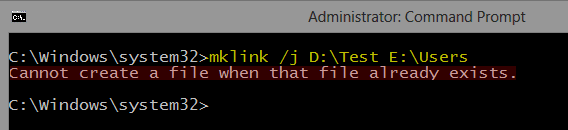
  1. A file or a folder with the name of the intended Link name may not exist. The link file or folder name must be free to use, not reserved by an existing file or folder. If the name is reserved you get an error message. My D: drive already has a folder Test, this is what happens when trying to create a junction with D:\Test (already an existing folder) as link and E:\Users as target:
    mklink_03.png
    Notice that command prompt is telling about a file already existing instead of a folder. This is because the system sees links as shortcuts (files) and not as folders.
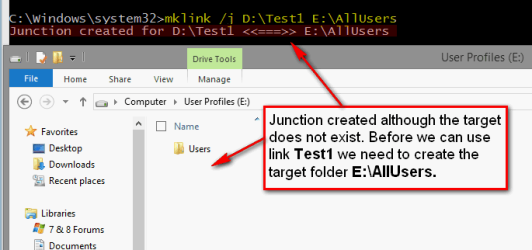
  2. Target folder may but must not exist. If it does not exist at the time when a link is created it must be created before you can use the link:
    mklink_04.png
  3. Target can be another Link. Above in (3.) we created a junction D:\Docs with target E:\Users\Kari\Documents. Following command would now create a link C:\Docs with target D:\Docs:
    Code:
    mklink /j C:\Docs D:\Docs
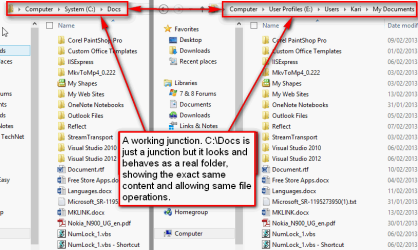
    In fact Windows sees no difference if the target is a real physical folder location or just another link. In this case all queries to C:\Docs would be sent to D:\Docs which would send them further to E:\Users\Kari\Documents. If a user now opens C:\Docs in Explorer, it shows the contents of E:\Users\Kari\Documents:
    mklink_05.png
    Noticed something interesting in screenshot above? The target folder is called Documents but Explorer shows it as My Documents. This is because those "My ..." folders in your user profile folder are actually not real folders. They are directory links: My Videos is simply a link with target Videos and so on.
(5.) Remove or rename a link

Links and junctions can be renamed and removed as any real folders. System automatically modifies registry and sets the target to be the same for a renamed link as it was on the original link.

This is because even not really existing, the system handles links as if they were real existing folders. This is what Explorer shows when asked for Properties for our example junction D:\Docs:
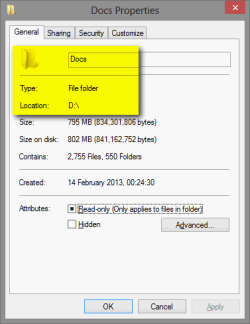
mklink_07.png
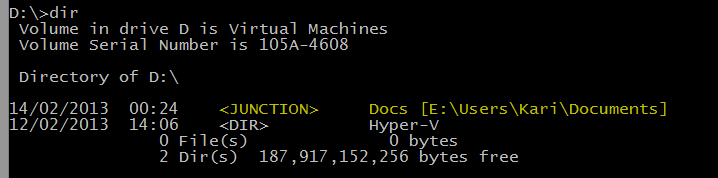
Only way to really see it is in fact a junction is to get directory listing in command prompt:
mklink_06.png
The listing not only shows it is a junction but also its target folder.


Part 3: Practical Examples

A typical situation: You have bought a game that must be installed on root level folder C:\Games. Your C: drive is becoming full, so you decide to move the whole C:\Games folder to D:, delete now empty C:\Games (remember, link folder may not exist) and create a junction:
Code:
mklink /j C:\Games D:\Games
When launching the game it still assumes it is located on C: although you, me and Windows know better ;): it's "secretly" residing on D: but still using the old address on C:.

Another situation: You want to work with some pics from last Christmas, to edit them to be ready to be published on that website of yours. Pics are currently located in X:\Backups\Pictures\My Pictures\Holidays\Christmas 2012.

You can create a junction X:\Pics, and now whenever you want to work with those pics you just type X:\Pics to Run dialog to open the correct folder:
Code:
mklink /j X:\Pics "X:\Backups\Pictures\My Pictures\Holidays\Christmas 2012"
Notice that if a path contains spaces it must be set in between quotation marks as in above target path.

That's about it. Any feedback welcome.

Kari
 
Last edited:

My Computer My Computer

At a glance

Windows 10 Pro x64 EN-GB1.6 GHz Intel Core i7-720QM Processor6 GBATI Mobility Radeon HD 5850 Graphics
Computer type
Laptop
Computer Manufacturer/Model Number
HP ENVY 17-1150eg
OS
Windows 10 Pro x64 EN-GB
CPU
1.6 GHz Intel Core i7-720QM Processor
Memory
6 GB
Graphics Card(s)
ATI Mobility Radeon HD 5850 Graphics
Sound Card
Beats sound system with integrated subwoofer
Monitor(s) Displays
17" laptop display, 22" LED and 32" Full HD TV through HDMI
Screen Resolution
1600*900 (1), 1920*1080 (2&3)
Hard Drives
Internal: 2 x 500 GB SATA Hard Disk Drive 7200 rpm
External: 2TB for backups, 3TB USB3 network drive for media
Cooling
As Envy runs a bit warm, I have it on a Cooler Master pad
Keyboard
Logitech diNovo Media Desktop Laser (bluetooth)
Mouse
Logitech Performance Mouse MX
Internet Speed
50/10 Mbps VDSL
Antivirus
Windows Defender 4.3.9431.0
Browser
Maxthon 3.5.2., IE11

My Computer My Computer

At a glance

Microsoft Windows 7 Home Premium 64-bit Servi...Intel(R) Core(TM) i3 CPU M 330 @ 2.13GHz8 GB DDR3Intel(R) HD Graphics
Computer type
Laptop
Computer Manufacturer/Model Number
Hewlett-Packard/G62-107SA Notebook
OS
Microsoft Windows 7 Home Premium 64-bit Service Pack 1
CPU
Intel(R) Core(TM) i3 CPU M 330 @ 2.13GHz
Motherboard
Hewlett-Packard 1425
Memory
8 GB DDR3
Graphics Card(s)
Intel(R) HD Graphics
Sound Card
Realtek High Definition Audio
Monitor(s) Displays
Builtin
Screen Resolution
1366 x 768 x 32 bits (4294967296 colors) @ 60 Hz
Hard Drives
250 GB SATA Hard Disk Drive 7200 rpm
2TB Seagate GoFlex USB 2 Drive
1TB Iomega Prestige USB 2 Drive
1.5TB Iomega Prestige USB 2 Drive (Samsung)
2TB WD MyBook Live NAS.
Mouse
Logitech Anywhere MX
Internet Speed
152 Mbs download 10 Mbs upload
Antivirus
Norton 360
Browser
Chrome
I stand corrected, begging you geeks to forgive me. My point was and is that I see no reason to use symbolic links to anything else than folders. With a file it's always better to use a hard link. Of course if you can tell a reason why you should use a symlink instead of hard link?

Anyway, as I am apologizing a bad choice of words, I am at the same time amused that no one could spot that the OP had the link and the target switched. The OP has now been given a working command.
 

My Computer My Computer

At a glance

Windows 10 Pro x64 EN-GB1.6 GHz Intel Core i7-720QM Processor6 GBATI Mobility Radeon HD 5850 Graphics
Computer type
Laptop
Computer Manufacturer/Model Number
HP ENVY 17-1150eg
OS
Windows 10 Pro x64 EN-GB
CPU
1.6 GHz Intel Core i7-720QM Processor
Memory
6 GB
Graphics Card(s)
ATI Mobility Radeon HD 5850 Graphics
Sound Card
Beats sound system with integrated subwoofer
Monitor(s) Displays
17" laptop display, 22" LED and 32" Full HD TV through HDMI
Screen Resolution
1600*900 (1), 1920*1080 (2&3)
Hard Drives
Internal: 2 x 500 GB SATA Hard Disk Drive 7200 rpm
External: 2TB for backups, 3TB USB3 network drive for media
Cooling
As Envy runs a bit warm, I have it on a Cooler Master pad
Keyboard
Logitech diNovo Media Desktop Laser (bluetooth)
Mouse
Logitech Performance Mouse MX
Internet Speed
50/10 Mbps VDSL
Antivirus
Windows Defender 4.3.9431.0
Browser
Maxthon 3.5.2., IE11
A Symlink can be used across volumes a hard link can't.
 

My Computer My Computer

At a glance

Microsoft Windows 7 Home Premium 64-bit Servi...Intel(R) Core(TM) i3 CPU M 330 @ 2.13GHz8 GB DDR3Intel(R) HD Graphics
Computer type
Laptop
Computer Manufacturer/Model Number
Hewlett-Packard/G62-107SA Notebook
OS
Microsoft Windows 7 Home Premium 64-bit Service Pack 1
CPU
Intel(R) Core(TM) i3 CPU M 330 @ 2.13GHz
Motherboard
Hewlett-Packard 1425
Memory
8 GB DDR3
Graphics Card(s)
Intel(R) HD Graphics
Sound Card
Realtek High Definition Audio
Monitor(s) Displays
Builtin
Screen Resolution
1366 x 768 x 32 bits (4294967296 colors) @ 60 Hz
Hard Drives
250 GB SATA Hard Disk Drive 7200 rpm
2TB Seagate GoFlex USB 2 Drive
1TB Iomega Prestige USB 2 Drive
1.5TB Iomega Prestige USB 2 Drive (Samsung)
2TB WD MyBook Live NAS.
Mouse
Logitech Anywhere MX
Internet Speed
152 Mbs download 10 Mbs upload
Antivirus
Norton 360
Browser
Chrome
OK, again I stand corrected. That's true and a reason good enough to use it if the link and the target are on different volumes.
 

My Computer My Computer

At a glance

Windows 10 Pro x64 EN-GB1.6 GHz Intel Core i7-720QM Processor6 GBATI Mobility Radeon HD 5850 Graphics
Computer type
Laptop
Computer Manufacturer/Model Number
HP ENVY 17-1150eg
OS
Windows 10 Pro x64 EN-GB
CPU
1.6 GHz Intel Core i7-720QM Processor
Memory
6 GB
Graphics Card(s)
ATI Mobility Radeon HD 5850 Graphics
Sound Card
Beats sound system with integrated subwoofer
Monitor(s) Displays
17" laptop display, 22" LED and 32" Full HD TV through HDMI
Screen Resolution
1600*900 (1), 1920*1080 (2&3)
Hard Drives
Internal: 2 x 500 GB SATA Hard Disk Drive 7200 rpm
External: 2TB for backups, 3TB USB3 network drive for media
Cooling
As Envy runs a bit warm, I have it on a Cooler Master pad
Keyboard
Logitech diNovo Media Desktop Laser (bluetooth)
Mouse
Logitech Performance Mouse MX
Internet Speed
50/10 Mbps VDSL
Antivirus
Windows Defender 4.3.9431.0
Browser
Maxthon 3.5.2., IE11
Wait, maybe I forgot to mention something, I want to make a hard like from a file to a directory same command ?

mklink /h <absolute path of the file> <absolute path of the target directory> ?
 

My Computer My Computer

At a glance

Windows 10 ProCore2Quad (2.6 Ghz)8 Gigs DDR2Geforce Titan Black
Computer type
PC/Desktop
Computer Manufacturer/Model Number
Custom Built
OS
Windows 10 Pro
CPU
Core2Quad (2.6 Ghz)
Motherboard
nVidia 775
Memory
8 Gigs DDR2
Graphics Card(s)
Geforce Titan Black
Sound Card
Motherboard Audio
Monitor(s) Displays
25" Asus LCD
Screen Resolution
1680x1050
Hard Drives
120 Gig SSD
60 Gig SSD
750 Gig HDD
PSU
850 Watts
Case
Mid-Size
Keyboard
Logitech
Mouse
Logitech - I love logitech mouses
Internet Speed
DSL 25Mbps - Although extremely expensive
Antivirus
Microsoft Anti-Virus
Browser
FireFox 36.x
mklink /h <path to link name> <path to real file>

I think. :confused:
 

My Computer My Computer

At a glance

Microsoft Windows 7 Home Premium 64-bit Servi...Intel(R) Core(TM) i3 CPU M 330 @ 2.13GHz8 GB DDR3Intel(R) HD Graphics
Computer type
Laptop
Computer Manufacturer/Model Number
Hewlett-Packard/G62-107SA Notebook
OS
Microsoft Windows 7 Home Premium 64-bit Service Pack 1
CPU
Intel(R) Core(TM) i3 CPU M 330 @ 2.13GHz
Motherboard
Hewlett-Packard 1425
Memory
8 GB DDR3
Graphics Card(s)
Intel(R) HD Graphics
Sound Card
Realtek High Definition Audio
Monitor(s) Displays
Builtin
Screen Resolution
1366 x 768 x 32 bits (4294967296 colors) @ 60 Hz
Hard Drives
250 GB SATA Hard Disk Drive 7200 rpm
2TB Seagate GoFlex USB 2 Drive
1TB Iomega Prestige USB 2 Drive
1.5TB Iomega Prestige USB 2 Drive (Samsung)
2TB WD MyBook Live NAS.
Mouse
Logitech Anywhere MX
Internet Speed
152 Mbs download 10 Mbs upload
Antivirus
Norton 360
Browser
Chrome
I see no reason to use symbolic links to anything else than folders. With a file it's always better to use a hard link. Of course if you can tell a reason why you should use a symlink instead of hard link?

Yes, I can list three, three of the biggest reasons why one would fancy a symbolic link over a hard link: (in decreasing order of interest)
  • Symbolic links are the only links that support relative paths as targets;
  • Symbolic links can link across partitions, unlike hard links which cannot;
  • Symbolic links can point to a non-existent target (mega useful if you want to allow the target's data to change whenever, without having to re-create the link).
Kari, I feel that hard links and junctions are obscuring the power of symbolic links in this tutorial of yours. Symbolic links should really be the type of link in the lime light; symbolic links should be the links that deserve to be demonstrated in a tutorial.

With all due respect, I strongly recommend that you add a table to the tutorial, Kari, one that summaries the benefits and disadvantages of the types of links: what links have support for files/folders?; what version of Windows is the link supported in?; can I link across hard disks using this link?. Certain links are simply better for certain situations, there's no denying that.


I am at the same time amused that no one could spot that the OP had the link and the target switched. The OP has now been given a working command.
Are you referring to Jerome's command line:
Code:
C:\Windows>mklink C:\Users\....\....\....\....\.....\...\<individual file> C:\1
If so, maybe we did, maybe we didn't spot that. In any case, you could not have concluded that "C:\Users\....\....\....\....\.....\...\<individual file>" was Jerome's intended target and "C:\1" was where his link should be created. Facing it, there are many things wrong with "mklink C:\Users\....\....\....\....\.....\...\<individual file> C:\1" that it just wouldn't be in good interest to help 'OP' at this stage, until 'OP' can clarify his objective.


Wait, maybe I forgot to mention something, I want to make a hard like from a file to a directory same command ?

mklink /h <absolute path of the file> <absolute path of the target directory> ?
No. Hard links have no support for folders. You must use a symbolic link or junction point instead.
 
Last edited:

My Computer My Computer

At a glance

Windows 10, Windows 8.1 Pro, Windows 7 Profes...
Computer type
PC/Desktop
OS
Windows 10, Windows 8.1 Pro, Windows 7 Professional, OS X El Capitan
Just wanted to add: Symbolic links turn into normal folders with copies of contents of the linked folder when copied to another place. Is there a way to avoid this? Learned this while we had a discussion in a thread recently.
 

My Computer My Computer

At a glance

Windows 7 Ultimate x64 SP1AMD Phenom 2 1090T2x8GB Kingston HyperX Fury Black 1600Mhz Unga...MSI GTX 970 Gaming 4G
Computer type
PC/Desktop
Computer Manufacturer/Model Number
Custom Build
OS
Windows 7 Ultimate x64 SP1
CPU
AMD Phenom 2 1090T
Motherboard
Gigabyte GA-890FXA-UD5
Memory
2x8GB Kingston HyperX Fury Black 1600Mhz Unganged
Graphics Card(s)
MSI GTX 970 Gaming 4G
Sound Card
Realtek On-Board HD 7.1 Audio / Logitech G35
Monitor(s) Displays
3xAcer GD245HQ
Screen Resolution
1920x1080
Hard Drives
Samsung 850 Pro 512GB SSD - OS /
WD Caviar Black SATA 3 - 1 TBx2 - Dynamic RAID 0 /
WD Caviar Green SATA 2 - 640GBx2 - Dynamic RAID 0 /
WD Caviar Green SATA 2 - 640GB - Internal Backup /
Seagate Barracude SATA 3 - 3TB - External Backup/ Sync
PSU
HighPower 1000W
Case
Cooler Master HAF 932
Cooling
Noctua NH-D14
Keyboard
Logitech G19
Mouse
Logitech G500
Internet Speed
100/4 Mbit Cable (100GB quota)
Antivirus
ZoneAlarm Extreme Security / MBAM Pro / MBAE Free / SAS Free
Browser
IE 11 - Firefox - Chrome
Other Info
Logitech F710/ G27/ G940/ Z5500 // TrackIR 5 // Nvidia 3D Surround Vision
I'm going to reiterate. I want to create a symbolic link whereas I create a symbolic link to a file, when the file in the symbolic link location gets updated, or the original location, either way both files get updated. In laymen terms, the file in the original location gets cloned; when I save the file in the cloned location, both the cloned file and the location of the original file get updated.

It has been informed that I must use a symbolic link for what I want to do personally;

mklink /d <absolute path of source location FILE> <absolute path of target location DIRECTORY\FOLDER>

The above command is not working ?
 

My Computer My Computer

At a glance

Windows 10 ProCore2Quad (2.6 Ghz)8 Gigs DDR2Geforce Titan Black
Computer type
PC/Desktop
Computer Manufacturer/Model Number
Custom Built
OS
Windows 10 Pro
CPU
Core2Quad (2.6 Ghz)
Motherboard
nVidia 775
Memory
8 Gigs DDR2
Graphics Card(s)
Geforce Titan Black
Sound Card
Motherboard Audio
Monitor(s) Displays
25" Asus LCD
Screen Resolution
1680x1050
Hard Drives
120 Gig SSD
60 Gig SSD
750 Gig HDD
PSU
850 Watts
Case
Mid-Size
Keyboard
Logitech
Mouse
Logitech - I love logitech mouses
Internet Speed
DSL 25Mbps - Although extremely expensive
Antivirus
Microsoft Anti-Virus
Browser
FireFox 36.x
have you tried mklink /h <absolute path to the link file name> <absolute path to the real file>

e.g. mklink /h C:\test\foobar.exe "C:\Program Files\foobar.exe" where c:\test exists and "c:\Program Files\foobar.exe" exists and is the real file.
 

My Computer My Computer

At a glance

Microsoft Windows 7 Home Premium 64-bit Servi...Intel(R) Core(TM) i3 CPU M 330 @ 2.13GHz8 GB DDR3Intel(R) HD Graphics
Computer type
Laptop
Computer Manufacturer/Model Number
Hewlett-Packard/G62-107SA Notebook
OS
Microsoft Windows 7 Home Premium 64-bit Service Pack 1
CPU
Intel(R) Core(TM) i3 CPU M 330 @ 2.13GHz
Motherboard
Hewlett-Packard 1425
Memory
8 GB DDR3
Graphics Card(s)
Intel(R) HD Graphics
Sound Card
Realtek High Definition Audio
Monitor(s) Displays
Builtin
Screen Resolution
1366 x 768 x 32 bits (4294967296 colors) @ 60 Hz
Hard Drives
250 GB SATA Hard Disk Drive 7200 rpm
2TB Seagate GoFlex USB 2 Drive
1TB Iomega Prestige USB 2 Drive
1.5TB Iomega Prestige USB 2 Drive (Samsung)
2TB WD MyBook Live NAS.
Mouse
Logitech Anywhere MX
Internet Speed
152 Mbs download 10 Mbs upload
Antivirus
Norton 360
Browser
Chrome
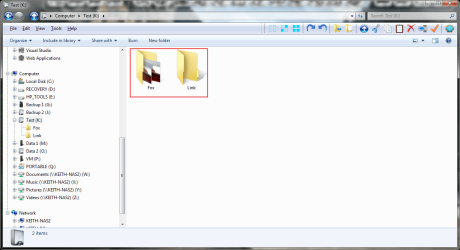
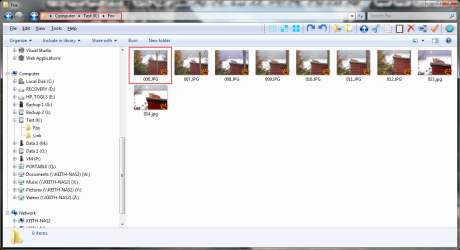
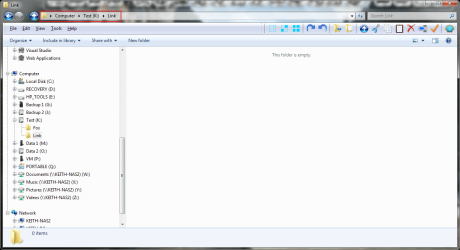
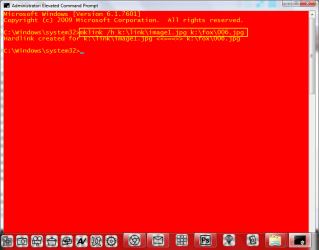
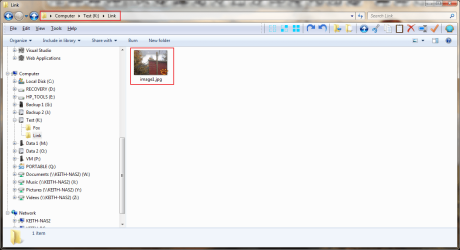
Here is an illustrated example on an image file.

Both folders exist

2015 07 10 001.png

Fox is populated with images

2015 07 10 002.png

Link is empty.

2015 07 10 003.png

The MKLINK command.

2015 07 10 004.png

Image1 is in Link as a hard link.

2015 07 10 005.png
 

My Computer My Computer

At a glance

Microsoft Windows 7 Home Premium 64-bit Servi...Intel(R) Core(TM) i3 CPU M 330 @ 2.13GHz8 GB DDR3Intel(R) HD Graphics
Computer type
Laptop
Computer Manufacturer/Model Number
Hewlett-Packard/G62-107SA Notebook
OS
Microsoft Windows 7 Home Premium 64-bit Service Pack 1
CPU
Intel(R) Core(TM) i3 CPU M 330 @ 2.13GHz
Motherboard
Hewlett-Packard 1425
Memory
8 GB DDR3
Graphics Card(s)
Intel(R) HD Graphics
Sound Card
Realtek High Definition Audio
Monitor(s) Displays
Builtin
Screen Resolution
1366 x 768 x 32 bits (4294967296 colors) @ 60 Hz
Hard Drives
250 GB SATA Hard Disk Drive 7200 rpm
2TB Seagate GoFlex USB 2 Drive
1TB Iomega Prestige USB 2 Drive
1.5TB Iomega Prestige USB 2 Drive (Samsung)
2TB WD MyBook Live NAS.
Mouse
Logitech Anywhere MX
Internet Speed
152 Mbs download 10 Mbs upload
Antivirus
Norton 360
Browser
Chrome
have you tried mklink /h <absolute path to the link file name> <absolute path to the real file>

e.g. mklink /h C:\test\foobar.exe "C:\Program Files\foobar.exe" where c:\test exists and "c:\Program Files\foobar.exe" exists and is the real file.

mklink /h <absolute path to the linked file name> <absolute path to the real file>
The syntax of the command is incorrect ?
 

My Computer My Computer

At a glance

Windows 10 ProCore2Quad (2.6 Ghz)8 Gigs DDR2Geforce Titan Black
Computer type
PC/Desktop
Computer Manufacturer/Model Number
Custom Built
OS
Windows 10 Pro
CPU
Core2Quad (2.6 Ghz)
Motherboard
nVidia 775
Memory
8 Gigs DDR2
Graphics Card(s)
Geforce Titan Black
Sound Card
Motherboard Audio
Monitor(s) Displays
25" Asus LCD
Screen Resolution
1680x1050
Hard Drives
120 Gig SSD
60 Gig SSD
750 Gig HDD
PSU
850 Watts
Case
Mid-Size
Keyboard
Logitech
Mouse
Logitech - I love logitech mouses
Internet Speed
DSL 25Mbps - Although extremely expensive
Antivirus
Microsoft Anti-Virus
Browser
FireFox 36.x
have you tried mklink /h <absolute path to the link file name> <absolute path to the real file>

e.g. mklink /h C:\test\foobar.exe "C:\Program Files\foobar.exe" where c:\test exists and "c:\Program Files\foobar.exe" exists and is the real file.

mklink /h <absolute path to the linked file name> <absolute path to the real file>
The syntax of the command is incorrect ?

See my worked example above.
 

My Computer My Computer

At a glance

Microsoft Windows 7 Home Premium 64-bit Servi...Intel(R) Core(TM) i3 CPU M 330 @ 2.13GHz8 GB DDR3Intel(R) HD Graphics
Computer type
Laptop
Computer Manufacturer/Model Number
Hewlett-Packard/G62-107SA Notebook
OS
Microsoft Windows 7 Home Premium 64-bit Service Pack 1
CPU
Intel(R) Core(TM) i3 CPU M 330 @ 2.13GHz
Motherboard
Hewlett-Packard 1425
Memory
8 GB DDR3
Graphics Card(s)
Intel(R) HD Graphics
Sound Card
Realtek High Definition Audio
Monitor(s) Displays
Builtin
Screen Resolution
1366 x 768 x 32 bits (4294967296 colors) @ 60 Hz
Hard Drives
250 GB SATA Hard Disk Drive 7200 rpm
2TB Seagate GoFlex USB 2 Drive
1TB Iomega Prestige USB 2 Drive
1.5TB Iomega Prestige USB 2 Drive (Samsung)
2TB WD MyBook Live NAS.
Mouse
Logitech Anywhere MX
Internet Speed
152 Mbs download 10 Mbs upload
Antivirus
Norton 360
Browser
Chrome
Symbolic links turn into normal folders with copies of contents of the linked folder when copied to another place. Is there a way to avoid this? Learned this while we had a discussion in a thread recently.
(About that "recent discussion", GokAy, sorry for ever being unreasonable, if I was. I'm just a lil stickler for what I believe are best practises. When you offered your method to the solution I decided it was too similar to mine for ease. Everything I've said there was only said so in an attempt to promote my own method)

I don't think the fact that "symbolic link's targets are followed when they're copied" is an intentional hit by design. I think that it is more of just a 'happening' that a folder-symbolic-link's contents are copied instead of the link itself, to be specific, I think Explorer is tricked into thinking the symbolic link is the real folder.

And that's the true reason why one would want to use these symbolic links, or hard links, or junctions over the standard Shortcut files in the first place anyway: to trick applications into thinking that the link is the actual target itself.

To answer the question of "Is there a way to avoid this?", as Relative's page indicates, it's easier to just re-create the links.


I'm going to reiterate. I want to create a symbolic link whereas I create a symbolic link to a file, when the file in the symbolic link location gets updated, or the original location, either way both files get updated. In laymen terms, the file in the original location gets cloned; when I save the file in the cloned location, both the cloned file and the location of the original file get updated.
Your intent isn't much clearer to me. But it does sound like you want a hard link.

The above command is not working ?
What command is not working? Jerome, I plead you post here the *exact* command line that falls short of your expectations. IOW, what exactly are you typing at the Command Prompt to receive such error as you described before?

Bloating the thread with "[insert Mklink command syntax here] isn't working" isn't going to get you far. It helps when additional information is provided, where ever possible.
 

My Computer My Computer

At a glance

Windows 10, Windows 8.1 Pro, Windows 7 Profes...
Computer type
PC/Desktop
OS
Windows 10, Windows 8.1 Pro, Windows 7 Professional, OS X El Capitan
mklink /d C:\my files\afiletolong C:\User\graple\preferences-sets

This is the command I'm using ?
 

My Computer My Computer

At a glance

Windows 10 ProCore2Quad (2.6 Ghz)8 Gigs DDR2Geforce Titan Black
Computer type
PC/Desktop
Computer Manufacturer/Model Number
Custom Built
OS
Windows 10 Pro
CPU
Core2Quad (2.6 Ghz)
Motherboard
nVidia 775
Memory
8 Gigs DDR2
Graphics Card(s)
Geforce Titan Black
Sound Card
Motherboard Audio
Monitor(s) Displays
25" Asus LCD
Screen Resolution
1680x1050
Hard Drives
120 Gig SSD
60 Gig SSD
750 Gig HDD
PSU
850 Watts
Case
Mid-Size
Keyboard
Logitech
Mouse
Logitech - I love logitech mouses
Internet Speed
DSL 25Mbps - Although extremely expensive
Antivirus
Microsoft Anti-Virus
Browser
FireFox 36.x
I have a few questions, I copy the file for which I want to make a hard link to the folder to which I want to make a hard link, connect, correct ? In other words, if the original location of the file is in C:\Users\acme\one; I want to make a hard link, I copy the file for which was in C:\Users\acme\one to C:\1 then run this command;

mklink /h C:\Users\acme\one C:\1 ?

If that is correct, why am I getting command errors ? Contrary to what one may believe, regardless if I post the exact file path; it won't help if what I'm doing is correct and it doesn't work, you can argue it will, but I'm not trying to type code; it's a straight forward command.
 

My Computer My Computer

At a glance

Windows 10 ProCore2Quad (2.6 Ghz)8 Gigs DDR2Geforce Titan Black
Computer type
PC/Desktop
Computer Manufacturer/Model Number
Custom Built
OS
Windows 10 Pro
CPU
Core2Quad (2.6 Ghz)
Motherboard
nVidia 775
Memory
8 Gigs DDR2
Graphics Card(s)
Geforce Titan Black
Sound Card
Motherboard Audio
Monitor(s) Displays
25" Asus LCD
Screen Resolution
1680x1050
Hard Drives
120 Gig SSD
60 Gig SSD
750 Gig HDD
PSU
850 Watts
Case
Mid-Size
Keyboard
Logitech
Mouse
Logitech - I love logitech mouses
Internet Speed
DSL 25Mbps - Although extremely expensive
Antivirus
Microsoft Anti-Virus
Browser
FireFox 36.x
mklink /d C:\my files\afiletolong C:\User\graple\preferences-sets
There's one problem, remember to quote paths with spaces in them. Quote all paths regardless.

I don't know what "C:\my files\afiletolong" or "C:\User\graple\preferences-sets" is, so I cannot tell if the command line is valid or not, yet.


I have a few questions, I copy the file for which I want to make a hard link to the folder to which I want to make a hard link, connect, correct ? In other words, if the original location of the file is in C:\Users\acme\one; I want to make a hard link, I copy the file for which was in C:\Users\acme\one to C:\1 then run this command
Please don't say, "I need a blah link", specifically, because you'll make the mistake of saying, for example, "I need a hard link to a folder" which is impossible: hard links to folders are not supported under any NTFS standard.

Jerome, just tell us want you want linked to what, and we'll create the command line for you.


If that is correct, why am I getting command errors ?.
If you are getting errors, obviously what you are typing isn't correct.

I can, however, tell you the conditions that must be satisfied prior to running
Code:
mklink /h C:\Users\acme\one C:\1
for it to be valid:
  • The folder "C:\Users\acme" must exist,
  • The path "C:\Users\acme\one" must not exist,
  • The folder "C:\1" must exist as a file.

Contrary to what one may believe, regardless if I post the exact file path; it won't help if what I'm doing is correct and it doesn't work, you can argue it will, but I'm not trying to type code; it's a straight forward command.
And it should be. I wanted you to post the exact command you are attempting in order to allow for us to spot minor mistakes such as un-quoted paths, or incorrect use of relative paths, etc. You've posted many lines of command here, I'm just so confused. :confused:
 

My Computer My Computer

At a glance

Windows 10, Windows 8.1 Pro, Windows 7 Profes...
Computer type
PC/Desktop
OS
Windows 10, Windows 8.1 Pro, Windows 7 Professional, OS X El Capitan
I have a few questions, I copy the file for which I want to make a hard link to the folder to which I want to make a hard link, connect, correct ? In other words, if the original location of the file is in C:\Users\acme\one; I want to make a hard link, I copy the file for which was in C:\Users\acme\one to C:\1 then run this command;

mklink /h C:\Users\acme\one C:\1 ?

If that is correct, why am I getting command errors ? Contrary to what one may believe, regardless if I post the exact file path; it won't help if what I'm doing is correct and it doesn't work, you can argue it will, but I'm not trying to type code; it's a straight forward command.

No. You do not copy anything anywhere. In your example if the original file is c:\users\acme\one\xxx.yyy then the command is.

mklink /h c:\1\xxx.yyy c:\users\acme\one\xxx.yyy

Note the order of the parameters.

The folder c:\1 must exist but must NOT contain a copy of xxx.yyy
 

My Computer My Computer

At a glance

Microsoft Windows 7 Home Premium 64-bit Servi...Intel(R) Core(TM) i3 CPU M 330 @ 2.13GHz8 GB DDR3Intel(R) HD Graphics
Computer type
Laptop
Computer Manufacturer/Model Number
Hewlett-Packard/G62-107SA Notebook
OS
Microsoft Windows 7 Home Premium 64-bit Service Pack 1
CPU
Intel(R) Core(TM) i3 CPU M 330 @ 2.13GHz
Motherboard
Hewlett-Packard 1425
Memory
8 GB DDR3
Graphics Card(s)
Intel(R) HD Graphics
Sound Card
Realtek High Definition Audio
Monitor(s) Displays
Builtin
Screen Resolution
1366 x 768 x 32 bits (4294967296 colors) @ 60 Hz
Hard Drives
250 GB SATA Hard Disk Drive 7200 rpm
2TB Seagate GoFlex USB 2 Drive
1TB Iomega Prestige USB 2 Drive
1.5TB Iomega Prestige USB 2 Drive (Samsung)
2TB WD MyBook Live NAS.
Mouse
Logitech Anywhere MX
Internet Speed
152 Mbs download 10 Mbs upload
Antivirus
Norton 360
Browser
Chrome
It worked. :)
 

My Computer My Computer

At a glance

Windows 10 ProCore2Quad (2.6 Ghz)8 Gigs DDR2Geforce Titan Black
Computer type
PC/Desktop
Computer Manufacturer/Model Number
Custom Built
OS
Windows 10 Pro
CPU
Core2Quad (2.6 Ghz)
Motherboard
nVidia 775
Memory
8 Gigs DDR2
Graphics Card(s)
Geforce Titan Black
Sound Card
Motherboard Audio
Monitor(s) Displays
25" Asus LCD
Screen Resolution
1680x1050
Hard Drives
120 Gig SSD
60 Gig SSD
750 Gig HDD
PSU
850 Watts
Case
Mid-Size
Keyboard
Logitech
Mouse
Logitech - I love logitech mouses
Internet Speed
DSL 25Mbps - Although extremely expensive
Antivirus
Microsoft Anti-Virus
Browser
FireFox 36.x
Back
Top