Mobile Device Center

Vosberg1

Is there not a cause?
Member
Local time
5:39 PM
Messages
46
Location
Post Falls ID
OK, i have posted this once, but in a differnt Set of threads (Hardware and Devices), so if figured i would give it a shot here. I have 7 Ulitmant 32 bit N version. I am trying to install the Mobile Device Manager, and when i try to install it, it gives me the error, "Windows is missing componts" I have tryed checking Microsofts website, and to no avail. What componets does the Mobile Device Manager need to install?

Thanks for your feed back.
 

My Computer

Computer Manufacturer/Model Number
Toshiba
OS
Windows 7 Ultimate x86
CPU
1.66 Ghz
Memory
3 Gb
Screen Resolution
1280x800
Hard Drives
75 GB Seagate
320 Gb Seagate Ext
500 Gb Seagate Ext
Mouse
Logitech
Other Info
Laptop A105
hi vosberg1,it may be you need the windows component updates and data access components i will try to find the link for you, be back shortly
 

My Computer

Computer type
PC/Desktop
Computer Manufacturer/Model Number
self build
OS
win 7 ultimate32bit, Win8.1pro wmc 32bit
CPU
amd phenom x4 9600
Motherboard
asus m2n32-sli deluxe
Memory
corsair twinxs 2x2gb
Graphics Card(s)
2x nvidia 1gb 8500gt
Sound Card
onboard
Monitor(s) Displays
23" PB Viseo 233d
Screen Resolution
1920x1080
Hard Drives
maxtor sata 500gb
maxtor sata 320gb
fujitsu sata200gb
PSU
oryxx tornado 750w
Case
thermaltake xaser lll
Cooling
artic freezer64 pro + 7 case fans
Last edited:

My Computer

Computer type
PC/Desktop
Computer Manufacturer/Model Number
self build
OS
win 7 ultimate32bit, Win8.1pro wmc 32bit
CPU
amd phenom x4 9600
Motherboard
asus m2n32-sli deluxe
Memory
corsair twinxs 2x2gb
Graphics Card(s)
2x nvidia 1gb 8500gt
Sound Card
onboard
Monitor(s) Displays
23" PB Viseo 233d
Screen Resolution
1920x1080
Hard Drives
maxtor sata 500gb
maxtor sata 320gb
fujitsu sata200gb
PSU
oryxx tornado 750w
Case
thermaltake xaser lll
Cooling
artic freezer64 pro + 7 case fans
I will give them a try right after work, and will let you know what happens. Thanks for the fast reply!
 

My Computer

Computer Manufacturer/Model Number
Toshiba
OS
Windows 7 Ultimate x86
CPU
1.66 Ghz
Memory
3 Gb
Screen Resolution
1280x800
Hard Drives
75 GB Seagate
320 Gb Seagate Ext
500 Gb Seagate Ext
Mouse
Logitech
Other Info
Laptop A105
I will give them a try right after work, and will let you know what happens. Thanks for the fast reply!

you're most welcome:D
 

My Computer

Computer type
PC/Desktop
Computer Manufacturer/Model Number
self build
OS
win 7 ultimate32bit, Win8.1pro wmc 32bit
CPU
amd phenom x4 9600
Motherboard
asus m2n32-sli deluxe
Memory
corsair twinxs 2x2gb
Graphics Card(s)
2x nvidia 1gb 8500gt
Sound Card
onboard
Monitor(s) Displays
23" PB Viseo 233d
Screen Resolution
1920x1080
Hard Drives
maxtor sata 500gb
maxtor sata 320gb
fujitsu sata200gb
PSU
oryxx tornado 750w
Case
thermaltake xaser lll
Cooling
artic freezer64 pro + 7 case fans
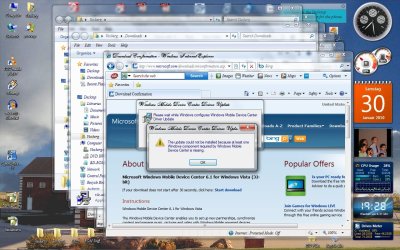
OK, tryed, and still no luck. I did a screen shot of what the error is, and if you need any info, i will defanitly provide what you need. But, one heads up, i will not be able to be online tommaro, as got a side job to do, so will be busy.

Thanks in advance,
 

Attachments

  • ScreenDeviceManagerError.jpg
    ScreenDeviceManagerError.jpg
    185.1 KB · Views: 161

My Computer

Computer Manufacturer/Model Number
Toshiba
OS
Windows 7 Ultimate x86
CPU
1.66 Ghz
Memory
3 Gb
Screen Resolution
1280x800
Hard Drives
75 GB Seagate
320 Gb Seagate Ext
500 Gb Seagate Ext
Mouse
Logitech
Other Info
Laptop A105
Unfortunately, it appears that it is incompatibility with windows 7. The download page says only vista. Have you tried installing it all in compatibility mode for vista? It is not listed as a compatible device in windows 7 compatibility center (in fact, it isn't listed in there at all)!
Good luck~!
 

My Computer

Computer Manufacturer/Model Number
Dell XPS 8000/HP G70 258US
OS
Windows 7 64 bit build 7600
CPU
Intel Core i5 750/Intel Pentium Duo T4200 2.00 ghz
Memory
6 gig/4 gig
Graphics Card(s)
ATI Radeon HD 4350/Intel Graphics Media Accelerator 4500MHD
Sound Card
Realtek/Conexant Smartaudio High Definition Device
Monitor(s) Displays
Two
Screen Resolution
1920x1080/1440x900
Hard Drives
750/250 gig
Internet Speed
24 mb
OK, i tryed to run in compatiblity mode, and same error. I even tryed to install ActiveSync, and run that in Compatiblity mode of XP SP2, and to no avail. Just emailed Microsoft, and we shall see. But in the mean time, if someone has a brain storm on this, please post.

Thanks in advance -
 

My Computer

Computer Manufacturer/Model Number
Toshiba
OS
Windows 7 Ultimate x86
CPU
1.66 Ghz
Memory
3 Gb
Screen Resolution
1280x800
Hard Drives
75 GB Seagate
320 Gb Seagate Ext
500 Gb Seagate Ext
Mouse
Logitech
Other Info
Laptop A105
Unfortunately, it appears that it is incompatibility with windows 7. The download page says only vista. Have you tried installing it all in compatibility mode for vista?

It is not a Windows 7 compatibility issue!!! Windows Mobile Device Center works flawlessly under both Windows 7 32 and 34-bit.

Download and install Windows Mobile Device Center 6.1 if you run Windows Vista or Windows 7 on your computer and you want to sync content between your mobile phone and your computer. Windows Mobile Device Center is only compatible with Windows Vista and Windows 7; if you run Windows XP or earlier, you have to download Microsoft ActiveSync.

:ar: Windows Mobile Device Center 6.1 | Windows Vista Support

And for what its worth, I use it to sync my HTC Touch Pro 2. What ever the OP's problem is, it's certainly not compatibility as you state.

@ Vosberg,

Make sure you download and install the appropriate version for Windows - either 32 or 64-bit
 

My Computer

Computer type
PC/Desktop
Computer Manufacturer/Model Number
Custom built by me.
OS
Windows 10 Pro
CPU
Intel Core i7-4770K (3.5Ghz)
Motherboard
Gigabyte G1 Sniper 5 (F10 Bios)
Memory
32 gig Corsair Dominator Platinum (4x8Gig)
Graphics Card(s)
Sapphire Tri-X R9 Fury
Sound Card
Soundblaster ZXR
Monitor(s) Displays
NEC PA242W 24" LCD Monitor
Screen Resolution
1920 x 1200
Hard Drives
Primary - Samsung 850 Pro (512gig), Samsung 840 Pro (256gig), 2TB WD Caviar Black.
PSU
EVGA Supernova 1000 G2
Case
Cooler Master HAF X
Cooling
Corsair H100i with Corsair Air Series SP120 Quiet Fans
Keyboard
Logitech Wireless Wave
Mouse
Logitech Performance MX
Internet Speed
High Speed Cable
Antivirus
Norton Security
Browser
IE11
Other Info
Memory Timings - 1866MHz @ 9-9-9-27-1T @ 1.5 volts
OK, just to give the update - Microsoft just emailed me back, and sent me this link.
http://www.pocketpcfaq.com/faqs/wmdc/t-shoot-wmdc.htm
I have not had a chance to try this just yet, but i did download the file. I will keep everone posted, i fee that this may help if some one stumbles on this issue. And, by the way, as of yet, everyone has been really helpful, and i have tryed all of the advice that people here have suggested, so that is not gone unnoticed.

(Here is a copy and paste of the email from Microsoft)

Hello Steve,

Thank you for contacting Microsoft Customer Service.

I’m sorry to know that you’re facing issues while installing Mobile Device Manager on your computer. I can understand your concern. Please don’t worry. I’ll be happy to assist you in this regard.

Steve, I did a research on the following website for you and found the below mentioned article. Please click on the link to get the support option:
http://www.pocketpcfaq.com/faqs/wmdc/t-shoot-wmdc.htm

Please note that the above link accesses a third party site, which is not under the control of Microsoft. Microsoft is not responsible for any content on third party sites. Microsoft is providing this resource to you only as a convenience and the inclusion of any link does not imply endorsement by Microsoft of the linked site.

If you still face the issue, suggest you to contact our Technical Team. Microsoft has a dedicated Support Professional Team who can assist you further. You may contact them at the below mentioned number.

Microsoft support phone number: (800) 936-5700
HOURS OF OPERATION (Pacific)
Monday – Friday: 5:00 A.M. - 9:00 P.M.
Saturday – Sunday: 6:00 A.M. - 3:00 P.M.

I hope the above information is helpful, and please contact us if you have any additional customer service questions, we would be more than glad to assist you.

Thank you,

Manu

 

My Computer

Computer Manufacturer/Model Number
Toshiba
OS
Windows 7 Ultimate x86
CPU
1.66 Ghz
Memory
3 Gb
Screen Resolution
1280x800
Hard Drives
75 GB Seagate
320 Gb Seagate Ext
500 Gb Seagate Ext
Mouse
Logitech
Other Info
Laptop A105

My Computer

Computer type
PC/Desktop
Computer Manufacturer/Model Number
Self built custom
OS
64-bit Windows 11 Pro for Workstations
CPU
Intel i7-8700K OC'd to 5 GHz
Motherboard
ASUS ROG Maximus XI Formula Z390
Memory
64 GB (4x16GB) G.SKILL TridentZ RGB DDR4 3600 MHz
Graphics Card(s)
ASUS ROG-STRIX-GTX1080TI-O11G-GAMING
Sound Card
Integrated
Monitor(s) Displays
2 x Samsung Odyssey G7 27"
Screen Resolution
2560x1440
Hard Drives
1TB Samsung 990 PRO M.2,
4TB Samsung 990 PRO PRO M.2,
TerraMaster F8 SSD Plus NAS
PSU
Seasonic Prime Titanium 850W
Case
Thermaltake Core P3
Cooling
Corsair Hydro H115i
Keyboard
Logitech wireless K800
Mouse
Logitech MX Master 4
Internet Speed
2 Gb/s Download and 100 Mb/s Upload
Antivirus
Malwarebyte Anti-Malware Premium
Browser
Google Chrome
Other Info
Logitech Z625 speaker system,
Logitech BRIO 4K Pro webcam,
HP Color LaserJet Pro MFP M477fdn,
APC SMART-UPS RT 1000 XL - SURT1000XLI,
Galaxy S23 Plus phone
I am trying to install the Mobile Device Manager,

OK, just to give the update - Microsoft just emailed me back, and sent me this link.
[URL]http://www.pocketpcfaq.com/faqs/wmdc/t-shoot-wmdc.htm[/URL]

That's a link for troubleshooting Windows Mobile Device Center


Hmmm....everything in his post points to Windows Mobile Device Center. Seems to be some confusion in the name of the issue :confused:

@ Vosberg, Is it Windows Mobile Device Center, or Windows Mobility Center???

Thanks
 

My Computer

Computer type
PC/Desktop
Computer Manufacturer/Model Number
Custom built by me.
OS
Windows 10 Pro
CPU
Intel Core i7-4770K (3.5Ghz)
Motherboard
Gigabyte G1 Sniper 5 (F10 Bios)
Memory
32 gig Corsair Dominator Platinum (4x8Gig)
Graphics Card(s)
Sapphire Tri-X R9 Fury
Sound Card
Soundblaster ZXR
Monitor(s) Displays
NEC PA242W 24" LCD Monitor
Screen Resolution
1920 x 1200
Hard Drives
Primary - Samsung 850 Pro (512gig), Samsung 840 Pro (256gig), 2TB WD Caviar Black.
PSU
EVGA Supernova 1000 G2
Case
Cooler Master HAF X
Cooling
Corsair H100i with Corsair Air Series SP120 Quiet Fans
Keyboard
Logitech Wireless Wave
Mouse
Logitech Performance MX
Internet Speed
High Speed Cable
Antivirus
Norton Security
Browser
IE11
Other Info
Memory Timings - 1866MHz @ 9-9-9-27-1T @ 1.5 volts
OK, yet another update. When i went to install the driver mentioned above, i found out that the driver is for the 64 bit Windows, and here i have the 32 bit installed on this laptop. I guess i thought that this was going to be any easy fix, but, i guess i was proven wrong. From the E-mail from Microsoft i got to contact their Tech Support, and here is where the fun comes in. I will be out of town for the next few days, so i will have to pick up this ball on Monday when i get back. In the mean time, double, or triple kudos to anyone that came maybe come up with any ideas of what to do. I was hoping to use the Device Center before i left, cause i have to update the phone, but, well that fell threw as well. Alwell, got to quit complaining, and just let things be! Well, have a great day, and as likewise, thanks for all of the ideas, it has not been unnoticed.

Oh, and Brink, the issue is not the Windows Mobility Center, but the Device Manager. This is the Active Sync for the newer version of Windows. But thanks for the input.
 
Last edited:

My Computer

Computer Manufacturer/Model Number
Toshiba
OS
Windows 7 Ultimate x86
CPU
1.66 Ghz
Memory
3 Gb
Screen Resolution
1280x800
Hard Drives
75 GB Seagate
320 Gb Seagate Ext
500 Gb Seagate Ext
Mouse
Logitech
Other Info
Laptop A105
Vosberg1,

I don't think you're reading our replies. It's been mentioned by me earlier that you needed to make sure you got the correct version for your OS....

Make sure you download and install the appropriate version for Windows - either 32 or 64-bit
You were also asked to clarify the problem you’re having….

@ Vosberg, Is it Windows Mobile Device Center, or Windows Mobility Center???

And to clear this up....

Oh, and Brink, the issue is not the Windows Mobility Center, but the Device Manager. This is the Active Sync for the newer version of Windows. But thanks for the input.

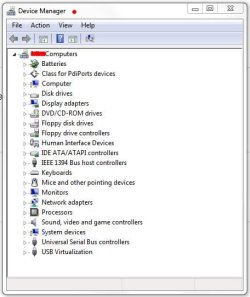
"Device Manager" is not the "Active Sync for the newer version of Windows" This is the "Device Manger"...

Device Manager2.JPG
The Device Manager is a Control Panel applet in Windows. It allows users to view and control hardware attached to the computer. Which has very little to do with Active Sync or Windows Mobile Device Center.

Something you also need to be aware of, "Active Sync" does not/will not work on Vista or Windows 7, that's why you need Windows Mobile Device Center.

XP = Active Sync
Vista/Win 7 = Windows Mobile Device Center

We can’t help you if you won’t answer our questions, or read and acknowledge our replies. Based on your last few posts, I believe we fixed your problem; you just needed to read them.

Just trying to help.

Later.
 
Last edited:

My Computer

Computer type
PC/Desktop
Computer Manufacturer/Model Number
Custom built by me.
OS
Windows 10 Pro
CPU
Intel Core i7-4770K (3.5Ghz)
Motherboard
Gigabyte G1 Sniper 5 (F10 Bios)
Memory
32 gig Corsair Dominator Platinum (4x8Gig)
Graphics Card(s)
Sapphire Tri-X R9 Fury
Sound Card
Soundblaster ZXR
Monitor(s) Displays
NEC PA242W 24" LCD Monitor
Screen Resolution
1920 x 1200
Hard Drives
Primary - Samsung 850 Pro (512gig), Samsung 840 Pro (256gig), 2TB WD Caviar Black.
PSU
EVGA Supernova 1000 G2
Case
Cooler Master HAF X
Cooling
Corsair H100i with Corsair Air Series SP120 Quiet Fans
Keyboard
Logitech Wireless Wave
Mouse
Logitech Performance MX
Internet Speed
High Speed Cable
Antivirus
Norton Security
Browser
IE11
Other Info
Memory Timings - 1866MHz @ 9-9-9-27-1T @ 1.5 volts
OK, i had some confusion with the NAME of the problem, but not of the logistics fo the problem. I appoligize for the confusion. It is the Device Center that i am having issues with, and, if the post have followed, i am still having issues trying to install it, but just to reinterate, (so everything is here in correct termanloigy)

1. Downloaded Moblile Device Center.
2. Attmpted to install - error - Windows Compont is missing
3. Attempted to run Device Center in comapt mode with Vista.
4. Concated Microsoft - they sent me the email that is posted in one of the posts.
5. Attempted to use the driver - it turns out to be supported with ONLY 64 bit 7 - mine is 32 bit.

That is it in a nutshell.

Thanks again for the help.
 

My Computer

Computer Manufacturer/Model Number
Toshiba
OS
Windows 7 Ultimate x86
CPU
1.66 Ghz
Memory
3 Gb
Screen Resolution
1280x800
Hard Drives
75 GB Seagate
320 Gb Seagate Ext
500 Gb Seagate Ext
Mouse
Logitech
Other Info
Laptop A105
OK, i had some confusion with the NAME of the problem, but not of the logistics fo the problem. I appoligize for the confusion. It is the Device Center that i am having issues with, and, if the post have followed, i am still having issues trying to install it, but just to reinterate, (so everything is here in correct termanloigy)

1. Downloaded Moblile Device Center.
2. Attmpted to install - error - Windows Compont is missing
3. Attempted to run Device Center in comapt mode with Vista.
4. Concated Microsoft - they sent me the email that is posted in one of the posts.
5. Attempted to use the driver - it turns out to be supported with ONLY 64 bit 7 - mine is 32 bit.

To reiterate what I said....

You need to download the 32-bit version of Windows Mobile Device Center!!! NOT THE 64-BIT!!!

:ar: Download details: Microsoft Windows Mobile Device Center 6.1 for Windows Vista (32-bit). I know the download link says Vista, but this WILL also work under Windows 7 (Windows Mobile Device Center 6.1 | Windows Vista Support). And this does not need to be installed in compatibility mode!

If you're trying to install the 64-bit version on your 32-bit OS (Windows) you're going to have problems!!!

Please read the posts instead of just looking at them.

Just trying to help
 

My Computer

Computer type
PC/Desktop
Computer Manufacturer/Model Number
Custom built by me.
OS
Windows 10 Pro
CPU
Intel Core i7-4770K (3.5Ghz)
Motherboard
Gigabyte G1 Sniper 5 (F10 Bios)
Memory
32 gig Corsair Dominator Platinum (4x8Gig)
Graphics Card(s)
Sapphire Tri-X R9 Fury
Sound Card
Soundblaster ZXR
Monitor(s) Displays
NEC PA242W 24" LCD Monitor
Screen Resolution
1920 x 1200
Hard Drives
Primary - Samsung 850 Pro (512gig), Samsung 840 Pro (256gig), 2TB WD Caviar Black.
PSU
EVGA Supernova 1000 G2
Case
Cooler Master HAF X
Cooling
Corsair H100i with Corsair Air Series SP120 Quiet Fans
Keyboard
Logitech Wireless Wave
Mouse
Logitech Performance MX
Internet Speed
High Speed Cable
Antivirus
Norton Security
Browser
IE11
Other Info
Memory Timings - 1866MHz @ 9-9-9-27-1T @ 1.5 volts
OK, i hope to clear up the confusion, i have downloaded the 32 bit Device Center, and that is what i am trying to install. The driver that Microsoft pointed me to to try to resolve this issue is the thing that is 64 bit. Sorry about the confusion. I hope to try to resolve this problem soon.
 

My Computer

Computer Manufacturer/Model Number
Toshiba
OS
Windows 7 Ultimate x86
CPU
1.66 Ghz
Memory
3 Gb
Screen Resolution
1280x800
Hard Drives
75 GB Seagate
320 Gb Seagate Ext
500 Gb Seagate Ext
Mouse
Logitech
Other Info
Laptop A105
Oh, here is the final update - i finally got the Device Center installed, there was a install pack that also included Microsoft Media Player. I had to do many call to Microsoft, and then, out of frustraition i again Googled "Window Compont Missing" and found a link to pack that i needed to install. (i will post it later). But just wanted everyone to know that this issue is resolved.

Hope that durring this i did not sound like a jerk, i took all advice serious, but when there was alot of "dedlock, both with Microsoft, and with Seven Fourums, i was getting very frustrated.

Thanks again,
 

My Computer

Computer Manufacturer/Model Number
Toshiba
OS
Windows 7 Ultimate x86
CPU
1.66 Ghz
Memory
3 Gb
Screen Resolution
1280x800
Hard Drives
75 GB Seagate
320 Gb Seagate Ext
500 Gb Seagate Ext
Mouse
Logitech
Other Info
Laptop A105
Back
Top