
You are using an out of date browser. It may not display this or other websites correctly.
You should upgrade or use an alternative browser.
You should upgrade or use an alternative browser.
Solved Modem Log ......[DOS]
- Thread starter jumanji
- Start date
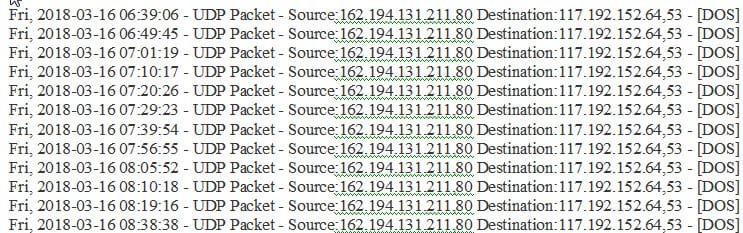

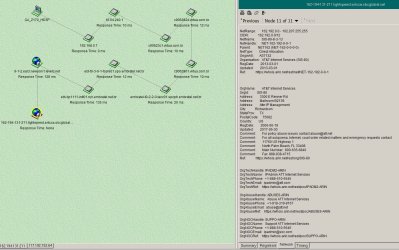
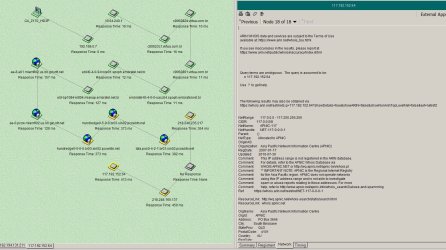
Udp doesnt actually connect to your pc like tcip it just sends a packet and its not replied to you get it if you ping a pc its classed as a denial of service attack unless its relentless its not a problem it can be something scanning or testing pings webcrawlers often do it to find new website so they can be indexed for a search engine. You could look up the ip to see were its from and try opening ip in a browser
My Computer
- Computer type
- PC/Desktop
- OS
- win 8 32 bit

My Computers
System One System Two
-
- Computer type
- PC/Desktop
- Computer Manufacturer/Model Number
- custom build
- OS
- Windows 7 HP 64
- CPU
- i5 6600K - 800MHz to 4200MHz
- Motherboard
- GA-Z170-HD3P
- Memory
- 4+4G GSkill DDR4 3000
- Graphics Card(s)
- IG - Intel 530
- Monitor(s) Displays
- Samsung 226BW
- Screen Resolution
- 1680x1050
- Hard Drives
- (1) -1 SM951 – 128GB M.2 AHCI PCIe SSD drive for Windows 7 and Lubuntu
(2) -1 WD SATA 3 - 1T for Data
(3) -1 WD SATA 3 - 1T for backup
- PSU
- Thermaltake 450W TR2 gold
- Keyboard
- Old and good Chicony mechanical keyboard
- Mouse
- Logitech mX performance - 9 buttons (had to disable some)
- Internet Speed
- 500Mb/s
- Browser
- Firefox 64
- Other Info
- TinyWall firewall
-
- Computer type
- Laptop
- System Manufacturer/Model Number
- Asus Q550LF
- OS
- Windows 7 Pro
- CPU
- i7-4500U 800MHz to 3.0GHz
- Motherboard
- Asus Q550LF
- Memory
- (4+4)G DDR3 1600
- Graphics Card(s)
- IG intel 4400 + NVIDIA GeForce GT 745M
- Sound Card
- Realtek
- Monitor(s) Displays
- LG Display LP156WF4-SPH1
- Screen Resolution
- 1920 x 1080
- Hard Drives
- BX500 120G SSD for Windows and programs +
1T HDD for data
- Internet Speed
- 500 Mb/s
- Browser
- Firefox
- Other Info
- TinyWall firewall

- Local time
- 7:41 PM
- Messages
- 5,915
....... destination on Brisbane, AU
hehe.... shows how far off you can be
 172.192.152.64 my dynamic IP address given by my ISP. So destination is always my PC.
If Source is Texas, then it must be Brink

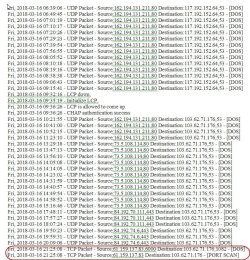
Jokes apart, today I seem to have more than a fair share of it. Samuria said UDP does not actually connect to my PC. Good and I was happy. But the last two entries in the log below that happened just an hour or so ago are TCP Packets. And the last one is Port Scan . Who or what is scanning my ports? And for what purpose?
My Computer
- OS
- Windows 7 Home Premium 32 bit
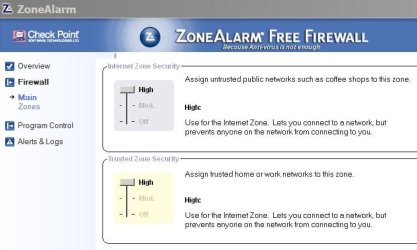
I use an old version of Zone Alarm (V9.2.106.000) It has a stealth setting to avoid to been seen on the network.
What Firewall do you use?
What Firewall do you use?
My Computers
System One System Two
-
- Computer type
- PC/Desktop
- Computer Manufacturer/Model Number
- custom build
- OS
- Windows 7 HP 64
- CPU
- i5 6600K - 800MHz to 4200MHz
- Motherboard
- GA-Z170-HD3P
- Memory
- 4+4G GSkill DDR4 3000
- Graphics Card(s)
- IG - Intel 530
- Monitor(s) Displays
- Samsung 226BW
- Screen Resolution
- 1680x1050
- Hard Drives
- (1) -1 SM951 – 128GB M.2 AHCI PCIe SSD drive for Windows 7 and Lubuntu
(2) -1 WD SATA 3 - 1T for Data
(3) -1 WD SATA 3 - 1T for backup
- PSU
- Thermaltake 450W TR2 gold
- Keyboard
- Old and good Chicony mechanical keyboard
- Mouse
- Logitech mX performance - 9 buttons (had to disable some)
- Internet Speed
- 500Mb/s
- Browser
- Firefox 64
- Other Info
- TinyWall firewall
-
- Computer type
- Laptop
- System Manufacturer/Model Number
- Asus Q550LF
- OS
- Windows 7 Pro
- CPU
- i7-4500U 800MHz to 3.0GHz
- Motherboard
- Asus Q550LF
- Memory
- (4+4)G DDR3 1600
- Graphics Card(s)
- IG intel 4400 + NVIDIA GeForce GT 745M
- Sound Card
- Realtek
- Monitor(s) Displays
- LG Display LP156WF4-SPH1
- Screen Resolution
- 1920 x 1080
- Hard Drives
- BX500 120G SSD for Windows and programs +
1T HDD for data
- Internet Speed
- 500 Mb/s
- Browser
- Firefox
- Other Info
- TinyWall firewall
- Local time
- 7:41 PM
- Messages
- 5,915
My router has its own firewall. I had left it at its default settings. ( It says it is for Advanced Administrators only and I am not one  )
)
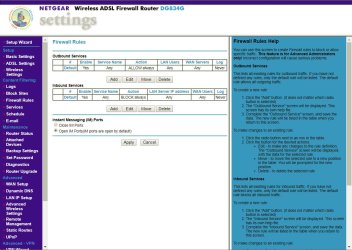
As for the system ( Win 7, Ultimate 32 bit) Windows firewall is on. I hadn't meddled with it anytime.
I am off to bed now and will be back only after another 8 hours.
)As for the system ( Win 7, Ultimate 32 bit) Windows firewall is on. I hadn't meddled with it anytime.
I am off to bed now and will be back only after another 8 hours.
My Computer
- OS
- Windows 7 Home Premium 32 bit
My cable modem / Router also has a firewall but I don't think i's enough.
ZAlarm reports almost 25 invasion attempts a DAY!!
Window firewall is \ used to be weak.
Z Alarm is very simple to use. I don't like the new versions (best software is the one you know how to use it)
Download ZoneAlarm Free 9.2.106.000 - FileHippo.com
New free version ZoneAlarm Free Firewall - Personal Computer Firewall Software
ZAlarm reports almost 25 invasion attempts a DAY!!
Window firewall is \ used to be weak.
Z Alarm is very simple to use. I don't like the new versions (best software is the one you know how to use it)
Download ZoneAlarm Free 9.2.106.000 - FileHippo.com
New free version ZoneAlarm Free Firewall - Personal Computer Firewall Software
Attachments
My Computers
System One System Two
-
- Computer type
- PC/Desktop
- Computer Manufacturer/Model Number
- custom build
- OS
- Windows 7 HP 64
- CPU
- i5 6600K - 800MHz to 4200MHz
- Motherboard
- GA-Z170-HD3P
- Memory
- 4+4G GSkill DDR4 3000
- Graphics Card(s)
- IG - Intel 530
- Monitor(s) Displays
- Samsung 226BW
- Screen Resolution
- 1680x1050
- Hard Drives
- (1) -1 SM951 – 128GB M.2 AHCI PCIe SSD drive for Windows 7 and Lubuntu
(2) -1 WD SATA 3 - 1T for Data
(3) -1 WD SATA 3 - 1T for backup
- PSU
- Thermaltake 450W TR2 gold
- Keyboard
- Old and good Chicony mechanical keyboard
- Mouse
- Logitech mX performance - 9 buttons (had to disable some)
- Internet Speed
- 500Mb/s
- Browser
- Firefox 64
- Other Info
- TinyWall firewall
-
- Computer type
- Laptop
- System Manufacturer/Model Number
- Asus Q550LF
- OS
- Windows 7 Pro
- CPU
- i7-4500U 800MHz to 3.0GHz
- Motherboard
- Asus Q550LF
- Memory
- (4+4)G DDR3 1600
- Graphics Card(s)
- IG intel 4400 + NVIDIA GeForce GT 745M
- Sound Card
- Realtek
- Monitor(s) Displays
- LG Display LP156WF4-SPH1
- Screen Resolution
- 1920 x 1080
- Hard Drives
- BX500 120G SSD for Windows and programs +
1T HDD for data
- Internet Speed
- 500 Mb/s
- Browser
- Firefox
- Other Info
- TinyWall firewall
- Local time
- 7:41 PM
- Messages
- 5,915
I was using Zone Alarm for a longtime perhaps with Windows 95, 98, ME and perhaps XP too. A particular update caused many problems, I don't remember exactly when. It was widely reported and rebelled at and at that point of time I jettisoned it. It could have improved later on but I have no intention to go back to it especially after Windows built-in firewall came in.. If you google "problems with ZoneAlarm" you may find many reports dating back as far as ........
Problems With Zone Alarm - Forums - CNET
"At a minimum you should have a firewall/router, local antivirus app and local spyware app for proper protection. Adding a local firewall app is good if you have the technical knowledge to lock it down properly. For most home users, I find them to be a hinderance."
Even now I would believe my modem/ router effectively stonewalls any intrusions reported.( I have immense faith in NetGear ) Samuria gave a convincing reply on the UDP packets.
Now what about the TCP packets? My question is "Who or what is scanning my ports? And for what purpose?"
Problems With Zone Alarm - Forums - CNET
"At a minimum you should have a firewall/router, local antivirus app and local spyware app for proper protection. Adding a local firewall app is good if you have the technical knowledge to lock it down properly. For most home users, I find them to be a hinderance."
Even now I would believe my modem/ router effectively stonewalls any intrusions reported.( I have immense faith in NetGear
) Samuria gave a convincing reply on the UDP packets. Now what about the TCP packets? My question is "Who or what is scanning my ports? And for what purpose?"
Last edited:
My Computer
- OS
- Windows 7 Home Premium 32 bit
Jumanji, the problem on the link you provided is from 2007.
There were some problems on the version at that time.
The V9.2.106.000 is from 2011 and has no problems. And you have control of the programs that access the internet.
The best free firewall 2018 | TechRadar
ZAlarm is on top of the list.
There were some problems on the version at that time.
The V9.2.106.000 is from 2011 and has no problems. And you have control of the programs that access the internet.
The best free firewall 2018 | TechRadar
ZAlarm is on top of the list.
My Computers
System One System Two
-
- Computer type
- PC/Desktop
- Computer Manufacturer/Model Number
- custom build
- OS
- Windows 7 HP 64
- CPU
- i5 6600K - 800MHz to 4200MHz
- Motherboard
- GA-Z170-HD3P
- Memory
- 4+4G GSkill DDR4 3000
- Graphics Card(s)
- IG - Intel 530
- Monitor(s) Displays
- Samsung 226BW
- Screen Resolution
- 1680x1050
- Hard Drives
- (1) -1 SM951 – 128GB M.2 AHCI PCIe SSD drive for Windows 7 and Lubuntu
(2) -1 WD SATA 3 - 1T for Data
(3) -1 WD SATA 3 - 1T for backup
- PSU
- Thermaltake 450W TR2 gold
- Keyboard
- Old and good Chicony mechanical keyboard
- Mouse
- Logitech mX performance - 9 buttons (had to disable some)
- Internet Speed
- 500Mb/s
- Browser
- Firefox 64
- Other Info
- TinyWall firewall
-
- Computer type
- Laptop
- System Manufacturer/Model Number
- Asus Q550LF
- OS
- Windows 7 Pro
- CPU
- i7-4500U 800MHz to 3.0GHz
- Motherboard
- Asus Q550LF
- Memory
- (4+4)G DDR3 1600
- Graphics Card(s)
- IG intel 4400 + NVIDIA GeForce GT 745M
- Sound Card
- Realtek
- Monitor(s) Displays
- LG Display LP156WF4-SPH1
- Screen Resolution
- 1920 x 1080
- Hard Drives
- BX500 120G SSD for Windows and programs +
1T HDD for data
- Internet Speed
- 500 Mb/s
- Browser
- Firefox
- Other Info
- TinyWall firewall
- Local time
- 7:41 PM
- Messages
- 5,915
After a google search, I gathered the followig points.
1. Do not open ports on your router. Do not use default admin password ( On day one itself I had changed the admin password. ) Do not enable WAN Management. Keep your modem/router firmware up-to-date.
2. Use a modem/router with a built-in firewall. (A firewall will be needed only in case of direct cable Internet connection plugged into your system.)
3. There are thousands of hosts that do nothing but scan all possible IP addresses looking for weaknesses. It is a fact of life. That is what a router/firewall is for. ((Only your ISP can filter out those for the range of IPs it dishes out, if it cares.)
4. Those may or may not be genuine attacks.
5. Did you check to see who owns the domains that are "attacking" you? It is a futile exercise. A hacker will keep shifting his IPs and trying from different domains from different locations. As long as the logs are showing the attacks the router ( its firewall) is doing its job. ( This what I felt and told in my post#8 in response to Megahertz07's recommendation of ZoneAlarm . "Even now I would believe my modem/ router effectively stonewalls any intrusions reported.( I have immense faith in NetGear )"
With these comments, I shall mark this thread as solved.
1. Do not open ports on your router. Do not use default admin password ( On day one itself I had changed the admin password
. ) Do not enable WAN Management. Keep your modem/router firmware up-to-date.2. Use a modem/router with a built-in firewall. (A firewall will be needed only in case of direct cable Internet connection plugged into your system.)
3. There are thousands of hosts that do nothing but scan all possible IP addresses looking for weaknesses. It is a fact of life. That is what a router/firewall is for. ((Only your ISP can filter out those for the range of IPs it dishes out, if it cares.)
4. Those may or may not be genuine attacks.
5. Did you check to see who owns the domains that are "attacking" you? It is a futile exercise. A hacker will keep shifting his IPs and trying from different domains from different locations. As long as the logs are showing the attacks the router ( its firewall) is doing its job. ( This what I felt and told in my post#8 in response to Megahertz07's recommendation of ZoneAlarm . "Even now I would believe my modem/ router effectively stonewalls any intrusions reported.( I have immense faith in NetGear )"
With these comments, I shall mark this thread as solved.
Last edited:
My Computer
- OS
- Windows 7 Home Premium 32 bit
To increase security, I set MAC filter to allow, so only the equipment on the MAC list is allowed to connect to my wireless, even with the correct password.
My Computers
System One System Two
-
- Computer type
- PC/Desktop
- Computer Manufacturer/Model Number
- custom build
- OS
- Windows 7 HP 64
- CPU
- i5 6600K - 800MHz to 4200MHz
- Motherboard
- GA-Z170-HD3P
- Memory
- 4+4G GSkill DDR4 3000
- Graphics Card(s)
- IG - Intel 530
- Monitor(s) Displays
- Samsung 226BW
- Screen Resolution
- 1680x1050
- Hard Drives
- (1) -1 SM951 – 128GB M.2 AHCI PCIe SSD drive for Windows 7 and Lubuntu
(2) -1 WD SATA 3 - 1T for Data
(3) -1 WD SATA 3 - 1T for backup
- PSU
- Thermaltake 450W TR2 gold
- Keyboard
- Old and good Chicony mechanical keyboard
- Mouse
- Logitech mX performance - 9 buttons (had to disable some)
- Internet Speed
- 500Mb/s
- Browser
- Firefox 64
- Other Info
- TinyWall firewall
-
- Computer type
- Laptop
- System Manufacturer/Model Number
- Asus Q550LF
- OS
- Windows 7 Pro
- CPU
- i7-4500U 800MHz to 3.0GHz
- Motherboard
- Asus Q550LF
- Memory
- (4+4)G DDR3 1600
- Graphics Card(s)
- IG intel 4400 + NVIDIA GeForce GT 745M
- Sound Card
- Realtek
- Monitor(s) Displays
- LG Display LP156WF4-SPH1
- Screen Resolution
- 1920 x 1080
- Hard Drives
- BX500 120G SSD for Windows and programs +
1T HDD for data
- Internet Speed
- 500 Mb/s
- Browser
- Firefox
- Other Info
- TinyWall firewall
- Local time
- 7:41 PM
- Messages
- 5,915
In addition to Wireless MAC filtering, I also use IP address reservation. Unspecified machines/network adapters with unspecified MAC address will not get an IP Address to connect.
( I have erased personally identifiable info on Device Names in the screenshot below and also the MAC address of each device so that nobody can spoof the MAC Address and try to connect )

( I have erased personally identifiable info on Device Names in the screenshot below and also the MAC address of each device so that nobody can spoof the MAC Address and try to connect
)My Computer
- OS
- Windows 7 Home Premium 32 bit
Similar threads
- Replies
- 9
- Views
- 4K
- Replies
- 20
- Views
- 4K
- Replies
- 1
- Views
- 9K


- Replies
- 4
- Views
- 1K