
You are using an out of date browser. It may not display this or other websites correctly.
You should upgrade or use an alternative browser.
You should upgrade or use an alternative browser.
Modify startup repair partition
- Thread starter in3D
- Start date

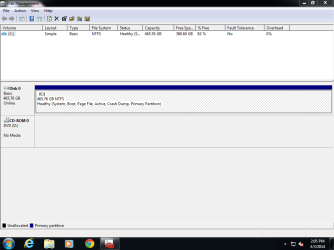
Post a picture of a full screen Disk Management window please.
My Computer
- Computer type
- PC/Desktop
- Computer Manufacturer/Model Number
- Lenovo IdeaCenter 450
- OS
- Windows 10 Pro X64
- CPU
- Intel Quad Core i7-4770 @ 3.4Ghz
- Memory
- 16.0GB PC3-12800 DDR3 SDRAM 1600 MHz
- Graphics Card(s)
- Intel Integrated HD Graphics
- Sound Card
- Realtek HD Audio
- Monitor(s) Displays
- HP 22" LCD
- Screen Resolution
- 1680 x 1050
- Hard Drives
- 250GB Samsung EVO SATA-3 SSD
2TB Seagate ST2000DM001 SATA-2
1.5TB Seagate ST3150041AS SATA
- Keyboard
- Dell USB
- Mouse
- Lenovo USB
- Internet Speed
- Cable via Road Runner 3MB Upload, 30MB Download
- Antivirus
- Windows Defender, MBAM Pro, MBAE
- Browser
- Seamonkey
- Other Info
- UEFI/GPT
PLDS DVD-RW DH16AERSH
My Computer
- Computer type
- PC/Desktop
- OS
- Windows 8 32bit, Windows 7 Pro x64

- Local time
- 7:10 PM
- Messages
- 16,784
Be easier if you post it here:
C:\Recovery\somelongnumber\WinRE.wim
It is hidden, so you will have to go to folder options and show hidden AND protected os files.
You need to take ownership to access the folder.
C:\Recovery\somelongnumber\WinRE.wim
It is hidden, so you will have to go to folder options and show hidden AND protected os files.
You need to take ownership to access the folder.
My Computers
System One System Two
-
- Computer type
- PC/Desktop
- OS
- 7 X64
- CPU
- i5 8400
- Motherboard
- gigabyte b365m ds3h
- Memory
- 2x8gb 3200mhz
- Hard Drives
- various
- PSU
- pure power 11 400w cm
- Case
- Coolermaster
- Cooling
- cryorig m9i
-
- Computer type
- PC/Desktop
- OS
- 7x64
- CPU
- g5400
- Motherboard
- ga b365m ds3h
- Memory
- 8gb ddr4 2400
- PSU
- xfx pro 450w
This appears to be recovery environment though... I think startup repair is different because it defaults to an automatic repair window.
BTW, can this be run in VBox? That'd be cool.
BTW, can this be run in VBox? That'd be cool.
My Computer
- Computer type
- PC/Desktop
- OS
- Windows 8 32bit, Windows 7 Pro x64

You need the DVD. http://www.sevenforums.com/tutorials/681-startup-repair.html
My Computer
- Computer Manufacturer/Model Number
- HP, Dell, Gateway, Toshiba - 4 laptops and 2 desktops
- OS
- Vista, Windows7, Mint Mate, Zorin, Windows 8
- CPU
- from 1.6GHz Duo to i7
- Monitor(s) Displays
- 2x HP w2207
- Hard Drives
- 5x HDD, 7x SSD, 12x Externals
- Keyboard
- with trackball - no mices
- Mouse
- Trackball mice
- Internet Speed
- DSL 6000
- Local time
- 7:10 PM
- Messages
- 16,784
Delete what file from what image?
You can try 7zip 932 to delete things from a .wim if that is what you mean.
You can try 7zip 932 to delete things from a .wim if that is what you mean.
My Computers
System One System Two
-
- Computer type
- PC/Desktop
- OS
- 7 X64
- CPU
- i5 8400
- Motherboard
- gigabyte b365m ds3h
- Memory
- 2x8gb 3200mhz
- Hard Drives
- various
- PSU
- pure power 11 400w cm
- Case
- Coolermaster
- Cooling
- cryorig m9i
-
- Computer type
- PC/Desktop
- OS
- 7x64
- CPU
- g5400
- Motherboard
- ga b365m ds3h
- Memory
- 8gb ddr4 2400
- PSU
- xfx pro 450w
I think you are looking at a hidden partition. Is this a factory computer or custom built? If factory you are probably looking at essentially your windows disc, drivers, factory bloatware, ect all lumped together on a partition. The reason you can't get rid of it is because you have an OEM copy of windows and if you delete it you won't be able to use that copy of windows anymore. OEM is different then retail windows. Some computer companies lock the partition to the drive for a number of reasons: to force you to buy new parts from them, so you don't lose the data, because its cheaper, because they have a special arrangement with Microsoft.
You can probably remove it if you nuke the drive with Dban or repartition with Gparted in linux but you will most likely lose that copy of windows forever. The product key will sometimes only work with a certain partition.
You can probably remove it if you nuke the drive with Dban or repartition with Gparted in linux but you will most likely lose that copy of windows forever. The product key will sometimes only work with a certain partition.
My Computer
- Computer type
- PC/Desktop
- Computer Manufacturer/Model Number
- custom
- OS
- Windows 7 64-bit
- CPU
- Intel 4690K
- Motherboard
- Asus Tuf Gryphon Z97
- Memory
- Corsair Vengeance 2133
- Graphics Card(s)
- EVGA GTX1060
- Screen Resolution
- 1080p
- Hard Drives
- Crucial m500 SSD 240gb
- PSU
- EVGA
- Case
- Fractal Design
- Cooling
- H7
- Browser
- Chrome
I don't think he has a 'hidden' partition. It would have shown up in his disk management. But that only shows 1 partition, the C partition.
My Computer
- Computer Manufacturer/Model Number
- HP, Dell, Gateway, Toshiba - 4 laptops and 2 desktops
- OS
- Vista, Windows7, Mint Mate, Zorin, Windows 8
- CPU
- from 1.6GHz Duo to i7
- Monitor(s) Displays
- 2x HP w2207
- Hard Drives
- 5x HDD, 7x SSD, 12x Externals
- Keyboard
- with trackball - no mices
- Mouse
- Trackball mice
- Internet Speed
- DSL 6000
Sorry, yeah your right. I was reading multiple threads and got confused.
My Computer
- Computer type
- PC/Desktop
- Computer Manufacturer/Model Number
- custom
- OS
- Windows 7 64-bit
- CPU
- Intel 4690K
- Motherboard
- Asus Tuf Gryphon Z97
- Memory
- Corsair Vengeance 2133
- Graphics Card(s)
- EVGA GTX1060
- Screen Resolution
- 1080p
- Hard Drives
- Crucial m500 SSD 240gb
- PSU
- EVGA
- Case
- Fractal Design
- Cooling
- H7
- Browser
- Chrome
I'm trying to make it so when the "Starting Windows" screen comes up and I press ctrl alt del and it goes to startup repair, instead of displaying the auto-repair dialog, notepad launches instead. That's exactly what I want to do. The part I'm stuck at is 7-zip is giving me "No such interface supported" errors when I try to modify the wim image.
My Computer
- Computer type
- PC/Desktop
- OS
- Windows 8 32bit, Windows 7 Pro x64
- Local time
- 7:10 PM
- Messages
- 16,784
1) What are you trying delete from the wim?
2) What effect do you think it will have ?
3)Do you have even the slightest idea what you are doing?
2) What effect do you think it will have ?
3)Do you have even the slightest idea what you are doing?
My Computers
System One System Two
-
- Computer type
- PC/Desktop
- OS
- 7 X64
- CPU
- i5 8400
- Motherboard
- gigabyte b365m ds3h
- Memory
- 2x8gb 3200mhz
- Hard Drives
- various
- PSU
- pure power 11 400w cm
- Case
- Coolermaster
- Cooling
- cryorig m9i
-
- Computer type
- PC/Desktop
- OS
- 7x64
- CPU
- g5400
- Motherboard
- ga b365m ds3h
- Memory
- 8gb ddr4 2400
- PSU
- xfx pro 450w
:roflmao:
My Computer
- Computer Manufacturer/Model Number
- HP, Dell, Gateway, Toshiba - 4 laptops and 2 desktops
- OS
- Vista, Windows7, Mint Mate, Zorin, Windows 8
- CPU
- from 1.6GHz Duo to i7
- Monitor(s) Displays
- 2x HP w2207
- Hard Drives
- 5x HDD, 7x SSD, 12x Externals
- Keyboard
- with trackball - no mices
- Mouse
- Trackball mice
- Internet Speed
- DSL 6000
- Local time
- 7:10 PM
- Messages
- 16,784
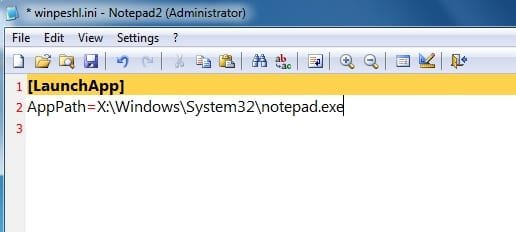
This is how:
1) Mount winre.wim read write using dism or any wim mounting tool.
2) In system32 of the mounted .wim is a file called winpeshl.ini. Rt click it, untick the read only box, Apply, Ok.
Then change the contents to this:
Save it, close the explorer window.
3) unmount the image with commit.
1) Mount winre.wim read write using dism or any wim mounting tool.
2) In system32 of the mounted .wim is a file called winpeshl.ini. Rt click it, untick the read only box, Apply, Ok.
Then change the contents to this:
Save it, close the explorer window.
3) unmount the image with commit.
My Computers
System One System Two
-
- Computer type
- PC/Desktop
- OS
- 7 X64
- CPU
- i5 8400
- Motherboard
- gigabyte b365m ds3h
- Memory
- 2x8gb 3200mhz
- Hard Drives
- various
- PSU
- pure power 11 400w cm
- Case
- Coolermaster
- Cooling
- cryorig m9i
-
- Computer type
- PC/Desktop
- OS
- 7x64
- CPU
- g5400
- Motherboard
- ga b365m ds3h
- Memory
- 8gb ddr4 2400
- PSU
- xfx pro 450w
Thank you so much SIW2. Any way to do it with 7-zip or a graphical app? I was trying to delete X:\setup.exe and replace it with notepad renamed. I can explain what I'm doing but it might not make sense:
There's a glitch in RE with notepad that allows you to modify any file on the hdd, regardless of who owns it. The file open window is the trick.
Normally, you would have to wait for start up repair to finish it's diagnostic and THEN open the diagnostic report in notepad.
Now though, I can restart the computer, press ctrl alt del and viola! Unrestricted hdd access!
There's a glitch in RE with notepad that allows you to modify any file on the hdd, regardless of who owns it. The file open window is the trick.
Normally, you would have to wait for start up repair to finish it's diagnostic and THEN open the diagnostic report in notepad.
Now though, I can restart the computer, press ctrl alt del and viola! Unrestricted hdd access!
My Computer
- Computer type
- PC/Desktop
- OS
- Windows 8 32bit, Windows 7 Pro x64
Similar threads
- Replies
- 7
- Views
- 3K

- Replies
- 8
- Views
- 911

- Replies
- 4
- Views
- 2K
