Monitor plug-n-prey driver assumes wrong refresh rate

bb42

New member
Local time
12:25 PM
Messages
7
I use a Asus PB277 monitor on the onelink+ dock of my Lenovo laptop.
Device manager uses a universal plug-n-play driver for the external monitor, and assumes the monitor can display the full resolution of 2560x1440 at 75 Hz - while the monitor offers only 60 Hz.
So when I 'extended' the desktop the monitor showed an unreadable distorted view, but I could change its refresh rate from the primary (laptop) display to 60 Hz. Then I assigned the monitor to be the primary display. But - now the laptop display is permanently on when I don't need it.
Then again, when I switch to 'Projector only' there is only the distorted monitor - obviously the driver switched to 75hz. In this status I can not change to 60 Hz because I can't read anything nor see the mouse pointer.
I asked Asus for a monitor driver that knows about the limited refresh rate - they do not seem to have one.

Is there a way to tell Windows that the external monitor is restricted to 60 Hz?
 

My Computer

Computer type
PC/Desktop
OS
Win 7 SP1 64 bit
Hi bb42,

Update System Specifications

Please update your system specifications in your UserCP => Edit System Spec setup. It will help us to help you!

This SevenForums tutorial [Published by Brink and written by CyberZeus] uses an automated tool which makes this task very easy and quick to do. Click here => System Info - See Your System Specs.

Thanks.
 

My Computer

Computer type
Laptop
Computer Manufacturer/Model Number
Fujitsu LIFEBOOK
OS
Win 7 HP SP1 64-bit Vista HB SP2 32-bit Linux Mint 18.3
CPU
Intel(R) Pentium(R) CPU P6200 @ 2.13GHz
Motherboard
FUJITSU FJNBB06
Memory
4.00 GB
Graphics Card(s)
Intel(R) Graphics Media Accelerator HD
Sound Card
[1] Realtek High Definition Audio [2] Intel(R) Display Audio
Screen Resolution
1366 x 768 x 32 bits (4294967296 colors) @ 59 Hz
Hard Drives
TOSHIBA MK5076GSX
Antivirus
AVG FREE
Hi bb42,

Just a thought...

Are there any yellow triangles in the Device Manager [Start => Control Panel => Device Manager => Expand ALL nodes]?
 

My Computer

Computer type
Laptop
Computer Manufacturer/Model Number
Fujitsu LIFEBOOK
OS
Win 7 HP SP1 64-bit Vista HB SP2 32-bit Linux Mint 18.3
CPU
Intel(R) Pentium(R) CPU P6200 @ 2.13GHz
Motherboard
FUJITSU FJNBB06
Memory
4.00 GB
Graphics Card(s)
Intel(R) Graphics Media Accelerator HD
Sound Card
[1] Realtek High Definition Audio [2] Intel(R) Display Audio
Screen Resolution
1366 x 768 x 32 bits (4294967296 colors) @ 59 Hz
Hard Drives
TOSHIBA MK5076GSX
Antivirus
AVG FREE
Hello bb42

I am not entirely convinced that the issue is due to screen resolution of the monitor. Because if this were the problem then the computer would automatically revert the resolution to a lower setting.

"When you set your monitor to a screen resolution that it can't support, the screen will go black for a few seconds while the monitor reverts back to the original resolution."
Source: windows 7 change screen resolution | microsoft

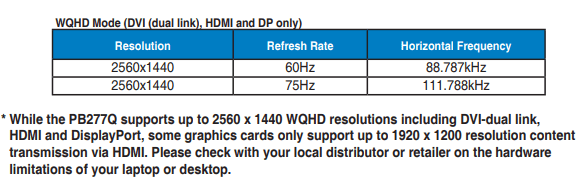
Looking at the manual of the PB277Q, I can see that the maximum refresh rate of 75Hz is supported at resolution of 2560x1440, when using DVI, HDMI or Display Port Input signals. (See pic)

Asus PB277Q monitor resolutions.PNG

So, that is not the problem from the monitors side. But it might be a problem from the graphics card or onelink+ point of view.

Which cables are you using to connect the monitor to the onelink+?
 

My Computer

Computer type
PC/Desktop
OS
Windows 7 x64, Vista x64, 8.1 smartphone
CPU
Intel E8400 65W 64-bit
Motherboard
Gigabyte EP45-UD3LR
Memory
DDR2 2 x 2GB, 1GB x 2
Graphics Card(s)
XFX Radeon HD5750
Sound Card
AMD High Definition Audio; Realtek High Definition Audio
Monitor(s) Displays
iiyama prolite X2377HDS
Screen Resolution
1920 x 1080
Hard Drives
500GB 7200 rpm Seagate ST3500413AS 16MB, 500GB 5400 rpm Toshiba MQ02ABF050H 32MB, 200GB 7200 rpm Seagate ST3200820AS 8MB, 2TB 7200 rpm Western Digital WD20EZRX 64MB
PSU
Enermax Liberty Modular
Case
Antec P193 Midi Tower
Keyboard
Mionix ZIBAL 60
Mouse
Razer USB 2.0 Diamondback Mouse or Huion Graphics Tablet
Browser
Internet Explorer, Lunascape, Firefox, Opera, Avast Safezone
Thanks for the hint.

You are right, the problem is not the monitor but the onelink+ adapter: It can only pass 60 Hz signals, but the graphics card doesn't know about this - so it's mainly a Lenovo problem.

Still, it would be desirable to change the refresh rate of monitors without switching to the respective display mode (and finding you're blind). This chicken-egg-problem is a real design flaw in Windows, IMHO.
 

My Computer

Computer type
PC/Desktop
OS
Win 7 SP1 64 bit
Windows is not detecting the presence of the onelink+, and the onelink is inherently limited to 60 Hz refresh rate - which is not very high by todays standards. You could get around the inherent limitation if you could set the refresh rate yourself, which is a problem when you set the monitor mode to 'projector only'.

There are a few options to explore from here.
1) If you use VGA cable out of the onelink+, then I think the monitor is restricted to 1920 x 1080 @ 60 Hz
2) Boot up computer in Safe Mode. Safe Mode will give you a low resolution display that does not use the third part display drivers. You might find that Safe Mode will give you access to the computer while monitor mode is 'projector only'.
3) Use third party utilities such as NirCMD's setdisplay.
nircmd.exe setdisplay 2560 1440 24 60​
 

My Computer

Computer type
PC/Desktop
OS
Windows 7 x64, Vista x64, 8.1 smartphone
CPU
Intel E8400 65W 64-bit
Motherboard
Gigabyte EP45-UD3LR
Memory
DDR2 2 x 2GB, 1GB x 2
Graphics Card(s)
XFX Radeon HD5750
Sound Card
AMD High Definition Audio; Realtek High Definition Audio
Monitor(s) Displays
iiyama prolite X2377HDS
Screen Resolution
1920 x 1080
Hard Drives
500GB 7200 rpm Seagate ST3500413AS 16MB, 500GB 5400 rpm Toshiba MQ02ABF050H 32MB, 200GB 7200 rpm Seagate ST3200820AS 8MB, 2TB 7200 rpm Western Digital WD20EZRX 64MB
PSU
Enermax Liberty Modular
Case
Antec P193 Midi Tower
Keyboard
Mionix ZIBAL 60
Mouse
Razer USB 2.0 Diamondback Mouse or Huion Graphics Tablet
Browser
Internet Explorer, Lunascape, Firefox, Opera, Avast Safezone
Thanks, Iko.


The onlink+ works fine at 2560x1440 and 60 Hz, and it connect to the Monitor via DP.


I will check the safe mode option, this could be the easiest way to solve the problem.
 

My Computer

Computer type
PC/Desktop
OS
Win 7 SP1 64 bit
Report:
- Safe Mode does not help because it hinders the external monitor to be recognized at all
- What DOES help is the 'Hotkey resolution changer' tool (HRC – HotKey Resolution Changer | funk.eu...hey, it's just me...) > assign a hot key to a any (lower) resolution and refresh rate > switch to 'projector only' > Hotkey > Monitor readable! > set to max. resolution with correct refresh > OK finally
 

My Computer

Computer type
PC/Desktop
OS
Win 7 SP1 64 bit
Back
Top