Monitor receives no signal all of the sudden

I doubt the card would even function at all if it was not plugged in securely, but I don't know that for sure.

Perhaps the card is overheating after all. Try testing your GPU temps with Speedfan.
 

My Computer My Computer

At a glance

Windows 7 Professional x64Intel i7 2600K OC'd @ 4620 MHz16GB GSkill Sniper 2133 Mhz (4x4GB)EVGA GeForce GTX 480 SuperClocked+
Computer Manufacturer/Model Number
Custom
OS
Windows 7 Professional x64
CPU
Intel i7 2600K OC'd @ 4620 MHz
Motherboard
Asus P8Z68-V Pro
Memory
16GB GSkill Sniper 2133 Mhz (4x4GB)
Graphics Card(s)
EVGA GeForce GTX 480 SuperClocked+
Sound Card
Realtek High Definition Audio
Monitor(s) Displays
2x Acer S273HLbmii 27"
Screen Resolution
2 x 1920x1080
Hard Drives
64GB Crucial M4 SSD

Storage: Hitachi 1TB 5400RPM, Samsung 1.5TB 5400RPM
PSU
Corsair HW Series 750w (modular)
Case
Cooler Master HAF 932 Advanced Blue Edition
Cooling
CM Hyper 212+ CPU cooler, 3x 230mm + 1x 140mm case fans
Keyboard
Logitech MK320 (wireless)
Mouse
Logitech MK320 (wireless)
Internet Speed
30 Mb/s : 2 Mb/s
Thanks again Jonathon,

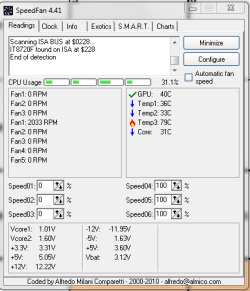
I have attached the capture of the speedfan reading.

Not sure which fan is which? Seems to be only picking up the mobo fan? I have two other case cooling fans and the graphics card fan which is still not working.

Temp 3 is concerning!

Considering the case is open and the room temp is quite cool, not sure what to make of it. Is there anyway to figure out which is temp3?
 

Attachments

  • speedfan.PNG
    speedfan.PNG
    10 KB · Views: 6

My Computer My Computer

At a glance

Windows 7 x 32 bitAMD Phenom II 810 Quad CoreCorsair 4GB (2x2GB)ASUS GTS250 1GB DDR3
Computer Manufacturer/Model Number
Chosen by me - Built by someone else ;)
OS
Windows 7 x 32 bit
CPU
AMD Phenom II 810 Quad Core
Motherboard
Gigabyte GA-MA770T
Memory
Corsair 4GB (2x2GB)
Graphics Card(s)
ASUS GTS250 1GB DDR3
Sound Card
Realtek Audio
Monitor(s) Displays
BenQ
Screen Resolution
1220 x 900
Hard Drives
Western Digital 1TB, Caviar Green
PSU
650w
Case
Antec Sonata Elite Black/Silver
Keyboard
Logitech New Touch
Mouse
Belkin
Try going to the Exotics tab, and click "Show the magic".

Perhaps that will tell you more.
 

My Computer My Computer

At a glance

Windows 7 Professional x64Intel i7 2600K OC'd @ 4620 MHz16GB GSkill Sniper 2133 Mhz (4x4GB)EVGA GeForce GTX 480 SuperClocked+
Computer Manufacturer/Model Number
Custom
OS
Windows 7 Professional x64
CPU
Intel i7 2600K OC'd @ 4620 MHz
Motherboard
Asus P8Z68-V Pro
Memory
16GB GSkill Sniper 2133 Mhz (4x4GB)
Graphics Card(s)
EVGA GeForce GTX 480 SuperClocked+
Sound Card
Realtek High Definition Audio
Monitor(s) Displays
2x Acer S273HLbmii 27"
Screen Resolution
2 x 1920x1080
Hard Drives
64GB Crucial M4 SSD

Storage: Hitachi 1TB 5400RPM, Samsung 1.5TB 5400RPM
PSU
Corsair HW Series 750w (modular)
Case
Cooler Master HAF 932 Advanced Blue Edition
Cooling
CM Hyper 212+ CPU cooler, 3x 230mm + 1x 140mm case fans
Keyboard
Logitech MK320 (wireless)
Mouse
Logitech MK320 (wireless)
Internet Speed
30 Mb/s : 2 Mb/s
Ok, here's the screen shot.

Still not sure where that temp is originating from but it is concerning.

GPU seems fine though :confused:
 

Attachments

  • speed fan exotic.PNG
    speed fan exotic.PNG
    8.2 KB · Views: 8

My Computer My Computer

At a glance

Windows 7 x 32 bitAMD Phenom II 810 Quad CoreCorsair 4GB (2x2GB)ASUS GTS250 1GB DDR3
Computer Manufacturer/Model Number
Chosen by me - Built by someone else ;)
OS
Windows 7 x 32 bit
CPU
AMD Phenom II 810 Quad Core
Motherboard
Gigabyte GA-MA770T
Memory
Corsair 4GB (2x2GB)
Graphics Card(s)
ASUS GTS250 1GB DDR3
Sound Card
Realtek Audio
Monitor(s) Displays
BenQ
Screen Resolution
1220 x 900
Hard Drives
Western Digital 1TB, Caviar Green
PSU
650w
Case
Antec Sonata Elite Black/Silver
Keyboard
Logitech New Touch
Mouse
Belkin
79C is a very high CPU temp, an unrealistic motherboard temp, absolutely not the hard drive temp, but for a GPU, it seems normal.

I honestly don't know what to say about that. :(

Perhaps the fan on the card only kicks on when the temperature reaches a certain point.

Maybe the card needed to be reseated, that's all. I guess we'll have to wait and see if the problem returns.

~JK
 

My Computer My Computer

At a glance

Windows 7 Professional x64Intel i7 2600K OC'd @ 4620 MHz16GB GSkill Sniper 2133 Mhz (4x4GB)EVGA GeForce GTX 480 SuperClocked+
Computer Manufacturer/Model Number
Custom
OS
Windows 7 Professional x64
CPU
Intel i7 2600K OC'd @ 4620 MHz
Motherboard
Asus P8Z68-V Pro
Memory
16GB GSkill Sniper 2133 Mhz (4x4GB)
Graphics Card(s)
EVGA GeForce GTX 480 SuperClocked+
Sound Card
Realtek High Definition Audio
Monitor(s) Displays
2x Acer S273HLbmii 27"
Screen Resolution
2 x 1920x1080
Hard Drives
64GB Crucial M4 SSD

Storage: Hitachi 1TB 5400RPM, Samsung 1.5TB 5400RPM
PSU
Corsair HW Series 750w (modular)
Case
Cooler Master HAF 932 Advanced Blue Edition
Cooling
CM Hyper 212+ CPU cooler, 3x 230mm + 1x 140mm case fans
Keyboard
Logitech MK320 (wireless)
Mouse
Logitech MK320 (wireless)
Internet Speed
30 Mb/s : 2 Mb/s
I was mistaken about the fan :( it has been on the whole time. I'm an idiot.

Shutdown computer. Restarted. No signal to monitor. Aargh.

I'm leaning toward faulty card (still under warranty thank goodness). If it was mobo, surely I'd be seeing the same issues with a different card.

As an aside, I thought mobos emitted a single beep when the computer is started. Mine doesn't and I don't recall if it ever did? I could be wrong though.
 
Last edited:

My Computer My Computer

At a glance

Windows 7 x 32 bitAMD Phenom II 810 Quad CoreCorsair 4GB (2x2GB)ASUS GTS250 1GB DDR3
Computer Manufacturer/Model Number
Chosen by me - Built by someone else ;)
OS
Windows 7 x 32 bit
CPU
AMD Phenom II 810 Quad Core
Motherboard
Gigabyte GA-MA770T
Memory
Corsair 4GB (2x2GB)
Graphics Card(s)
ASUS GTS250 1GB DDR3
Sound Card
Realtek Audio
Monitor(s) Displays
BenQ
Screen Resolution
1220 x 900
Hard Drives
Western Digital 1TB, Caviar Green
PSU
650w
Case
Antec Sonata Elite Black/Silver
Keyboard
Logitech New Touch
Mouse
Belkin
It depends on the motherboard, really. Mine has no speakers, so no beep codes ever.

On the family desktop, it beeps only when it encounters an error (no keyboard, hard drive, etc).
 

My Computer My Computer

At a glance

Windows 7 Professional x64Intel i7 2600K OC'd @ 4620 MHz16GB GSkill Sniper 2133 Mhz (4x4GB)EVGA GeForce GTX 480 SuperClocked+
Computer Manufacturer/Model Number
Custom
OS
Windows 7 Professional x64
CPU
Intel i7 2600K OC'd @ 4620 MHz
Motherboard
Asus P8Z68-V Pro
Memory
16GB GSkill Sniper 2133 Mhz (4x4GB)
Graphics Card(s)
EVGA GeForce GTX 480 SuperClocked+
Sound Card
Realtek High Definition Audio
Monitor(s) Displays
2x Acer S273HLbmii 27"
Screen Resolution
2 x 1920x1080
Hard Drives
64GB Crucial M4 SSD

Storage: Hitachi 1TB 5400RPM, Samsung 1.5TB 5400RPM
PSU
Corsair HW Series 750w (modular)
Case
Cooler Master HAF 932 Advanced Blue Edition
Cooling
CM Hyper 212+ CPU cooler, 3x 230mm + 1x 140mm case fans
Keyboard
Logitech MK320 (wireless)
Mouse
Logitech MK320 (wireless)
Internet Speed
30 Mb/s : 2 Mb/s
Have you tried a different lead between graphics/monitor? Could be a broken/loose wire inside.

Why don't you 'tweak' your voltages for graphic card/memory 0.1v

See how u get on.
 

My Computer My Computer

At a glance

WIN7 Ultimate 64bitAMD FX8150/Trinity A10-5700G-Skill 2400 x2 @ 1866 (both pc's)Sapphire (factory OC version) AMD 7770
Computer type
PC/Desktop
Computer Manufacturer/Model Number
D.I.Y.
OS
WIN7 Ultimate 64bit
CPU
AMD FX8150/Trinity A10-5700
Motherboard
Asus Sabertooth v.1 /Asus F2A85-M Pro
Memory
G-Skill 2400 x2 @ 1866 (both pc's)
Graphics Card(s)
Sapphire (factory OC version) AMD 7770
Sound Card
onboard
Monitor(s) Displays
T260 Samsung
Screen Resolution
1920x1080
Hard Drives
Western Digital Sata 2TB/1TB Caviar Blacks
Buffalo 1TB usb (excellent drive)
PSU
Be-Quiet 700W E-9/Be-Quiet 550W E-9(E-9 = built by FSP)
Case
Antec P183/Antec P180mini
Cooling
x2 Xigmatek SXHH7-U01 + C-Master R4-EXBB-20PK-R0 120mm Fans
Keyboard
Cherry
Mouse
MS Explorer 3.0
Other Info
LG Blu ray combo
Pioneer 207D/208 Blu ray burners
Hi Nina,
Internal speakers that produce the POST (power on self test) beeps are usually supplied, or built into the case at the time of build. If one isn't supplied with the case, they are often not added in by the system builder. Many people don't like the "annoying little beep sound" anyway so they don't miss them until they find out that they can be a handy little diagnostic tool :)
Your motherboard layout should look something like this, with an internal speaker (if supplied) connected to the pin header shown:
attachment.php

If you don't have one, I have a few spares here that I can help you with so don't stress!

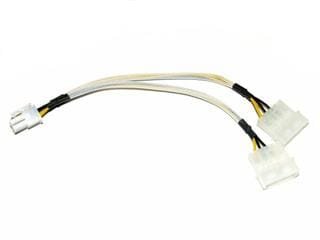
The GTS 250 cards also need additional power from a y-adaptor cable, which should have been supplied with the card, something like this:
attachment.php

Make sure that it's securely inserted into the graphics power connector at the end of the card, or it may be suffering from power issues ;) Under full load, your card should consume around 220W of power, so the 650W power supply should be enough, depending on how many other devices you have attached, it's component quality and actual power output.

I got distracted halfway through typing this post up, and my apologies if you've already tried this, but before you re-inserted your graphics card in question, did you give the contacts a little clean up first?
If not, it's pretty easy to do, but you do need to be careful...

Unplug the power cable at the back of the pc and then take the side panel off the case. Touch the bottom of the metal case to ground any static electricity from your body, then unscrew the graphics card retaining screw and remove the card while pushing the retaining clip in at the end of the PCI-E slot (if present).
Carefully put the card down flat on a non-metallic surface (anti-static bags from computer parts are handy for this).
There's a few products you can buy to clean the contacts, but if you're careful, you can use a clean pencil eraser. Gently polish the gold contacts on one side of the card, turn it over and do the other side, then use a clean, lint free cloth to wipe away any little rubber dags that are left behind.
Ground yourself again by touching the inside of the case, re-insert the card, ensuring that it's seated propoerly and the retaining clip is doing it's job, re-connect the y-adaptor power cable, connect the PSU power cable at the back, power it up and check it out.
Let us know how you get on :)

 

Attachments

  • spk.jpg
    spk.jpg
    39.6 KB · Views: 304
  • CB-6PCIE-B.jpg
    CB-6PCIE-B.jpg
    15.5 KB · Views: 303

My Computer My Computer

At a glance

XP Pro/Vista Ultimate (64)/Windows 7 Ultimate...Core 2 Duo E8500 @ stock8Gb (4 X 2Gb) Corsair Dominator 1066Mhz DDR2XFX ATI Radeon 4870 1Gb
OS
XP Pro/Vista Ultimate (64)/Windows 7 Ultimate Signature Edition(64)
CPU
Core 2 Duo E8500 @ stock
Motherboard
Gigabyte EP45-UD3R
Memory
8Gb (4 X 2Gb) Corsair Dominator 1066Mhz DDR2
Graphics Card(s)
XFX ATI Radeon 4870 1Gb
Sound Card
Onboard 7.1
Monitor(s) Displays
BenQ E2200Hd, Asus VW161D, HP L1506
Screen Resolution
1920 X 1080
Hard Drives
Seagate 7200.12 500Gb
2 X Hitachi 1Tb
PSU
CoolerMaster 650 EPD
Case
Thermaltake
Cooling
2 X Noctua 120mm's, Stock Intel
Keyboard
Logitech
Mouse
Logitech
As Orpheous mentioned, check power cables are connected securely and you have the Y cable connected to the PSU.

iseeuu mentioned the possibility of a PSU problem.
What brand is your PSU?
Some brands don't give the power they claim and can decrease over time.
If you can borrow a PSU from someone you could confirm or rule this out.

thefabe mentioned checking the cables, did you try a different one?
Are you using the HDMI, DVI or D-SUB cable?

If your monitor has one of the other connections than your using now, try another cable.
This will rule out a cable or socket problem.

You can also check for a bent pin in the cable/socket your using now. Check that there isn't anything in there that shouldn't be, dirt etc.

With other cards working in your computer and your graphics card working in other computers (what cable did they use?), appears to be cable/socket problem or some issue with the PSU or monitor.
 

My Computer My Computer

At a glance

Windows 7 Ult x64 - SP1/ Windows 8 Pro x64Intel Core i5-3570K 4.6GHz8GB (2X4GB) DDR3 1600 Corsair Vengeance CL8 1.5vSapphire HD 7770 Vapor-X OC 1GB DDR5
Computer type
PC/Desktop
Computer Manufacturer/Model Number
76~2.0
OS
Windows 7 Ult x64 - SP1/ Windows 8 Pro x64
CPU
Intel Core i5-3570K 4.6GHz
Motherboard
Gigabyte GA-Z77X UD3H, f18
Memory
8GB (2X4GB) DDR3 1600 Corsair Vengeance CL8 1.5v
Graphics Card(s)
Sapphire HD 7770 Vapor-X OC 1GB DDR5
Sound Card
Onboard VIA VT2021
Monitor(s) Displays
22" LCD Dell
Screen Resolution
1680x1050
Hard Drives
Samsung 840Pro 128GB SSD,
Seagate Barracuda 500GB SATA2 7200rpm 32MB cache, Seagate Barracuda 1TB SATA2 7200rpm 32MB cache,
PSU
Corsair HX650W
Case
Cooler Master Storm Scout
Cooling
Corsair H80 2x12cm Noctua NF P12 , 2x14cm case fans
Keyboard
Logitech Wave
Mouse
CM Sentinel
Internet Speed
Dismal
Antivirus
Avast
Browser
Opera Next
Other Info
Haswell laptop: HP Envy 17t-j, i7-4700MQ, GeForce 740M 2GB DDR3, 17.3" Full HD 1920x1080, 16GB RAM, Samsung 840 Pro 128GB, 1TB Hitachi 7200 HDD,
Desktop: eSATA ports,
External eSATA Seagate 500GB SATA2 7200rpm,
External WD USB 500GB
Back
Top