monitor resolution problem.

Aarbron

New member
Local time
5:30 AM
Messages
9
hi from greece fellas! recently i obtained a 32 inch LG tv,the model is LG32LH2000.when i plugged it in the pc the resolution was still 1920x1080 but when i reboot the computer or press "scan" in the resolution properties window,the resolution changes to 1360x768 by force and then i cant set it back to 1920x1080.in the resolution properties window it says that 1360x768 is the recommended one,all the rest are lower.i also have no idea about cables,the one i use is the classic one with the 2 little screws to the sides.1360x768 is bad,the screen looks crooked,the only solution that i found is to plug in the old screen,press "scan" and then it automatically changes the resolution back to 1920x1080 and in the end i plug in the new tv again but without pressing "scan".the problem is i cant keep the old monitor,i must find a solution for the new one.any help would be much appreciated.thank you for your time friends! :)
 

My Computer

Computer type
PC/Desktop
Computer Manufacturer/Model Number
Intel
OS
Windows 7 Ultimate x64
CPU
Intel(R) Core(TM) i7-3770 @3,40GHz
Motherboard
Asus
Memory
16GB
Graphics Card(s)
AMD Radeon HD 7800 series
Hard Drives
878GB
Antivirus
Microsoft Security Essentials
Browser
Chrome
Hi Aarbron

Welcome to the Seven Forums.

My first suggestion is to replace the VGA adapter that I'm assuming you're using. I would get an HDMI cable. According to AMD's Product Specs you have an HDMI port, as well as a DVI port, and either of these is preferable to the VGA.

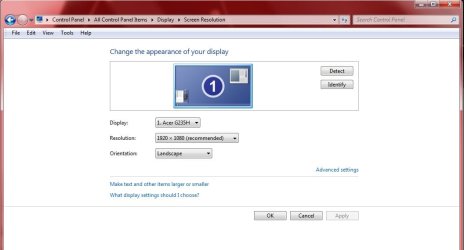
Just before you "scan", does the control panel correctly identify your monitor? Check Control Panel\All Control Panel Items\Display\Screen Resolution and tell us what is displayed there. Mine looks like the attached photo.
 

Attachments

  • screen rez.jpg
    screen rez.jpg
    38 KB · Views: 2

My Computer

Computer type
PC/Desktop
Computer Manufacturer/Model Number
iBuyPower NZXT
OS
Microsoft Windows 10 Home Build 15036
CPU
Intel(R) Core(TM) i7-860 @ 2.80GHz
Motherboard
Gigabyte Technology Co., Ltd. P55-UD3L
Memory
4.00 GB
Graphics Card(s)
NVIDIA GeForce GTX 750
Sound Card
(1) Line 6 UX2 (2) Realtek High Definition Audio
Monitor(s) Displays
23" acer
Screen Resolution
1920 x 1080 x 32 bits (4294967296 colors) @ 60 Hz
Hard Drives
(1) WDC WD5000AAKS-00D2B0 ATA Device (2) Seagate FreeAgent Go 250G USB Device
Cooling
Corsair H75 liquid cooler (Very easy to install, actually)
Internet Speed
60M cable modem-->Linksys E1200-->1Gbps net card
Browser
Chrome
Other Info
This is probably the longest I've ever had a Windows machine run without having to restore it to scratch. I'm used to restoring to "factory" about every 2 yrs. I've run with Win7 since new in 2009 and only recently (Nov, '14) restored to clean up the machine from all my 'xperimenting. LOL!! I may never need another machine.

Upgraded to 10 when it was still free, then installed 2017 update.
Hi Aarbron

Welcome to the Seven Forums.

My first suggestion is to replace the VGA adapter that I'm assuming you're using. I would get an HDMI cable. According to AMD's Product Specs you have an HDMI port, as well as a DVI port, and either of these is preferable to the VGA.

Just before you "scan", does the control panel correctly identify your monitor? Check Control Panel\All Control Panel Items\Display\Screen Resolution and tell us what is displayed there. Mine looks like the attached photo.

yes yes,when i press "scan" with the new monitor plugged in,it says "LG TV" and the recommended resolution turns into 1360x768 by force,the 1920x1080 cant be found anywhere,only lower resolutions.if i dont press "scan",the old monitor's name is in and it's "M2362D".
 

My Computer

Computer type
PC/Desktop
Computer Manufacturer/Model Number
Intel
OS
Windows 7 Ultimate x64
CPU
Intel(R) Core(TM) i7-3770 @3,40GHz
Motherboard
Asus
Memory
16GB
Graphics Card(s)
AMD Radeon HD 7800 series
Hard Drives
878GB
Antivirus
Microsoft Security Essentials
Browser
Chrome
Then my first suggestion is the next thing I'd try. Cheap HDMI cables run about $15 USD. I don't know how that converts in Greece.
 

My Computer

Computer type
PC/Desktop
Computer Manufacturer/Model Number
iBuyPower NZXT
OS
Microsoft Windows 10 Home Build 15036
CPU
Intel(R) Core(TM) i7-860 @ 2.80GHz
Motherboard
Gigabyte Technology Co., Ltd. P55-UD3L
Memory
4.00 GB
Graphics Card(s)
NVIDIA GeForce GTX 750
Sound Card
(1) Line 6 UX2 (2) Realtek High Definition Audio
Monitor(s) Displays
23" acer
Screen Resolution
1920 x 1080 x 32 bits (4294967296 colors) @ 60 Hz
Hard Drives
(1) WDC WD5000AAKS-00D2B0 ATA Device (2) Seagate FreeAgent Go 250G USB Device
Cooling
Corsair H75 liquid cooler (Very easy to install, actually)
Internet Speed
60M cable modem-->Linksys E1200-->1Gbps net card
Browser
Chrome
Other Info
This is probably the longest I've ever had a Windows machine run without having to restore it to scratch. I'm used to restoring to "factory" about every 2 yrs. I've run with Win7 since new in 2009 and only recently (Nov, '14) restored to clean up the machine from all my 'xperimenting. LOL!! I may never need another machine.

Upgraded to 10 when it was still free, then installed 2017 update.

My Computer

Computer type
PC/Desktop
Computer Manufacturer/Model Number
Intel
OS
Windows 7 Ultimate x64
CPU
Intel(R) Core(TM) i7-3770 @3,40GHz
Motherboard
Asus
Memory
16GB
Graphics Card(s)
AMD Radeon HD 7800 series
Hard Drives
878GB
Antivirus
Microsoft Security Essentials
Browser
Chrome
Turbo-X Καλώδιο HDMI should work fine. Be sure before you order that your TV has HDMI jacks. Get the length you need.

Turbo-X Καλώδιο HDMI to DVI-D M/M will work if you only have DVI on one end.
 

My Computer

Computer type
PC/Desktop
Computer Manufacturer/Model Number
iBuyPower NZXT
OS
Microsoft Windows 10 Home Build 15036
CPU
Intel(R) Core(TM) i7-860 @ 2.80GHz
Motherboard
Gigabyte Technology Co., Ltd. P55-UD3L
Memory
4.00 GB
Graphics Card(s)
NVIDIA GeForce GTX 750
Sound Card
(1) Line 6 UX2 (2) Realtek High Definition Audio
Monitor(s) Displays
23" acer
Screen Resolution
1920 x 1080 x 32 bits (4294967296 colors) @ 60 Hz
Hard Drives
(1) WDC WD5000AAKS-00D2B0 ATA Device (2) Seagate FreeAgent Go 250G USB Device
Cooling
Corsair H75 liquid cooler (Very easy to install, actually)
Internet Speed
60M cable modem-->Linksys E1200-->1Gbps net card
Browser
Chrome
Other Info
This is probably the longest I've ever had a Windows machine run without having to restore it to scratch. I'm used to restoring to "factory" about every 2 yrs. I've run with Win7 since new in 2009 and only recently (Nov, '14) restored to clean up the machine from all my 'xperimenting. LOL!! I may never need another machine.

Upgraded to 10 when it was still free, then installed 2017 update.
Turbo-X Καλώδιο HDMI should work fine. Be sure before you order that your TV has HDMI jacks. Get the length you need.

Turbo-X Καλώδιο HDMI to DVI-D M/M will work if you only have DVI on one end.

ok i checked it.both pc and tv have HDMI ports.i will buy an HDMI-to-HDMI cable and i will let you guys know.thank you again for your time. :)
 

My Computer

Computer type
PC/Desktop
Computer Manufacturer/Model Number
Intel
OS
Windows 7 Ultimate x64
CPU
Intel(R) Core(TM) i7-3770 @3,40GHz
Motherboard
Asus
Memory
16GB
Graphics Card(s)
AMD Radeon HD 7800 series
Hard Drives
878GB
Antivirus
Microsoft Security Essentials
Browser
Chrome
ok so i bought an HDMI-to-HDMI cable,one end plugged in the pc and the other end in the monitor but the screen was black and said "no signal".there is an HDMI port behind the monitor that says "HDMI DVI IN" as well as a second port to the left side of the monitor that says "HDMI IN 2".i plugged the cable in both inputs but it kept saying "no signal".any ideas? :o
 

My Computer

Computer type
PC/Desktop
Computer Manufacturer/Model Number
Intel
OS
Windows 7 Ultimate x64
CPU
Intel(R) Core(TM) i7-3770 @3,40GHz
Motherboard
Asus
Memory
16GB
Graphics Card(s)
AMD Radeon HD 7800 series
Hard Drives
878GB
Antivirus
Microsoft Security Essentials
Browser
Chrome
Do you have ANYTHING that will plug into that HDMI cable, then the tv input? In other words, will anything drive that HDMI channel?
 

My Computer

Computer type
PC/Desktop
Computer Manufacturer/Model Number
iBuyPower NZXT
OS
Microsoft Windows 10 Home Build 15036
CPU
Intel(R) Core(TM) i7-860 @ 2.80GHz
Motherboard
Gigabyte Technology Co., Ltd. P55-UD3L
Memory
4.00 GB
Graphics Card(s)
NVIDIA GeForce GTX 750
Sound Card
(1) Line 6 UX2 (2) Realtek High Definition Audio
Monitor(s) Displays
23" acer
Screen Resolution
1920 x 1080 x 32 bits (4294967296 colors) @ 60 Hz
Hard Drives
(1) WDC WD5000AAKS-00D2B0 ATA Device (2) Seagate FreeAgent Go 250G USB Device
Cooling
Corsair H75 liquid cooler (Very easy to install, actually)
Internet Speed
60M cable modem-->Linksys E1200-->1Gbps net card
Browser
Chrome
Other Info
This is probably the longest I've ever had a Windows machine run without having to restore it to scratch. I'm used to restoring to "factory" about every 2 yrs. I've run with Win7 since new in 2009 and only recently (Nov, '14) restored to clean up the machine from all my 'xperimenting. LOL!! I may never need another machine.

Upgraded to 10 when it was still free, then installed 2017 update.
nope,i only have the cable.the old one that i have plugged in right now has blue edges, (with little holes and 2 screws on the sides) one in the tv and the other one in another plug (which also has 2 screws) in the computer. :confused:
 

My Computer

Computer type
PC/Desktop
Computer Manufacturer/Model Number
Intel
OS
Windows 7 Ultimate x64
CPU
Intel(R) Core(TM) i7-3770 @3,40GHz
Motherboard
Asus
Memory
16GB
Graphics Card(s)
AMD Radeon HD 7800 series
Hard Drives
878GB
Antivirus
Microsoft Security Essentials
Browser
Chrome
I meant, something you can use to be sure the HDMI channel on the tv is working...
 

My Computer

Computer type
PC/Desktop
Computer Manufacturer/Model Number
iBuyPower NZXT
OS
Microsoft Windows 10 Home Build 15036
CPU
Intel(R) Core(TM) i7-860 @ 2.80GHz
Motherboard
Gigabyte Technology Co., Ltd. P55-UD3L
Memory
4.00 GB
Graphics Card(s)
NVIDIA GeForce GTX 750
Sound Card
(1) Line 6 UX2 (2) Realtek High Definition Audio
Monitor(s) Displays
23" acer
Screen Resolution
1920 x 1080 x 32 bits (4294967296 colors) @ 60 Hz
Hard Drives
(1) WDC WD5000AAKS-00D2B0 ATA Device (2) Seagate FreeAgent Go 250G USB Device
Cooling
Corsair H75 liquid cooler (Very easy to install, actually)
Internet Speed
60M cable modem-->Linksys E1200-->1Gbps net card
Browser
Chrome
Other Info
This is probably the longest I've ever had a Windows machine run without having to restore it to scratch. I'm used to restoring to "factory" about every 2 yrs. I've run with Win7 since new in 2009 and only recently (Nov, '14) restored to clean up the machine from all my 'xperimenting. LOL!! I may never need another machine.

Upgraded to 10 when it was still free, then installed 2017 update.
Back
Top