Monitor Woes

Campbell

New member
Local time
12:07 AM
Messages
17
I have a Samsung px23720,the problem that I am having with it is that I cant get the full screen.I am running Windows 7 ult,radeon 5780 graphics card.I have tried adjusting everything to no avail.I cant even get the get the install disc to work with my pc,as it says that it is incompatible with my system.I have been onto Samsung,their helpline leaves a lot to be desired.For a supposed 23 "monitor i'm only getting a 20" pic.I have been down every road that i can think of to try and solve this.I am by no means brilliant on a pc,but I know my way round the different settings.I hope someone can help me.thanks.
 

My Computer

Computer type
Laptop
Computer Manufacturer/Model Number
Dell
OS
windows 7
CPU
Intel(R) Core(TM) i5-2410M CPU @ 2.30GHz
Motherboard
Dell Inc. 0K4H3G .2VF4QQ1.CN4864316A0077.
Memory
2.00 GB SODIMM
Graphics Card(s)
NVIDIA GeForce GT 550M
Sound Card
Realtek High Definition Audio

My Computer

Computer type
PC/Desktop
Computer Manufacturer/Model Number
Me
OS
Win 7 Ultimate x64
CPU
FX-8350 @ 4.6 GHz so far
Motherboard
Asus M5A97 EVO
Memory
ADATA XPG V1 Series Black 8GB DDR3 1600
Graphics Card(s)
Sapphire R9 270x Dual-X
Sound Card
Xonar DGX w/ Corsair Vengence 1300
Monitor(s) Displays
Acer S232HL Abid
Screen Resolution
1920x1080
Hard Drives
120 GB OCZ Vertex 3
500 GB Seagate 7200.12
PSU
Antec Earthwatts 650W Green
Case
Antec Three Hundred
Cooling
Cooler Master 212 EVO
Keyboard
Logitech G510
Mouse
Logitech G500s
Internet Speed
35000/3000
I think he has the same monitor as Me, which is a SyncMaster PX2370 (One of Samsung's LED 23" Widescreen Monitors)

As far as full screen is concerned, Yes, please tell us how you have your monitor hooked up to your computer. I am currently using the DVI connection and getting the full screen without any issue. As far as I can tell, I am having no issues and from the looks of your card, you don't have an analog connection, but a DVI connection, so you should be able to get the full screen.
 

My Computer

Computer Manufacturer/Model Number
Alienware Area 51 Desktop and Dell Inspirion 17R (N7010)
OS
Windows 7 Ultimate x64 and Home Premium x64
CPU
Intel i7 960 (3.2 GHz Quad Core)
Motherboard
Alienware Intel based X58
Memory
12 Gigs (Triple Channel)
Graphics Card(s)
Alienware OEM nVidia GTX 560 Ti (1.25 Gig)
Sound Card
Creative Labs X-Fi Titanium
Monitor(s) Displays
Samsung PX2370 LED 23" Monitor
Screen Resolution
1920x1080
Hard Drives
2 320 Gig SATA in Raid 1 Configuration (System/App)
1 1 Tera SATA (Games)
1 1 Tera SATA (Data/Music/Videos)
PSU
750 Watt Power Supply
Case
Alienware Area 51 Desktop
Cooling
Liquid Cooled
Keyboard
Logitech G510
Mouse
Microsoft Trackball Explorer
Internet Speed
Cable
For some reason this happens within Win 7, and an ATi card. I had the same problem with my iMac 27 when going from mini HDMI to HDMI on the monitor (Dell 24"). I changed out the cable with an HDMI off the mini to a DVI on the monitor, problem solved.

The Video in my iMac is a Radeon 4850. This happens only in Boot Camp where I was running Win 7.

Hope this helps.
 

My Computer

Computer Manufacturer/Model Number
HP Pavilion a4302f
OS
Win 7 Pro x64, VM Win XP, Win7 Pro Sandbox, Kubuntu 11
CPU
AMD Athlon(tm) II X4 640 @ 3.0 Gbz
Memory
12GB 1066MHz DDR3 SDRAM - 2x4GB, 2x2GB
Graphics Card(s)
ATI Radeon HD 4350 HD Graphics/Audio with 512MB
Sound Card
Realtek High Definition Audio
Monitor(s) Displays
1. Dell 23" SP2307, 2. Mitsublishi 40" HDTV, Hannspree 25"
Screen Resolution
1. 2048x1152, 2. 1920-1080, 3. 1920x1200
Hard Drives
Int: 1 120 Gig SSD i
1 - 2.5" 500 USB External HDD
1 -1 Tb USB External HDD
Case
Mid Tower
Cooling
Standard Fans - 5 fans (very quiet)
Keyboard
Microsoft Wireless 2000
Mouse
Microsoft Wireless Mouse 5000
Internet Speed
10 Mbit (realistically 500 Kbit - 1.2 Mbit)
Other Info
Speakers - Bose Desktop (Excellent Sound)
1 external CD|DVD\Blue-ray Recorders/Players (Sony)

My Computer

Computer type
Laptop
Computer Manufacturer/Model Number
Dell
OS
windows 7
CPU
Intel(R) Core(TM) i5-2410M CPU @ 2.30GHz
Motherboard
Dell Inc. 0K4H3G .2VF4QQ1.CN4864316A0077.
Memory
2.00 GB SODIMM
Graphics Card(s)
NVIDIA GeForce GT 550M
Sound Card
Realtek High Definition Audio
For some reason this happens within Win 7, and an ATi card. I had the same problem with my iMac 27 when going from mini HDMI to HDMI on the monitor (Dell 24"). I changed out the cable with an HDMI off the mini to a DVI on the monitor, problem solved.

The Video in my iMac is a Radeon 4850. This happens only in Boot Camp where I was running Win 7.

Hope this helps.

I shall try a DVI,at present I'm using a HDMI cable.Thanks.
 

My Computer

Computer type
Laptop
Computer Manufacturer/Model Number
Dell
OS
windows 7
CPU
Intel(R) Core(TM) i5-2410M CPU @ 2.30GHz
Motherboard
Dell Inc. 0K4H3G .2VF4QQ1.CN4864316A0077.
Memory
2.00 GB SODIMM
Graphics Card(s)
NVIDIA GeForce GT 550M
Sound Card
Realtek High Definition Audio
Oops no dvi on the back of this monitor.any other suggestions.Thanks
 

My Computer

Computer type
Laptop
Computer Manufacturer/Model Number
Dell
OS
windows 7
CPU
Intel(R) Core(TM) i5-2410M CPU @ 2.30GHz
Motherboard
Dell Inc. 0K4H3G .2VF4QQ1.CN4864316A0077.
Memory
2.00 GB SODIMM
Graphics Card(s)
NVIDIA GeForce GT 550M
Sound Card
Realtek High Definition Audio

My Computer

Computer Manufacturer/Model Number
Alienware Area 51 Desktop and Dell Inspirion 17R (N7010)
OS
Windows 7 Ultimate x64 and Home Premium x64
CPU
Intel i7 960 (3.2 GHz Quad Core)
Motherboard
Alienware Intel based X58
Memory
12 Gigs (Triple Channel)
Graphics Card(s)
Alienware OEM nVidia GTX 560 Ti (1.25 Gig)
Sound Card
Creative Labs X-Fi Titanium
Monitor(s) Displays
Samsung PX2370 LED 23" Monitor
Screen Resolution
1920x1080
Hard Drives
2 320 Gig SATA in Raid 1 Configuration (System/App)
1 1 Tera SATA (Games)
1 1 Tera SATA (Data/Music/Videos)
PSU
750 Watt Power Supply
Case
Alienware Area 51 Desktop
Cooling
Liquid Cooled
Keyboard
Logitech G510
Mouse
Microsoft Trackball Explorer
Internet Speed
Cable
Tried the Dvi connection.No joy.Guess I'll just have to save up and get another monitor.Thanks for your help anyway.I have never came across this problem with any monitor before.
 

My Computer

Computer type
Laptop
Computer Manufacturer/Model Number
Dell
OS
windows 7
CPU
Intel(R) Core(TM) i5-2410M CPU @ 2.30GHz
Motherboard
Dell Inc. 0K4H3G .2VF4QQ1.CN4864316A0077.
Memory
2.00 GB SODIMM
Graphics Card(s)
NVIDIA GeForce GT 550M
Sound Card
Realtek High Definition Audio
Tried the Dvi connection.No joy.Guess I'll just have to save up and get another monitor.Thanks for your help anyway.I have never came across this problem with any monitor before.

Wait wait wait... What exactly happens when you have the DVI connector hooked up? And did you look at the monitor settings within windows?
 

My Computer

Computer Manufacturer/Model Number
Alienware Area 51 Desktop and Dell Inspirion 17R (N7010)
OS
Windows 7 Ultimate x64 and Home Premium x64
CPU
Intel i7 960 (3.2 GHz Quad Core)
Motherboard
Alienware Intel based X58
Memory
12 Gigs (Triple Channel)
Graphics Card(s)
Alienware OEM nVidia GTX 560 Ti (1.25 Gig)
Sound Card
Creative Labs X-Fi Titanium
Monitor(s) Displays
Samsung PX2370 LED 23" Monitor
Screen Resolution
1920x1080
Hard Drives
2 320 Gig SATA in Raid 1 Configuration (System/App)
1 1 Tera SATA (Games)
1 1 Tera SATA (Data/Music/Videos)
PSU
750 Watt Power Supply
Case
Alienware Area 51 Desktop
Cooling
Liquid Cooled
Keyboard
Logitech G510
Mouse
Microsoft Trackball Explorer
Internet Speed
Cable
How long ago did you buy the monitor, maybe you can still return it.
 

My Computer

Computer type
PC/Desktop
Computer Manufacturer/Model Number
Custom built Desktop(Myself) Specs below - Also Asus G53SW-A1 laptop
OS
Windows 10 Pro / OpenSUSE
CPU
Intel Core i7 4790K
Motherboard
Asus Z97-A
Memory
32GB DDR3
Graphics Card(s)
EVGA GTX 1070
Sound Card
OnBoard
Monitor(s) Displays
3 X 1080P 24" displays
Screen Resolution
1280x1050 & 1920x1080
Hard Drives
SSD: Crucial M500 128GB
HD 1: WD Caviar Black 1TB
HD 2: WD Caviar Black 2TB
HD 3: WD Caviar Blue 500GB
PSU
Corsair CX650M
Case
Corsair Obisidian 450D
Cooling
Noctua NH-D14
Keyboard
Corsair K70 Vengeance (blue switches)
Mouse
Logitech M500
Internet Speed
65/10
Antivirus
Kaskersky Internet Securty
Browser
Opera
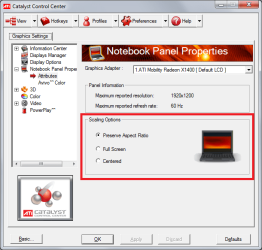
Did you try scaling options?
 

Attachments

  • Untitled.png
    Untitled.png
    33 KB · Views: 3

My Computer

Computer type
PC/Desktop
Computer Manufacturer/Model Number
Alienware Aurora ALX R4
OS
Windows 10 Pro (x64)
CPU
Intel Core i7-3930K (3.2GHz - 4.5GHz)
Motherboard
Alienware Aurora-R4 x79
Memory
4x Samsung 4GB PC3-12800 DDR3 (16GB 1600MHz)
Graphics Card(s)
Nvidia Geforce GTX 690
Sound Card
SteelSeries Siberia Elite
Monitor(s) Displays
Dell UltraSharp U3011
Screen Resolution
2560x1600
Hard Drives
Samsung 850 Pro 256 GB, Seagate 1TB Desktop Hybrid HDD, 2x Western Digital 4TB Green HDD
PSU
875W Some Dell PSU <.<
Case
Alienware Aurora ALX
Cooling
Custom Liquid Cooling (EK CPU & GPU blocks) dual EK 480RAD
Keyboard
Logitech G710+ Mechanical
Mouse
Logitech G700s
Internet Speed
Verizon Fios (50 mbps average)
Other Info
Server: Intel NUC D54250WYK: i5-4250U, 16GB, 256 GB mSATA, Windows Server 2012 R2
Tried the Dvi connection.No joy.Guess I'll just have to save up and get another monitor.Thanks for your help anyway.I have never came across this problem with any monitor before.

Wait wait wait... What exactly happens when you have the DVI connector hooked up? And did you look at the monitor settings within windows?

Hi,thanks for the reply.When I connected dvi cable,the screen shrunk with only a very small picture in the middle.That's the best way that I can describe it.Yes I have been into the windows settings,still no joy there though.
 

My Computer

Computer type
Laptop
Computer Manufacturer/Model Number
Dell
OS
windows 7
CPU
Intel(R) Core(TM) i5-2410M CPU @ 2.30GHz
Motherboard
Dell Inc. 0K4H3G .2VF4QQ1.CN4864316A0077.
Memory
2.00 GB SODIMM
Graphics Card(s)
NVIDIA GeForce GT 550M
Sound Card
Realtek High Definition Audio

My Computer

Computer type
Laptop
Computer Manufacturer/Model Number
Dell
OS
windows 7
CPU
Intel(R) Core(TM) i5-2410M CPU @ 2.30GHz
Motherboard
Dell Inc. 0K4H3G .2VF4QQ1.CN4864316A0077.
Memory
2.00 GB SODIMM
Graphics Card(s)
NVIDIA GeForce GT 550M
Sound Card
Realtek High Definition Audio
How long ago did you buy the monitor, maybe you can still return it.
Now here is a tale of woe.I bought the monitor from Amazon(not direct one of their marketplaces) In June,I work away from home,so the day before I left I ordered the monitor.By the time I got back and started the setup it was four weeks later.Yes I did complain to Amazon,I did put in appeal,because my 14 days had passed I was scuppered.I lost my appeal.I know that's pretty rotten but I'll have to live with it.So this morning it's back on the phone to Samsung.I don't expect any more joy from them either.Their customer service is bad to say the least.
Thanks for your reply.
 

My Computer

Computer type
Laptop
Computer Manufacturer/Model Number
Dell
OS
windows 7
CPU
Intel(R) Core(TM) i5-2410M CPU @ 2.30GHz
Motherboard
Dell Inc. 0K4H3G .2VF4QQ1.CN4864316A0077.
Memory
2.00 GB SODIMM
Graphics Card(s)
NVIDIA GeForce GT 550M
Sound Card
Realtek High Definition Audio
Result,Samsung are replacing the monitor within 2 days.Why couldn't they have gone down this route when I previously called them.Will keep you posted on developments.Thanks for everybody's input into trying to solve my problem.Appreciated.
 

My Computer

Computer type
Laptop
Computer Manufacturer/Model Number
Dell
OS
windows 7
CPU
Intel(R) Core(TM) i5-2410M CPU @ 2.30GHz
Motherboard
Dell Inc. 0K4H3G .2VF4QQ1.CN4864316A0077.
Memory
2.00 GB SODIMM
Graphics Card(s)
NVIDIA GeForce GT 550M
Sound Card
Realtek High Definition Audio
Back
Top