More homegroup problems

ahainline100

New member
I have a desktop and a laptop both running windows 7 ultimate and I cannot join the homegroup. I have no problem setting up the homegroup, but I cannot join with the other. It says that the computer encountered an error when trying to join. My ipv6 says no network access, I heard that this could be a problem but I am not sure. I would like for the homegroup just to work. Windows 7 troubleshooter obviously has not worked. ipv6 is enabled but still displays no network access (on both computers).
 

My Computer

OS
windows 7 ultimate
CPU
intel core i3
Motherboard
evga p55 classified 200MB
Memory
4 GB DDR3
Graphics Card(s)
ati radeon hd 4670
Monitor(s) Displays
Asus 24"
Case
Rosewill case
Also verify that the date and time are correctly set on both computers.
 

My Computer

Computer Manufacturer/Model Number
Home built
OS
Windows 7 Ultimate 32 bit
CPU
Intel(R) Pentium(R) 4 CPU 3.00GHz
Motherboard
ASUS P4P800-VM Motherboard Chipset: Intel 865G + ICH5
Memory
2.50 GB RAM
Graphics Card(s)
NVIDIA GeForce 7600 GS
Sound Card
SoundMax Integrated Digital Audio (Chip)
Monitor(s) Displays
ViewSonic VX 1962 wm
Screen Resolution
1680 X 1050
Hard Drives
Seagate Barracuda 7200.10 80 GB
ST380215A ATA Device 18.6 GB
Western Digital "My Book" external hard drive 750 GB
Cooling
Fan based
Keyboard
Microsoft Comfort Curve Keyboard 2000 v10 USB
Mouse
Logitec optic USB
Internet Speed
3.01 Mb/s download 0.64 Mb/s upload
I have a desktop and a laptop both running windows 7 ultimate and I cannot join the homegroup. I have no problem setting up the homegroup, but I cannot join with the other. It says that the computer encountered an error when trying to join. My ipv6 says no network access, I heard that this could be a problem but I am not sure. I would like for the homegroup just to work. Windows 7 troubleshooter obviously has not worked. ipv6 is enabled but still displays no network access (on both computers).

IPv6 works on the LAN only which is why it says no internet access, that is perfectly normal.

For the can't join Homegroup problem it sometimes requires a rogue file be delated.

The fix seems to be Deleting the file idstore.sst under C:\windows\serviceProfiles\LocalService\AppData\Roaming\PeerNetworking

If the file isn't there then go through this Homegroup walk through and make sure that everything is set up correctly. Pay particular attention to the registry adjustment, the time/date settings on your machines are also important as Carl pointed out earlier.

Ultimate Troubleshooting Guide for Windows 7 HomeGroup Connection Issues
 

My Computer

Computer type
PC/Desktop
Computer Manufacturer/Model Number
Home built
OS
Windows 7 Ult, Windows 8.1 Pro,
CPU
Q9650-4.275GHz, E8600 4.5GHz, E6750-3.8GHz
Motherboard
Evga 780i FTW
Memory
G.Skill PC2 9600 1200Mhz 5 5 5 15 2T
Graphics Card(s)
GTX480
Sound Card
Asus Xonar D2
Monitor(s) Displays
HannsG
Screen Resolution
1680X1050
Hard Drives
GSkill Phoenix Pro 120GB SSD
PSU
ThermalTake Toughpower 1000Watt modular
Case
ThermalTake XaserV
Cooling
Xigmatek S1283
Keyboard
Logitech G15
Mouse
Logitech G9
Internet Speed
T1
Ok. I am still not able to connect.

I deleted said file on both computers:

C:\windows\serviceProfiles\LocalService\AppData\Roaming\PeerNetworking

I have also gone through all of the steps on that troubleshooting guide:

Ultimate Troubleshooting Guide for Windows 7 HomeGroup Connection Issues

This includes making sure ipv6 is enabled, synchronizing the time, making sure network discovery is turned on, making sure all of the required services are turned on. Also, I am connected to the home network on both computers...the password is correct and so on.

The one thing I am not sure about is if my antivirus has a firewall that is blocking me. I am using AVG Free, and I don't think it is because I couldn't even find an option for it..but I am not 100% positive.

Still no luck. I continue to get the same message:

Homegroup encountered an error.

Here are the steps I am taking to set up the hg:

I successfully set up the homegroup on my desktop. Then on my laptop I go to the network and sharing center, click on homegroup, then join now (as it detects that there is a homegroup on my home network), type in the password and click join. Then it takes a minute or two and tells me that homegroup encountered an error.

Does anyone have any other ideas?? (ps thanks for the help so far)
 

My Computer

OS
windows 7 ultimate
CPU
intel core i3
Motherboard
evga p55 classified 200MB
Memory
4 GB DDR3
Graphics Card(s)
ati radeon hd 4670
Monitor(s) Displays
Asus 24"
Case
Rosewill case
Uninstall AVG completely; you can always install it again. AVG has created problems for some folks trying to network and others have had no problem with it. At best you will be able to connect; at worst you will have eliminated AVG as the problem.
 

My Computer

Computer Manufacturer/Model Number
Home built
OS
Windows 7 Ultimate 32 bit
CPU
Intel(R) Pentium(R) 4 CPU 3.00GHz
Motherboard
ASUS P4P800-VM Motherboard Chipset: Intel 865G + ICH5
Memory
2.50 GB RAM
Graphics Card(s)
NVIDIA GeForce 7600 GS
Sound Card
SoundMax Integrated Digital Audio (Chip)
Monitor(s) Displays
ViewSonic VX 1962 wm
Screen Resolution
1680 X 1050
Hard Drives
Seagate Barracuda 7200.10 80 GB
ST380215A ATA Device 18.6 GB
Western Digital "My Book" external hard drive 750 GB
Cooling
Fan based
Keyboard
Microsoft Comfort Curve Keyboard 2000 v10 USB
Mouse
Logitec optic USB
Internet Speed
3.01 Mb/s download 0.64 Mb/s upload

1. First you will need to uninstall completely AVG or which ever A/V software you have installed, and I mean every last file on all machines.

2. If that doesn't work go through the check list in the link below first. Pay close attention that the Time/Date settings are in sync on all machines and also that the bios clock is in sync. Also noticed the registry adjustment which is sometimes required.

http://helpdeskgeek.com/windows-7/wi...-to-homegroup/


3. There are several reasons why you can’t access your HomeGroup. Here are the most popular reasons for not being able to connect to your HomeGroup.
If none of these troubleshooting tips work, try restarting your computer, or leave and then re-join the HomeGroup.

4. Other times there is a rogue file causing problems with Homegroups.

Open Windows explorer and navigate to the following file.

C:\Windows\ServiceProfiles\LocalService\AppData\Roaming\PeerNetworking and delete all of the files in this folder. Now restart the computer.

Go to Services again and you should be able to start 'Peer Networking Grouping' and 'Peer Name Resolution Protocol'. Restart the computer again.

When you log on this time, check the event log again, to ensure no errors concerning the two services are present and also check Services to ensure the two services concerned are running.

You should now have full functionality restored to your homegroup.


5. There are a few more things you can do if it's still not working.

Open up a command prompt and type "regedit" without the quotes then hit enter. Navigate to the following key.
[HKEY_LOCAL_MACHINE\SYSTEM\CurrentControlSet\Services\Tcpip6\Parameters]

You have to set the DisabledComponents Dword to 0

Very important> If there isn't a disabled components dword you have to create one and then set it to zero. To do this follow the next step while you are still at the same spot in the registry.

In the right pane, right-click and select New – DWORD (32-bit value) and type in it's name as> “DisabledComponents” and set its value to 0.
“0″ = Enable All IPv6 Interfaces (Default)
After that reboot your machine and see if the problem is fixed.

6. The following services need to be started for Homegroup networking to function properly. It sometimes helps to change them from Manual to Automatic.

First open a command prompt and type in services.msc then hit enter. Scroll down the list and locate the following services, right click on the service and choose properties, set the service to Automatic rather than Manual.

Right click the sevice, go to properties, make sure that all these services are started then Set to Automatic> DNS Client, Function Discovery Resource Publication, SSDP Discovery, Peer Networking Grouping,UPnP Device Host services, Homegroup listener, Homegroup provider.

For wireless connectivity with Windows 7, you need to run the network setup wizard for everything to work correctly.
 
Last edited:

My Computer

Computer type
PC/Desktop
Computer Manufacturer/Model Number
Home built
OS
Windows 7 Ult, Windows 8.1 Pro,
CPU
Q9650-4.275GHz, E8600 4.5GHz, E6750-3.8GHz
Motherboard
Evga 780i FTW
Memory
G.Skill PC2 9600 1200Mhz 5 5 5 15 2T
Graphics Card(s)
GTX480
Sound Card
Asus Xonar D2
Monitor(s) Displays
HannsG
Screen Resolution
1680X1050
Hard Drives
GSkill Phoenix Pro 120GB SSD
PSU
ThermalTake Toughpower 1000Watt modular
Case
ThermalTake XaserV
Cooling
Xigmatek S1283
Keyboard
Logitech G15
Mouse
Logitech G9
Internet Speed
T1
Ok. I completely uninstalled AVG on both machines and deleted all associated files.

I have also meticulously gone through all of the other steps listed in all of the previous posts on both systems.

It is still not working. I think I have almost tried absolutely everything. Do I need to turn off Windows firewall? That doesn't seem to make sense to me (why would Windows block itself).

Any other ideas?

At the very least this should be the most comprehensive troubleshoot for homegroup out there. :)
 

My Computer

OS
windows 7 ultimate
CPU
intel core i3
Motherboard
evga p55 classified 200MB
Memory
4 GB DDR3
Graphics Card(s)
ati radeon hd 4670
Monitor(s) Displays
Asus 24"
Case
Rosewill case
I never needed to turn off the Windows firewall and Homegroups always seems to work for me but then again I never tried installing a third party firewall or an A/V software.

Yes that list is comprehensive and it took me quite awhile to gather up all that info. In most cases going through that list will solve the problem. I suspect there is something blocking the connection but it's hard to guess at it from here when I can't even see the machine. It's probably just one small thing preventing access like a remnant from an A/V or third party firewall. It could even be a router problem but that is less likely.

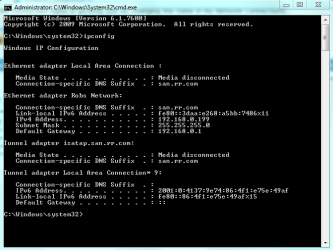
You may want to type ipconfig /all into a command prompt on all your machines to make sure they are all using the same default gateway. Resetting the router can sometimes fix these types of problems if it's working right, or even installing new firmware can help. You can post the results here so we can have a look at it. It should look similar to the picture below.
 

Attachments

  • ipconfig both connections.PNG
    ipconfig both connections.PNG
    60.2 KB · Views: 17
Last edited:

My Computer

Computer type
PC/Desktop
Computer Manufacturer/Model Number
Home built
OS
Windows 7 Ult, Windows 8.1 Pro,
CPU
Q9650-4.275GHz, E8600 4.5GHz, E6750-3.8GHz
Motherboard
Evga 780i FTW
Memory
G.Skill PC2 9600 1200Mhz 5 5 5 15 2T
Graphics Card(s)
GTX480
Sound Card
Asus Xonar D2
Monitor(s) Displays
HannsG
Screen Resolution
1680X1050
Hard Drives
GSkill Phoenix Pro 120GB SSD
PSU
ThermalTake Toughpower 1000Watt modular
Case
ThermalTake XaserV
Cooling
Xigmatek S1283
Keyboard
Logitech G15
Mouse
Logitech G9
Internet Speed
T1
Still having problems here

I have IPV6 turned on and get "no network access"

Now, here is what I know and haven't seen reported anywhere...

I had homegroup working just dandy without any problems at all. Then my router started having problems (unrelated, it is old) so I decided to replace it. I bought a new model Belkin router. Fairly top of the line. I then reconfigured everything for my new network and...yeah, homegroups started having problems.

I have 4 Windows 7 computers. Now what is *really* strange is that 2 of the 4 can see the homegroup and the other 2 cannot!! The 2 that CAN see the home network run on the wireless side of the router where as my 2 problem PCs are wired directly to the router. Weird, no?

Trust me, I have read all of this article and other articles linked in the comments. IPV6 is working but it cannot access the network on these 2 computers.

Perhaps I just need to return my router. If anyone has any other solutions I'll give them a try. For those having problems, what brand router do you have?
 

My Computer

OS
Windows 7
I also have a belkin router. That is interesting. I knew I should have gone with linksys. I will call belkin customer service and see if they know anything about it. I will post the results. Thanks for the comment!
 

My Computer

OS
windows 7 ultimate
CPU
intel core i3
Motherboard
evga p55 classified 200MB
Memory
4 GB DDR3
Graphics Card(s)
ati radeon hd 4670
Monitor(s) Displays
Asus 24"
Case
Rosewill case
Belkin

@ahainline100 yep, it's Belkin. I'm sure of it now. Last night I turned on the wireless card in on one of the computers I was having issues with. Sure enough, on the wireless interface, IPv6 works fine.
What is weird is this router replaces an old cheap Netgear router I had. Like you, should have gone with Linksys.
 

My Computer

OS
Windows 7
Back
Top