More on search hell

I don't know what I'm doing wrong :confused: I used your TryToFindThis in my Doc Library, and as soon as I typed * it came up, along with several others.........

Then I typed *
Try*, *To*, *Find*, and *This* each in succession, and the file stayed there while others that didn't match disappeared?!?
 

My Computer

Computer type
PC/Desktop
Computer Manufacturer/Model Number
Gateway DX4831-01e (Mid-Tower Desktop)
OS
Originally Win 7 Hm Prem x64 Ver 6.1.7600 Build 7601-SP1 | Upgraded to Windows 10 December 14, 2019
CPU
Intel i3 530 2.93GHz, 2933MHz 2 Cores 4 Logical Processors
Motherboard
Gateway H57M01 133 megahertz
Memory
6GB of 1,333MHz DDR3 SDRAM
Graphics Card(s)
32MB Intel Graphics Media Accelerator HD IGChip
Sound Card
Realtek High Definition Audio
Monitor(s) Displays
Gateway HX2000 20inch TFT active matrix TN
Screen Resolution
1600 x 900 x 59 hertz
Hard Drives
WDC WD10EADS-00M2B0 [HDD] (1000.20 GB) -- drive 0,
HL-DT-ST DVDRAM GH41N [CD-ROM dr]
Four card readers, and Four USB 2.0
PSU
300watts.
Case
Mid-Tower Desktop
Cooling
Stock from Gateway
Keyboard
Natural Ergonomic Keyboard 4000, see Other Info
Mouse
Orig. Gateway wore out now using Insignia USB wired optical
Internet Speed
Vz FIOS 10ms png 57.64Mbps down 65.53Mbps up Speedtest.org
Antivirus
Zamana Anti-logger with Anti-malware, MSE, Windows Firewall,
Browser
IE11.0.9600.19399-Upd ver11.0.135, Firefox 68.0.1 x64
Other Info
System Specs by Belarc.

BIOS: American Megatrends Inc. P01-A0 11/17/2009

Replaced the MS 'Natural' Standard PS/2 Enhanced 101-102 Keyboard with a new Natural Ergonomic Keyboard 4000 on August 1st 2014.

Canon Pixma MG3222 Printer.

Updated to IE11 on 12102015 | Fios Quantum Router g1100

Additional AV: SpywareBlaster, manual Mbam, SAS
Correct me if I'm wrong: Indexing is ONLY about speeding up searches. It has nothing to do with whether the files can be found or not.
 

My Computer

OS
Windows 7 Professional 64 bit
Kari, try my example in a newly created 'Kari' directory.

I've played with it a bit too, it seems like it behaves differently depending on the folder..
In my C:\Windows folder, it didn't find the file even when I typed the full "TryToFindThis" string...
Otherwise it behaves like I described initially.
 

My Computer

OS
Windows 7 Professional 64 bit
I think your only partially right. According to this:
Indexing Service is a base service that extracts content from files and constructs an indexed catalog to facilitate efficient and rapid searching.
Indexing Service (Windows)

If you go down a little further look into using filters:
Using Custom Filters with Indexing Service (Windows)

But if you look at the very top of the first link, it says:
[Indexing Service is obsolete as of Windows XP. Instead, use Windows Search.]
 

My Computer

Computer type
PC/Desktop
Computer Manufacturer/Model Number
Gateway DX4831-01e (Mid-Tower Desktop)
OS
Originally Win 7 Hm Prem x64 Ver 6.1.7600 Build 7601-SP1 | Upgraded to Windows 10 December 14, 2019
CPU
Intel i3 530 2.93GHz, 2933MHz 2 Cores 4 Logical Processors
Motherboard
Gateway H57M01 133 megahertz
Memory
6GB of 1,333MHz DDR3 SDRAM
Graphics Card(s)
32MB Intel Graphics Media Accelerator HD IGChip
Sound Card
Realtek High Definition Audio
Monitor(s) Displays
Gateway HX2000 20inch TFT active matrix TN
Screen Resolution
1600 x 900 x 59 hertz
Hard Drives
WDC WD10EADS-00M2B0 [HDD] (1000.20 GB) -- drive 0,
HL-DT-ST DVDRAM GH41N [CD-ROM dr]
Four card readers, and Four USB 2.0
PSU
300watts.
Case
Mid-Tower Desktop
Cooling
Stock from Gateway
Keyboard
Natural Ergonomic Keyboard 4000, see Other Info
Mouse
Orig. Gateway wore out now using Insignia USB wired optical
Internet Speed
Vz FIOS 10ms png 57.64Mbps down 65.53Mbps up Speedtest.org
Antivirus
Zamana Anti-logger with Anti-malware, MSE, Windows Firewall,
Browser
IE11.0.9600.19399-Upd ver11.0.135, Firefox 68.0.1 x64
Other Info
System Specs by Belarc.

BIOS: American Megatrends Inc. P01-A0 11/17/2009

Replaced the MS 'Natural' Standard PS/2 Enhanced 101-102 Keyboard with a new Natural Ergonomic Keyboard 4000 on August 1st 2014.

Canon Pixma MG3222 Printer.

Updated to IE11 on 12102015 | Fios Quantum Router g1100

Additional AV: SpywareBlaster, manual Mbam, SAS
Correct me if I'm wrong: Indexing is ONLY about speeding up searches. It has nothing to do with whether the files can be found or not.
Indexed = file is listed in search index i.e. (should be) found if search criteria matches
Not indexed = file is not listed, not found, when searching only the indexed locations.

Example (re: two different search systems as mentioned in my earlier post):
- searching from Start Menu > Search Field, only indexed files and their contents are searched i.e. a non-indexed file is not found
- Searching from Explorer window > search field, all files & their contents is (should be) searched
 

My Computer

Computer type
Laptop
Computer Manufacturer/Model Number
HP ENVY 17-1150eg
OS
Windows 10 Pro x64 EN-GB
CPU
1.6 GHz Intel Core i7-720QM Processor
Memory
6 GB
Graphics Card(s)
ATI Mobility Radeon HD 5850 Graphics
Sound Card
Beats sound system with integrated subwoofer
Monitor(s) Displays
17" laptop display, 22" LED and 32" Full HD TV through HDMI
Screen Resolution
1600*900 (1), 1920*1080 (2&3)
Hard Drives
Internal: 2 x 500 GB SATA Hard Disk Drive 7200 rpm
External: 2TB for backups, 3TB USB3 network drive for media
Cooling
As Envy runs a bit warm, I have it on a Cooler Master pad
Keyboard
Logitech diNovo Media Desktop Laser (bluetooth)
Mouse
Logitech Performance Mouse MX
Internet Speed
50/10 Mbps VDSL
Antivirus
Windows Defender 4.3.9431.0
Browser
Maxthon 3.5.2., IE11
Gil, I put the TryToFindThis folder that had a TryToFindThis file in it, in C:\Windows\

I did a search like before:
I typed *Try*, *To*, *Find*, and *This* each in succession, and the file stayed there while others that didn't match disappeared.
I found both the Folder, and the File.

When I went to its location it was ...C:\Windows\TryToFindThis
 

My Computer

Computer type
PC/Desktop
Computer Manufacturer/Model Number
Gateway DX4831-01e (Mid-Tower Desktop)
OS
Originally Win 7 Hm Prem x64 Ver 6.1.7600 Build 7601-SP1 | Upgraded to Windows 10 December 14, 2019
CPU
Intel i3 530 2.93GHz, 2933MHz 2 Cores 4 Logical Processors
Motherboard
Gateway H57M01 133 megahertz
Memory
6GB of 1,333MHz DDR3 SDRAM
Graphics Card(s)
32MB Intel Graphics Media Accelerator HD IGChip
Sound Card
Realtek High Definition Audio
Monitor(s) Displays
Gateway HX2000 20inch TFT active matrix TN
Screen Resolution
1600 x 900 x 59 hertz
Hard Drives
WDC WD10EADS-00M2B0 [HDD] (1000.20 GB) -- drive 0,
HL-DT-ST DVDRAM GH41N [CD-ROM dr]
Four card readers, and Four USB 2.0
PSU
300watts.
Case
Mid-Tower Desktop
Cooling
Stock from Gateway
Keyboard
Natural Ergonomic Keyboard 4000, see Other Info
Mouse
Orig. Gateway wore out now using Insignia USB wired optical
Internet Speed
Vz FIOS 10ms png 57.64Mbps down 65.53Mbps up Speedtest.org
Antivirus
Zamana Anti-logger with Anti-malware, MSE, Windows Firewall,
Browser
IE11.0.9600.19399-Upd ver11.0.135, Firefox 68.0.1 x64
Other Info
System Specs by Belarc.

BIOS: American Megatrends Inc. P01-A0 11/17/2009

Replaced the MS 'Natural' Standard PS/2 Enhanced 101-102 Keyboard with a new Natural Ergonomic Keyboard 4000 on August 1st 2014.

Canon Pixma MG3222 Printer.

Updated to IE11 on 12102015 | Fios Quantum Router g1100

Additional AV: SpywareBlaster, manual Mbam, SAS
Mmm.. strange.
Maybe it makes a difference whether the folder had been indexed (or is within an indexed folder).
It doesn't work for me this way.
Can anyone else try this too, please?
 

My Computer

OS
Windows 7 Professional 64 bit
I've nothing to add directly except to note that when I need to grovel through my source code files for a particular string of characters I rely on my text editor's file contents search because win search hasn't been consistent in delivering results. Shrug. Could be indexing, could be PEBKAC - but precisely because pinpointing the exact cause of the problem isn't easy, it's far less hassle to just throw up your hands in defeat and use a 3rd party tool which you know will deliver. However, I know I'd love it if you guys can get this to work.

Sorry about the diversion; carry on.
 

My Computer

Computer Manufacturer/Model Number
Self-built rig
OS
Win7 Pro x64
CPU
Koa i5-2550K
Memory
8 GB
Graphics Card(s)
Sapphire ATI 6870 1GB GDDR5
Sound Card
RealTek HD Audio / ATI HDMI Audio
Monitor(s) Displays
Samsung HDTV Monitor T23A350
Screen Resolution
1920 x 1080
Hard Drives
- SSD (C:)
- HDD (D:)
- BD-ROM (E:)
Keyboard
Logitech G110
Internet Speed
Unifi home (5mbps)
Gil I tried A new File and Folder in C:\Windows with the same result. All words or groups were found.

You might have a corrupt Index. Go to search type in index, then click on Index Options >Advance >From there you can rebuild it or troubleshoot it.
 

Attachments

  • Indexing Options.JPG
    Indexing Options.JPG
    75.8 KB · Views: 3

My Computer

Computer type
PC/Desktop
Computer Manufacturer/Model Number
Gateway DX4831-01e (Mid-Tower Desktop)
OS
Originally Win 7 Hm Prem x64 Ver 6.1.7600 Build 7601-SP1 | Upgraded to Windows 10 December 14, 2019
CPU
Intel i3 530 2.93GHz, 2933MHz 2 Cores 4 Logical Processors
Motherboard
Gateway H57M01 133 megahertz
Memory
6GB of 1,333MHz DDR3 SDRAM
Graphics Card(s)
32MB Intel Graphics Media Accelerator HD IGChip
Sound Card
Realtek High Definition Audio
Monitor(s) Displays
Gateway HX2000 20inch TFT active matrix TN
Screen Resolution
1600 x 900 x 59 hertz
Hard Drives
WDC WD10EADS-00M2B0 [HDD] (1000.20 GB) -- drive 0,
HL-DT-ST DVDRAM GH41N [CD-ROM dr]
Four card readers, and Four USB 2.0
PSU
300watts.
Case
Mid-Tower Desktop
Cooling
Stock from Gateway
Keyboard
Natural Ergonomic Keyboard 4000, see Other Info
Mouse
Orig. Gateway wore out now using Insignia USB wired optical
Internet Speed
Vz FIOS 10ms png 57.64Mbps down 65.53Mbps up Speedtest.org
Antivirus
Zamana Anti-logger with Anti-malware, MSE, Windows Firewall,
Browser
IE11.0.9600.19399-Upd ver11.0.135, Firefox 68.0.1 x64
Other Info
System Specs by Belarc.

BIOS: American Megatrends Inc. P01-A0 11/17/2009

Replaced the MS 'Natural' Standard PS/2 Enhanced 101-102 Keyboard with a new Natural Ergonomic Keyboard 4000 on August 1st 2014.

Canon Pixma MG3222 Printer.

Updated to IE11 on 12102015 | Fios Quantum Router g1100

Additional AV: SpywareBlaster, manual Mbam, SAS

Almost forgot....

If you use the troubleshooter you see when you search for index click on advance, then run as Administrator.
 

My Computer

Computer type
PC/Desktop
Computer Manufacturer/Model Number
Gateway DX4831-01e (Mid-Tower Desktop)
OS
Originally Win 7 Hm Prem x64 Ver 6.1.7600 Build 7601-SP1 | Upgraded to Windows 10 December 14, 2019
CPU
Intel i3 530 2.93GHz, 2933MHz 2 Cores 4 Logical Processors
Motherboard
Gateway H57M01 133 megahertz
Memory
6GB of 1,333MHz DDR3 SDRAM
Graphics Card(s)
32MB Intel Graphics Media Accelerator HD IGChip
Sound Card
Realtek High Definition Audio
Monitor(s) Displays
Gateway HX2000 20inch TFT active matrix TN
Screen Resolution
1600 x 900 x 59 hertz
Hard Drives
WDC WD10EADS-00M2B0 [HDD] (1000.20 GB) -- drive 0,
HL-DT-ST DVDRAM GH41N [CD-ROM dr]
Four card readers, and Four USB 2.0
PSU
300watts.
Case
Mid-Tower Desktop
Cooling
Stock from Gateway
Keyboard
Natural Ergonomic Keyboard 4000, see Other Info
Mouse
Orig. Gateway wore out now using Insignia USB wired optical
Internet Speed
Vz FIOS 10ms png 57.64Mbps down 65.53Mbps up Speedtest.org
Antivirus
Zamana Anti-logger with Anti-malware, MSE, Windows Firewall,
Browser
IE11.0.9600.19399-Upd ver11.0.135, Firefox 68.0.1 x64
Other Info
System Specs by Belarc.

BIOS: American Megatrends Inc. P01-A0 11/17/2009

Replaced the MS 'Natural' Standard PS/2 Enhanced 101-102 Keyboard with a new Natural Ergonomic Keyboard 4000 on August 1st 2014.

Canon Pixma MG3222 Printer.

Updated to IE11 on 12102015 | Fios Quantum Router g1100

Additional AV: SpywareBlaster, manual Mbam, SAS
Anak,
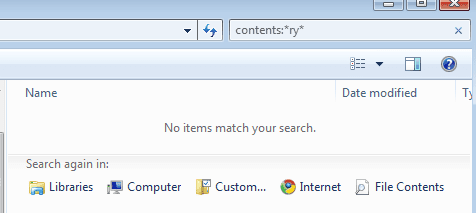
You have always tried in C:\Windows. Try (once more, if you please) in an abandoned location on your disk, or maybe simply under C:\ .

Here's a demonstration of what I'm seeing:

*Try*
TryToFindThis0.png
*ry*
TryToFindThis1.png


*sorry for the different-sized images*
This happens also if I omit the "contents:" type.

Note - I don't care about indexing, the search should take place whether this folder is indexed or not.

Gil.
 

My Computer

OS
Windows 7 Professional 64 bit

My Computer

Computer type
PC/Desktop
Computer Manufacturer/Model Number
Bruce ... somewhere in his 40's
OS
Windows 7 Ultimate 32bit SP1
CPU
Intel(R) Core(TM)2 Quad CPU @ 2.40GHz, 2400 MHz
Motherboard
INTEL/D975XBX2
Memory
4 GB
Graphics Card(s)
ATI Radeon HD 2600 Pro
Monitor(s) Displays
Samsung SyncMaster 914v
Screen Resolution
1280 x 1024
Hard Drives
2/500GB each ... ST3500630AS ATA Device.
One is not connected
PSU
Rocketfish 700 W
Case
G.Skill Gigabyte Chassis
Keyboard
Standard PS/2 Keyboard
Mouse
Microsoft PS/2 Mouse
Internet Speed
DSL
Antivirus
Avira Internet Security
Browser
IE 11
Other Info
ATI HDMI Audio
Hope I didn't leave you hanging, I had to go for a "Cat-Scan".
I also hope this is what you were after.

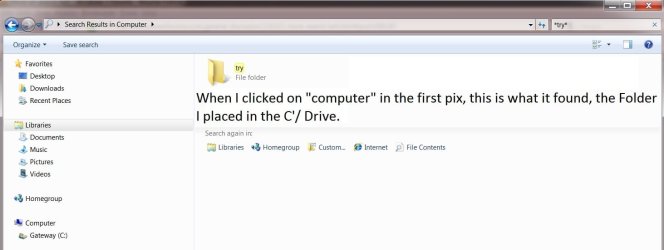
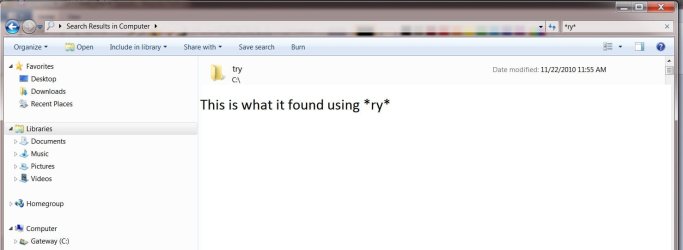
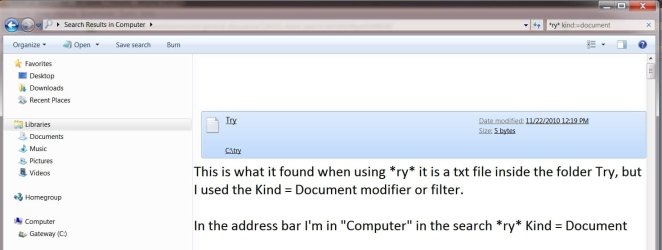
See Four pixs.
Also take note of what I wrote in each one, and check the address and search bars.

It wasn't until I clicked on computer that it found the folder, and Kind = document that it found the file inside the folder "Try".

As you can see it did find *Try* using *try* or *ry*.
 

Attachments

  • TrySearch.jpg
    TrySearch.jpg
    48.6 KB · Views: 7
  • TrySearch1.jpg
    TrySearch1.jpg
    52.2 KB · Views: 6
  • TrySearch2.jpg
    TrySearch2.jpg
    46.6 KB · Views: 7
  • TrySearch3.jpg
    TrySearch3.jpg
    62.5 KB · Views: 7

My Computer

Computer type
PC/Desktop
Computer Manufacturer/Model Number
Gateway DX4831-01e (Mid-Tower Desktop)
OS
Originally Win 7 Hm Prem x64 Ver 6.1.7600 Build 7601-SP1 | Upgraded to Windows 10 December 14, 2019
CPU
Intel i3 530 2.93GHz, 2933MHz 2 Cores 4 Logical Processors
Motherboard
Gateway H57M01 133 megahertz
Memory
6GB of 1,333MHz DDR3 SDRAM
Graphics Card(s)
32MB Intel Graphics Media Accelerator HD IGChip
Sound Card
Realtek High Definition Audio
Monitor(s) Displays
Gateway HX2000 20inch TFT active matrix TN
Screen Resolution
1600 x 900 x 59 hertz
Hard Drives
WDC WD10EADS-00M2B0 [HDD] (1000.20 GB) -- drive 0,
HL-DT-ST DVDRAM GH41N [CD-ROM dr]
Four card readers, and Four USB 2.0
PSU
300watts.
Case
Mid-Tower Desktop
Cooling
Stock from Gateway
Keyboard
Natural Ergonomic Keyboard 4000, see Other Info
Mouse
Orig. Gateway wore out now using Insignia USB wired optical
Internet Speed
Vz FIOS 10ms png 57.64Mbps down 65.53Mbps up Speedtest.org
Antivirus
Zamana Anti-logger with Anti-malware, MSE, Windows Firewall,
Browser
IE11.0.9600.19399-Upd ver11.0.135, Firefox 68.0.1 x64
Other Info
System Specs by Belarc.

BIOS: American Megatrends Inc. P01-A0 11/17/2009

Replaced the MS 'Natural' Standard PS/2 Enhanced 101-102 Keyboard with a new Natural Ergonomic Keyboard 4000 on August 1st 2014.

Canon Pixma MG3222 Printer.

Updated to IE11 on 12102015 | Fios Quantum Router g1100

Additional AV: SpywareBlaster, manual Mbam, SAS
That's ok, thanks for coming back for me :)

Are you now talking again about finding a file by its name? That's not of a problem anymore.
The problem is now finding the text *inside* the file. That's what my "TryToFindThis" example is about...
 

My Computer

OS
Windows 7 Professional 64 bit
Confusion is not a rare condition when it comes to Windows Search. I have been reading and participating in these 'what's wrong with windows 7 Search?" threads for quite some time, and there seems to be no common denominator. In my case, search is so inconsistent that I often just don't use it.

I actually have resorted to indexing all locations (except for my Acronis partition) and rebuilding the index. This has helped somewhat, but a simple filename search on a 40GB partition with 17 GB of data often returns no result, or if it does, it takes several seconds to several minutes, during which time the GROD slowly makes its way across the address bar.

It has been suggested that perhaps the number of partitions is a factor, and perhaps it is (I have 12 spread across several drives on my main machine), but the reality is that 3rd party search engines can find the exact same file in a fraction of a second.

Many report that search works fine for them simply by typing the word, string or even a few letters and can't understand why it shouldn't work for all in that same way. If only it did. One glaring attribute of Windows 7 search is its inconsistency. I have found this inconsistency demonstrated even between different machines here, although it doesn’t perform to my expectations on any of several machines I have.

I myself find it frustrating that (for me) even a simple filename search is unsuccessful (or so slow it's not worth using), even when trying different syntax and/or filters when a free search engine can find it immediately.


Ideally, I would like search to work seamlessly. I would like filename searches to immediately return results with the first letter or two, reducing the number of results as I type more letters, regardless of whether the term is a filename, partial filename or the contents of a file. And this should happen regardless of how many drives or partitions I have on a given machine. Sorry that I have no answers, but additional information may be helpful. Add me to the list of users who find Windows Search woefully inadequate.

James
 
Last edited:

My Computer

OS
Win7U 64 RTM
CPU
Q9550
Motherboard
GA-EP45-UD3R
Memory
8GB Gskill
Graphics Card(s)
ASUS|EAH4850/HTDI/1GD3/A
Sound Card
xfi Plat
Monitor(s) Displays
Dell 2405fpw
Screen Resolution
1920x1200
Hard Drives
Seagate & WD sata Drives
PSU
Antec
Case
Antec
Keyboard
MS Natural Ergonomic 4000
Mouse
Logitech MX610 USB Cordless
Personally, I've had quite good results using Windows Search. I have indexed the whole computer, and then starts the annoying setup process. You have to manually tell the search to index the file contents, too. Extension by extension, manually (as shown in this post: http://www.sevenforums.com/general-discussion/126321-more-search-hell-2.html#post1089869)

But once you have done it, search also finds a strings or partial strings in file content. Usually. Quite often...

Kari
 

My Computer

Computer type
Laptop
Computer Manufacturer/Model Number
HP ENVY 17-1150eg
OS
Windows 10 Pro x64 EN-GB
CPU
1.6 GHz Intel Core i7-720QM Processor
Memory
6 GB
Graphics Card(s)
ATI Mobility Radeon HD 5850 Graphics
Sound Card
Beats sound system with integrated subwoofer
Monitor(s) Displays
17" laptop display, 22" LED and 32" Full HD TV through HDMI
Screen Resolution
1600*900 (1), 1920*1080 (2&3)
Hard Drives
Internal: 2 x 500 GB SATA Hard Disk Drive 7200 rpm
External: 2TB for backups, 3TB USB3 network drive for media
Cooling
As Envy runs a bit warm, I have it on a Cooler Master pad
Keyboard
Logitech diNovo Media Desktop Laser (bluetooth)
Mouse
Logitech Performance Mouse MX
Internet Speed
50/10 Mbps VDSL
Antivirus
Windows Defender 4.3.9431.0
Browser
Maxthon 3.5.2., IE11
Personally, I've had quite good results using Windows Search. I have indexed the whole computer, and then starts the annoying setup process. You have to manually tell the search to index the file contents, too. Extension by extension, manually (as shown in this post: http://www.sevenforums.com/general-discussion/126321-more-search-hell-2.html#post1089869)

But once you have done it, search also finds a strings or partial strings in file content. Usually. Quite often...

Kari

I have manually set the search properties, adding file contents, but only for those extensions for which I would deem it neccessary.

And this is part of the dynamics of Windows Search. It is often stated that one must do this or that, or use this or that syntax or...(insert 'must do' here). The reality is that a Microsoft search tool built for the masses shouldn't make one jump through hoops to get results. And then, even if one has jumped through all the hoops, this does not guarantee results. All of the threads on the topic should tell us something.

Truthfully, 99% of my searches are filename or partial filename. This reality makes it all the more frustrating. I would love to be able to search from the start menu and explorer. It would make my life simpler. If only it worked. Here, not there.

James
 

My Computer

OS
Win7U 64 RTM
CPU
Q9550
Motherboard
GA-EP45-UD3R
Memory
8GB Gskill
Graphics Card(s)
ASUS|EAH4850/HTDI/1GD3/A
Sound Card
xfi Plat
Monitor(s) Displays
Dell 2405fpw
Screen Resolution
1920x1200
Hard Drives
Seagate & WD sata Drives
PSU
Antec
Case
Antec
Keyboard
MS Natural Ergonomic 4000
Mouse
Logitech MX610 USB Cordless
I accept it when my friends call me a MS fan boy nowadays. Although always using Windows, Windows 7 really bought me from Linux world back to the MS camp. Today I only run OpenSUSE on VirtualBox, more for nostalgic reasons than anything else. All my computers are protected with MSE, I use Outlook for mail and Word for writing. I update my blogs with Live Writer and Live Photo Gallery, Live Mail takes care of my "To join you have to provide an email" post. I backup all my systems with Windows Home Server and built-in backup and imaging.

I have no problems to face the reality. Certain features and elements in Windows are not ready, certain might never be. The sad truth is if you want a fast, reliable search system you have to use third party apps and solutions. Although mentioning in my previous post that I'm quite satisfied with Windows Search, it's only because I normally never searchs file contents. I use long, explaining file names and saving almost all documents also in Office OneNote, Office Journal archiving everything. I usually find what I'm looking for.

That said, even my own "field tests" reveal it clearly: comparing for instance Google Desktop Search with Windows Search, there's no doubt who's the winner. If searching file contents is essential to you, my recommendation is to install Google Desktop Search.

I'm happy with what Microsoft has provided to keep track of my documents and correspondence. That I'm happy does not mean others must be happy, too.

Kari
 

My Computer

Computer type
Laptop
Computer Manufacturer/Model Number
HP ENVY 17-1150eg
OS
Windows 10 Pro x64 EN-GB
CPU
1.6 GHz Intel Core i7-720QM Processor
Memory
6 GB
Graphics Card(s)
ATI Mobility Radeon HD 5850 Graphics
Sound Card
Beats sound system with integrated subwoofer
Monitor(s) Displays
17" laptop display, 22" LED and 32" Full HD TV through HDMI
Screen Resolution
1600*900 (1), 1920*1080 (2&3)
Hard Drives
Internal: 2 x 500 GB SATA Hard Disk Drive 7200 rpm
External: 2TB for backups, 3TB USB3 network drive for media
Cooling
As Envy runs a bit warm, I have it on a Cooler Master pad
Keyboard
Logitech diNovo Media Desktop Laser (bluetooth)
Mouse
Logitech Performance Mouse MX
Internet Speed
50/10 Mbps VDSL
Antivirus
Windows Defender 4.3.9431.0
Browser
Maxthon 3.5.2., IE11
James Colbert,
I agree Windows search in my opinion is woeful. After much effort I could not resolve the issues. More importantly if I "fix" it, I no longer trust it.
It was time to go third party. I use "Agent Ransack" - free, nonindexed and great.
It will allow multiple levels of search complexity including complex Boolean searches.

example at start of thread:
Filename: persist

Location: c:\windows\logs simple browse to folder

4 occurrences found < 1 sec
searched
c:\windows
51 items found 37 secs.

Found an obscure string contained in 900MB of pdfs in 2 min.

Spend 30 min download it, try it.
 

My Computer

Computer type
PC/Desktop
Computer Manufacturer/Model Number
Own build
OS
Windows 7x64 Home Premium SP1
CPU
Intel i7 2600k
Motherboard
ASUS P8Z68 Deluxe
Memory
G.Skill Ripjaws (DDR3-1600) 2x4GB
Graphics Card(s)
Nvidia GeForce GTS 450; Intel HD Graphics 3000(GT2+)
Monitor(s) Displays
Dell Ultrasharp IPS panel U2311H, Samsung SyncMaster P2350
Screen Resolution
1920x1080
Hard Drives
Samsung 850 Pro SSD 256GB, Samsung SSD 840 120GB, Seagates 1TB Barracuda ST31000528AS x2
PSU
Seasonic M12II 520W
Case
Lian Li Lancool PC-K60
Cooling
Case: 1x120mm, 3x140mm CPU: Hyper 212+
Keyboard
Logitech MK520 (wireless)
Mouse
Logitech MK520
Internet Speed
6-7 Mbps
Antivirus
Norton Security Premium, Malwarebytes on 2 (MSE on 3rd PC)
Browser
FireFox
Other Info
Audio: Logitech Z523 2.1
Just to add on to mjf's post...I also have used Agent Ransack and found it to be a great program. They now have rebranded it and call it FileLocator Lite...From Web site
FileLocator Lite is a rebranding of Agent Ransack for corporate environments. It has exactly the same functionality but with a different name and logo.
you can download it => FileLocator Lite - Free File Searching Utility
 

My Computer

Computer Manufacturer/Model Number
Dell Optiplex GX620
OS
Windows 7 Ultimate
CPU
Pentium D 2.80GHz
Memory
4.00 GB
Graphics Card(s)
1.00 GB nVidia GeForce 9500GT
Monitor(s) Displays
Dual - 23" Samsung P2370 & 22" Samsung 2232GW
Hard Drives
c: 250 GB
d: 320 GB
USB External 1.0 TB
Keyboard
Logitech Illuminated \ Logitech DiNovo Edge
Mouse
Logitech Trackman
Internet Speed
DSL
Back
Top