More on search hell

I accept it when my friends call me a MS fan boy nowadays.

Nothing wrong with that. :geek:


Although mentioning in my previous post that I'm quite satisfied with Windows Search, it's only because I normally never searchs file contents. I use long, explaining file names and saving almost all documents also in Office OneNote, Office Journal archiving everything. I usually find what I'm looking for.

And maybe this is a clue of sorts. Perhaps the inconsistencies are in some way related to different file management styles. My several partitions, saving files in non-default locations, using a myriad of different programs (although Word and OneNote as well), may somehow 'throw a wrench in the works'.

Obviously, changing file management styles or 'user technique' is not a solution, and this is speculation in its entirety, but logically, there has to be a reason why it works better for some than others. :shock:


That said, even my own "field tests" reveal it clearly: comparing for instance Google Desktop Search with Windows Search, there's no doubt who's the winner. If searching file contents is essential to you, my recommendation is to install Google Desktop Search.

I hear that GDS is fast and efficient, but I have concerns regarding privacy with Google.

I'm happy with what Microsoft has provided to keep track of my documents and correspondence. That I'm happy does not mean others must be happy, too.

Nor would I assume so. I want to be happy with WS. In fact, my participation in this thread is an attempt of sorts to figure out how to be happy. :)

James
 

My Computer

OS
Win7U 64 RTM
CPU
Q9550
Motherboard
GA-EP45-UD3R
Memory
8GB Gskill
Graphics Card(s)
ASUS|EAH4850/HTDI/1GD3/A
Sound Card
xfi Plat
Monitor(s) Displays
Dell 2405fpw
Screen Resolution
1920x1200
Hard Drives
Seagate & WD sata Drives
PSU
Antec
Case
Antec
Keyboard
MS Natural Ergonomic 4000
Mouse
Logitech MX610 USB Cordless
James, to avoid misinterpretations: I agree with about everything you've said :)
 

My Computer

Computer type
Laptop
Computer Manufacturer/Model Number
HP ENVY 17-1150eg
OS
Windows 10 Pro x64 EN-GB
CPU
1.6 GHz Intel Core i7-720QM Processor
Memory
6 GB
Graphics Card(s)
ATI Mobility Radeon HD 5850 Graphics
Sound Card
Beats sound system with integrated subwoofer
Monitor(s) Displays
17" laptop display, 22" LED and 32" Full HD TV through HDMI
Screen Resolution
1600*900 (1), 1920*1080 (2&3)
Hard Drives
Internal: 2 x 500 GB SATA Hard Disk Drive 7200 rpm
External: 2TB for backups, 3TB USB3 network drive for media
Cooling
As Envy runs a bit warm, I have it on a Cooler Master pad
Keyboard
Logitech diNovo Media Desktop Laser (bluetooth)
Mouse
Logitech Performance Mouse MX
Internet Speed
50/10 Mbps VDSL
Antivirus
Windows Defender 4.3.9431.0
Browser
Maxthon 3.5.2., IE11
I agree Windows search in my opinion is woeful. After much effort I could not resolve the issues. More importantly if I "fix" it, I no longer trust it.
It was time to go third party. I use "Agent Ransack" - free, nonindexed and great.
It will allow multiple levels of search complexity including complex Boolean searches.


Spend 30 min download it, try it.

Actually, it was your commitment to Agent Ransack that prompted me to download it (although I haven't gotten around to trying it yet). Any product that someone believes in as much as you do has to be worth a try. :geek:

James


Thanks for the link, dobhar. :)
 

My Computer

OS
Win7U 64 RTM
CPU
Q9550
Motherboard
GA-EP45-UD3R
Memory
8GB Gskill
Graphics Card(s)
ASUS|EAH4850/HTDI/1GD3/A
Sound Card
xfi Plat
Monitor(s) Displays
Dell 2405fpw
Screen Resolution
1920x1200
Hard Drives
Seagate & WD sata Drives
PSU
Antec
Case
Antec
Keyboard
MS Natural Ergonomic 4000
Mouse
Logitech MX610 USB Cordless
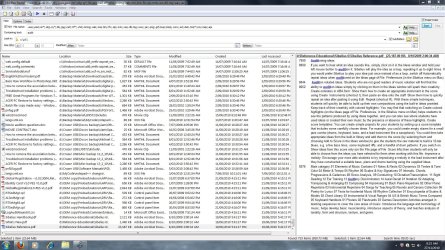
Same here, downloaded Agent Ransack and had it pass my "TryToFindThis" test. It did it without even blinking.
So for now, Ransack it is for me.

Thanks all for your wise words!
 

My Computer

OS
Windows 7 Professional 64 bit
Thought's on “Search Hell”

[FONT=Verdana, sans-serif]When I first attempted to answer gilmoses thread '[/FONT]More on search hell' I had limited knowledge on how Windows 7 performed searches. I usually just used the Start Menu >Search, and that was sufficient enough for me, although, I did notice peculiarities. Such as, no items to view when, like gilmoses I knew without a doubt the file existed.

As the thread evolved it became apparent that I was somewhat out of my league when using search in the upper right hand corner of (WE) Windows Explorer, but I do use that search box almost exclusively when using my Browsers, but that is like comparing apples to oranges.
So in order to learn more about how this style of search was used I made efforts to understand gilmoses by trying examples of searches he was trying to accomplish.

At first it seemed that I was able to find obscure words saved in Files located in obscure places on my HDD, but as I practiced more with searching by using the WE search box I ran into the same difficulties that everyone else was experiencing, and I do mean anyone that uses Windows7.

Search for “win7 search” on the web, and it will return tens of millions of hits of users that are having problems with the way Windows7 searches.
[FONT=Verdana, sans-serif]
What was Microsoft thinking when they let their search engine evolve the way it did? The answer is [/FONT]Advanced Query Syntax.
[FONT=Verdana, sans-serif]In Windows 7, getting the best out of the built-in search requires becoming familiar with (AQS) the Advanced Query Syntax system, by learning how to use the many syntax involved, and there is a reason behind the concept.[/FONT]

Explained here:
Why Windows 7 search is the way it is*|*The Long Climb
There is a link to Mike Halsey's Free PDF Guide to windows 7 Search on this page.

Or a direct link here:
http://www.thelongclimb.com/win7powersearch.pdf

[FONT=Verdana, sans-serif]Another short explanation here:[/FONT]
Become a Windows Search ninja with Advanced Query Syntax | Ed Bott's Windows Expertise

[FONT=Verdana, sans-serif]It is like anything else we attempt to use that we are unfamiliar with, it takes time to learn the new system.[/FONT]

[FONT=Verdana, sans-serif]If all you've ever driven was a car with an automatic transmission, and then bought one with a manual transmission, it took time to learn how to shift it.....Smoothly. [/FONT]
[FONT=Verdana, sans-serif]All my life I have had manual's. With my first auto, it took me a week to stop raising my left foot when coming to a stop.[/FONT]

[FONT=Verdana, sans-serif]So if you don't want to learn how to drive, you'll have to use a third-party search utility.[/FONT]
 

My Computer

Computer type
PC/Desktop
Computer Manufacturer/Model Number
Gateway DX4831-01e (Mid-Tower Desktop)
OS
Originally Win 7 Hm Prem x64 Ver 6.1.7600 Build 7601-SP1 | Upgraded to Windows 10 December 14, 2019
CPU
Intel i3 530 2.93GHz, 2933MHz 2 Cores 4 Logical Processors
Motherboard
Gateway H57M01 133 megahertz
Memory
6GB of 1,333MHz DDR3 SDRAM
Graphics Card(s)
32MB Intel Graphics Media Accelerator HD IGChip
Sound Card
Realtek High Definition Audio
Monitor(s) Displays
Gateway HX2000 20inch TFT active matrix TN
Screen Resolution
1600 x 900 x 59 hertz
Hard Drives
WDC WD10EADS-00M2B0 [HDD] (1000.20 GB) -- drive 0,
HL-DT-ST DVDRAM GH41N [CD-ROM dr]
Four card readers, and Four USB 2.0
PSU
300watts.
Case
Mid-Tower Desktop
Cooling
Stock from Gateway
Keyboard
Natural Ergonomic Keyboard 4000, see Other Info
Mouse
Orig. Gateway wore out now using Insignia USB wired optical
Internet Speed
Vz FIOS 10ms png 57.64Mbps down 65.53Mbps up Speedtest.org
Antivirus
Zamana Anti-logger with Anti-malware, MSE, Windows Firewall,
Browser
IE11.0.9600.19399-Upd ver11.0.135, Firefox 68.0.1 x64
Other Info
System Specs by Belarc.

BIOS: American Megatrends Inc. P01-A0 11/17/2009

Replaced the MS 'Natural' Standard PS/2 Enhanced 101-102 Keyboard with a new Natural Ergonomic Keyboard 4000 on August 1st 2014.

Canon Pixma MG3222 Printer.

Updated to IE11 on 12102015 | Fios Quantum Router g1100

Additional AV: SpywareBlaster, manual Mbam, SAS
A very good post, Anak. Repping you as soon as I've finished typing this ;)

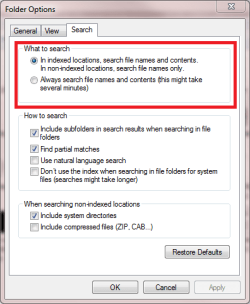
I think I am quite experienced Search user. I normally find what I'm looking for. But, as you, me too wondered why this was so difficult. Then yesterday evening I realized one thing, one simple click that could cause or solve OP's problems:

Search_7.png

Then I read Brink's Search tutorials, once more. I've decided to really concentrate on this, it can not be true that Microsoft would overlook a feature this big and important. I'm willing to accept I did not know as much about Windows Search as I had thought...

Kari

Index - Enable or Disable - Vista Forums
http://www.sevenforums.com/tutorials/36599-search-windows-7-a.html
http://www.sevenforums.com/tutorials/117952-search-have-more-accurate-search-results.html
 

My Computer

Computer type
Laptop
Computer Manufacturer/Model Number
HP ENVY 17-1150eg
OS
Windows 10 Pro x64 EN-GB
CPU
1.6 GHz Intel Core i7-720QM Processor
Memory
6 GB
Graphics Card(s)
ATI Mobility Radeon HD 5850 Graphics
Sound Card
Beats sound system with integrated subwoofer
Monitor(s) Displays
17" laptop display, 22" LED and 32" Full HD TV through HDMI
Screen Resolution
1600*900 (1), 1920*1080 (2&3)
Hard Drives
Internal: 2 x 500 GB SATA Hard Disk Drive 7200 rpm
External: 2TB for backups, 3TB USB3 network drive for media
Cooling
As Envy runs a bit warm, I have it on a Cooler Master pad
Keyboard
Logitech diNovo Media Desktop Laser (bluetooth)
Mouse
Logitech Performance Mouse MX
Internet Speed
50/10 Mbps VDSL
Antivirus
Windows Defender 4.3.9431.0
Browser
Maxthon 3.5.2., IE11
When Windows indexed search works for you then it is natural, perhaps, to think it is a user problem. After 2 months of "solid" investigation, registry fixes, index rebuilding ..... I gave up.
I resisted Agent Ransack, though recommended highly to me, because anything with such a silly name had to be a silly program. The only silly thing was the name and me for not trying it sooner. They had to change the name to FileLocator Lite for it to be embraced by the Corporate world.

Kari,
With Windows search -
I thought ticking search file names and contents (which I had done) came with a high overhead??
As you are a skilled in Windows search, I would be extremely curious to know what you thought of FileLocator Lite if you ever found the time.
 

My Computer

Computer type
PC/Desktop
Computer Manufacturer/Model Number
Own build
OS
Windows 7x64 Home Premium SP1
CPU
Intel i7 2600k
Motherboard
ASUS P8Z68 Deluxe
Memory
G.Skill Ripjaws (DDR3-1600) 2x4GB
Graphics Card(s)
Nvidia GeForce GTS 450; Intel HD Graphics 3000(GT2+)
Monitor(s) Displays
Dell Ultrasharp IPS panel U2311H, Samsung SyncMaster P2350
Screen Resolution
1920x1080
Hard Drives
Samsung 850 Pro SSD 256GB, Samsung SSD 840 120GB, Seagates 1TB Barracuda ST31000528AS x2
PSU
Seasonic M12II 520W
Case
Lian Li Lancool PC-K60
Cooling
Case: 1x120mm, 3x140mm CPU: Hyper 212+
Keyboard
Logitech MK520 (wireless)
Mouse
Logitech MK520
Internet Speed
6-7 Mbps
Antivirus
Norton Security Premium, Malwarebytes on 2 (MSE on 3rd PC)
Browser
FireFox
Other Info
Audio: Logitech Z523 2.1
Wow, this has been both a great post and an education for many of us I'm sure. Maybe we could do with more posts like it!! :D
 

My Computer

OS
win7
Wow, this has been both a great post and an education for many of us I'm sure. Maybe we could do with more posts like it!! :D

I agree, as the whole point of the forums is to provide solutions and different views/methods of doing things. Even the experts sometimes learn something new!
 

My Computer

Computer type
PC/Desktop
Computer Manufacturer/Model Number
Virtual Machine
OS
Windows 7 Professional 32-bit SP1
CPU
AMD A4/A6
Motherboard
Intel Corporation 440BX Desktop Reference Platform
Memory
3.00GB EDO
Graphics Card(s)
VMware SVGA 3D
Sound Card
High Definition Audio Device
Monitor(s) Displays
Generic Non-PnP Monitor on VMware SVGA 3D
Screen Resolution
1440x900
Hard Drives
1 x 60GB VMware Virtual SATA Hard Drive ATA Device
Antivirus
Kaspersky Total Security
:ditto:

I realized that I had accepted the poor search capibilities in Win7, could find some things some of the time.

D/L FileLocator 64bit. Works good so far, and is fast.

Thanks for the information.
 

My Computer

Computer type
PC/Desktop
Computer Manufacturer/Model Number
76~2.0
OS
Windows 7 Ult x64 - SP1/ Windows 8 Pro x64
CPU
Intel Core i5-3570K 4.6GHz
Motherboard
Gigabyte GA-Z77X UD3H, f18
Memory
8GB (2X4GB) DDR3 1600 Corsair Vengeance CL8 1.5v
Graphics Card(s)
Sapphire HD 7770 Vapor-X OC 1GB DDR5
Sound Card
Onboard VIA VT2021
Monitor(s) Displays
22" LCD Dell
Screen Resolution
1680x1050
Hard Drives
Samsung 840Pro 128GB SSD,
Seagate Barracuda 500GB SATA2 7200rpm 32MB cache, Seagate Barracuda 1TB SATA2 7200rpm 32MB cache,
PSU
Corsair HX650W
Case
Cooler Master Storm Scout
Cooling
Corsair H80 2x12cm Noctua NF P12 , 2x14cm case fans
Keyboard
Logitech Wave
Mouse
CM Sentinel
Internet Speed
Dismal
Antivirus
Avast
Browser
Opera Next
Other Info
Haswell laptop: HP Envy 17t-j, i7-4700MQ, GeForce 740M 2GB DDR3, 17.3" Full HD 1920x1080, 16GB RAM, Samsung 840 Pro 128GB, 1TB Hitachi 7200 HDD,
Desktop: eSATA ports,
External eSATA Seagate 500GB SATA2 7200rpm,
External WD USB 500GB
Ok geeks, you are not going to like this. But please remember, this is just my personal opinion, based on the tests I've done today. No facts, just a subjective user opinion. OK?

I'll stick to Windows Search. I ran some tests and File Locator Lite is a huge disappointment. First I disconnected all external disks, leaving only my two internal HD's, C where I have Windows and Program Files (300 gigs, 160 gigs used) and D where I have ProgramData folder and user profiles (300 gigs, 250 gigs used). I also disabled indexing.

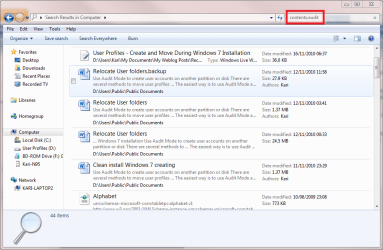
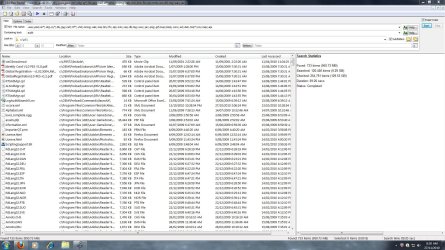
I searched the whole computer file contents to find all files where the word "Audit" appears. Search from Explorer > 2 minutes 50 seconds, 44 hits, the files I was looking among them.

Search00.png

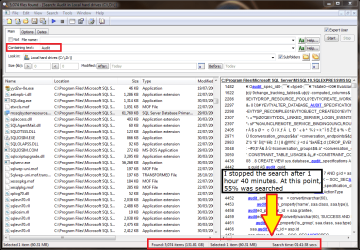
Then File Locator. I did not have enough patience to wait, I interrupted the search after 1 hour 40 minutes when it had searched just over half of my computer, finding thousands and thousands files. All hits useless; I mean, if I'm searching for a word in file contents, what the hell am I doing with all exe and dll files where File Locator finds this word?

Search1.png

Windows Search 1 - File Locator 0

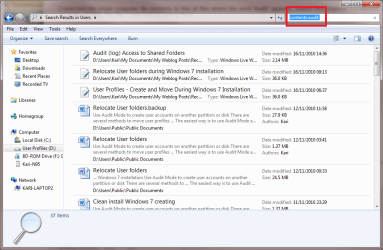
Next test. Explorer search for the same word in my user folder D:\Users\Kari (197 gigs). Windows Search 55 seconds, 37 hits, all relevant.

Search0.png

File locator:

Search2.png

Again, I had no patience to wait. I interrupted the search after 1 hour 13 minutes, when File Locator had searched about 65% of my user folder, finding over 130 files, mostly useless and irrelevant hits.

Windows Search 2 - File Locator 0

Ok, last test. Searching the same word, this time in my documents folder D:\Users\Kari\Documents (32 gigs). Windows search 7 seconds, 26 hits, all relevant. File locator 3 minutes 22 seconds, 26 hits, all relevant

Windows Search 3 - File Locator 0

Kari
 
Last edited:

My Computer

Computer type
Laptop
Computer Manufacturer/Model Number
HP ENVY 17-1150eg
OS
Windows 10 Pro x64 EN-GB
CPU
1.6 GHz Intel Core i7-720QM Processor
Memory
6 GB
Graphics Card(s)
ATI Mobility Radeon HD 5850 Graphics
Sound Card
Beats sound system with integrated subwoofer
Monitor(s) Displays
17" laptop display, 22" LED and 32" Full HD TV through HDMI
Screen Resolution
1600*900 (1), 1920*1080 (2&3)
Hard Drives
Internal: 2 x 500 GB SATA Hard Disk Drive 7200 rpm
External: 2TB for backups, 3TB USB3 network drive for media
Cooling
As Envy runs a bit warm, I have it on a Cooler Master pad
Keyboard
Logitech diNovo Media Desktop Laser (bluetooth)
Mouse
Logitech Performance Mouse MX
Internet Speed
50/10 Mbps VDSL
Antivirus
Windows Defender 4.3.9431.0
Browser
Maxthon 3.5.2., IE11
Ok geeks, you are not going to like this. But please remember, this is just my personal opinion, based on the tests I've done today. No facts, just a subjective user opinion. OK?

I'll stick to Windows Search. I run some test and File Locator Lite is a huge disappointment. First test was to disconnect all external disks, leaving only my two internal HD's, C where I have Windows and Program Files (300 gigs, 160 gigs used) and D where I have ProgramData folder and user profiles (300 gigs, 250 gigs used). I also disabled indexing.

I searched the whole computer file contents to find all files where the word "Audit" appears. Search from Explorer > 2 minutes 50 seconds, 44 hits, the files I was looking among them.

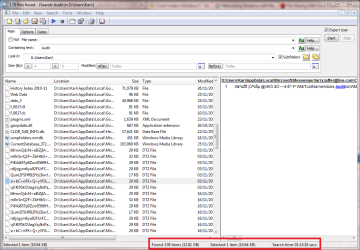
Then File Locator. I did not have enough patience to wait, I interrupted the search after 1 hour 40 minutes when it had searched just over half of my computer, finding thousands and thousands files. All hits useless; I mean, if I'm searching for a word in file contents, what the hell am I doing with all exe and dll files where File Locator finds this word?

View attachment 117841

Windows Search 1 - File Locator 0

Next test. Explorer search for the same word in my user folder D:\Users\Kari (197 gigs). Windows Search 55 seconds, 37 hits, all relevant. File locator:

View attachment 117842

Again, I had no patience to wait. I interrupted the search after 1 hour 13 minutes, when File Locator had searched about 65% of my user folder, finding over 130 files, mostly useless and irrelevant hits.

Windows Search 2 - File Locator 0

Ok, last test. Serarching the same word, this time in my documents folder D:\Users\Kari\Documents (32 gigs). Windows search 7 seconds, 26 hits, all relevant. File locator 3 minutes 22 seconds, 26 hits, all relevant

Windows Search 3 - File Locator 0

Kari

And that is why whenever the subject of Windows Search comes up on SevenForums (or anywhere else), I always try to make people understand how much better it is than the sub-standard third-party utilities.

It could stand to be tweaked a bit, but for the emmediate here and now, it's the best there is.
 

My Computer

Computer type
PC/Desktop
Computer Manufacturer/Model Number
Virtual Machine
OS
Windows 7 Professional 32-bit SP1
CPU
AMD A4/A6
Motherboard
Intel Corporation 440BX Desktop Reference Platform
Memory
3.00GB EDO
Graphics Card(s)
VMware SVGA 3D
Sound Card
High Definition Audio Device
Monitor(s) Displays
Generic Non-PnP Monitor on VMware SVGA 3D
Screen Resolution
1440x900
Hard Drives
1 x 60GB VMware Virtual SATA Hard Drive ATA Device
Antivirus
Kaspersky Total Security
Apples & Oranges

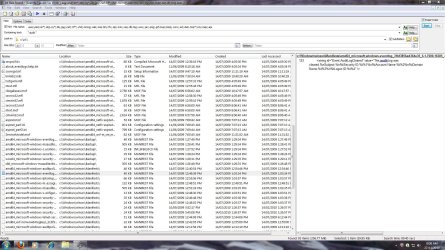
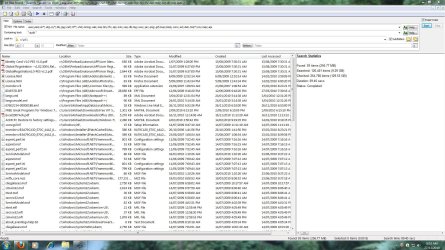
Here are the results of my tests which still convince me Agent Ransack / FileLocator Lite(FLL) is here to stay for me. Windows for me at least (and others I'm sure) is an untrusty/flaky piece of software.
I can't compare Windows non indexed content searching because I cannot get it to work.
When the test for FLL is set up as Kari did I think it unintentionally biases the result. FLL will search absolutely every file on C: & D:. I do not believe Windows has searched the contents of every file in a non indexed fashion.

My results assume a defined search criteria which exclude "silly" files for a realistic search (eg. .exe, .sys, .vhd...). I searched for the string "audit" :
(1) as an isolated word
(2) as a string either isolated or as part of another

This is an unindexed search on masses of data with many more hits than in Kari's example. The example for the isolated word "audit" is from a Manifest file !!!
Both searches took less than 10 minutes. Of course you would generally constrain your search to better suit your needs

Agent Ransack / File Locator Lite = Robust, reliable, fast(for true non indexed search), nice user interface, very good search flexibility.
 

Attachments

  • ARtest2b.JPG
    ARtest2b.JPG
    482.9 KB · Views: 6
  • ARtest2a.JPG
    ARtest2a.JPG
    329 KB · Views: 5
  • ARtest1b.JPG
    ARtest1b.JPG
    343 KB · Views: 6
  • ARtest1a.JPG
    ARtest1a.JPG
    334.3 KB · Views: 11

My Computer

Computer type
PC/Desktop
Computer Manufacturer/Model Number
Own build
OS
Windows 7x64 Home Premium SP1
CPU
Intel i7 2600k
Motherboard
ASUS P8Z68 Deluxe
Memory
G.Skill Ripjaws (DDR3-1600) 2x4GB
Graphics Card(s)
Nvidia GeForce GTS 450; Intel HD Graphics 3000(GT2+)
Monitor(s) Displays
Dell Ultrasharp IPS panel U2311H, Samsung SyncMaster P2350
Screen Resolution
1920x1080
Hard Drives
Samsung 850 Pro SSD 256GB, Samsung SSD 840 120GB, Seagates 1TB Barracuda ST31000528AS x2
PSU
Seasonic M12II 520W
Case
Lian Li Lancool PC-K60
Cooling
Case: 1x120mm, 3x140mm CPU: Hyper 212+
Keyboard
Logitech MK520 (wireless)
Mouse
Logitech MK520
Internet Speed
6-7 Mbps
Antivirus
Norton Security Premium, Malwarebytes on 2 (MSE on 3rd PC)
Browser
FireFox
Other Info
Audio: Logitech Z523 2.1
My last, third test alone shows the difference, doing it very clearly.

My Documents folder has ONLY relevant files, regarding this search test. I save there nothing else. I mean, at least in my case the Documents folder only includes MS Office files, PDF-files, text files and so on. No pics, videos, music, nothing more than documents.

And the results? Quoting my own post:
...
Ok, last test. Searching the same word, this time in my documents folder D:\Users\Kari\Documents (32 gigs). Windows search 7 seconds, 26 hits, all relevant. File locator 3 minutes 22 seconds, 26 hits, all relevant

Windows Search 3 - File Locator 0
This was the only of my three tests where both found the same files. In my other tests, I didn't exclude any files from File Locator search because I also didn't exclude files from Windows search. Same terms for both. You call it biased when I use same terms and parameters on both searches, at the same time you are not biased when you have to use quite a lot extra time when excluding files from your File Locator search. Where's the logics of that?

BTW, you have to use even more time if you want to do it as easy as it is with Windows Search. Your search results include for instance control panel cpl-files, at least one movie clip, some language files for an application etc. so there's quite a lot to exclude, to type.

Besides, how many gigs did you search in that 10 minutes? My tests were searching over 400 gigs:

Laptop-2_hard_disks.PNG

When search takes as long as it took using File Locator searching just over 400 gigs, or as in my last test only 32 gigs of documents, how long it would take when I have my 3.5+ teras external disks connected?

Have you even tried turning Windows indexing off and then using "contents:" parameter?

Kari
 

My Computer

Computer type
Laptop
Computer Manufacturer/Model Number
HP ENVY 17-1150eg
OS
Windows 10 Pro x64 EN-GB
CPU
1.6 GHz Intel Core i7-720QM Processor
Memory
6 GB
Graphics Card(s)
ATI Mobility Radeon HD 5850 Graphics
Sound Card
Beats sound system with integrated subwoofer
Monitor(s) Displays
17" laptop display, 22" LED and 32" Full HD TV through HDMI
Screen Resolution
1600*900 (1), 1920*1080 (2&3)
Hard Drives
Internal: 2 x 500 GB SATA Hard Disk Drive 7200 rpm
External: 2TB for backups, 3TB USB3 network drive for media
Cooling
As Envy runs a bit warm, I have it on a Cooler Master pad
Keyboard
Logitech diNovo Media Desktop Laser (bluetooth)
Mouse
Logitech Performance Mouse MX
Internet Speed
50/10 Mbps VDSL
Antivirus
Windows Defender 4.3.9431.0
Browser
Maxthon 3.5.2., IE11
I'm going to need some time to digest your response. Just a couple of things.
Any reference by me to the word "bias" is used in the context of experimental bias and has no personal reference to you. We are both working on two different computers and datasets. My search statistics are in the screenshots.

You mention relevance of the finds of the string "audit". This confuses me since you either find the string in the document or not.

With (Agent Ransack)AR you can save search contexts. The file exclusion list is a user (me) defined context - you don't manually setup a context each time.

When you say:
"Have you even tried turning Windows indexing off and then using "contents:" parameter?"
Yes
I've tried the exercise on my D:\ drive which is not indexed.
with AR I have a directory with around 3500 source code subroutines
4 of them have " mjf modified x/x/x " in them and
finds the 4 in <1 sec.

Windows non indexed search finds nothing. It will find file names without any problem but not contents.

PS: I'm pretty much at the stage where:
(1) For me and others Windows search is flawed. Or we cannot get it to work for us.
(2) I don't shower praise on a program lightly and Agent Ransack for me gets full marks for what it is. It suits me.
(3) If you think Windows search is the best thing out since sliced bread and Agent Ransack is Micky Mouse - fine, I really don't care.
 
Last edited:

My Computer

Computer type
PC/Desktop
Computer Manufacturer/Model Number
Own build
OS
Windows 7x64 Home Premium SP1
CPU
Intel i7 2600k
Motherboard
ASUS P8Z68 Deluxe
Memory
G.Skill Ripjaws (DDR3-1600) 2x4GB
Graphics Card(s)
Nvidia GeForce GTS 450; Intel HD Graphics 3000(GT2+)
Monitor(s) Displays
Dell Ultrasharp IPS panel U2311H, Samsung SyncMaster P2350
Screen Resolution
1920x1080
Hard Drives
Samsung 850 Pro SSD 256GB, Samsung SSD 840 120GB, Seagates 1TB Barracuda ST31000528AS x2
PSU
Seasonic M12II 520W
Case
Lian Li Lancool PC-K60
Cooling
Case: 1x120mm, 3x140mm CPU: Hyper 212+
Keyboard
Logitech MK520 (wireless)
Mouse
Logitech MK520
Internet Speed
6-7 Mbps
Antivirus
Norton Security Premium, Malwarebytes on 2 (MSE on 3rd PC)
Browser
FireFox
Other Info
Audio: Logitech Z523 2.1
I'm going to need some time to digest your response. Just a couple of things.
Any reference by me to the word "bias" is used in the context of experimental bias and has no personal reference to you. We are both working on two different computers and datasets. My search statistics are in the screenshots.
My misinterpretation. I'm sorry for that.

You mention relevance of the finds of the string "audit". This confuses me since you either find the string in the document or not.
English not being my native language, not even second language, I make this kind of remarks quite often. I mean something and say something else.

What I meant with relevant files regarding the last of my three small tests was that because I only have certain types of files in my Documents folder, only filetypes where text strings appear and are relevant to and should be included in search, the search environment was at least in my opinion equal for both search apps. No files to exclude, no exe, dll, com and so on files to go unnecessary through. This, I think, makes this last of my three tests more balanced giving really something to compare.

With (Agent Ransack)AR you can save search contexts. The file exclusion list is a user (me) defined context - you don't manually setup a context each time.
Yes, that is only logical. However, this is one step you don't have to do with Windows Search.

When you say:
"Have you even tried turning Windows indexing off and then using "contents:" parameter?"
Yes
I've tried the exercise on my D:\ drive which is not indexed.
with AR I have a directory with around 3500 source code subroutines
4 of them have " mjf modified x/x/x " in them and
finds the 4 in <1 sec.

Windows non indexed search finds nothing. It will find file names without any problem but not contents.
That I have to test more. I have a lot of code, from HTML to different dialects of C on my HD and I seem to be able to find what I'm looking for.

(3) If you think Windows search is the best thing out since sliced bread and Agent Ransack is Micky Mouse - fine, I really don't care.
As I mentioned in one of my earlier posts in this thread, I prefer Google Desktop Search when I have to find complicated strings. But only then. However, we were talking about Windows Search versus AR or File Locator, and in my opinion it's easy to prove latter two belong to minor league compared to Windows Search.

I have too much data to search, no time and patience to play with searches that take an hour or more.

Kari
 
Last edited:

My Computer

Computer type
Laptop
Computer Manufacturer/Model Number
HP ENVY 17-1150eg
OS
Windows 10 Pro x64 EN-GB
CPU
1.6 GHz Intel Core i7-720QM Processor
Memory
6 GB
Graphics Card(s)
ATI Mobility Radeon HD 5850 Graphics
Sound Card
Beats sound system with integrated subwoofer
Monitor(s) Displays
17" laptop display, 22" LED and 32" Full HD TV through HDMI
Screen Resolution
1600*900 (1), 1920*1080 (2&3)
Hard Drives
Internal: 2 x 500 GB SATA Hard Disk Drive 7200 rpm
External: 2TB for backups, 3TB USB3 network drive for media
Cooling
As Envy runs a bit warm, I have it on a Cooler Master pad
Keyboard
Logitech diNovo Media Desktop Laser (bluetooth)
Mouse
Logitech Performance Mouse MX
Internet Speed
50/10 Mbps VDSL
Antivirus
Windows Defender 4.3.9431.0
Browser
Maxthon 3.5.2., IE11
Thoughts on “Search Hell” As...

Hi Anak,

Thanks for a thought provoking post, and for informative links. Apologies for my delayed response, but the Thanksgiving weekend took me away (Happy Thanksgiving to all!).

I haven't really had the time to go through the pdf file as of yet, but certainly, I will. It is my hope that my experience with 'the inadequacies of search' will prove to be a lack of education, and that it can be mastered through the rigors of AQS research.

I must confess, however, that I still have doubts as to its efficiency and accuracy due to problems I've had with simple filename searches (using just the file name or various syntax).

I did attempt a search with the simple syntax in Ed's article: type:doc name:ch*.
I searched my Data drive, which contains about 16 GB of data, including Documents (about 2 GB), saved files from various apps (not in Documents), catalogs, database files and other data. I think most will agree that 16 GB is not an excessive amount. All drives are indexed and rebuilding initiated (with the exception of my Acronis partition). I found two problems with the results of this search:

1) The amount of returns. 344 in all, and they included 256 emails.

Not too big of a problem, given that sorting by type allowed me to eliminate having to wade through them all. The fact that the emails had cryptic, 'class ID-like' names makes those (.eml) results rather pointless, even if I were looking for a specific email that correlated with the search terms, opening 256 files to find the right one could become tedious and pointless. The likelihood is that I could search in my email client and find it faster. I suppose also that there is a filter to eliminate the .eml extension to narrow the results.

2) It failed to find at least one file that I created this very morning, and it did indeed have a 'ch' in the filename. And, it was in a folder stored on the root of D:\ (my Data partition). Not difficult circumstances.

This concerns me. Certainly it should have been included in the results. It was even on the Recent file list in the Start Menu. If I can't trust the accuracy of the results, or if it doesn't find the file I need, it's a problem.

It seems to me that you are partly correct in your conclusion that AQS is the answer, although the file it didn’t find seems to contradict. I think there is much I can (and will) learn from the pdf file you linked to (thanks for that).

I also believe that an accurate assessment can be found in Mike Halsey's article ( http://www.thelongclimb.com/?p=1110 ):

"A lot of the people... ...felt that these were the two extremes of what they were really after, and that the middle ground, better represented by the way you could search in XP, hadn’t been catered for."

Simply put, 'the masses' will not be able to benefit from WIn7 search simply because they won't take the time to learn AQS. This, IMO, is a no brainer. If AQS really is the secret, most are left out in the cold, or, 'Search Hell', as it were. It encompasses a complexity that most just aren't willing to take on.

I myself would be quite happy using more advanced forms of AQS, if that is all there is to it. However, given that valid returns were not included in my 'type:doc name:ch*' search, I still have concerns.

Apologies to all for the length of this post. For me, this is not the end. I somehow hope that the un-included file is my lack (but I somehow doubt this), and that I simply require a greater degree of AQS savvy. It's something I'll be looking into. And I'll likely learn a great deal in the process. Thanks, Anak, for your post, and to all contributors. I'm on a new path of learning.

The un-included results, however, are bothersome, and seem to support the oft-held conclusion that Win 7 Search is inconsistent in its performance for different users. I suppose time will tell.

James
 

My Computer

OS
Win7U 64 RTM
CPU
Q9550
Motherboard
GA-EP45-UD3R
Memory
8GB Gskill
Graphics Card(s)
ASUS|EAH4850/HTDI/1GD3/A
Sound Card
xfi Plat
Monitor(s) Displays
Dell 2405fpw
Screen Resolution
1920x1200
Hard Drives
Seagate & WD sata Drives
PSU
Antec
Case
Antec
Keyboard
MS Natural Ergonomic 4000
Mouse
Logitech MX610 USB Cordless
I searched the whole computer file contents to find all files where the word "Audit" appears. Search from Explorer > 2 minutes 50 seconds, 44 hits, the files I was looking among them.

View attachment 117861
They keyword "contents:" is exactly what I'd been looking for. Dunno how I missed it previously, it just wasn't clicking for me until I re-read your post. So to test it I groveled through several gigs of .pdf manuals a coupla minutes ago and it found me what I wanted.

I love you.

In a manly, brotherly way.
 

My Computer

Computer Manufacturer/Model Number
Self-built rig
OS
Win7 Pro x64
CPU
Koa i5-2550K
Memory
8 GB
Graphics Card(s)
Sapphire ATI 6870 1GB GDDR5
Sound Card
RealTek HD Audio / ATI HDMI Audio
Monitor(s) Displays
Samsung HDTV Monitor T23A350
Screen Resolution
1920 x 1080
Hard Drives
- SSD (C:)
- HDD (D:)
- BD-ROM (E:)
Keyboard
Logitech G110
Internet Speed
Unifi home (5mbps)

My Computer

Computer type
Laptop
Computer Manufacturer/Model Number
HP ENVY 17-1150eg
OS
Windows 10 Pro x64 EN-GB
CPU
1.6 GHz Intel Core i7-720QM Processor
Memory
6 GB
Graphics Card(s)
ATI Mobility Radeon HD 5850 Graphics
Sound Card
Beats sound system with integrated subwoofer
Monitor(s) Displays
17" laptop display, 22" LED and 32" Full HD TV through HDMI
Screen Resolution
1600*900 (1), 1920*1080 (2&3)
Hard Drives
Internal: 2 x 500 GB SATA Hard Disk Drive 7200 rpm
External: 2TB for backups, 3TB USB3 network drive for media
Cooling
As Envy runs a bit warm, I have it on a Cooler Master pad
Keyboard
Logitech diNovo Media Desktop Laser (bluetooth)
Mouse
Logitech Performance Mouse MX
Internet Speed
50/10 Mbps VDSL
Antivirus
Windows Defender 4.3.9431.0
Browser
Maxthon 3.5.2., IE11
Hi! James,

No need to apologize for the length of your post, solid solutions require rational thought.
My hope is that you, and everyone else will have the patients to endure this one.


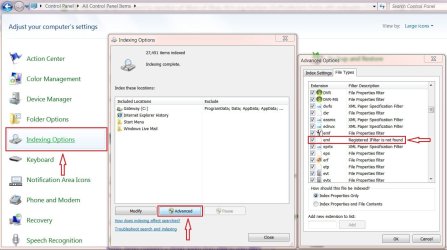
You are correct in your assumption that your .eml results will need a filter. I offer the first attachment as a qualifier, this view can be found at: Control Panel\All Control Panel Items\Indexing Options\Advance Options\File Types.
As you can see I do not have the Registered IFilter either.

That's not all, I have a total of five not Registered IFilters one of which is for .pdf files.
The exclusion of these filters will degrade the performance of Windows Search.

The .pdf filter seems to be a matter of contention with a lot of users. I have applied the latest filter that I know of located here: Adobe - Acrobat : For Windows : Adobe PDF iFilter 9 for 64-bit platforms You will notice that it only goes to Vistax64, but it installed, is running, and has improved my search for text within .pdf documents.
With the plethora of .pdf style programs available today the corresponding IFilter will need to be installed if it does not come with the program.

Full-Text search is based on the character-based data in SQL Server tables.
By default, the following data types are supported: char, varchar, nchar, nvarchar, text, ntext, image, xml, varbinary, or varbinary(max). However, if you want to search for the additional document formats, you need to install the IFilter that supports the document formats.

Full text search should support pdf files, and logically can support .eml files if you can find a suitable IFilter for it, and there lies the rub.

So far the only solution I have been able to find is a registry modification offered by Microsoft here: Using Windows Search to search for Windows Live Mail e-mail will return incomplete results on Windows 7 64-bit Operating Systems

As to a installable IFilter, I have not been able to find one. Yet.


Win7 should come with at least a lite version of SQL. Mine is located at: C:\Program Files (x86)\Microsoft SQL Server Compact Edition\v3.1 .
This by itself may explain the problems with WinSearch, the full blown version of SQL may offer a better platform for WinSearch.

This concerns me. Certainly it should have been included in the results. It was even on the Recent file list in the Start Menu. If I can't trust the accuracy of the results, or if it doesn't find the file I need, it's a problem.
The reason for this is because win7 handles the RFL differently than stored files, and it could be files that may not have been indexed yet.

Simply put, 'the masses' will not be able to benefit from WIn7 search simply because they won't take the time to learn AQS. This, IMO, is a no brainer. If AQS really is the secret, most are left out in the cold, or, 'Search Hell', as it were. It encompasses a complexity that most just aren't willing to take on
I equate this to the recent flap with the Transportation Security Administration (TSA) here in the States, and how they conduct searches.

Everyone wants the utmost in security, but now that they have it they are unwilling to submit to it.
That's just human nature; It's not me, it's you.

I myself would be quite happy using more advanced forms of AQS, if that is all there is to it. However, given that valid returns were not included in my 'type:doc name:ch*' search, I still have concerns.
This is where that file may not have the proper permissions or you may have either an incomplete index or a corrupt one.
Security, and permissions are a whole 'nother story involving WinSearch, if the file is secure...Indexing can not touch it. Think UAC
One solution I found, that again is a registry modification. Please read fully, and take note of the “notes” before implementing. This can be found at DocBlases's post #8 here:
[FONT=Verdana, sans-serif]http://www.sevenforums.com/general-discussion/25669-win7-folder-search-kind-crippled.html [/FONT]

Apologies to all for the length of this post. For me, this is not the end. I somehow hope that the un-included file is my lack (but I somehow doubt this), and that I simply require a greater degree of AQS savvy. It's something I'll be looking into. And I'll likely learn a great deal in the process. Thanks, Anak, for your post, and to all contributors. I'm on a new path of learning.

The un-included results, however, are bothersome, and seem to support the oft-held conclusion that Win 7 Search is inconsistent in its performance for different users. I suppose time will tell.
Your welcome. I agree, everyone's mileage will vary until WinSearch becomes reliable. Refer to my above comments about the un-included results.

I would like to see The forum Admins create a re-direct for any questions on WinSearch to a sticky for Windows Desktop Search, they could use gilmoses's thread here to start one.

Just the other day I was going to answer this one, http://www.sevenforums.com/general-discussion/127193-how-do-i-use-search.html#post1102879 , but thought different :zip:.
It would of been, just 'nother
:banghead: until I saw DeaconFrost's answer in post #8. Instead I gave him some rep.
A mite drastic, but getting back to defaults works in a lot of cases.


Post #4 earlier in this thread by Dzomlija is another excellent explanation.

In lieu of the above, Brinks Tutorials on search here:

http://www.sevenforums.com/tutorials/36599-search-windows-7-a.html , and the accompanying tutorials at the bottom are also excellent starting points.


For now, “That's it”...I have to go and swap-out a dead tractor battery.

Steve....aka...Anak...
 

Attachments

  • IndexOptionFilters.JPG
    IndexOptionFilters.JPG
    122.5 KB · Views: 8

My Computer

Computer type
PC/Desktop
Computer Manufacturer/Model Number
Gateway DX4831-01e (Mid-Tower Desktop)
OS
Originally Win 7 Hm Prem x64 Ver 6.1.7600 Build 7601-SP1 | Upgraded to Windows 10 December 14, 2019
CPU
Intel i3 530 2.93GHz, 2933MHz 2 Cores 4 Logical Processors
Motherboard
Gateway H57M01 133 megahertz
Memory
6GB of 1,333MHz DDR3 SDRAM
Graphics Card(s)
32MB Intel Graphics Media Accelerator HD IGChip
Sound Card
Realtek High Definition Audio
Monitor(s) Displays
Gateway HX2000 20inch TFT active matrix TN
Screen Resolution
1600 x 900 x 59 hertz
Hard Drives
WDC WD10EADS-00M2B0 [HDD] (1000.20 GB) -- drive 0,
HL-DT-ST DVDRAM GH41N [CD-ROM dr]
Four card readers, and Four USB 2.0
PSU
300watts.
Case
Mid-Tower Desktop
Cooling
Stock from Gateway
Keyboard
Natural Ergonomic Keyboard 4000, see Other Info
Mouse
Orig. Gateway wore out now using Insignia USB wired optical
Internet Speed
Vz FIOS 10ms png 57.64Mbps down 65.53Mbps up Speedtest.org
Antivirus
Zamana Anti-logger with Anti-malware, MSE, Windows Firewall,
Browser
IE11.0.9600.19399-Upd ver11.0.135, Firefox 68.0.1 x64
Other Info
System Specs by Belarc.

BIOS: American Megatrends Inc. P01-A0 11/17/2009

Replaced the MS 'Natural' Standard PS/2 Enhanced 101-102 Keyboard with a new Natural Ergonomic Keyboard 4000 on August 1st 2014.

Canon Pixma MG3222 Printer.

Updated to IE11 on 12102015 | Fios Quantum Router g1100

Additional AV: SpywareBlaster, manual Mbam, SAS
Back
Top