More questions about how folders contents are displayed

bru

New member
Pro User
Local time
2:32 PM
Messages
417
Location
A suburb of Chicago
Based on my other thread I have a feeling there is some bug with how my folders are displayed.

http://www.sevenforums.com/general-discussion/172409-folders-desktop-not-showing-whats-inside.html

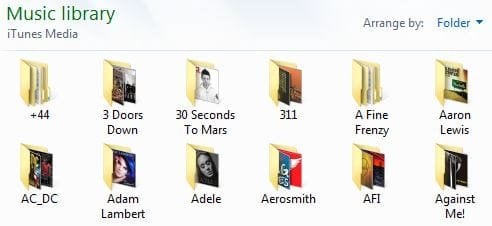
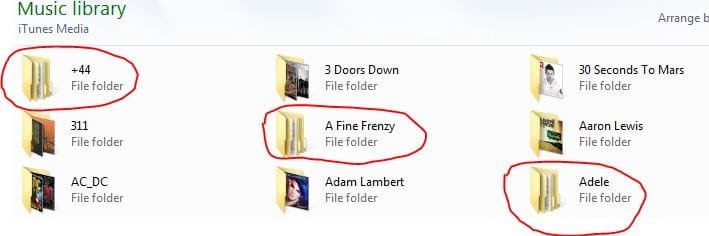
Looking at Music folders why do some show the contents as pictures while others don't? I'm sure that why some that don't show the pictures is because there is no picture associated with the actual file (+44 folder). But if there is artwork attached to the file (Adele folder) why does the main folder not display it like several others in the screenshot do?

AFAICT I have everything in terms of folder views ticked correctly.

edit: This computer is $%^$. I deleted the music files and reimported them. Added the artwork to the folder like I always do and now the folder doesn't display it. It did before. To get them to display I have to do my workaround and through Users, My Music have to restore the default icon to the folder. I am so frustrated by all this.

Can someone please help me. Earlier today every CD I imported showed the artwork now I have to use my workaround of restoring default icons to get it to display. Nothing changed on the computer. Why is this computer acting this way?
 

Attachments
  • 1.JPG
    1.JPG
    27.5 KB · Views: 21
  • 2.JPG
    2.JPG
    12.5 KB · Views: 634
  • 4.JPG
    4.JPG
    37.2 KB · Views: 15
  • 3.JPG
    3.JPG
    11.6 KB · Views: 634
  • 6.JPG
    6.JPG
    13.6 KB · Views: 11
Last edited:

My Computer My Computer

At a glance

Win 7 Home Premium x64Intel Core i3-540 3.07 GHz4 GB (2 X 2) Dual-Channel PC-10600 DDR3 @ 665...Integrated Intel H57
Computer Manufacturer/Model Number
HP p6608f
OS
Win 7 Home Premium x64
CPU
Intel Core i3-540 3.07 GHz
Motherboard
MS-7613 (Iona-GL8E)
Memory
4 GB (2 X 2) Dual-Channel PC-10600 DDR3 @ 665MHz (9-9-9-24)
Graphics Card(s)
Integrated Intel H57
Sound Card
Integrated Realtek ALC888S Audio
Monitor(s) Displays
17" SDM-HS73 (a vestige from my old computer)
Screen Resolution
1280 X 1024
Hard Drives
750GB SATA 7200 RPM
PSU
250W
Keyboard
HP USB keyboard
Mouse
HP USB optical mouse
Internet Speed
15Mbps/1Mbps
I'm on it. We'll get it somehow. It is going to take me some time however which, regretfully, I don't have much of coming 2 days... But I'm pretty sure it has something to do with the 'space' W7 uses to save the pic's/previews in. Either a space or as I said before, an authorisation problem. Maybe someone else recognises it?
 

My Computer My Computer

At a glance

Windows 7 64b UltimateI7-2600 3.40GHz - testing various OC levels..2x 4Gb DDR3/1333GTX570 - testing OC levels
Computer Manufacturer/Model Number
custom build
OS
Windows 7 64b Ultimate
CPU
I7-2600 3.40GHz - testing various OC levels..
Motherboard
ASUS Sabretooth
Memory
2x 4Gb DDR3/1333
Graphics Card(s)
GTX570 - testing OC levels
Sound Card
motherboard 7.1 DIG.
Monitor(s) Displays
2x Ilyama 24" E2409HDS-B1 2ms/DVI
Screen Resolution
1920 x 1080
Hard Drives
120 GB Intel Elmcrest SSD
1 TB SATAII 7200RPM/32MB
External 2TB USB3
PSU
Corsair Pro HX850W
Cooling
Coolermaster Hyper V8
Keyboard
Logitech G110
Mouse
Logitech G700
Internet Speed
25Mb
Other Info
CPU: 7,7 RAM: 7,7 GTX: 7,9 GTX 3D : 7,9 SSD 7,6
Overall 7,6 ...... now to speed up the SSD... ;)

Also use a Dell XPS M1710 on Vista 32b
Asus LT on Vista 32
3 older machines still doing fine on Linux/ubuntu but not used much anymore...
I'll be waiting. Honestly I am really thinking it may be best to just restore this computer.

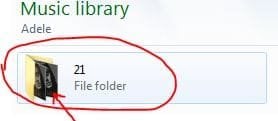
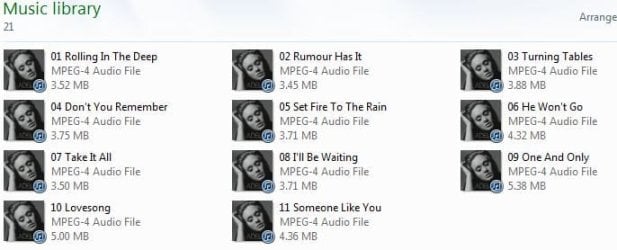
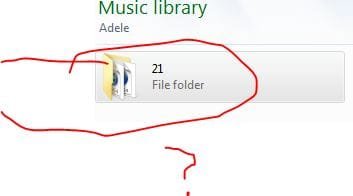
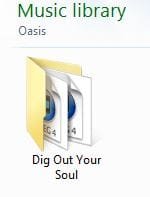
Found another related problem. In the screen shot you will see how the Adele folder shows two of the same pictures. It should only show one picture if that's all that is in there.

Also can't get my views to stick. If I selet medium icons the next time I open it's back to details.

edit: Am I in the Twilight Zone? Check out these images. Now Adele (I hope people don't critique my music I have very eclectic taste) shows the content on the main folder and the album folder only has one photo. The proof is above how they previously displayed. Other folders still don't display the photo and still others display the two pictures so it's not like everything was fixed. Nothing changed on the computer AFAIK.
 

Attachments

  • 1.JPG
    1.JPG
    22.3 KB · Views: 12
  • 2.JPG
    2.JPG
    9.7 KB · Views: 614
Last edited:

My Computer My Computer

At a glance

Win 7 Home Premium x64Intel Core i3-540 3.07 GHz4 GB (2 X 2) Dual-Channel PC-10600 DDR3 @ 665...Integrated Intel H57
Computer Manufacturer/Model Number
HP p6608f
OS
Win 7 Home Premium x64
CPU
Intel Core i3-540 3.07 GHz
Motherboard
MS-7613 (Iona-GL8E)
Memory
4 GB (2 X 2) Dual-Channel PC-10600 DDR3 @ 665MHz (9-9-9-24)
Graphics Card(s)
Integrated Intel H57
Sound Card
Integrated Realtek ALC888S Audio
Monitor(s) Displays
17" SDM-HS73 (a vestige from my old computer)
Screen Resolution
1280 X 1024
Hard Drives
750GB SATA 7200 RPM
PSU
250W
Keyboard
HP USB keyboard
Mouse
HP USB optical mouse
Internet Speed
15Mbps/1Mbps

My Computer My Computer

At a glance

Windows 7 64b UltimateI7-2600 3.40GHz - testing various OC levels..2x 4Gb DDR3/1333GTX570 - testing OC levels
Computer Manufacturer/Model Number
custom build
OS
Windows 7 64b Ultimate
CPU
I7-2600 3.40GHz - testing various OC levels..
Motherboard
ASUS Sabretooth
Memory
2x 4Gb DDR3/1333
Graphics Card(s)
GTX570 - testing OC levels
Sound Card
motherboard 7.1 DIG.
Monitor(s) Displays
2x Ilyama 24" E2409HDS-B1 2ms/DVI
Screen Resolution
1920 x 1080
Hard Drives
120 GB Intel Elmcrest SSD
1 TB SATAII 7200RPM/32MB
External 2TB USB3
PSU
Corsair Pro HX850W
Cooling
Coolermaster Hyper V8
Keyboard
Logitech G110
Mouse
Logitech G700
Internet Speed
25Mb
Other Info
CPU: 7,7 RAM: 7,7 GTX: 7,9 GTX 3D : 7,9 SSD 7,6
Overall 7,6 ...... now to speed up the SSD... ;)

Also use a Dell XPS M1710 on Vista 32b
Asus LT on Vista 32
3 older machines still doing fine on Linux/ubuntu but not used much anymore...
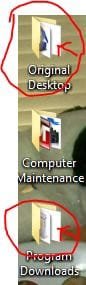
Wondering if you have had some time to think about this. Now the desktop folders are displaying a blank page. Happened all of a sudden and not all of them do it.
 

Attachments

  • dt.JPG
    dt.JPG
    14.3 KB · Views: 601

My Computer My Computer

At a glance

Win 7 Home Premium x64Intel Core i3-540 3.07 GHz4 GB (2 X 2) Dual-Channel PC-10600 DDR3 @ 665...Integrated Intel H57
Computer Manufacturer/Model Number
HP p6608f
OS
Win 7 Home Premium x64
CPU
Intel Core i3-540 3.07 GHz
Motherboard
MS-7613 (Iona-GL8E)
Memory
4 GB (2 X 2) Dual-Channel PC-10600 DDR3 @ 665MHz (9-9-9-24)
Graphics Card(s)
Integrated Intel H57
Sound Card
Integrated Realtek ALC888S Audio
Monitor(s) Displays
17" SDM-HS73 (a vestige from my old computer)
Screen Resolution
1280 X 1024
Hard Drives
750GB SATA 7200 RPM
PSU
250W
Keyboard
HP USB keyboard
Mouse
HP USB optical mouse
Internet Speed
15Mbps/1Mbps

My Computer My Computer

At a glance

Windows 7 64b UltimateI7-2600 3.40GHz - testing various OC levels..2x 4Gb DDR3/1333GTX570 - testing OC levels
Computer Manufacturer/Model Number
custom build
OS
Windows 7 64b Ultimate
CPU
I7-2600 3.40GHz - testing various OC levels..
Motherboard
ASUS Sabretooth
Memory
2x 4Gb DDR3/1333
Graphics Card(s)
GTX570 - testing OC levels
Sound Card
motherboard 7.1 DIG.
Monitor(s) Displays
2x Ilyama 24" E2409HDS-B1 2ms/DVI
Screen Resolution
1920 x 1080
Hard Drives
120 GB Intel Elmcrest SSD
1 TB SATAII 7200RPM/32MB
External 2TB USB3
PSU
Corsair Pro HX850W
Cooling
Coolermaster Hyper V8
Keyboard
Logitech G110
Mouse
Logitech G700
Internet Speed
25Mb
Other Info
CPU: 7,7 RAM: 7,7 GTX: 7,9 GTX 3D : 7,9 SSD 7,6
Overall 7,6 ...... now to speed up the SSD... ;)

Also use a Dell XPS M1710 on Vista 32b
Asus LT on Vista 32
3 older machines still doing fine on Linux/ubuntu but not used much anymore...
I did. But I'm not sure what I was supoposed to do once I logged in as built-in Admin. It set up the new desktop and in order to view the music folders I had to go to my user account and then everything still looked the same.

I would really like to figure out why what I posted above is happening. For whatever reason the folders were showing two artworks (e.g. Adele in first post) and then they showed one artwork (e.g. Adele in my 2nd post). Now any music I add shows two pieces of artwork and no matter what I do I can't get it to show one. Like it should and did in the past.
 

My Computer My Computer

At a glance

Win 7 Home Premium x64Intel Core i3-540 3.07 GHz4 GB (2 X 2) Dual-Channel PC-10600 DDR3 @ 665...Integrated Intel H57
Computer Manufacturer/Model Number
HP p6608f
OS
Win 7 Home Premium x64
CPU
Intel Core i3-540 3.07 GHz
Motherboard
MS-7613 (Iona-GL8E)
Memory
4 GB (2 X 2) Dual-Channel PC-10600 DDR3 @ 665MHz (9-9-9-24)
Graphics Card(s)
Integrated Intel H57
Sound Card
Integrated Realtek ALC888S Audio
Monitor(s) Displays
17" SDM-HS73 (a vestige from my old computer)
Screen Resolution
1280 X 1024
Hard Drives
750GB SATA 7200 RPM
PSU
250W
Keyboard
HP USB keyboard
Mouse
HP USB optical mouse
Internet Speed
15Mbps/1Mbps
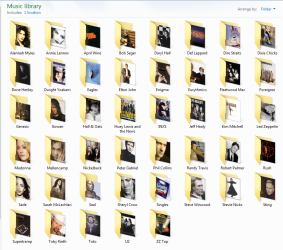
I'm not sure if this helps but its what I have done to make my music libraray look better. If a folder contains a folder.jpg file you will just see the one thumbnail view. It's a hidden file. If the folder doesn't contain the folder.jpg file then you see multiple thumbnails based on what files are in the folder. I made my own folder.jpg files for each on the main folders in my music library.
music library Capture.PNG
That way I get just the one picture of the artist instead of all the album covers.
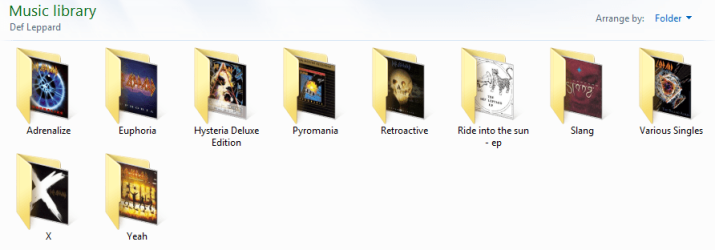
Windows media player will usually create one for each album based on the album art. If it can't find any album art and the original files didn't come with any you won't see a picture for a thumbnail, it will just be the default which I believe is the page with a turned corner. What can also happen if you download the music online, is it may come with the front cover, back cover, track list, etc as pictures. If there is no folder.jpg file those images will be displayed as thumbnails for that folder. I have no use for those files and delete them if present. I like my albums displayed like this.
music 2 Capture.PNG
 

My Computer My Computer

At a glance

Windows 10 Education 64 bitAMD Phenom II X4 980 Black Edition Deneb 3.7GHz8GB 4GBx2 Kingston PC10600 DDR3 1333 MemoryZotac NVIDIA Geforce GT640 2 Gig DDR3 PCIe
Computer type
PC/Desktop
Computer Manufacturer/Model Number
Home Built
OS
Windows 10 Education 64 bit
CPU
AMD Phenom II X4 980 Black Edition Deneb 3.7GHz
Motherboard
Asus M4N68T-M V2 µATX Motherboard
Memory
8GB 4GBx2 Kingston PC10600 DDR3 1333 Memory
Graphics Card(s)
Zotac NVIDIA Geforce GT640 2 Gig DDR3 PCIe
Sound Card
VIA VT1708s High Definition Audio 8-channel Onboard
Monitor(s) Displays
22" LG E2242 1080p and 2 19" I-INC AG191D
Screen Resolution
1280x1024 - 1920x1080 - 1280x1024
Hard Drives
Crucial M100 256 GB SSD and 500 GB WD Blue SATA
PSU
Thermaltake TR 620
Case
Power Up Black ATX Mid-Tower Case
Cooling
Stock heatsink and fan
Keyboard
Logitech Wireless K350 Wave
Mouse
Logitech Wireless M570 Trackman Wheel
Internet Speed
80 Mbps Down 30 Mbps Up
Antivirus
Windows Defender
Browser
Internet Explorer 11
Other Info
HP DVD1040e Lightscribe - External USB2
You are probably on to something. First question I have is how do you create folder.jpg and then what do you do with it?

I actually have seen folder.jpg along with my music files when I look at the music that I backed up to my external HDD so it is there somehow for some of my music. But why it's there for some and not others I am not sure. I just checked my external HDD and the ones that show two picturse the same don't have folder.jpg. How did I add it to some and not others?

Here's what I do related to music. I have standardized it for the last month or so and that is why I am confused as to why everything doesn't display the same. I use iTunes. If it downloads artwork I copy that artwork and manually add it to files. If no artwork downloads then I find it online and copy it to the files. So either way I am manually adding the artwork. This way the artwork will always be with the music even if I have to reload my library into a new iTunes. Much of my music has downloaded iTunes artwork and that is why they don't display a picture but as mentioned I have done it this way for about a month and even started converting those that just had downloaded pictures.

But as pictured in my posts some are showing up as one picture others as two. And I honestly haven't done anything different. Now it seems as if everything is showing up as two pictures where a few weeks ago I could get it to display one picture.

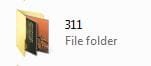
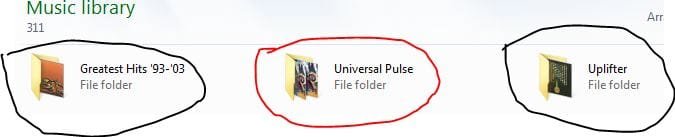
Using 311 as an example. Today I manually added the artwork to Universal Pulse and it shows two pictures both the same. The other two albums I added a few weeks ago and they show one. The artist folder shows the two albums that have 1 picture so there must be something to the folder that is showing 2 pictures that makes it not display in the artist folder.

The Adele I show above somehow changed from 2 to 1 but I can't figure out how.

So maybe I should do what you do but I have 65GB of music so to go back would be hard but going forward I could do it...if I understood :confused: .
 

Attachments

  • 311f.JPG
    311f.JPG
    8.6 KB · Views: 587
  • 311a.JPG
    311a.JPG
    19.5 KB · Views: 10

My Computer My Computer

At a glance

Win 7 Home Premium x64Intel Core i3-540 3.07 GHz4 GB (2 X 2) Dual-Channel PC-10600 DDR3 @ 665...Integrated Intel H57
Computer Manufacturer/Model Number
HP p6608f
OS
Win 7 Home Premium x64
CPU
Intel Core i3-540 3.07 GHz
Motherboard
MS-7613 (Iona-GL8E)
Memory
4 GB (2 X 2) Dual-Channel PC-10600 DDR3 @ 665MHz (9-9-9-24)
Graphics Card(s)
Integrated Intel H57
Sound Card
Integrated Realtek ALC888S Audio
Monitor(s) Displays
17" SDM-HS73 (a vestige from my old computer)
Screen Resolution
1280 X 1024
Hard Drives
750GB SATA 7200 RPM
PSU
250W
Keyboard
HP USB keyboard
Mouse
HP USB optical mouse
Internet Speed
15Mbps/1Mbps
What I usually do is Google the artist, look for a good picture to use, and down load it. If it's not a jpg file I'll use something like infanview to convert it to one. I may also edit out any thing I don't want. Sometimes I'll just edit an album cover and remove the text, etc. Once I have the picture I want, I rename it folder.jpg, move it to the folder and make it hidden. I have media player set to NOT "Retrieve additional information from the internet". I don't want it changing anything. I edited all my mp3 files with mp3tag to add any missing album art. Something I noticed while doing that was that you can have two or more images for your album art. I deleted everything except the one I wanted. I would think that could cause multiple thumbnails instead of just the one. The one thing to keep in mind is if there is no folder.jpg, windows will just look for images in any and all sub folders to display. I didn't like the multiple album covers etc so I slowly over time edited things the way I wanted them. I've been doing it this way since windows XP.
 

My Computer My Computer

At a glance

Windows 10 Education 64 bitAMD Phenom II X4 980 Black Edition Deneb 3.7GHz8GB 4GBx2 Kingston PC10600 DDR3 1333 MemoryZotac NVIDIA Geforce GT640 2 Gig DDR3 PCIe
Computer type
PC/Desktop
Computer Manufacturer/Model Number
Home Built
OS
Windows 10 Education 64 bit
CPU
AMD Phenom II X4 980 Black Edition Deneb 3.7GHz
Motherboard
Asus M4N68T-M V2 µATX Motherboard
Memory
8GB 4GBx2 Kingston PC10600 DDR3 1333 Memory
Graphics Card(s)
Zotac NVIDIA Geforce GT640 2 Gig DDR3 PCIe
Sound Card
VIA VT1708s High Definition Audio 8-channel Onboard
Monitor(s) Displays
22" LG E2242 1080p and 2 19" I-INC AG191D
Screen Resolution
1280x1024 - 1920x1080 - 1280x1024
Hard Drives
Crucial M100 256 GB SSD and 500 GB WD Blue SATA
PSU
Thermaltake TR 620
Case
Power Up Black ATX Mid-Tower Case
Cooling
Stock heatsink and fan
Keyboard
Logitech Wireless K350 Wave
Mouse
Logitech Wireless M570 Trackman Wheel
Internet Speed
80 Mbps Down 30 Mbps Up
Antivirus
Windows Defender
Browser
Internet Explorer 11
Other Info
HP DVD1040e Lightscribe - External USB2
What I usually do is Google the artist, look for a good picture to use, and down load it. If it's not a jpg file I'll use something like infanview to convert it to one. I may also edit out any thing I don't want. Sometimes I'll just edit an album cover and remove the text, etc. Once I have the picture I want, I rename it folder.jpg, move it to the folder and make it hidden. I have media player set to NOT "Retrieve additional information from the internet". I don't want it changing anything. I edited all my mp3 files with mp3tag to add any missing album art. Something I noticed while doing that was that you can have two or more images for your album art. I deleted everything except the one I wanted. I would think that could cause multiple thumbnails instead of just the one. The one thing to keep in mind is if there is no folder.jpg, windows will just look for images in any and all sub folders to display. I didn't like the multiple album covers etc so I slowly over time edited things the way I wanted them. I've been doing it this way since windows XP.

I know some of my folders must have this "folder.jpg" because if there are only eight tracks I will see 9 files or more. And I also see it in the external hard drive. But why some do and others don't I don't understand.

I tried manually adding folder.jpg to one but it didn't seem to change anything. I am at a loss on this.

edit: OK I found something. It is related to WMP. I had not used WMP until recently and now I wish I could set it back to when it had nothing but I can't. So if the album art is found by WMP it changes how it is displayed in the folder. If it isn't found it still displays the two pictures.

How do I get rid of what has been loaded for music in WMP?

edit2: Made some progress. Figured out how to do it your way. It's a good tool but I really would like it to work the way I previously had it.

Importantly I was able to reset WMP to initial settings. This was something I was trying to do on another thread but could not. Now we will see if it solves my problem with WMP adding the same artwork to all albums that don't have any.

Or maybe I will just forget all this and just look at my artwork in iTunes and who cares what the folders look like. Would make things a lot easier and less stressful.
 
Last edited:

My Computer My Computer

At a glance

Win 7 Home Premium x64Intel Core i3-540 3.07 GHz4 GB (2 X 2) Dual-Channel PC-10600 DDR3 @ 665...Integrated Intel H57
Computer Manufacturer/Model Number
HP p6608f
OS
Win 7 Home Premium x64
CPU
Intel Core i3-540 3.07 GHz
Motherboard
MS-7613 (Iona-GL8E)
Memory
4 GB (2 X 2) Dual-Channel PC-10600 DDR3 @ 665MHz (9-9-9-24)
Graphics Card(s)
Integrated Intel H57
Sound Card
Integrated Realtek ALC888S Audio
Monitor(s) Displays
17" SDM-HS73 (a vestige from my old computer)
Screen Resolution
1280 X 1024
Hard Drives
750GB SATA 7200 RPM
PSU
250W
Keyboard
HP USB keyboard
Mouse
HP USB optical mouse
Internet Speed
15Mbps/1Mbps
I have windows media player set to NOT "Retrieve additional information from the internet". I don't want it changing anything. Windows Media player gets it wrong some times and can really mess things up if you let it. For example, I've ended up with "Beatles" and "The Beatles", "Eagles" and "The Eagles". With albums split in half, one half under Beatles and the other half under The Beatles. And different album art for tracks in the same album. In the end it was easier to just edit it all my self with MP3TAG. I just slowly went though my whole collection one artist at a time. If you set windows to display hidden and system files you will find more than just the folder.jpg file in your mp3 folders. There will also be some album art pictures of varying sizes. I believe Windows MP uses them, windows creates them
 

My Computer My Computer

At a glance

Windows 10 Education 64 bitAMD Phenom II X4 980 Black Edition Deneb 3.7GHz8GB 4GBx2 Kingston PC10600 DDR3 1333 MemoryZotac NVIDIA Geforce GT640 2 Gig DDR3 PCIe
Computer type
PC/Desktop
Computer Manufacturer/Model Number
Home Built
OS
Windows 10 Education 64 bit
CPU
AMD Phenom II X4 980 Black Edition Deneb 3.7GHz
Motherboard
Asus M4N68T-M V2 µATX Motherboard
Memory
8GB 4GBx2 Kingston PC10600 DDR3 1333 Memory
Graphics Card(s)
Zotac NVIDIA Geforce GT640 2 Gig DDR3 PCIe
Sound Card
VIA VT1708s High Definition Audio 8-channel Onboard
Monitor(s) Displays
22" LG E2242 1080p and 2 19" I-INC AG191D
Screen Resolution
1280x1024 - 1920x1080 - 1280x1024
Hard Drives
Crucial M100 256 GB SSD and 500 GB WD Blue SATA
PSU
Thermaltake TR 620
Case
Power Up Black ATX Mid-Tower Case
Cooling
Stock heatsink and fan
Keyboard
Logitech Wireless K350 Wave
Mouse
Logitech Wireless M570 Trackman Wheel
Internet Speed
80 Mbps Down 30 Mbps Up
Antivirus
Windows Defender
Browser
Internet Explorer 11
Other Info
HP DVD1040e Lightscribe - External USB2
Yes I have noticed now that WMP has my entire library in it, it has created these additional files you mention. I think they are small and large art. Funny thing is I can never see them even if I enable hidden files. And now that they are part of the files I sure hope they don't mess them up if I ever need to put them back in iTunes.

I had quite the adventure with WMP last night. Ended up having to reset it to initial. And I have it set NOT to retrieve info too. HAd it that way and still was doing weird things with the artwork. WMP had never been used on this computer for so long and it seemed like my artwork was going in My Music folders ok but now even after resetting it, WMP is definitely influencing how the artwork is displayed.

http://www.sevenforums.com/media-center/178215-my-wmp-messing-up.html

I need to read up on how people who use iTunes deal with WMP. Or maybe they just don't. Problem is once I used WMP for something (viewing a video) I could not stop it from setting up my music library.
 

My Computer My Computer

At a glance

Win 7 Home Premium x64Intel Core i3-540 3.07 GHz4 GB (2 X 2) Dual-Channel PC-10600 DDR3 @ 665...Integrated Intel H57
Computer Manufacturer/Model Number
HP p6608f
OS
Win 7 Home Premium x64
CPU
Intel Core i3-540 3.07 GHz
Motherboard
MS-7613 (Iona-GL8E)
Memory
4 GB (2 X 2) Dual-Channel PC-10600 DDR3 @ 665MHz (9-9-9-24)
Graphics Card(s)
Integrated Intel H57
Sound Card
Integrated Realtek ALC888S Audio
Monitor(s) Displays
17" SDM-HS73 (a vestige from my old computer)
Screen Resolution
1280 X 1024
Hard Drives
750GB SATA 7200 RPM
PSU
250W
Keyboard
HP USB keyboard
Mouse
HP USB optical mouse
Internet Speed
15Mbps/1Mbps
Yeah once you launch it MP looks though certain folders for music etc and automatically adds any it finds to its library. In MP 11 you can select or exclude what folders are monitored. I can't seem to find that option in MP 12 though? I can't help you with iTunes, I don't use it, I have a Sony Walkman MP3 player and use MP to sync to it.
 

My Computer My Computer

At a glance

Windows 10 Education 64 bitAMD Phenom II X4 980 Black Edition Deneb 3.7GHz8GB 4GBx2 Kingston PC10600 DDR3 1333 MemoryZotac NVIDIA Geforce GT640 2 Gig DDR3 PCIe
Computer type
PC/Desktop
Computer Manufacturer/Model Number
Home Built
OS
Windows 10 Education 64 bit
CPU
AMD Phenom II X4 980 Black Edition Deneb 3.7GHz
Motherboard
Asus M4N68T-M V2 µATX Motherboard
Memory
8GB 4GBx2 Kingston PC10600 DDR3 1333 Memory
Graphics Card(s)
Zotac NVIDIA Geforce GT640 2 Gig DDR3 PCIe
Sound Card
VIA VT1708s High Definition Audio 8-channel Onboard
Monitor(s) Displays
22" LG E2242 1080p and 2 19" I-INC AG191D
Screen Resolution
1280x1024 - 1920x1080 - 1280x1024
Hard Drives
Crucial M100 256 GB SSD and 500 GB WD Blue SATA
PSU
Thermaltake TR 620
Case
Power Up Black ATX Mid-Tower Case
Cooling
Stock heatsink and fan
Keyboard
Logitech Wireless K350 Wave
Mouse
Logitech Wireless M570 Trackman Wheel
Internet Speed
80 Mbps Down 30 Mbps Up
Antivirus
Windows Defender
Browser
Internet Explorer 11
Other Info
HP DVD1040e Lightscribe - External USB2
One positive out of all this is I can now play my music through WMP. I guess it now supports .m4a format which is what I have for almost all of my music. I remember when Microsoft wouldn't let you play Apple files.

On my old XP computer I don't remember WMP (version 10 maybe) giving me nearly as much trouble and IIRC it only populated with music that was outside of iTunes even though I had the same music I do now.

Now that I reset it and it is behaving I hope it doesn't mess me up again.
 

My Computer My Computer

At a glance

Win 7 Home Premium x64Intel Core i3-540 3.07 GHz4 GB (2 X 2) Dual-Channel PC-10600 DDR3 @ 665...Integrated Intel H57
Computer Manufacturer/Model Number
HP p6608f
OS
Win 7 Home Premium x64
CPU
Intel Core i3-540 3.07 GHz
Motherboard
MS-7613 (Iona-GL8E)
Memory
4 GB (2 X 2) Dual-Channel PC-10600 DDR3 @ 665MHz (9-9-9-24)
Graphics Card(s)
Integrated Intel H57
Sound Card
Integrated Realtek ALC888S Audio
Monitor(s) Displays
17" SDM-HS73 (a vestige from my old computer)
Screen Resolution
1280 X 1024
Hard Drives
750GB SATA 7200 RPM
PSU
250W
Keyboard
HP USB keyboard
Mouse
HP USB optical mouse
Internet Speed
15Mbps/1Mbps
I know I've posted a lot but the way my folders display still doesn't seem right. Now that I've sorted out the WMP issues this is what is happening to my music folders specifically.

It doesn't matter if it's a new CD being added or changing information about a current music folder it seems to behave the same. I will use a new CD as an example.

I import the CD into iTunes. I manually add the artwork to the music files. It creates a new folder in My Music-->iTunes-->iTunesMedia. This new folder will show the album name and the folder will show as it contents two pages that show the iTunes logo w/MPEG-4 with the corners turned down. Inside the folder the music files are there with the artwork and the thumbnail to play with iTunes. So indeed the files do have the artwork attached. But it is not showing as contents when the folder is viewed.

Now if I open WMP it will update and the new album will appear in WMP with the artwork since it is attached to the files (I have retrieve from Internet turned off for WMP).

If I go back to the album folder in iTunes Media the folder that used to display the two pages now displays one page and it is the artwork. So WMP updating somehow translates in to the folder in My Music also being updated.

But the parent folder (the band name as opposed to the album name) still doesn't display any contents. Thats' when I have to do my workaround which is open the file location and customize the icon by resetting it to default. Then the contents of the album folder display as the contents of the band name folder.

Have I totally confused you? Essentially it comes down two questions/concerns. Why does the artwork not show up in the music folder until WMP has updated to include it?

Why do I have to do the workaround explained to get the parent folder to display the contents? This is also what I have to do for my dektop folders.
 

Attachments

  • oa1.JPG
    oa1.JPG
    9.5 KB · Views: 241
  • oa2.JPG
    oa2.JPG
    11.3 KB · Views: 241
  • oa3.JPG
    oa3.JPG
    11.6 KB · Views: 241
  • oa4.JPG
    oa4.JPG
    9.5 KB · Views: 241

My Computer My Computer

At a glance

Win 7 Home Premium x64Intel Core i3-540 3.07 GHz4 GB (2 X 2) Dual-Channel PC-10600 DDR3 @ 665...Integrated Intel H57
Computer Manufacturer/Model Number
HP p6608f
OS
Win 7 Home Premium x64
CPU
Intel Core i3-540 3.07 GHz
Motherboard
MS-7613 (Iona-GL8E)
Memory
4 GB (2 X 2) Dual-Channel PC-10600 DDR3 @ 665MHz (9-9-9-24)
Graphics Card(s)
Integrated Intel H57
Sound Card
Integrated Realtek ALC888S Audio
Monitor(s) Displays
17" SDM-HS73 (a vestige from my old computer)
Screen Resolution
1280 X 1024
Hard Drives
750GB SATA 7200 RPM
PSU
250W
Keyboard
HP USB keyboard
Mouse
HP USB optical mouse
Internet Speed
15Mbps/1Mbps
My best guess is windows media player is creating the folder.jpg file when it scans the music folders. If Windows sees a folder.jpg file that becomes the single thumbnail for that folder, if its not there it shows multiple images based on what files are in the folder. Windows Media Player is adding folder.jpg files and changing the way things look.
 

My Computer My Computer

At a glance

Windows 10 Education 64 bitAMD Phenom II X4 980 Black Edition Deneb 3.7GHz8GB 4GBx2 Kingston PC10600 DDR3 1333 MemoryZotac NVIDIA Geforce GT640 2 Gig DDR3 PCIe
Computer type
PC/Desktop
Computer Manufacturer/Model Number
Home Built
OS
Windows 10 Education 64 bit
CPU
AMD Phenom II X4 980 Black Edition Deneb 3.7GHz
Motherboard
Asus M4N68T-M V2 µATX Motherboard
Memory
8GB 4GBx2 Kingston PC10600 DDR3 1333 Memory
Graphics Card(s)
Zotac NVIDIA Geforce GT640 2 Gig DDR3 PCIe
Sound Card
VIA VT1708s High Definition Audio 8-channel Onboard
Monitor(s) Displays
22" LG E2242 1080p and 2 19" I-INC AG191D
Screen Resolution
1280x1024 - 1920x1080 - 1280x1024
Hard Drives
Crucial M100 256 GB SSD and 500 GB WD Blue SATA
PSU
Thermaltake TR 620
Case
Power Up Black ATX Mid-Tower Case
Cooling
Stock heatsink and fan
Keyboard
Logitech Wireless K350 Wave
Mouse
Logitech Wireless M570 Trackman Wheel
Internet Speed
80 Mbps Down 30 Mbps Up
Antivirus
Windows Defender
Browser
Internet Explorer 11
Other Info
HP DVD1040e Lightscribe - External USB2
Back
Top