More Than 3 Out of 4 Enthusiasts Reject Windows 8

Status
Not open for further replies.
Make Windows 8 LOOK & FEEL like Windows 7

It seems Windows 7 is here to stay, wherever Microsoft want Windows 7 to stay or not, Windows 8's UI has become too touchscreen orientated, and I've even struggled to find files and programs Windows 8 due to the metro Start Menu.

Windows 8 actually HAS a function that allows you to Make it act and FEEL like Windows 7,
if you are comfortable with Windows 7.

I don't know why people aren't telling others about this, but the way to do it is Simple.
Either go to the Help menu on your Windows 8 or
follow this link and follow the instructions.

(if you are paying for a program to change your Windows 8 to look like Windows 7, you are getting cheated )
How to make Windows 8 look like Windows 7 | Reviews | CNET UK

Or simply install the "Classic Shell" from here:
http://www.classicshell.net/
 

My Computer My Computer

At a glance

Windows7 Home Premium 64-bit
Computer type
PC/Desktop
OS
Windows7 Home Premium 64-bit
Or just use Windows 7 if you've already got it.
 

My Computer My Computer

At a glance

W7 Pro x64 SP1 | W10 Pro IP x64 | W8.1 Pro x6...i7-4790k @ 4GHz (4.4GHz Boost)16GB DDR3 Kingston HyperX Fury @ 1600MHz CL 9...EVGA GTX 980 Classified
Computer type
PC/Desktop
Computer Manufacturer/Model Number
Custom Build
OS
W7 Pro x64 SP1 | W10 Pro IP x64 | W8.1 Pro x64 VM | Linux Mint VM
CPU
i7-4790k @ 4GHz (4.4GHz Boost)
Motherboard
ASUS Sabertooth Z87 (BIOS Rev 2004)
Memory
16GB DDR3 Kingston HyperX Fury @ 1600MHz CL 9-9-9-27
Graphics Card(s)
EVGA GTX 980 Classified
Sound Card
Realtek Onboard
Monitor(s) Displays
Samsung S27D390
Screen Resolution
1920 x 1080
Hard Drives
240GB Intel 520 Series SSD |
Samsung 850 EVO 120GB SSD |
2TB WD Caviar Black |
2TB WD Caviar Green
PSU
Corsair HX850-80 Gold Modular
Case
Cooler Master Silencio 650
Cooling
Corsair H80i w/2 x Corsair SP120 | 2 x 120mm Noctua NF-S12B
Keyboard
Microsoft Sidewinder X4
Mouse
Gigabyte M6900 optical
Internet Speed
152mb
Antivirus
F-Secure
Browser
Firefox 38.0
Other Info
Backup Rig: Win 7 Pro 64-bit | AMD A10-5800k | ASUS F2A85-V Pro | 8GB Samsung DDR3 @1600MHz | 120GB Toshiba SDD | 2TB Seagate HDD | Cooler Master Silencio 550
I agree with what you say Jim but mate des this mean that we who have recently taken up 8 will have to shell out more for the 8.1 or do you think it will come as an update? I hope so cos I have spent enough time and money already.

Personally how I have mine set up now is fine by me it has turned my old Ford model 10 laptop into a Ferrari!

Hi there
it will be a FREE update.

Just a reminder -- Windows 8 is being replaced by Windows 8.1 as a FREE upgrade around the end of the year when W8 will stop getting updates etc. W8 is now essentially "deprecated" so venom and vitriol on what is now a defunct OS is a waste of time . W8.1 is available for preview testing (Free) if you want to see for yourselves - IE11 has issues as I've said but try W8.1 -- you might be surprised.

All the discussions on W8 start screen etc should be reviewed in the light of the NEW W8.1 features --pointed out by me in about three posts back in this thread so a lot of the stuff about METRO, endless scrolling on the START screen and not being able to boot straight to the desktop are now TOTALLY REDUNDANT and DEAD. You can configure it up so you NEVER HAVE TO LOOK AT A METRO SCREEN AGAIN if you want and you can disable the corner navigation too.

By all means raise concerns about 8.1 but don't trouble yourselves with W8 any more. BUT READ the difference in navigation and how applications (desktop type) are installed in W8.1 before jumping to conclusions --it's DIFFERENT to W8.

Cheers
jimbo
 

My Computer My Computer

At a glance

Linux CENTOS 7 / various Windows OS'es and se...Intel i7 Intel i58GB, 16GBOn Motherboard
Computer type
PC/Desktop
Computer Manufacturer/Model Number
Custom built, several laptops HP/ASUS
OS
Linux CENTOS 7 / various Windows OS'es and servers
CPU
Intel i7 Intel i5
Memory
8GB, 16GB
Graphics Card(s)
On Motherboard
Sound Card
Realtek HD audio
Monitor(s) Displays
Apple Cinema display, Samsung LCD
Screen Resolution
1920 X 1080
Hard Drives
4 X 1TB SATA
Mouse
Toshiba wireless laser
Internet Speed
> 20MB up
Windows 7 on 8

Or just use Windows 7 if you've already got it.

Yeah, well the info was for people who are HAVE Windows 8 , and are unhappy with it.

Not for others to just make smart alecy remarks. :) thanx anyways.
 

My Computer My Computer

At a glance

Windows7 Home Premium 64-bit
Computer type
PC/Desktop
OS
Windows7 Home Premium 64-bit
TheDarkSide said:
Yeah, well the info was for people who are HAVE Windows 8 , and are unhappy with it.

Not for others to just make smart alecy remarks. :) thanx anyways.

It wasn't smart alecy. Your post wasn't very clear that it was for people with Windows 8 and don't like it as opposed to advocating people move from 7 to 8.

You're welcome. :)
 

My Computer My Computer

At a glance

W7 Pro x64 SP1 | W10 Pro IP x64 | W8.1 Pro x6...i7-4790k @ 4GHz (4.4GHz Boost)16GB DDR3 Kingston HyperX Fury @ 1600MHz CL 9...EVGA GTX 980 Classified
Computer type
PC/Desktop
Computer Manufacturer/Model Number
Custom Build
OS
W7 Pro x64 SP1 | W10 Pro IP x64 | W8.1 Pro x64 VM | Linux Mint VM
CPU
i7-4790k @ 4GHz (4.4GHz Boost)
Motherboard
ASUS Sabertooth Z87 (BIOS Rev 2004)
Memory
16GB DDR3 Kingston HyperX Fury @ 1600MHz CL 9-9-9-27
Graphics Card(s)
EVGA GTX 980 Classified
Sound Card
Realtek Onboard
Monitor(s) Displays
Samsung S27D390
Screen Resolution
1920 x 1080
Hard Drives
240GB Intel 520 Series SSD |
Samsung 850 EVO 120GB SSD |
2TB WD Caviar Black |
2TB WD Caviar Green
PSU
Corsair HX850-80 Gold Modular
Case
Cooler Master Silencio 650
Cooling
Corsair H80i w/2 x Corsair SP120 | 2 x 120mm Noctua NF-S12B
Keyboard
Microsoft Sidewinder X4
Mouse
Gigabyte M6900 optical
Internet Speed
152mb
Antivirus
F-Secure
Browser
Firefox 38.0
Other Info
Backup Rig: Win 7 Pro 64-bit | AMD A10-5800k | ASUS F2A85-V Pro | 8GB Samsung DDR3 @1600MHz | 120GB Toshiba SDD | 2TB Seagate HDD | Cooler Master Silencio 550
It seems Windows 7 is here to stay, wherever Microsoft want Windows 7 to stay or not, Windows 8's UI has become too touchscreen orientated, and I've even struggled to find files and programs Windows 8 due to the metro Start Menu.

Windows 8 actually HAS a function that allows you to Make it act and FEEL like Windows 7,
if you are comfortable with Windows 7.

I don't know why people aren't telling others about this, but the way to do it is Simple.
Either go to the Help menu on your Windows 8 or
follow this link and follow the instructions.

(if you are paying for a program to change your Windows 8 to look like Windows 7, you are getting cheated )
How to make Windows 8 look like Windows 7 | Reviews | CNET UK

Or simply install the "Classic Shell" from here:
Classic Shell - Start menu and other Windows enhancements
Look I agree with you entirely I use 8 in the 7 style and I have no problem with it I actually found the laptop works ten times faster with the 8 than 7 - 5 secs boot and 1 sec shutdown as opposed to around 30 secs boot and 20 shut down. I am not a lover of the Metro muck I just like the speed it is in reality no different than 7 in use.
A lot of fuss about not much at all really I use 7 on the other machines and am about to go to 8 on the Sandy Bridge so I shall have the best of both worlds if one sees a difference at all:sarc:
 

My Computer My Computer

At a glance

Desk1 7 Home Prem / Desk2 10 Pro / Main lap A...Desk1 i5 3750K / Laptop i7 GTX 860M / Desk2 i...Desk1 8GB (1866) / Desk2 16GB (1333) / Laptop...Desk 1& 2NVidia GTX 650 & Laptops on board Intel
Computer type
PC/Desktop
Computer Manufacturer/Model Number
Own build (new) Desk1 / Asus ROG Win 7 / Desk2 1st build
OS
Desk1 7 Home Prem / Desk2 10 Pro / Main lap Asus ROG 10 Pro 2 laptop Toshiba 7 Pro Asus P2520 7 & 10
CPU
Desk1 i5 3750K / Laptop i7 GTX 860M / Desk2 i5 2500
Motherboard
Desk1 Asus P877-V / Desk2 Gigabyte H67 UD3H / Laptop ?
Memory
Desk1 8GB (1866) / Desk2 16GB (1333) / Laptop 8Gb DDR3
Graphics Card(s)
Desk 1& 2NVidia GTX 650 & Laptops on board Intel
Sound Card
Desk 1 & 2 -XONAR DG Realtek High Def audio Laptop
Monitor(s) Displays
Desk 1 Benq HD 2450 / Desk2 Philips 24" / Laptop 17.5"
Screen Resolution
1920x1080 D1 & D2 & Laptop 1
Hard Drives
Desk1 Samsung 120GB 830 SSD
Asus ROG 256GB 850 Pro SSD
Desk2 Samsung 840 256 SSD
Toshiba 120GB EVO
PSU
Desk 1 Corsair HX 1050/ Laptop ? / Desk 2 Corsair HX 650
Case
Desk 1 Cooler HAF XM ? Toshiba laptop / Desk2 Coolermaster
Cooling
Fans on all Desk1 -2 Desk2 - all Coolermasters 5 Laptop ?
Keyboard
Desk 1 MS Sidewinder X6 Desk 2 MS Sidewinder X 4
Mouse
Desk 1&2 - Gigabyte MS 900 gamer - laptop - Logitec wireless
Internet Speed
ADSL2+
Other Info
One other Desktop (tester) and spare Toshba laptop both with SSD's
Running Kaspersky 2016 ISS on all machines config'd identically
Logitec audio stereo systems on each machine (x3)
Canon MG5250MFC
Router/modem TP-Link running WPA2SK
Windows 8 actually HAS a function that allows you to Make it act and FEEL like Windows 7,
if you are comfortable with Windows 7.

So it gets you the normal functional Start pop up menu back and you don't have to navigate through the Start screen and side menus?

I use my Start menu primarily for system programs that I put there, running programs with command tags, and expanded Control Panel.

I don't use desktop icons, but instead use custom pup up menus from the Taskbar for links, user files, programs, and storage devices. Works great for me, even on my Nexus 7 tablet.
 

My Computer My Computer

At a glance

Windows 7 Professional SP1 64bit, Manjaro Xfc...Intel i7-3930K @ 4.2GHzCorsair Dominator 64GB Quad Channel DDR3 @ 16...EVGA GeForce GTX Titan Black Superclocked (×2...
Computer type
PC/Desktop
OS
Windows 7 Professional SP1 64bit, Manjaro Xfce, Debian 10 64bit Xfce
CPU
Intel i7-3930K @ 4.2GHz
Motherboard
ASUS P9X79 WS
Memory
Corsair Dominator 64GB Quad Channel DDR3 @ 1600MHz
Graphics Card(s)
EVGA GeForce GTX Titan Black Superclocked (×2, SLI)
Monitor(s) Displays
Sony Bravia 46"
Screen Resolution
1920×1080 (Full Screen), 1366×768 (Windows)
Hard Drives
Samsung 860 PRO 4TB SSD, Samsung 850 EVO 1TB SSD, Western Digital WD Gold 16TB 7200 RPM 512MB Cache HDD
PSU
Corsair AX1200 (1200W, 100.4A @ 12V)
Case
Corsair Obsidian 750D
Cooling
Corsair H110, 5 NOCTUA NF-A14 industrialPPC-3000 PWM Fans
Keyboard
Logitech K360
Mouse
Logitech M220
Browser
Firefox Developer Edition, Pale Moon, Tor
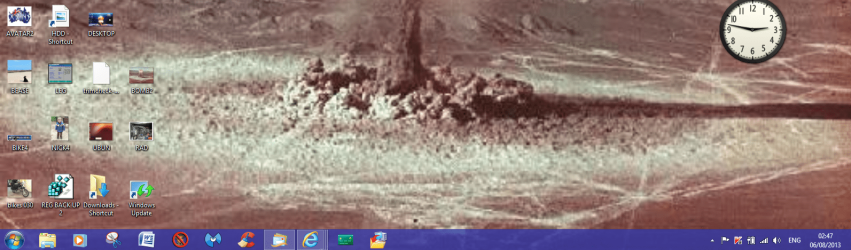
Well for what it is worth here is my 8 desktop couldn't be more like 7 really.
 

Attachments

  • NEW2.PNG
    NEW2.PNG
    385.6 KB · Views: 17

My Computer My Computer

At a glance

Desk1 7 Home Prem / Desk2 10 Pro / Main lap A...Desk1 i5 3750K / Laptop i7 GTX 860M / Desk2 i...Desk1 8GB (1866) / Desk2 16GB (1333) / Laptop...Desk 1& 2NVidia GTX 650 & Laptops on board Intel
Computer type
PC/Desktop
Computer Manufacturer/Model Number
Own build (new) Desk1 / Asus ROG Win 7 / Desk2 1st build
OS
Desk1 7 Home Prem / Desk2 10 Pro / Main lap Asus ROG 10 Pro 2 laptop Toshiba 7 Pro Asus P2520 7 & 10
CPU
Desk1 i5 3750K / Laptop i7 GTX 860M / Desk2 i5 2500
Motherboard
Desk1 Asus P877-V / Desk2 Gigabyte H67 UD3H / Laptop ?
Memory
Desk1 8GB (1866) / Desk2 16GB (1333) / Laptop 8Gb DDR3
Graphics Card(s)
Desk 1& 2NVidia GTX 650 & Laptops on board Intel
Sound Card
Desk 1 & 2 -XONAR DG Realtek High Def audio Laptop
Monitor(s) Displays
Desk 1 Benq HD 2450 / Desk2 Philips 24" / Laptop 17.5"
Screen Resolution
1920x1080 D1 & D2 & Laptop 1
Hard Drives
Desk1 Samsung 120GB 830 SSD
Asus ROG 256GB 850 Pro SSD
Desk2 Samsung 840 256 SSD
Toshiba 120GB EVO
PSU
Desk 1 Corsair HX 1050/ Laptop ? / Desk 2 Corsair HX 650
Case
Desk 1 Cooler HAF XM ? Toshiba laptop / Desk2 Coolermaster
Cooling
Fans on all Desk1 -2 Desk2 - all Coolermasters 5 Laptop ?
Keyboard
Desk 1 MS Sidewinder X6 Desk 2 MS Sidewinder X 4
Mouse
Desk 1&2 - Gigabyte MS 900 gamer - laptop - Logitec wireless
Internet Speed
ADSL2+
Other Info
One other Desktop (tester) and spare Toshba laptop both with SSD's
Running Kaspersky 2016 ISS on all machines config'd identically
Logitec audio stereo systems on each machine (x3)
Canon MG5250MFC
Router/modem TP-Link running WPA2SK

My Computer My Computer

At a glance

Desk1 7 Home Prem / Desk2 10 Pro / Main lap A...Desk1 i5 3750K / Laptop i7 GTX 860M / Desk2 i...Desk1 8GB (1866) / Desk2 16GB (1333) / Laptop...Desk 1& 2NVidia GTX 650 & Laptops on board Intel
Computer type
PC/Desktop
Computer Manufacturer/Model Number
Own build (new) Desk1 / Asus ROG Win 7 / Desk2 1st build
OS
Desk1 7 Home Prem / Desk2 10 Pro / Main lap Asus ROG 10 Pro 2 laptop Toshiba 7 Pro Asus P2520 7 & 10
CPU
Desk1 i5 3750K / Laptop i7 GTX 860M / Desk2 i5 2500
Motherboard
Desk1 Asus P877-V / Desk2 Gigabyte H67 UD3H / Laptop ?
Memory
Desk1 8GB (1866) / Desk2 16GB (1333) / Laptop 8Gb DDR3
Graphics Card(s)
Desk 1& 2NVidia GTX 650 & Laptops on board Intel
Sound Card
Desk 1 & 2 -XONAR DG Realtek High Def audio Laptop
Monitor(s) Displays
Desk 1 Benq HD 2450 / Desk2 Philips 24" / Laptop 17.5"
Screen Resolution
1920x1080 D1 & D2 & Laptop 1
Hard Drives
Desk1 Samsung 120GB 830 SSD
Asus ROG 256GB 850 Pro SSD
Desk2 Samsung 840 256 SSD
Toshiba 120GB EVO
PSU
Desk 1 Corsair HX 1050/ Laptop ? / Desk 2 Corsair HX 650
Case
Desk 1 Cooler HAF XM ? Toshiba laptop / Desk2 Coolermaster
Cooling
Fans on all Desk1 -2 Desk2 - all Coolermasters 5 Laptop ?
Keyboard
Desk 1 MS Sidewinder X6 Desk 2 MS Sidewinder X 4
Mouse
Desk 1&2 - Gigabyte MS 900 gamer - laptop - Logitec wireless
Internet Speed
ADSL2+
Other Info
One other Desktop (tester) and spare Toshba laptop both with SSD's
Running Kaspersky 2016 ISS on all machines config'd identically
Logitec audio stereo systems on each machine (x3)
Canon MG5250MFC
Router/modem TP-Link running WPA2SK
I agree with what you say Jim but mate des this mean that we who have recently taken up 8 will have to shell out more for the 8.1 or do you think it will come as an update? I hope so cos I have spent enough time and money already.

Personally how I have mine set up now is fine by me it has turned my old Ford model 10 laptop into a Ferrari!

Hi there
it will be a FREE update.

Just a reminder -- Windows 8 is being replaced by Windows 8.1 as a FREE upgrade around the end of the year when W8 will stop getting updates etc. W8 is now essentially "deprecated" so venom and vitriol on what is now a defunct OS is a waste of time . W8.1 is available for preview testing (Free) if you want to see for yourselves - IE11 has issues as I've said but try W8.1 -- you might be surprised.

All the discussions on W8 start screen etc should be reviewed in the light of the NEW W8.1 features --pointed out by me in about three posts back in this thread so a lot of the stuff about METRO, endless scrolling on the START screen and not being able to boot straight to the desktop are now TOTALLY REDUNDANT and DEAD. You can configure it up so you NEVER HAVE TO LOOK AT A METRO SCREEN AGAIN if you want and you can disable the corner navigation too.

By all means raise concerns about 8.1 but don't trouble yourselves with W8 any more. BUT READ the difference in navigation and how applications (desktop type) are installed in W8.1 before jumping to conclusions --it's DIFFERENT to W8.

Cheers
jimbo
Sorry Jimbo missed the post I'll have a Google around for the 8.1 and see what it is about. In the meantime I don't see any Metro except that initial tall tower thing on power up > touch a key and it takes me straight to login then to the screen post of my desktop a while back, takes all of 5 secs.:)
 

My Computer My Computer

At a glance

Desk1 7 Home Prem / Desk2 10 Pro / Main lap A...Desk1 i5 3750K / Laptop i7 GTX 860M / Desk2 i...Desk1 8GB (1866) / Desk2 16GB (1333) / Laptop...Desk 1& 2NVidia GTX 650 & Laptops on board Intel
Computer type
PC/Desktop
Computer Manufacturer/Model Number
Own build (new) Desk1 / Asus ROG Win 7 / Desk2 1st build
OS
Desk1 7 Home Prem / Desk2 10 Pro / Main lap Asus ROG 10 Pro 2 laptop Toshiba 7 Pro Asus P2520 7 & 10
CPU
Desk1 i5 3750K / Laptop i7 GTX 860M / Desk2 i5 2500
Motherboard
Desk1 Asus P877-V / Desk2 Gigabyte H67 UD3H / Laptop ?
Memory
Desk1 8GB (1866) / Desk2 16GB (1333) / Laptop 8Gb DDR3
Graphics Card(s)
Desk 1& 2NVidia GTX 650 & Laptops on board Intel
Sound Card
Desk 1 & 2 -XONAR DG Realtek High Def audio Laptop
Monitor(s) Displays
Desk 1 Benq HD 2450 / Desk2 Philips 24" / Laptop 17.5"
Screen Resolution
1920x1080 D1 & D2 & Laptop 1
Hard Drives
Desk1 Samsung 120GB 830 SSD
Asus ROG 256GB 850 Pro SSD
Desk2 Samsung 840 256 SSD
Toshiba 120GB EVO
PSU
Desk 1 Corsair HX 1050/ Laptop ? / Desk 2 Corsair HX 650
Case
Desk 1 Cooler HAF XM ? Toshiba laptop / Desk2 Coolermaster
Cooling
Fans on all Desk1 -2 Desk2 - all Coolermasters 5 Laptop ?
Keyboard
Desk 1 MS Sidewinder X6 Desk 2 MS Sidewinder X 4
Mouse
Desk 1&2 - Gigabyte MS 900 gamer - laptop - Logitec wireless
Internet Speed
ADSL2+
Other Info
One other Desktop (tester) and spare Toshba laptop both with SSD's
Running Kaspersky 2016 ISS on all machines config'd identically
Logitec audio stereo systems on each machine (x3)
Canon MG5250MFC
Router/modem TP-Link running WPA2SK
Who would pay for it?

At this point, who would buy the OS? The Big Boxes are all taking its mention out of their Sunday ads.

Kim Commando on her Saturday radio show repeated twice to a mother to get her daughter Windows 7 on her new PC for college. Kim is the mainstream's tech mama.

The equivalent is New Coke if they hadn't pulled it off the market within days, and instead doubled down with more prune juice flavor. Now they're into Tylenol territory.
 
[/QUOTE]
Sorry Jimbo missed the post I'll have a Google around for the 8.1 and see what it is about. In the meantime I don't see any Metro except that initial tall tower thing on power up > touch a key and it takes me straight to login then to the screen post of my desktop a while back, takes all of 5 secs.:)[/QUOTE]

Just don't want to pee on your chips John but while Windows 8/8.1 hybrid boot enables the OS to appear to boot up quicker the fact that you then have to wait for Metro to load so you can take all of 5 seconds to load the desktop adds to the boot up time IMHO. I just leave my machines on so the desktop appears in 1 second once the monitor has showed up. The power saving functions of Windows 7 spin down the hard drives and everything else goes to idle. Also hibernation on 7 would make the system appear to boot quicker. I have got Windows 8 Pro and no longer even bother with it. I recently built a new machine to use with my Agfa SnapScan 600 and I installed Windows 7 on that. That PC is extremely snappy and responsive and uses the AMD platform with a Phenom II at 3.4 GHZ not overclocked or anything. Windows 8 had its chance and no amount of polishing the turd will fix it. Roll on Windows 7, give us a SP2 with all the updates rolled in and stick some tweaks in the system to work better. Your desktop client base vastly outnumbers the "Toy town Fondle slab Brigade".
 

My Computer My Computer

At a glance

Windows 7 x64 Ultimate and numerous virtual m...AMD FX-8350 Vishera 32nm Technology @ 4.2 GHz...G Skill 32.0GB Dual-Channel DDR3 @ 1204MHz (1...EVGA GeForce GTX 960 4GB Super SC ACX 2.0+ wi...
Computer type
PC/Desktop
Computer Manufacturer/Model Number
Bluethunder II
OS
Windows 7 x64 Ultimate and numerous virtual machines
CPU
AMD FX-8350 Vishera 32nm Technology @ 4.2 GHz default
Motherboard
ASUSTeK COMPUTER INC. SABERTOOTH 990FX R2.0 (Socket 942)
Memory
G Skill 32.0GB Dual-Channel DDR3 @ 1204MHz (11-13-13-31)
Graphics Card(s)
EVGA GeForce GTX 960 4GB Super SC ACX 2.0+ with Back Plate
Sound Card
Creative X-Fi Titanium HD Audiophile PCIe
Monitor(s) Displays
LG L227WTG x 3
Screen Resolution
1680 x 1050 16:10
Hard Drives
238GB Samsung850 PRO SATA Disk Device (SSD)
1863GB Seagate ST2000DM 001-1CH164 (SATA)
1397GB Seagate ST1500DL 003-9VT16L(SATA)
466GB Western Digital WDC WD50 03AZEX-00K1GA0 (SATA) x 2
932GB Seagate ST310005 28AS SATA Disk Device (SATA)
PSU
Enermax Revolution87+ 1000 Watts Gold Certified Power Supply
Case
Rocketfish Full Tower
Cooling
Cooler Master Hyper 212 EVO Push Pull 120mm Fans
Keyboard
Logitech K740
Mouse
Logitech G100S Laser LED + Logitech Gamepad F310
Internet Speed
500 mbs down and 30mbs up
Antivirus
Malwarebytes Pro & Avast and MSE on certain Virtual Machines
Browser
Firefox (Main) Chrome, Internet Explorer (Back Up)
Other Info
Logitech X 230 2.1 Stereo System and 5.1 Yamaha RX V2090
B&W DM6 Monitor Speakers + Center and Surround Speakers
Using Mouse Without Borders (Google it)
Well for what it is worth here is my 8 desktop couldn't be more like 7 really.

Windows 7 SP2? ;)
Got me there Harry the SP2 what the dickens is that? I can't find anything on Google re that:confused:
Windows 8/ 8.1 with enough tweaking is win-7 sp2,
I dread visiting regedit for every little thing though :eek:
But I'm sure by the dead line/ Price for windows 8 goes up from 40 u.s. I'll have at least one Full version.
 

My Computer My Computer

At a glance

Win-7-Pro64bit 7-H-Prem-64biti7-5930K 2nd i9-9940x both water blocked VRM'...Trident-z 3200C14 2nd Trident-z 3600C16EVGA 1080ti ftw3 2nd Titan Xp both water blocked
Computer type
PC/Desktop
Computer Manufacturer/Model Number
Custom assembled by me :}
OS
Win-7-Pro64bit 7-H-Prem-64bit
CPU
i7-5930K 2nd i9-9940x both water blocked VRM's too
Motherboard
ASUS SABERTOOTH X99 2nd ASUS x299 Apex
Memory
Trident-z 3200C14 2nd Trident-z 3600C16
Graphics Card(s)
EVGA 1080ti ftw3 2nd Titan Xp both water blocked
Sound Card
Built-in Realtek
Monitor(s) Displays
1-AOC G2460PG 24"G-Sync 144Hz/ 2nd 1-ASUS VG248QE 24" 144Hz
Screen Resolution
1920 x 1080 144Hz
Hard Drives
2-Samsung M.2 Evo & Evo Plus
2-Samsung 850 EVO 500GB SSD's/ 3-2.5 W.D. Black 1tb-&3-1tb/3-3.5 WD Black 1tb hdd's
PSU
EVGA SuperNOVA 1000-P2 2nd 1200-P2
Case
2-Corsair Obsidian Series 450D Black ATX Mid Tower
Cooling
Custom water loops
Keyboard
Logitech G710+/ 2nd Logitech G910
Mouse
2-RedDragon M901 Perdition 16400 dpi Gaming mouse = wired
Internet Speed
Comcast Ping 19ms 89.31mbps download speed 6.12mbps upload
Antivirus
Malwarebytes Pro/ Superantispyware Pro
Browser
FireFox & Pale moon
Other Info
2nd ASUS X299 Apex/Intel i9-9940x with Custom water loop/7H-Prem-x64/Corsair 450D case/Ram Trident-z 3600C16 4x8gb / Samsung970Evo plus 500gb SSD/Dual ssd EZ swap evo/PSU EVGA SuperNova 1200w-P2 80+Platinum/GPU Titan Xp /8-ML-140 on push-pull on 2-280GTX rads
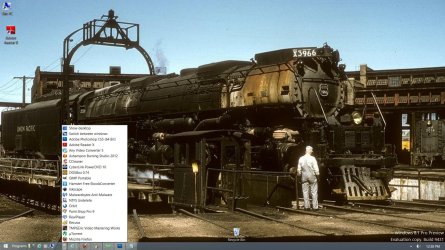
The 8.1 preview is too buggy to use as a primary OS at this stage, so I've gone back to Win 8 (I've kept an image, tho). But 8.1, once I'd disabled all the net-centric rubbish and tweaked it up a bit, is a lovely OS to use. I'm running it on a local a/c, not an MS a/c.

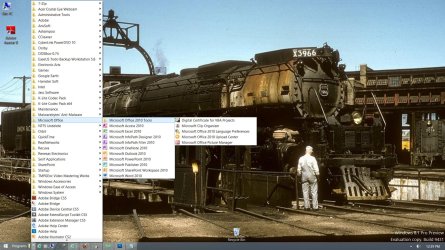
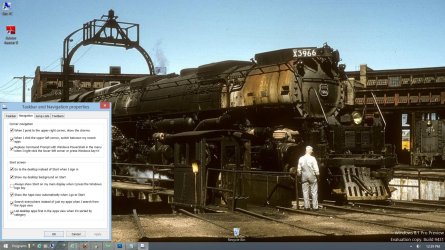
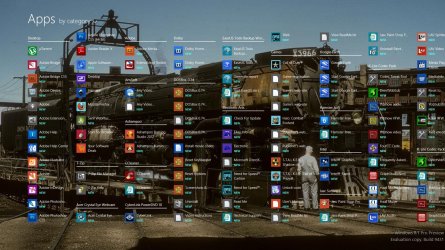
I felt no need to install Classic Shell, but did enable the Quick-Launch toolbar, and I have Metro set to go to the All Apps screen instead of the Start Screen (which is as buggy as a flophouse mattress as I've said previously) and it boots directly to the desktop. I never see Metro unless I specifically want to.

All Apps works best if you sort the apps/programs by category.

Shown below is my 8.1 desktop and All Apps screen... In the second pic, 8.1's built-in start menu is activated (Win 8 has this as well).


Wenda.
 

Attachments

  • Screenshot (10).jpg
    Screenshot (10).jpg
    250.7 KB · Views: 12
  • Screenshot (11).jpg
    Screenshot (11).jpg
    264.5 KB · Views: 15
  • Screenshot (12).jpg
    Screenshot (12).jpg
    248.2 KB · Views: 11
  • Screenshot (13).jpg
    Screenshot (13).jpg
    306.3 KB · Views: 15

My Computer My Computer

At a glance

Windows 7 Ultimate SP1 32-bit; Windows 7 Home...Intel T6500 Core 2 Duo@2Ghz.3GB DDR2Intel 4500MHD
Computer type
Laptop
Computer Manufacturer/Model Number
Acer AS5735
OS
Windows 7 Ultimate SP1 32-bit; Windows 7 Home Premium 64-bit (VM).
CPU
Intel T6500 Core 2 Duo@2Ghz.
Motherboard
Acer
Memory
3GB DDR2
Graphics Card(s)
Intel 4500MHD
Sound Card
Realtek onboard
Monitor(s) Displays
Built-in, no touch
Screen Resolution
1366x768
Hard Drives
250GB SATA in two equal partitions.
PSU
Stock
Case
Laptop
Cooling
Stock
Keyboard
Full 101-key
Mouse
USB cordless IR
Antivirus
MSE
Browser
IE9, Firefox.
Other Info
A top little machine that hasn't let me down once since the day I removed it from its packaging over four years ago. It's done everything I could want, and more, all without a single issue. 10/10, Acer!!
Hi thee
As I keep saying -- W8.1 (when released as final) can be operated TOTALLY different to W8 -- a lot of the earlier complaints just don't really wash.

I'd also recommend that you TURN OFF the desktop background on the Applications screen although YMMV - it's obviously a USER preference choice but IMO it's much easier to READ the app tiles when they are on a plain background rather than use the same background as on your Desktop Theme. Keep your desktop themes of course.

@Wenda -- look at your 4th screen (apps screen) IMO that is definitely better if you stick with the plain background for this view.

IE11 is the biggest block to me using it regularly so far -- but for non WEB use it seems fine including Office, Photoshop and all the standard apps I have plus of course VMware workstation which I use a lot too.

Custom toolbars also make a use of the W7 type menu not so relevant anymore either as Wenda shows in her screenshots.

Once again a reminder for people who haven't used W8.1 -- W8.1 CAN boot straight to desktop and also you don't need to use an MS account -- a local account is just fine. People are STILL complaining about W8 -- remember effective from NOW W8 is effectively DEAD AND BURIED -- there will be NO MORE SUPPORT for it after W8.1 is released -- and the 8.1 release is a FREE upgrade. This makes W8 then the shortest lived OS in MS's history !!!

Cheers
jimbo
 

My Computer My Computer

At a glance

Linux CENTOS 7 / various Windows OS'es and se...Intel i7 Intel i58GB, 16GBOn Motherboard
Computer type
PC/Desktop
Computer Manufacturer/Model Number
Custom built, several laptops HP/ASUS
OS
Linux CENTOS 7 / various Windows OS'es and servers
CPU
Intel i7 Intel i5
Memory
8GB, 16GB
Graphics Card(s)
On Motherboard
Sound Card
Realtek HD audio
Monitor(s) Displays
Apple Cinema display, Samsung LCD
Screen Resolution
1920 X 1080
Hard Drives
4 X 1TB SATA
Mouse
Toshiba wireless laser
Internet Speed
> 20MB up
Sorry Jimbo missed the post I'll have a Google around for the 8.1 and see what it is about. In the meantime I don't see any Metro except that initial tall tower thing on power up > touch a key and it takes me straight to login then to the screen post of my desktop a while back, takes all of 5 secs.:)[/QUOTE]

Just don't want to pee on your chips John but while Windows 8/8.1 hybrid boot enables the OS to appear to boot up quicker the fact that you then have to wait for Metro to load so you can take all of 5 seconds to load the desktop adds to the boot up time IMHO. I just leave my machines on so the desktop appears in 1 second once the monitor has showed up. The power saving functions of Windows 7 spin down the hard drives and everything else goes to idle. Also hibernation on 7 would make the system appear to boot quicker. I have got Windows 8 Pro and no longer even bother with it. I recently built a new machine to use with my Agfa SnapScan 600 and I installed Windows 7 on that. That PC is extremely snappy and responsive and uses the AMD platform with a Phenom II at 3.4 GHZ not overclocked or anything. Windows 8 had its chance and no amount of polishing the turd will fix it. Roll on Windows 7, give us a SP2 with all the updates rolled in and stick some tweaks in the system to work better. Your desktop client base vastly outnumbers the "Toy town Fondle slab Brigade".[/QUOTE]
Yes and no mate the chips are fine mate;) I am talking about a four year old laptop that I boot from cold as I never leave machines running. It has a reasonably slow CPU although 8GB and an SSD but I am just in awe of the speed difference beit 8 or 7 SP2 or Joes café special OS, and I use it just like I do 7 so I have 7 at lightning speed and can dip back and forth into the Metro for apps news etc.
There seems to be an overbearing desire in this thread to jam ones ideas about whatever down the throats of everyone else and personally I am finding a tad boring now. For a $53 upgrade I am happy and that is all that counts:)
Now SP2 has got me confused than ever LOL!! and I did look into the 8.1 and saw something horrible about Skydrive saving my docs and pics and stuff something that is NEVER going to happen if I have anything to do with it, that would be the only issue with 8 if it ever became mandatory to have.
 

My Computer My Computer

At a glance

Desk1 7 Home Prem / Desk2 10 Pro / Main lap A...Desk1 i5 3750K / Laptop i7 GTX 860M / Desk2 i...Desk1 8GB (1866) / Desk2 16GB (1333) / Laptop...Desk 1& 2NVidia GTX 650 & Laptops on board Intel
Computer type
PC/Desktop
Computer Manufacturer/Model Number
Own build (new) Desk1 / Asus ROG Win 7 / Desk2 1st build
OS
Desk1 7 Home Prem / Desk2 10 Pro / Main lap Asus ROG 10 Pro 2 laptop Toshiba 7 Pro Asus P2520 7 & 10
CPU
Desk1 i5 3750K / Laptop i7 GTX 860M / Desk2 i5 2500
Motherboard
Desk1 Asus P877-V / Desk2 Gigabyte H67 UD3H / Laptop ?
Memory
Desk1 8GB (1866) / Desk2 16GB (1333) / Laptop 8Gb DDR3
Graphics Card(s)
Desk 1& 2NVidia GTX 650 & Laptops on board Intel
Sound Card
Desk 1 & 2 -XONAR DG Realtek High Def audio Laptop
Monitor(s) Displays
Desk 1 Benq HD 2450 / Desk2 Philips 24" / Laptop 17.5"
Screen Resolution
1920x1080 D1 & D2 & Laptop 1
Hard Drives
Desk1 Samsung 120GB 830 SSD
Asus ROG 256GB 850 Pro SSD
Desk2 Samsung 840 256 SSD
Toshiba 120GB EVO
PSU
Desk 1 Corsair HX 1050/ Laptop ? / Desk 2 Corsair HX 650
Case
Desk 1 Cooler HAF XM ? Toshiba laptop / Desk2 Coolermaster
Cooling
Fans on all Desk1 -2 Desk2 - all Coolermasters 5 Laptop ?
Keyboard
Desk 1 MS Sidewinder X6 Desk 2 MS Sidewinder X 4
Mouse
Desk 1&2 - Gigabyte MS 900 gamer - laptop - Logitec wireless
Internet Speed
ADSL2+
Other Info
One other Desktop (tester) and spare Toshba laptop both with SSD's
Running Kaspersky 2016 ISS on all machines config'd identically
Logitec audio stereo systems on each machine (x3)
Canon MG5250MFC
Router/modem TP-Link running WPA2SK
......Windows 8.1 is far superior for decently managing LARGE and MUILTIPLE monitors - windows 7 is a bit of a pain with THREE monitors (or more !!)......


Cheers
jimbo


Jimbo I can just see you swishing, wiping and swiping multiple large touchscreens, especially if you were in a hurry!
:D
 

My Computer My Computer

At a glance

Windows 7 Pro x64Intel I7 6700 3.40 GHz8GB
Computer type
PC/Desktop
Computer Manufacturer/Model Number
HP ProDesk 400 G3
OS
Windows 7 Pro x64
CPU
Intel I7 6700 3.40 GHz
Memory
8GB
Monitor(s) Displays
Samsung 21.5" LED
Hard Drives
1 TB
Keyboard
Ducky mechanical with PBT double shot keycaps.
......Windows 8.1 is far superior for decently managing LARGE and MUILTIPLE monitors - windows 7 is a bit of a pain with THREE monitors (or more !!)......


Cheers
jimbo


Jimbo I can just see you swishing, wiping and swiping multiple large touchscreens, especially if you were in a hurry!
:D
Hmm what beats me is why do you need more than one monitor for heavens sake does one live at the stock exchange?? :sarc: As for touch screens dirty habit!!
 

My Computer My Computer

At a glance

Desk1 7 Home Prem / Desk2 10 Pro / Main lap A...Desk1 i5 3750K / Laptop i7 GTX 860M / Desk2 i...Desk1 8GB (1866) / Desk2 16GB (1333) / Laptop...Desk 1& 2NVidia GTX 650 & Laptops on board Intel
Computer type
PC/Desktop
Computer Manufacturer/Model Number
Own build (new) Desk1 / Asus ROG Win 7 / Desk2 1st build
OS
Desk1 7 Home Prem / Desk2 10 Pro / Main lap Asus ROG 10 Pro 2 laptop Toshiba 7 Pro Asus P2520 7 & 10
CPU
Desk1 i5 3750K / Laptop i7 GTX 860M / Desk2 i5 2500
Motherboard
Desk1 Asus P877-V / Desk2 Gigabyte H67 UD3H / Laptop ?
Memory
Desk1 8GB (1866) / Desk2 16GB (1333) / Laptop 8Gb DDR3
Graphics Card(s)
Desk 1& 2NVidia GTX 650 & Laptops on board Intel
Sound Card
Desk 1 & 2 -XONAR DG Realtek High Def audio Laptop
Monitor(s) Displays
Desk 1 Benq HD 2450 / Desk2 Philips 24" / Laptop 17.5"
Screen Resolution
1920x1080 D1 & D2 & Laptop 1
Hard Drives
Desk1 Samsung 120GB 830 SSD
Asus ROG 256GB 850 Pro SSD
Desk2 Samsung 840 256 SSD
Toshiba 120GB EVO
PSU
Desk 1 Corsair HX 1050/ Laptop ? / Desk 2 Corsair HX 650
Case
Desk 1 Cooler HAF XM ? Toshiba laptop / Desk2 Coolermaster
Cooling
Fans on all Desk1 -2 Desk2 - all Coolermasters 5 Laptop ?
Keyboard
Desk 1 MS Sidewinder X6 Desk 2 MS Sidewinder X 4
Mouse
Desk 1&2 - Gigabyte MS 900 gamer - laptop - Logitec wireless
Internet Speed
ADSL2+
Other Info
One other Desktop (tester) and spare Toshba laptop both with SSD's
Running Kaspersky 2016 ISS on all machines config'd identically
Logitec audio stereo systems on each machine (x3)
Canon MG5250MFC
Router/modem TP-Link running WPA2SK
......Windows 8.1 is far superior for decently managing LARGE and MUILTIPLE monitors - windows 7 is a bit of a pain with THREE monitors (or more !!)......


Cheers
jimbo


Jimbo I can just see you swishing, wiping and swiping multiple large touchscreens, especially if you were in a hurry!
:D
Hmm what beats me is why do you need more than one monitor for heavens sake does one live at the stock exchange?? :sarc: As for touch screens dirty habit!!

Hi there
THREE screens are actually quite useful in loads of situations (apart from having a Movie on one and applications on others).

Typical examples :

Programming / code debugging -- sometimes you want to have the debugger in a different place so you can set break points and examine variables etc while still running the application - and it's MUCH simpler to have these on separate screens rather than as smaller windows on the main screen.

Engineering / CAD drawing -- you might want to expand / Explode parts of the drawing --again much easier to display this on another screen while still being able to view the main drawing.

There's all sorts of other reasons too. -- what about say at work when you are logging on from ONE computer on your desk to THREE different company machines -- say PROD / DEV / QC -- OK you CAN do it with a single monitor and switch applications or windows but it's much easier with three screens especially when an application works say in QC but fails in PROD and you need to test a new version in TEST. You need to see all 3 at the same time. (OK it CAN be done with ONE -- the same way as you could RIDE A HORSE from NYC to Washington DC but there are better ways to go from NYC to Washington DC - same as using multiple monitors in the scenario I've just stated above).

Loads more cases -- once you've got used to using more than one monitor you'll be surprised how strange it feels to only going back to using ONE.

(For casual browsing / other typical "Tablety" or Mobile phone stuff then one monitor is fine --that's if you even NEED a computer at all for those purposes).

Cheers
jimbo
 

My Computer My Computer

At a glance

Linux CENTOS 7 / various Windows OS'es and se...Intel i7 Intel i58GB, 16GBOn Motherboard
Computer type
PC/Desktop
Computer Manufacturer/Model Number
Custom built, several laptops HP/ASUS
OS
Linux CENTOS 7 / various Windows OS'es and servers
CPU
Intel i7 Intel i5
Memory
8GB, 16GB
Graphics Card(s)
On Motherboard
Sound Card
Realtek HD audio
Monitor(s) Displays
Apple Cinema display, Samsung LCD
Screen Resolution
1920 X 1080
Hard Drives
4 X 1TB SATA
Mouse
Toshiba wireless laser
Internet Speed
> 20MB up
Status
Not open for further replies.
Back
Top