
Motion Eye Sony Vaio VGN-FZ180E

Marley

New member
Local time
10:07 PM
Messages
1
So I know there have been a ton of threads about this, where my computer won't recognize my built in camera after I installed Windows 7 (Professional x32)--it actually did work the first time I used it, but stopped after about 3 minutes. My problem with the available solutions is that my device manager doesn't even show an imaging device. I've tried installing vista drivers in compatibility mode, can't restore to a previous point because I didn't have resort enabled, tried running it through the XP-virtual PC, nothing has worked.. now what?
 

Attachments
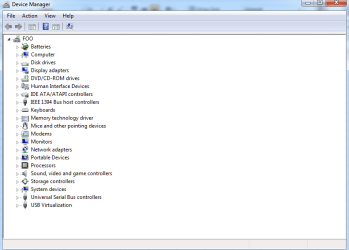
  • Device Manager.png
    Device Manager.png
    18.6 KB · Views: 89

My Computer My Computer

At a glance

Windows 7 Professional 32 bit
Computer Manufacturer/Model Number
Sony Vaio VGN-FZ180E
OS
Windows 7 Professional 32 bit
Do you have a driver disc or anything like that? Also try the manucture's website for any updates etc.
 

My Computer My Computer

At a glance

Dual-boot: Windows 7 HP 32-bit SP1 & Windows ...AMD Phenom X4 9550 2.8Ghz4.0GB RAM256MB On-board ATI Radeon X1200 Series
Computer Manufacturer/Model Number
Advent
OS
Dual-boot: Windows 7 HP 32-bit SP1 & Windows XP Pro 32-bit SP2.
CPU
AMD Phenom X4 9550 2.8Ghz
Motherboard
FOXCONN A6VMX (Socket 940)
Memory
4.0GB RAM
Graphics Card(s)
256MB On-board ATI Radeon X1200 Series
Sound Card
UnKnown
Monitor(s) Displays
19" TFT Mointor
Screen Resolution
1400 by 900
Hard Drives
500GB Western Digital WDC
Keyboard
HP Keyboard
Internet Speed
Dial-up via Mobile phone (Three)
Other Info
80GB External Hard-drive.

Also I have an old Windows XP Laptop for backup/occasional use etc.
Do you need install FN drives Video ?
 

My Computer My Computer

At a glance

Windows 7 32 bits
OS
Windows 7 32 bits
Back
Top