Mouse and system randomly freezes

The Minimalist

New member
Local time
11:44 AM
Messages
31
My mouse randomly freezes, along with my system. The only way I can get it to work again is to reboot the computer.
This has only been happening today, and it has happened twice. Please advise?
 

My Computer

Computer Manufacturer/Model Number
Build to Order Computer
OS
Windows 7 Home Premium 32bit
CPU
Intel(R) Core(TM) i3-2100 CPU @ 3.10GHz 3.10GHz
Motherboard
Gigabyte
Memory
454GB + 477GB
Monitor(s) Displays
ViewSonic VP950b
Screen Resolution
1024 x 768
Hard Drives
Hitachi HDS721010CLA332 ATA Device
Keyboard
Dell SK-8115
Mouse
Logitech M100
Check your system for any malware, spyware and the likes...then make sure you have your system is up to date with all MS updates and then the same for all your drivers.
 

My Computer

Computer Manufacturer/Model Number
Custom built
OS
Windows 7 Ultimate 64 bit
CPU
AMD Phenom II X4 965 Black Edition
Motherboard
Gigabyte GA-MA790X-DS4
Memory
GSkill 4 X 2 GB PC 8500
Graphics Card(s)
XFX Radeon HD 6790 D
Sound Card
On board RealTek HD
Monitor(s) Displays
Dual monitors:Samsung SyncMaster S20B300
Screen Resolution
1600 X 900
Hard Drives
Seagate Barracuda 1TB (primary)
Seagate Barracuda 2 X 320 GB
PSU
Ultra X4 750 watt fully modular
Case
Thermaltake Overseer RX 1 full tower
Cooling
Core-Contact 92 mm CPU Cooler
Keyboard
Logitech G510
Mouse
Razor DeathAdder
Internet Speed
50/5 Mbps UL/DL
Other Info
Optical: Super Muliti DVD burner w/lightscribe, Hauppauge WinTV HVR-1800
Thank you for replying! :)
I've run a full-system scan with Avast! and there are no threats found. Everything is up-to-date as well.

So far it has not occured again, but I just want to make sure.


The first time it happened, I was pasting a screenshot using Microsoft Word, and the second time, I was using my flash drive. Both times, when I clicked ctrl+alt+del, Windows Task Manager does not work.

The only possibilities that I can think of is that I recently changed my wallpaper theme to a slideshow instead of the regular one. (Which might have caused my computer to hang.)

Also, I have accidentally clicked on a website called youutube.com. I immediately closed the website a few seconds after clicking on it. (Might be malware/spyware from the website, but it does not reflect from my Avast! full system scan.)

Usually, if a website is dangerous, Avast would have blocked it and give me a warning, but it doesn't.
 
Last edited:

My Computer

Computer Manufacturer/Model Number
Build to Order Computer
OS
Windows 7 Home Premium 32bit
CPU
Intel(R) Core(TM) i3-2100 CPU @ 3.10GHz 3.10GHz
Motherboard
Gigabyte
Memory
454GB + 477GB
Monitor(s) Displays
ViewSonic VP950b
Screen Resolution
1024 x 768
Hard Drives
Hitachi HDS721010CLA332 ATA Device
Keyboard
Dell SK-8115
Mouse
Logitech M100
Ok, I've run Avast again, and there is this infected file in the location:
C:\Windows\Temp\_asw_aisT.tm~a04044

It is listed as High severity and Avast have removed it. Is it still a danger if it has been removed?
 

My Computer

Computer Manufacturer/Model Number
Build to Order Computer
OS
Windows 7 Home Premium 32bit
CPU
Intel(R) Core(TM) i3-2100 CPU @ 3.10GHz 3.10GHz
Motherboard
Gigabyte
Memory
454GB + 477GB
Monitor(s) Displays
ViewSonic VP950b
Screen Resolution
1024 x 768
Hard Drives
Hitachi HDS721010CLA332 ATA Device
Keyboard
Dell SK-8115
Mouse
Logitech M100

My Computer

Computer Manufacturer/Model Number
LAPTOP. HP Pavilion dv7-4010TX .
OS
Win 7 Ultimate 64-bit. SP1.
CPU
Intel i7 -720QM.[1.6GHz Turbo Boost 2.8GHz. 6MB Cache.]
Memory
8 DDR 3 RAM. 1066MHZ
Graphics Card(s)
ATI 1024 MB. DDR3. Radeon HD5650
Monitor(s) Displays
17.3" High Definition Brightview LCD. LED Backlit.
Screen Resolution
1600 x 900.
Hard Drives
640GB
Case
Laptop / notebook.
Mouse
Logitech Anywhere mouse. MX.
Internet Speed
ADSL [ but too slow ]
Everytime I click on download, it redirects to cnet.com.

Can this website be trusted?
 

My Computer

Computer Manufacturer/Model Number
Build to Order Computer
OS
Windows 7 Home Premium 32bit
CPU
Intel(R) Core(TM) i3-2100 CPU @ 3.10GHz 3.10GHz
Motherboard
Gigabyte
Memory
454GB + 477GB
Monitor(s) Displays
ViewSonic VP950b
Screen Resolution
1024 x 768
Hard Drives
Hitachi HDS721010CLA332 ATA Device
Keyboard
Dell SK-8115
Mouse
Logitech M100

My Computer

Computer Manufacturer/Model Number
LAPTOP. HP Pavilion dv7-4010TX .
OS
Win 7 Ultimate 64-bit. SP1.
CPU
Intel i7 -720QM.[1.6GHz Turbo Boost 2.8GHz. 6MB Cache.]
Memory
8 DDR 3 RAM. 1066MHZ
Graphics Card(s)
ATI 1024 MB. DDR3. Radeon HD5650
Monitor(s) Displays
17.3" High Definition Brightview LCD. LED Backlit.
Screen Resolution
1600 x 900.
Hard Drives
640GB
Case
Laptop / notebook.
Mouse
Logitech Anywhere mouse. MX.
Internet Speed
ADSL [ but too slow ]
That's what I meant. When I click on the 'download now' button, I get redirected to download.cnet.com
 

My Computer

Computer Manufacturer/Model Number
Build to Order Computer
OS
Windows 7 Home Premium 32bit
CPU
Intel(R) Core(TM) i3-2100 CPU @ 3.10GHz 3.10GHz
Motherboard
Gigabyte
Memory
454GB + 477GB
Monitor(s) Displays
ViewSonic VP950b
Screen Resolution
1024 x 768
Hard Drives
Hitachi HDS721010CLA332 ATA Device
Keyboard
Dell SK-8115
Mouse
Logitech M100
Seems like the link is safe. I've downloaded Malwarebytes and ran a scan. Here are the results:


Malwarebytes Anti-Malware 1.60.1.1000
www.malwarebytes.org
Database version: v2012.03.29.03
Windows 7 x86 NTFS
Internet Explorer 8.0.7600.16385
User :: USER-PC [administrator]
3/29/2012 5:43:40 PM
mbam-log-2012-03-29 (17-43-40).txt
Scan type: Full scan
Scan options enabled: Memory | Startup | Registry | File System | Heuristics/Extra | Heuristics/Shuriken | PUP | PUM
Scan options disabled: P2P
Objects scanned: 224417
Time elapsed: 12 minute(s), 56 second(s)
Memory Processes Detected: 0
(No malicious items detected)
Memory Modules Detected: 0
(No malicious items detected)
Registry Keys Detected: 0
(No malicious items detected)
Registry Values Detected: 0
(No malicious items detected)
Registry Data Items Detected: 0
(No malicious items detected)
Folders Detected: 0
(No malicious items detected)
Files Detected: 0
(No malicious items detected)
(end)


Thanks, JMH and basssfisher6522.
What is the next step of precaution that I should take?
 
Last edited:

My Computer

Computer Manufacturer/Model Number
Build to Order Computer
OS
Windows 7 Home Premium 32bit
CPU
Intel(R) Core(TM) i3-2100 CPU @ 3.10GHz 3.10GHz
Motherboard
Gigabyte
Memory
454GB + 477GB
Monitor(s) Displays
ViewSonic VP950b
Screen Resolution
1024 x 768
Hard Drives
Hitachi HDS721010CLA332 ATA Device
Keyboard
Dell SK-8115
Mouse
Logitech M100
Dear fellow members,
The mouse and system freezing has been happening again, and I am afraid that it might be a sign of hard disk failure. Currently I am scanning my computer again to rule out malware and rootkit infection. Could this be possibly the case?
 

My Computer

Computer Manufacturer/Model Number
Build to Order Computer
OS
Windows 7 Home Premium 32bit
CPU
Intel(R) Core(TM) i3-2100 CPU @ 3.10GHz 3.10GHz
Motherboard
Gigabyte
Memory
454GB + 477GB
Monitor(s) Displays
ViewSonic VP950b
Screen Resolution
1024 x 768
Hard Drives
Hitachi HDS721010CLA332 ATA Device
Keyboard
Dell SK-8115
Mouse
Logitech M100
* Have you SP1 installed?

* Have you checked in Event Viewer?
Type eventvwr in search.
Go to the Windows Logs > Application {& System} in the left hand column.
Note anything in red that relates to the CURRENT freezing problem.
Please record the event ID, and the Source Code and tell us what they are.

Some generic troubleshooting steps you might like to try...

* Safe Mode.

What is safe mode?

* Clean boot. You may discover what is causing your problem.

How to troubleshoot a problem by performing a clean boot in Windows Vista or in Windows 7

* Malwarebytes
Did you run the FULL SYSTEM scan earlier as requested?

* List all the Security software you have ever had installed & currently have now on your computer please.

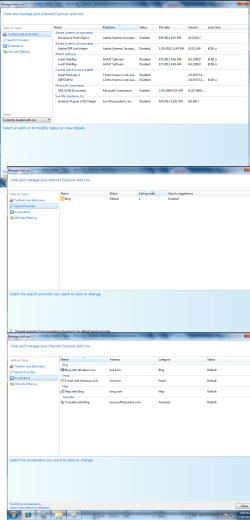
* Browser addons can create problems.
Check how many you have on your various browsers.
Is each & every one really needed?


My Computer

Computer Manufacturer/Model Number
LAPTOP. HP Pavilion dv7-4010TX .
OS
Win 7 Ultimate 64-bit. SP1.
CPU
Intel i7 -720QM.[1.6GHz Turbo Boost 2.8GHz. 6MB Cache.]
Memory
8 DDR 3 RAM. 1066MHZ
Graphics Card(s)
ATI 1024 MB. DDR3. Radeon HD5650
Monitor(s) Displays
17.3" High Definition Brightview LCD. LED Backlit.
Screen Resolution
1600 x 900.
Hard Drives
640GB
Case
Laptop / notebook.
Mouse
Logitech Anywhere mouse. MX.
Internet Speed
ADSL [ but too slow ]
Perform the following tasks::

  • Scan your computer with an antivirus
  • Apply De-fragmentation on your system
  • Delete all temporary files
  • Run disc clean up
  • Fix registry errors.

Click Start - Run, type in %temp% and then click OK.

Once that temp folder is open and you can view its contents, select and delete EVERYTHING that's inside it.

It's all junk and is a good place for "nasties" to hide.

If a few files resist being deleted, that's normal. Leave them alone and delete EVERYTHING else.

Repeat the steps with c:\windows\temp

After you're done with both temp folders, restart the computer.
 

My Computer

OS
Windows 7 Ultimate x64
Strangely, the third time this happened, I was watching a Youtube video.
The audio was still running during the freezing, even though everything else on the screen freezes.
Could it be a graphics card/monitor problem as well?
 

My Computer

Computer Manufacturer/Model Number
Build to Order Computer
OS
Windows 7 Home Premium 32bit
CPU
Intel(R) Core(TM) i3-2100 CPU @ 3.10GHz 3.10GHz
Motherboard
Gigabyte
Memory
454GB + 477GB
Monitor(s) Displays
ViewSonic VP950b
Screen Resolution
1024 x 768
Hard Drives
Hitachi HDS721010CLA332 ATA Device
Keyboard
Dell SK-8115
Mouse
Logitech M100
@JMH: No, mine is not an upgrade from Vista SP1. Is that what you are asking?

I found several problems on the events viewer, should I upload the Event log here?


Malwarebytes did not find any problems; here is the report (Full system scan):
Malwarebytes Anti-Malware 1.60.1.1000
www.malwarebytes.org
Database version: v2012.03.29.03
Windows 7 x86 NTFS
Internet Explorer 8.0.7600.16385
User :: USER-PC [administrator]
3/29/2012 5:43:40 PM
mbam-log-2012-03-29 (17-43-40).txt
Scan type: Full scan
Scan options enabled: Memory | Startup | Registry | File System | Heuristics/Extra | Heuristics/Shuriken | PUP | PUM
Scan options disabled: P2P
Objects scanned: 224417
Time elapsed: 12 minute(s), 56 second(s)
Memory Processes Detected: 0
(No malicious items detected)
Memory Modules Detected: 0
(No malicious items detected)
Registry Keys Detected: 0
(No malicious items detected)
Registry Values Detected: 0
(No malicious items detected)
Registry Data Items Detected: 0
(No malicious items detected)
Folders Detected: 0
(No malicious items detected)
Files Detected: 0
(No malicious items detected)
(end)


I have Malwarebytes and Avast as my antivirus, with Malwarebytes added just yesterday.
These are all that I ever had on my computer.
 
Last edited:

My Computer

Computer Manufacturer/Model Number
Build to Order Computer
OS
Windows 7 Home Premium 32bit
CPU
Intel(R) Core(TM) i3-2100 CPU @ 3.10GHz 3.10GHz
Motherboard
Gigabyte
Memory
454GB + 477GB
Monitor(s) Displays
ViewSonic VP950b
Screen Resolution
1024 x 768
Hard Drives
Hitachi HDS721010CLA332 ATA Device
Keyboard
Dell SK-8115
Mouse
Logitech M100

Attachments

  • Manage Add-ons.png
    Manage Add-ons.png
    96.5 KB · Views: 7

My Computer

Computer Manufacturer/Model Number
Build to Order Computer
OS
Windows 7 Home Premium 32bit
CPU
Intel(R) Core(TM) i3-2100 CPU @ 3.10GHz 3.10GHz
Motherboard
Gigabyte
Memory
454GB + 477GB
Monitor(s) Displays
ViewSonic VP950b
Screen Resolution
1024 x 768
Hard Drives
Hitachi HDS721010CLA332 ATA Device
Keyboard
Dell SK-8115
Mouse
Logitech M100
@alishathomaz:

You are right about the temp folder. The last time, Avast caught a trojan horse and a rootkit in the temp internet files and temp files respectively.

I will do your instructions as adviced, and report back later. Thank you so much!
 

My Computer

Computer Manufacturer/Model Number
Build to Order Computer
OS
Windows 7 Home Premium 32bit
CPU
Intel(R) Core(TM) i3-2100 CPU @ 3.10GHz 3.10GHz
Motherboard
Gigabyte
Memory
454GB + 477GB
Monitor(s) Displays
ViewSonic VP950b
Screen Resolution
1024 x 768
Hard Drives
Hitachi HDS721010CLA332 ATA Device
Keyboard
Dell SK-8115
Mouse
Logitech M100
@bassfisher6522, JMH and alishathomaz:

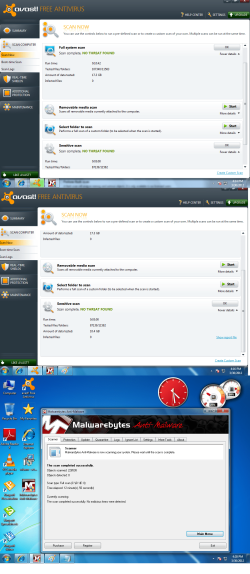
This are my most recent antivirus results:

http://www.sevenforums.com/attachment.php?attachmentid=204978&stc=1&d=1333096318

Malwarebytes' report:
Malwarebytes Anti-Malware 1.60.1.1000
www.malwarebytes.org
Database version: v2012.03.29.03
Windows 7 x86 NTFS
Internet Explorer 8.0.7600.16385
User :: USER-PC [administrator]
3/30/2012 4:15:19 PM
mbam-log-2012-03-30 (16-15-19).txt
Scan type: Full scan
Scan options enabled: Memory | Startup | Registry | File System | Heuristics/Extra | Heuristics/Shuriken | PUP | PUM | P2P
Scan options disabled:
Objects scanned: 226538
Time elapsed: 12 minute(s), 56 second(s)
Memory Processes Detected: 0
(No malicious items detected)
Memory Modules Detected: 0
(No malicious items detected)
Registry Keys Detected: 0
(No malicious items detected)
Registry Values Detected: 0
(No malicious items detected)
Registry Data Items Detected: 0
(No malicious items detected)
Folders Detected: 0
(No malicious items detected)
Files Detected: 0
(No malicious items detected)
(end)
 

Attachments

  • Antivirus results.png
    Antivirus results.png
    259.7 KB · Views: 5

My Computer

Computer Manufacturer/Model Number
Build to Order Computer
OS
Windows 7 Home Premium 32bit
CPU
Intel(R) Core(TM) i3-2100 CPU @ 3.10GHz 3.10GHz
Motherboard
Gigabyte
Memory
454GB + 477GB
Monitor(s) Displays
ViewSonic VP950b
Screen Resolution
1024 x 768
Hard Drives
Hitachi HDS721010CLA332 ATA Device
Keyboard
Dell SK-8115
Mouse
Logitech M100
There's another similar thread that mentioned about this problem, and the solution is a graphic card update.
http://www.sevenforums.com/crashes-...freezes-mouse-keyboard-then-unresponsive.html

Currently I am using the computer under a clean boot, as suggested by JMH, and the problem seems to have stopped. Could an outdated graphic card be the problem?

Update:
Using the clean boot and disabling all extra services, everything is running smoothly, even as I play Youtube videos and Facebook flash games. Thanks to all of you for your help!
 
Last edited:

My Computer

Computer Manufacturer/Model Number
Build to Order Computer
OS
Windows 7 Home Premium 32bit
CPU
Intel(R) Core(TM) i3-2100 CPU @ 3.10GHz 3.10GHz
Motherboard
Gigabyte
Memory
454GB + 477GB
Monitor(s) Displays
ViewSonic VP950b
Screen Resolution
1024 x 768
Hard Drives
Hitachi HDS721010CLA332 ATA Device
Keyboard
Dell SK-8115
Mouse
Logitech M100
Currently I am using the computer under a clean boot, as suggested by JMH, and the problem seems to have stopped. Could an outdated graphic card be the problem?

Update:
Using the clean boot and disabling all extra services, everything is running smoothly, even as I play Youtube videos and Facebook flash games. Thanks to all of you for your help!

Good to hear all appears well again.
Thanks for letting us know. :)
Safe surfing!
 

My Computer

Computer Manufacturer/Model Number
LAPTOP. HP Pavilion dv7-4010TX .
OS
Win 7 Ultimate 64-bit. SP1.
CPU
Intel i7 -720QM.[1.6GHz Turbo Boost 2.8GHz. 6MB Cache.]
Memory
8 DDR 3 RAM. 1066MHZ
Graphics Card(s)
ATI 1024 MB. DDR3. Radeon HD5650
Monitor(s) Displays
17.3" High Definition Brightview LCD. LED Backlit.
Screen Resolution
1600 x 900.
Hard Drives
640GB
Case
Laptop / notebook.
Mouse
Logitech Anywhere mouse. MX.
Internet Speed
ADSL [ but too slow ]
Thanks JMH! Unfortunately, I went two days without any problems, but it has returned again. :(
I noticed that everytime this happens, it occurs right after I am dragging my mouse.

It's frustrating and worrying. I am still not sure what is wrong.
 

My Computer

Computer Manufacturer/Model Number
Build to Order Computer
OS
Windows 7 Home Premium 32bit
CPU
Intel(R) Core(TM) i3-2100 CPU @ 3.10GHz 3.10GHz
Motherboard
Gigabyte
Memory
454GB + 477GB
Monitor(s) Displays
ViewSonic VP950b
Screen Resolution
1024 x 768
Hard Drives
Hitachi HDS721010CLA332 ATA Device
Keyboard
Dell SK-8115
Mouse
Logitech M100
Back
Top