
Mouse high polling rate worse?

YogalD

New member
Local time
5:28 PM
Messages
6
Hi guys I'm new here but anyways...
I got a new mouse recently and in the drivers there was an option to change polling rate, from what i read almost everyone says higher is better, so I think okay I'll change it to 1000hz. With my old mouse i think it was 125hz and 800dpi by default.
But then when i go to paint and draw lines, it seems 1000 hz makes the lines really jagged, why is this? Look at my screenshot to see why
Maybe it's better for games but worse for drawing?
 

Attachments
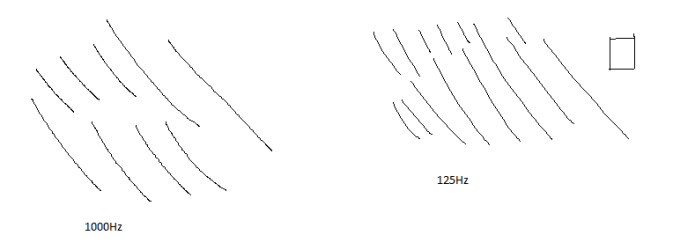
  • poll.png
    poll.png
    2.5 KB · Views: 3

My Computer

Computer type
PC/Desktop
OS
Windows 7 64 bit OS
Hi YogalD Welcome to Seven Forums .. Increasing the polling interval will improve precision in games But the problem is the CPU is using more resources therefore care should be taken when adjusting this value.
 

My Computer

Computer Manufacturer/Model Number
W530-3630QM1
OS
windows 7 home 64bit
CPU
INTEL-CORE I7
Memory
16GB
Hard Drives
750GB
Browser
Chrome
yes I understand but is it a bad thing that the natural physical imprecision of a mouse sensor is also picked up by using a higher polling rate? because with 125hz I can easily draw a straight line but with 1000hz it's not straight at all
 

My Computer

Computer type
PC/Desktop
OS
Windows 7 64 bit OS
Hi there .. As you can see setting the polling rate to high effects other programs .. I have read a fair bit about this .. Everyone is of the same opinion that is should never be set that high .. Some even suggest using them settings long term can damage your computer . I also do know there is an improvement in Game performance . But ask you is it really that noticeable ?
 

My Computer

Computer Manufacturer/Model Number
W530-3630QM1
OS
windows 7 home 64bit
CPU
INTEL-CORE I7
Memory
16GB
Hard Drives
750GB
Browser
Chrome
Is this actually true? Cos if i google high polling rate, everyone seems to say it's so much better. My mouse was at 1000hz out of the box by default so it shouldn't damage anything. But that was until i noticed that it felt different, reducing it to 125hz made it feel like my old mouse.

But then after reading about how its so much better I decided to up it to 1000 hz. But why is it considered "better" to have jaggy lines?
 

My Computer

Computer type
PC/Desktop
OS
Windows 7 64 bit OS
Hi there .. You are absolutely right the Default setting should not do any harm . I was only going by your first post which stated

:ar: I got a new mouse recently and in the drivers there was an option to change polling rate, from what i read almost everyone says higher is better, so I think okay I'll change it to 1000hz

Read the Link below .Maybe that will make things a bit more clear for you . And help you decide which is best for you


Competitive Gaming 1000 hz vs 500 hz polling rate
 

My Computer

Computer Manufacturer/Model Number
W530-3630QM1
OS
windows 7 home 64bit
CPU
INTEL-CORE I7
Memory
16GB
Hard Drives
750GB
Browser
Chrome
Back
Top