Mouse Pointers - Change

How to Change the Mouse Pointers in Windows 7

   Information
This will show you how to change and customize the mouse pointers in Windows 7.

   Note
Windows 7 uses .ani (animated cursor) and .cur (cursor) files for the mouse pointers.

The default Cursor folder in Windows 7 is located at C:\Windows\Cursors. It would be best to keep your pointers saved in this folder as well.

   Tip
For all you left handed folks out there, here are some left handed Aero cursors for you in a .zip file below. :)


Download


OPTION ONE

To Change Pointers in Mouse Properties

1. Open the Control Panel (icons view), and click on the Mouse icon.

2. Close the Control Panel window.

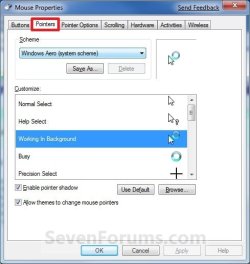
3. Click on the Pointers tab, then do either step 4 or 5 below for how you would like to change them. (see screenshot below)Properties-1.jpg

4. To Select a Mouse Pointer Scheme (theme)
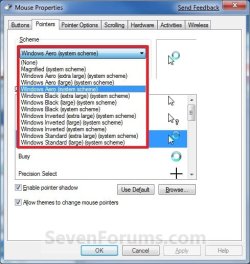
NOTE: This will let you select a default Windows 7 scheme, or a custom scheme saved by you from step 6 below.A) Under Scheme, select a scheme that you want to use for all of the pointers from the drop down menu. (see screenshot above and below)Properties-2.jpg

B) If you do not want to customize any of these pointers, then go to step 8.

5. To Customize and Change a Mouse Pointer
NOTE: This will allow you to change any individual pointer event in a scheme to whatever pointer that you want instead.A) Under Customize, select the event that you want to change the pointer for, and click on the Browse button. (see screenshot below step 3)
NOTE: If you want to use the default pointer for that event, click on the Use Default button instead. This can be handy if you have already changed pointer from it's default pointer.

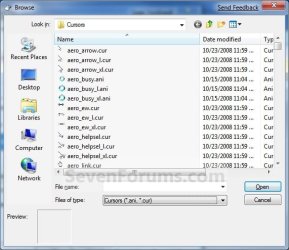
B) Navigate to where you have your pointer saved to, then select it and click on the Open button. (see screenshow below)
   Note
For custom mouse pointer .cur or .ani file that you have downloaded and saved to your computer, be sure that you right click on the .cur or .ani file, click on Properties, General tab, and click on the Unblock button if there as below. Not making sure that the .cur file is unblocked already will prevent the image from being used and displayed.

Unblock.png
Browse.jpg

C) If you do not want to save your new custom pointers scheme, then go to step 8.

6. To Save a Mouse Pointer Scheme (theme)
NOTE: This will allow you to save your custom scheme so that it will be available to select from step 4 above.A) Under Scheme, click on the Save As button. (see screenshot below step 4)

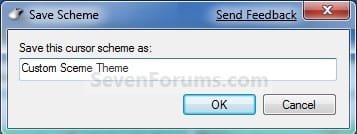
B) Type in a name for your pointers scheme and click on OK. (see screenshot below)Save.jpg


7. To Delete a Mouse Pointer Scheme (theme)
NOTE: This will allow you to delete a custom scheme that you have saved from step 6 above. You cannot delete a default Windows 7 pointers scheme.A) Under Scheme, select a scheme from the drop down menu that you want to delete, and click on the Delete button. (see screenshots below step 3 and 4A)
NOTE: If the Delete button is grayed out, then you have a default Windows 7 pointers theme selected. You will need to select one that you had saved from step 6 before instead.

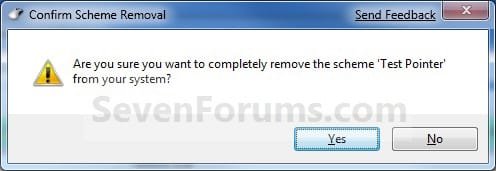
B) Click on Yes to confirm the deletion. (see screenshot below)Confirm.jpg


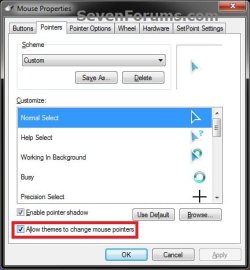
8. When done, check the Allow themes to change mouse pointers box and click on OK. (see screenshot below)Check.jpg

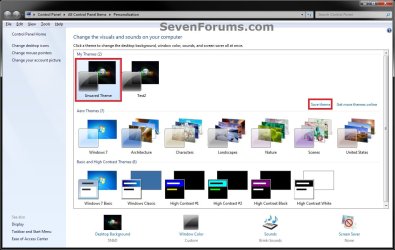
9. Now, save your new Windows theme. (see screenshots below)
NOTE: Since your new mouse pointer theme is also part of your Windows theme, you will need to re-save your Windows theme so that the changes you made to your mouse pointers are applied again the next time you log off and log on or restart the computer.Theme.jpg

Theme-2.jpg


OPTION TWO

To Change Pointers in Registy Editor

1. Open the Start Menu, then type regedit in the search box and press Enter.

2. If prompted by UAC, then click on Yes.

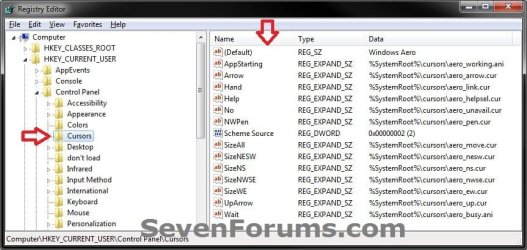
3. In regedit, navigate to the location below, then do either step 4 or 5 below for how you would like to change them. (see screenshot below)HKEY_CURRENT_USER\Control Panel\Cursors

Reg1.jpg

4. To Select a Mouse Pointer Scheme (theme)A) In the right pane of Cursors, right click on (Default) and click on Modify. (see screenshot above)

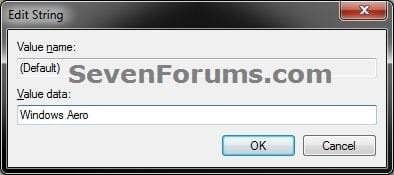
B) Type in the Data value exactly as is below for the pointer Scheme that you would like to use, and click on OK. (see screenshow below)Modify1.jpg

Data Values:


  • (leave empty in Modify for None)
  • Magnified
  • Windows Aero (extra large)
  • Windows Aero (large)
  • Windows Aero
  • Windows Black (extra large)
  • Windows Black (large)
  • Windows Black
  • Windows Inverted (extra large)
  • Windows Inverted (large)
  • Windows Inverted
  • Windows Standard (extra large)
  • Windows Inverted (large)
B) If you do not want to customize any of these pointers, then go to step 6.

5. To Customize and Change a Mouse Pointer
NOTE: This will allow you to change any individual pointer event in a scheme to whatever pointer that you want instead.A) In the right pane of Cursors, right click on the string value Name (see table below) for the mouse pointer that you want to change, then click on Modify. (see screenshot below step 3)
NOTE: The string value names in red below are not listed by default, and will need to be added. To do so, right click in a empty space in the right pane and click on New and String Value, then type in the string value name below and press enter.

Mouse PointerString Value Name
Normal SelectArrow
Help SelectHelp
Working in BackgroundAppStarting
BusyWait
Precision SelectCrosshair
Text SelectIBeam
HandwritingNWPen
UnavailableNo
Vertical ResizeSizeNS
Horizontal ResizeSizeWE
Diagonal Resize 1SizeNWSE
Diagonal Resize 2SizeNESW
MoveSizeAll
Alternate SelectUpArrow
Link SelectHand

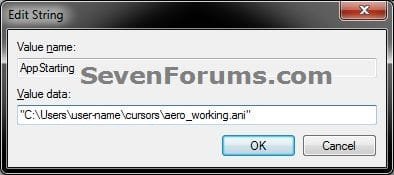
B) Type in the full path to the location of your saved .ani or .cur file within quotes, and click on OK. (see screenshot below)
   Note
For custom mouse pointer .cur or .ani file that you have downloaded and saved to your computer, be sure that you right click on the .cur or .ani file, click on Properties, General tab, and click on the Unblock button if there as below. Not making sure that the .cur file is unblocked already will prevent the image from being used and displayed.
Unblock.png
Modify.jpg


6. Close regedit.

7. Now, save your new desktop theme. (see screenshots below)
NOTE: Since your new mouse pointer theme is also part of your desktop theme, you will need to re-save your desktop theme so that the changes you made to your mouse pointers are applied again the next time you log off and log on or restart the computer.Theme.jpg

Theme-2.jpg


That's it,
Shawn Brink


Attachments

Last edited:
Umm.. I have a little problem with cursors.. which is, I have downlaoded a cursor theme and applied it. But everytime I restart the computer it changes to the default theme again. Is there any way I can make it start on stratup?
Thanks.
 

My Computer

Computer Manufacturer/Model Number
dell/dell windows 7 pc
OS
windows 7 ultimate edition
CPU
AMD athlon 64x2 dual core
Memory
3gb
Graphics Card(s)
ati radeon hd 3200 graphics
Hello Ashanub,

What method did you use to apply the cursor theme?

Could you also post back the link to the download page of this theme? This way we could do some testing with it to see if we may be able to spot what the problem may be. :)
 

My Computer

Computer type
PC/Desktop
Computer Manufacturer/Model Number
Self built custom
OS
64-bit Windows 11 Pro for Workstations
CPU
Intel i7-8700K OC'd to 5 GHz
Motherboard
ASUS ROG Maximus XI Formula Z390
Memory
64 GB (4x16GB) G.SKILL TridentZ RGB DDR4 3600 MHz
Graphics Card(s)
ASUS ROG-STRIX-GTX1080TI-O11G-GAMING
Sound Card
Integrated
Monitor(s) Displays
2 x Samsung Odyssey G7 27"
Screen Resolution
2560x1440
Hard Drives
1TB Samsung 990 PRO M.2,
4TB Samsung 990 PRO PRO M.2,
TerraMaster F8 SSD Plus NAS
PSU
Seasonic Prime Titanium 850W
Case
Thermaltake Core P3
Cooling
Corsair Hydro H115i
Keyboard
Logitech wireless K800
Mouse
Logitech MX Master 4
Internet Speed
2 Gb/s Download and 100 Mb/s Upload
Antivirus
Malwarebyte Anti-Malware Premium
Browser
Google Chrome
Other Info
Logitech Z625 speaker system,
Logitech BRIO 4K Pro webcam,
HP Color LaserJet Pro MFP M477fdn,
APC SMART-UPS RT 1000 XL - SURT1000XLI,
Galaxy S23 Plus phone
Hello Ashanub,

What method did you use to apply the cursor theme?

Could you also post back the link to the download page of this theme? This way we could do some testing with it to see if we may be able to spot what the problem may be. :)

this is where i downloaded it : Blue Arrow by ~tornado5 on deviantART
and, to install, I didn't get any setup or something. So I had to manually browse for them and apply. :)
 

My Computer

Computer Manufacturer/Model Number
dell/dell windows 7 pc
OS
windows 7 ultimate edition
CPU
AMD athlon 64x2 dual core
Memory
3gb
Graphics Card(s)
ati radeon hd 3200 graphics
Hello Ashanub,

I found the problem. :)

You would need to re-save your desktop theme after making the changes to the mouse pointers so that they will be loaded after a log off and log on or restart. I have added steps 8 and 9 in OPTION ONE for more on this.
 

My Computer

Computer type
PC/Desktop
Computer Manufacturer/Model Number
Self built custom
OS
64-bit Windows 11 Pro for Workstations
CPU
Intel i7-8700K OC'd to 5 GHz
Motherboard
ASUS ROG Maximus XI Formula Z390
Memory
64 GB (4x16GB) G.SKILL TridentZ RGB DDR4 3600 MHz
Graphics Card(s)
ASUS ROG-STRIX-GTX1080TI-O11G-GAMING
Sound Card
Integrated
Monitor(s) Displays
2 x Samsung Odyssey G7 27"
Screen Resolution
2560x1440
Hard Drives
1TB Samsung 990 PRO M.2,
4TB Samsung 990 PRO PRO M.2,
TerraMaster F8 SSD Plus NAS
PSU
Seasonic Prime Titanium 850W
Case
Thermaltake Core P3
Cooling
Corsair Hydro H115i
Keyboard
Logitech wireless K800
Mouse
Logitech MX Master 4
Internet Speed
2 Gb/s Download and 100 Mb/s Upload
Antivirus
Malwarebyte Anti-Malware Premium
Browser
Google Chrome
Other Info
Logitech Z625 speaker system,
Logitech BRIO 4K Pro webcam,
HP Color LaserJet Pro MFP M477fdn,
APC SMART-UPS RT 1000 XL - SURT1000XLI,
Galaxy S23 Plus phone
Thanks for your help Brink, it worked perfectly:D
 

My Computer

Computer Manufacturer/Model Number
dell/dell windows 7 pc
OS
windows 7 ultimate edition
CPU
AMD athlon 64x2 dual core
Memory
3gb
Graphics Card(s)
ati radeon hd 3200 graphics
You're most welcome.

Strange that you do not have to save the theme for sounds and wallpapers to keep them after a log off/log on or restart, but you do for mouse pointers. LOL
 

My Computer

Computer type
PC/Desktop
Computer Manufacturer/Model Number
Self built custom
OS
64-bit Windows 11 Pro for Workstations
CPU
Intel i7-8700K OC'd to 5 GHz
Motherboard
ASUS ROG Maximus XI Formula Z390
Memory
64 GB (4x16GB) G.SKILL TridentZ RGB DDR4 3600 MHz
Graphics Card(s)
ASUS ROG-STRIX-GTX1080TI-O11G-GAMING
Sound Card
Integrated
Monitor(s) Displays
2 x Samsung Odyssey G7 27"
Screen Resolution
2560x1440
Hard Drives
1TB Samsung 990 PRO M.2,
4TB Samsung 990 PRO PRO M.2,
TerraMaster F8 SSD Plus NAS
PSU
Seasonic Prime Titanium 850W
Case
Thermaltake Core P3
Cooling
Corsair Hydro H115i
Keyboard
Logitech wireless K800
Mouse
Logitech MX Master 4
Internet Speed
2 Gb/s Download and 100 Mb/s Upload
Antivirus
Malwarebyte Anti-Malware Premium
Browser
Google Chrome
Other Info
Logitech Z625 speaker system,
Logitech BRIO 4K Pro webcam,
HP Color LaserJet Pro MFP M477fdn,
APC SMART-UPS RT 1000 XL - SURT1000XLI,
Galaxy S23 Plus phone
annoying mouse pointer

I have recently updated my mouse driver. Since doing this my mouse pointer is not the same. All i want is my arrow pointer back, i have changed it using the correct options but when i come to scroll i get this annoying grey box with a double blue arrow in it and it wont change back. I just want my little arrow back when im scrolling. Any help would be appreciated.
 

My Computer

Computer Manufacturer/Model Number
Packard bell
OS
windows 7 64bit
Hello Mike,

What mouse (brand and model) do you have?

This sounds like the scroll feature on my mouse for when you click the scroll wheel on the mouse and move the mouse to scroll with. Usually rolling the mouse wheel or left clicking somewhere will stop this and return you to the pointer instead of the double arrow scroll.

Hope this helps some,
Shawn
 

My Computer

Computer type
PC/Desktop
Computer Manufacturer/Model Number
Self built custom
OS
64-bit Windows 11 Pro for Workstations
CPU
Intel i7-8700K OC'd to 5 GHz
Motherboard
ASUS ROG Maximus XI Formula Z390
Memory
64 GB (4x16GB) G.SKILL TridentZ RGB DDR4 3600 MHz
Graphics Card(s)
ASUS ROG-STRIX-GTX1080TI-O11G-GAMING
Sound Card
Integrated
Monitor(s) Displays
2 x Samsung Odyssey G7 27"
Screen Resolution
2560x1440
Hard Drives
1TB Samsung 990 PRO M.2,
4TB Samsung 990 PRO PRO M.2,
TerraMaster F8 SSD Plus NAS
PSU
Seasonic Prime Titanium 850W
Case
Thermaltake Core P3
Cooling
Corsair Hydro H115i
Keyboard
Logitech wireless K800
Mouse
Logitech MX Master 4
Internet Speed
2 Gb/s Download and 100 Mb/s Upload
Antivirus
Malwarebyte Anti-Malware Premium
Browser
Google Chrome
Other Info
Logitech Z625 speaker system,
Logitech BRIO 4K Pro webcam,
HP Color LaserJet Pro MFP M477fdn,
APC SMART-UPS RT 1000 XL - SURT1000XLI,
Galaxy S23 Plus phone
Check these cool Cursors .
MAC OS X Theme Cursors :D

attachment.php

Added Attachment the image and Cursors
OR
Download from here
RapidShare: Easy Filehosting

Read here
Mac OSX Cursors on Windows - Mac OSX Cursors on Windows | TFTB.NET


thank you!
 

My Computer

Computer Manufacturer/Model Number
HAMED
OS
windows 7
CPU
2al core amd
Motherboard
giga
Memory
ddr3
Graphics Card(s)
zotac
Sound Card
onboard
Monitor(s) Displays
lg
Screen Resolution
hd
Hard Drives
maxtor
PSU
intel
Case
digital me
Cooling
intel
Internet Speed
512
Other Info
98
How to Fix Mouse with Grey Box and double arrow

I have recently updated my mouse driver. Since doing this my mouse pointer is not the same. All i want is my arrow pointer back, i have changed it using the correct options but when i come to scroll i get this annoying grey box with a double blue arrow in it and it wont change back. I just want my little arrow back when im scrolling. Any help would be appreciated.


Hello All, I finally had tech support help me and after three techs..only one had the solution! In the newer systems there is a tab under mouse properties called "function"..you have to unclick "web assistant" and then unclick "enable icon view" and also unclick "zoom and circular scrolling"..this should get rid of all the pop up mouse icons. It worked!!
 
Last edited by a moderator:

My Computer

OS
windows 7 64bit
Sorry but there is absolutely no way to change the way your mouse cursor/icon or whatever it is looks like by using any procedure found in this tutorial or anywhere else I look on the net...hell i've even googled this and there is nothing that shows any way to actually change the arrow mouse.

It always stays as an arrow..I have been through every setting, at least 50 different tutorials and none of them ever show the actual way to change what mouse icon is other than an arrow.

If I want a pen or an animal or something like that as my mouse cursor it cannot be done and never changes from an arrow no matter what option is chosen.

Make a video tutorial showing the mouse icon being changed from an arrow into something else other than an arrow. I mean seriously why have all these different pictures or other things if there is no way to actually get them usable.
 

My Computer

OS
Windows 7 32 bit
Hello tx3000,

I'm not sure why you may not be able to, but yes you most certainly can normally change the mouse point using the exact steps as in the tutorial. You should not make broad statements like that just because it does not work for you for some unknown reason so far. ;)

Could you upload the .ani or .cur file that you are trying to use? I'll be happy to test it on my system to see if something may be wrong with it.
 

My Computer

Computer type
PC/Desktop
Computer Manufacturer/Model Number
Self built custom
OS
64-bit Windows 11 Pro for Workstations
CPU
Intel i7-8700K OC'd to 5 GHz
Motherboard
ASUS ROG Maximus XI Formula Z390
Memory
64 GB (4x16GB) G.SKILL TridentZ RGB DDR4 3600 MHz
Graphics Card(s)
ASUS ROG-STRIX-GTX1080TI-O11G-GAMING
Sound Card
Integrated
Monitor(s) Displays
2 x Samsung Odyssey G7 27"
Screen Resolution
2560x1440
Hard Drives
1TB Samsung 990 PRO M.2,
4TB Samsung 990 PRO PRO M.2,
TerraMaster F8 SSD Plus NAS
PSU
Seasonic Prime Titanium 850W
Case
Thermaltake Core P3
Cooling
Corsair Hydro H115i
Keyboard
Logitech wireless K800
Mouse
Logitech MX Master 4
Internet Speed
2 Gb/s Download and 100 Mb/s Upload
Antivirus
Malwarebyte Anti-Malware Premium
Browser
Google Chrome
Other Info
Logitech Z625 speaker system,
Logitech BRIO 4K Pro webcam,
HP Color LaserJet Pro MFP M477fdn,
APC SMART-UPS RT 1000 XL - SURT1000XLI,
Galaxy S23 Plus phone
Im having problems with this too. Pointers just wont change.

I have a solution wich I found on google, and this solution is to copy .cur files to Windows/Cursors folder, and then Pointers are loaded. Windows searches .cur files in that folder, so if they are anywhere else they just wont load.
This solution would be great if this themepack would be just for me, but I want to upload it, so others can have it.
So if anyone have a solution for that, please write it down. If not, then Im thinking to make some batch file or installer, that copies .cur files to Windows/Cursors. If this problem wasnt present, my thempack would be done a lot sooner.
 

My Computer

Computer type
PC/Desktop
Computer Manufacturer/Model Number
Custom build
OS
Windows 7 SP1 x64 Ultimate
CPU
FX 8320 4ghz
Motherboard
Gigabyte 970A UD3P
Memory
Crucial Ballistix Tactical 8GB 240-Pin DDR3 1600 Mhz
Graphics Card(s)
Sapphire R9 270 Dual X
Sound Card
VIA HD Audio
Monitor(s) Displays
Samsung SyncMaster 2032BW
Screen Resolution
1680 * 1050
Hard Drives
WD Blue WD10EZEX
PSU
Energon 650w
Case
Aerocool Strike X One
Cooling
Xigmatek Dark Knight SD1283 Night Hawk Edition
Keyboard
Typhoon CarbonKey
Mouse
Trust GXT 25 Gaming Mouse
Internet Speed
120mb/4mb
Antivirus
Comodo Internet Security 8.1
Browser
Firefox
Other Info
CfosSpeed 10

My Computer

Computer type
PC/Desktop
Computer Manufacturer/Model Number
Self built custom
OS
64-bit Windows 11 Pro for Workstations
CPU
Intel i7-8700K OC'd to 5 GHz
Motherboard
ASUS ROG Maximus XI Formula Z390
Memory
64 GB (4x16GB) G.SKILL TridentZ RGB DDR4 3600 MHz
Graphics Card(s)
ASUS ROG-STRIX-GTX1080TI-O11G-GAMING
Sound Card
Integrated
Monitor(s) Displays
2 x Samsung Odyssey G7 27"
Screen Resolution
2560x1440
Hard Drives
1TB Samsung 990 PRO M.2,
4TB Samsung 990 PRO PRO M.2,
TerraMaster F8 SSD Plus NAS
PSU
Seasonic Prime Titanium 850W
Case
Thermaltake Core P3
Cooling
Corsair Hydro H115i
Keyboard
Logitech wireless K800
Mouse
Logitech MX Master 4
Internet Speed
2 Gb/s Download and 100 Mb/s Upload
Antivirus
Malwarebyte Anti-Malware Premium
Browser
Google Chrome
Other Info
Logitech Z625 speaker system,
Logitech BRIO 4K Pro webcam,
HP Color LaserJet Pro MFP M477fdn,
APC SMART-UPS RT 1000 XL - SURT1000XLI,
Galaxy S23 Plus phone
It wont change cursor unless I copy them to windows/cursors folder.

I made installer wich copies .cur to that folder, and afterwards installs themepack. Windows just wont load them from default theme folder wich is C:\Users\DigDeep\AppData\Local\Microsoft\Windows\Themes

So i fixed it with installer
 

My Computer

Computer type
PC/Desktop
Computer Manufacturer/Model Number
Custom build
OS
Windows 7 SP1 x64 Ultimate
CPU
FX 8320 4ghz
Motherboard
Gigabyte 970A UD3P
Memory
Crucial Ballistix Tactical 8GB 240-Pin DDR3 1600 Mhz
Graphics Card(s)
Sapphire R9 270 Dual X
Sound Card
VIA HD Audio
Monitor(s) Displays
Samsung SyncMaster 2032BW
Screen Resolution
1680 * 1050
Hard Drives
WD Blue WD10EZEX
PSU
Energon 650w
Case
Aerocool Strike X One
Cooling
Xigmatek Dark Knight SD1283 Night Hawk Edition
Keyboard
Typhoon CarbonKey
Mouse
Trust GXT 25 Gaming Mouse
Internet Speed
120mb/4mb
Antivirus
Comodo Internet Security 8.1
Browser
Firefox
Other Info
CfosSpeed 10
Odd. It should have included the cursors, but glad to hear you got it sorted.
 

My Computer

Computer type
PC/Desktop
Computer Manufacturer/Model Number
Self built custom
OS
64-bit Windows 11 Pro for Workstations
CPU
Intel i7-8700K OC'd to 5 GHz
Motherboard
ASUS ROG Maximus XI Formula Z390
Memory
64 GB (4x16GB) G.SKILL TridentZ RGB DDR4 3600 MHz
Graphics Card(s)
ASUS ROG-STRIX-GTX1080TI-O11G-GAMING
Sound Card
Integrated
Monitor(s) Displays
2 x Samsung Odyssey G7 27"
Screen Resolution
2560x1440
Hard Drives
1TB Samsung 990 PRO M.2,
4TB Samsung 990 PRO PRO M.2,
TerraMaster F8 SSD Plus NAS
PSU
Seasonic Prime Titanium 850W
Case
Thermaltake Core P3
Cooling
Corsair Hydro H115i
Keyboard
Logitech wireless K800
Mouse
Logitech MX Master 4
Internet Speed
2 Gb/s Download and 100 Mb/s Upload
Antivirus
Malwarebyte Anti-Malware Premium
Browser
Google Chrome
Other Info
Logitech Z625 speaker system,
Logitech BRIO 4K Pro webcam,
HP Color LaserJet Pro MFP M477fdn,
APC SMART-UPS RT 1000 XL - SURT1000XLI,
Galaxy S23 Plus phone
help

I have tried everything under the sun to remove this very annoying hourglass, and have followed every tutorial I can find in this (and other) threads. can somebody give me a sure fire way? it would be most appreciated.
thanks
 

My Computer

Computer type
PC/Desktop
OS
Windows 64
Hello EveryMothersSon, and welcome to Seven Forums.

Is this for Windows or a specific program?

What scheme are you currently using for pointers? If you have not already, see if switching to the Windows Aero scheme may help.

Hope this helps for now, :)
Shawn
 

My Computer

Computer type
PC/Desktop
Computer Manufacturer/Model Number
Self built custom
OS
64-bit Windows 11 Pro for Workstations
CPU
Intel i7-8700K OC'd to 5 GHz
Motherboard
ASUS ROG Maximus XI Formula Z390
Memory
64 GB (4x16GB) G.SKILL TridentZ RGB DDR4 3600 MHz
Graphics Card(s)
ASUS ROG-STRIX-GTX1080TI-O11G-GAMING
Sound Card
Integrated
Monitor(s) Displays
2 x Samsung Odyssey G7 27"
Screen Resolution
2560x1440
Hard Drives
1TB Samsung 990 PRO M.2,
4TB Samsung 990 PRO PRO M.2,
TerraMaster F8 SSD Plus NAS
PSU
Seasonic Prime Titanium 850W
Case
Thermaltake Core P3
Cooling
Corsair Hydro H115i
Keyboard
Logitech wireless K800
Mouse
Logitech MX Master 4
Internet Speed
2 Gb/s Download and 100 Mb/s Upload
Antivirus
Malwarebyte Anti-Malware Premium
Browser
Google Chrome
Other Info
Logitech Z625 speaker system,
Logitech BRIO 4K Pro webcam,
HP Color LaserJet Pro MFP M477fdn,
APC SMART-UPS RT 1000 XL - SURT1000XLI,
Galaxy S23 Plus phone
there must be another way. did that suggestion work for everyone on here? this issue seemed to coincide with a new printer (about a year ago). could that have anything to do with it?

sorry, did not respond earlier. 32 bit
 
Last edited by a moderator:

My Computer

Computer type
PC/Desktop
OS
Windows 64

My Computer

Computer type
PC/Desktop
Computer Manufacturer/Model Number
Self built custom
OS
64-bit Windows 11 Pro for Workstations
CPU
Intel i7-8700K OC'd to 5 GHz
Motherboard
ASUS ROG Maximus XI Formula Z390
Memory
64 GB (4x16GB) G.SKILL TridentZ RGB DDR4 3600 MHz
Graphics Card(s)
ASUS ROG-STRIX-GTX1080TI-O11G-GAMING
Sound Card
Integrated
Monitor(s) Displays
2 x Samsung Odyssey G7 27"
Screen Resolution
2560x1440
Hard Drives
1TB Samsung 990 PRO M.2,
4TB Samsung 990 PRO PRO M.2,
TerraMaster F8 SSD Plus NAS
PSU
Seasonic Prime Titanium 850W
Case
Thermaltake Core P3
Cooling
Corsair Hydro H115i
Keyboard
Logitech wireless K800
Mouse
Logitech MX Master 4
Internet Speed
2 Gb/s Download and 100 Mb/s Upload
Antivirus
Malwarebyte Anti-Malware Premium
Browser
Google Chrome
Other Info
Logitech Z625 speaker system,
Logitech BRIO 4K Pro webcam,
HP Color LaserJet Pro MFP M477fdn,
APC SMART-UPS RT 1000 XL - SURT1000XLI,
Galaxy S23 Plus phone
Back
Top