Solved Mouse problems with dual screens

Bek P

New member
Local time
9:34 AM
Messages
2
Hi...
I am currently using 2 screens (laptop and external monitor.) The set up is that the external screen is my main screen with my laptop sitting next to it on the right hand side. I have noticed I have to move the mouse to the left of the external screen to get it onto the laptop screen. Not a major drama, but slightly frustrating!
I know the logical solution would be to relocate the laptop to the left hand side of my desk.... but I can't as the fixed data cable is not long enough (it runs through a wall). If anyone has any ideas, would be greatly appreciated.
Thanks :)
 

My Computer

OS
Windows 7
Hi Bek, welcome to the Seven Forums.

No need to panic. Open Screen Resolution by right clicking an empty spot on desktop and choosing Screen Resolution from context menu.

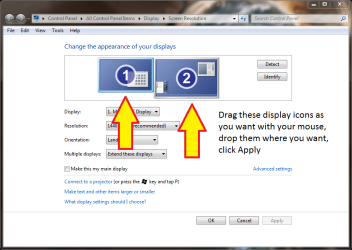
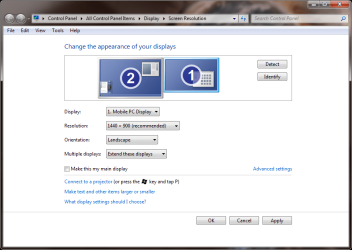
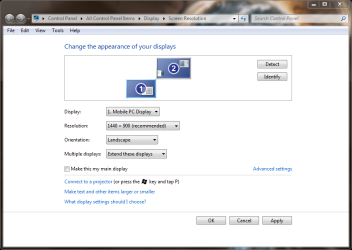
Now you can drag and drop those display icons as you like and click Apply. Notice that mouse moves then exactly as you put those displays: If you put display 1 under the display 2, you have to move mouse over the top of the display 1 to get pointer to the display 2. If you put those display icons as in attached image 3, the mouse pointer gets from display 1 to display 2 only from the upper right corner.

Practice makes a master, so try moving those display icons in different order, click Apply and see how the pointer reacts.

Kari

Image 1:
Display1.PNG

Image2:
Display2.PNG

Image 3:
Display3.PNG
 

My Computer

Computer type
Laptop
Computer Manufacturer/Model Number
HP ENVY 17-1150eg
OS
Windows 10 Pro x64 EN-GB
CPU
1.6 GHz Intel Core i7-720QM Processor
Memory
6 GB
Graphics Card(s)
ATI Mobility Radeon HD 5850 Graphics
Sound Card
Beats sound system with integrated subwoofer
Monitor(s) Displays
17" laptop display, 22" LED and 32" Full HD TV through HDMI
Screen Resolution
1600*900 (1), 1920*1080 (2&3)
Hard Drives
Internal: 2 x 500 GB SATA Hard Disk Drive 7200 rpm
External: 2TB for backups, 3TB USB3 network drive for media
Cooling
As Envy runs a bit warm, I have it on a Cooler Master pad
Keyboard
Logitech diNovo Media Desktop Laser (bluetooth)
Mouse
Logitech Performance Mouse MX
Internet Speed
50/10 Mbps VDSL
Antivirus
Windows Defender 4.3.9431.0
Browser
Maxthon 3.5.2., IE11
Thanks Kari - you're a legend in the making - worked first time :) Thanks heaps.
 

My Computer

OS
Windows 7
You are welcome :)
 

My Computer

Computer type
Laptop
Computer Manufacturer/Model Number
HP ENVY 17-1150eg
OS
Windows 10 Pro x64 EN-GB
CPU
1.6 GHz Intel Core i7-720QM Processor
Memory
6 GB
Graphics Card(s)
ATI Mobility Radeon HD 5850 Graphics
Sound Card
Beats sound system with integrated subwoofer
Monitor(s) Displays
17" laptop display, 22" LED and 32" Full HD TV through HDMI
Screen Resolution
1600*900 (1), 1920*1080 (2&3)
Hard Drives
Internal: 2 x 500 GB SATA Hard Disk Drive 7200 rpm
External: 2TB for backups, 3TB USB3 network drive for media
Cooling
As Envy runs a bit warm, I have it on a Cooler Master pad
Keyboard
Logitech diNovo Media Desktop Laser (bluetooth)
Mouse
Logitech Performance Mouse MX
Internet Speed
50/10 Mbps VDSL
Antivirus
Windows Defender 4.3.9431.0
Browser
Maxthon 3.5.2., IE11
I know this is a old post. But Thanks.
I wanted to move mouse from top to down. It worked.
 

My Computer

OS
Windows 7 Professional 64bit
Yes old post. But I'm kinda old too.

Kari this is very cool. WHO KNEW that the monitor icons in the control panel were draggable/positionable?? Not I!

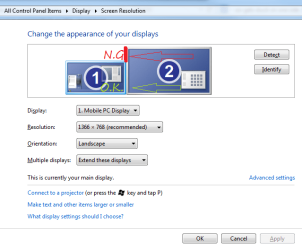
Now I realize why my mouse cursor from this Logitech trackball was getting stuck on one screen - because depending upon how those screen icons are aligned in control panel, the PC doesn't expect there to BE another monitor to move to. Specifically my cursor won't move right to left between my two screens if I try to move it left thru the RED LINE AREA I have marked on my attachment, grabbed from Control Panel>All Control Panel Items>Display>Screen Resolution.

Why I didn't have this problem using the old mouse, I'm not sure. Perhaps I didn't notice it? Anyway, all I care about is knowing how to get my cursor where I want it. Excellent info.
 

Attachments

  • Display.png
    Display.png
    22.1 KB · Views: 36

My Computer

Computer Manufacturer/Model Number
Custom
OS
Win7Pro 64bit
CPU
Intel Core 2 Duo E8400, OC'd to 3GHz
Motherboard
Gigabyte GA-EP45T-UD3P
Memory
2G x2 CORSAIR DDR3
Graphics Card(s)
SAPPHIRE 100248L HD3850 512M RT
Monitor(s) Displays
Hannspree
Screen Resolution
1920X1200
Hard Drives
Seagate Barracuda, 465G X2, RAID 0
PSU
PCP - WRCLS61EPS RT
Case
XCLIO Windtunnel ATX full tower, black, 1.0mm SECC
Keyboard
Logitech illuminated
Mouse
Logitech mouseman wheel
Internet Speed
broadband
This posting saved my life today when I finally set up my second monitor and was mousing around like a maniac.

THANK YOU for this very helpful information!!!
 

My Computer

Computer type
PC/Desktop
Computer Manufacturer/Model Number
Dell Alienware
OS
Windows 7 Home Premium 64bit
Graphics Card(s)
AMD
Antivirus
McAfee
Browser
Firefox
I registered on this site just to say thank you :)
 

My Computer

Computer type
PC/Desktop
OS
Windows 7 Professional 64 bit
I also registered on this site to say thank you Kari! :cool:
I have my TV as second monitor and by default I had to move my pointer off screen to the right to go there. With Win 8.1 there are lots of functions on the right hand edge of the screen and so many times I've overshot on to the TV screen. But now I move my cursor to the left to go to the TV which is so much better.
 

My Computer

Computer type
Laptop
Computer Manufacturer/Model Number
TOSHIBA SATELLITE P50t-B-10K PSPNVE-00X00CEN
OS
Windows 8.1 64 bit
CPU
2.40 gigahertz Intel Core i7-4700HQ
Motherboard
TOSHIBA VG20SQ 100 mhz UEFI: TOSHIBA 1.50 12/09/2014
Memory
8104 Megabytes Usable Installed Memory
Graphics Card(s)
Intel(R) HD Graphics 4600, AMD Radeon R9 M265X
Hard Drives
HGST HTS541010A9E680 [Hard drive] (1000.20 GB)
Back
Top