MOVE a Virtual XP Machine in Windows 7

agunslinger

New member
Member
Local time
3:57 PM
Messages
47
I read the great walkthough on "Copying" a VM and at end realized it was just to COPY to use on same system simultaneously:

http://www.sevenforums.com/tutorials/21904-virtual-xp-machine-copy.html


I would like to COPY a base VM I have setup on test machine and copy it to other machines. But Im guessing more XML changes need made to the VM options files.

Any ideas or did I miss this other MOVE tutorial somewhere?

Thanks!
 

My Computer

OS
Windows 7
The tutorial you mentioned was written when we were still using early beta versions of Virtual PC. With the current version, this is already much easier.

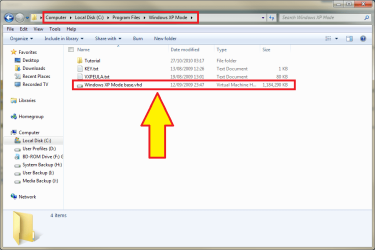
If you are using XP Mode defaults, it consists of two vhd-files, the file Windows XP Mode base.vhd is located in folder C:\Program Files\Windows XP Mode, and the Windows XP mode.vhd, which is located in %UserProfile%\AppData\Local\Microsoft\Windows Virtual PC\Virtual Machines.

The base vhd is the core of XP, the part that all users share. The individual vhd is the part a user can modify i.e. it's here where user specific installed apps and personal files are located.

To move XP Mode to another computer is easy. First, if you are going to use the default XP Mode base, just copy the personal XP Mode.vhd to a new computer, where you have Virtual PC and XP Mode already installed.

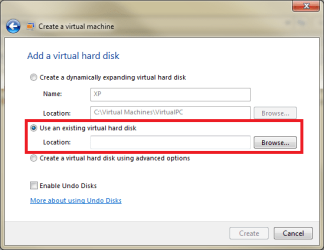
Now simply create a new virtual machine choosing Use an existing virtual hard disk. Browse to the XP Mode.vhd you just moved, and click create.

XPMode_move_3.png

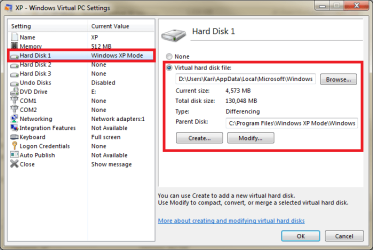
That's it. The setup recognizes the vhd is XP Mode, and attach the needed base vhd (parent disk) from the new computers XP Mode installation

XPMode_move_4.png

If you have created your own XP Mode base vhd, simply copy it to new computer and replace original.

More about base and individual vhd's etc.:
- http://www.sevenforums.com/virtualization/80378-backup-xp-mode.html#post711304
- http://www.sevenforums.com/virtualization/80378-backup-xp-mode-2.html#post751417
- http://www.sevenforums.com/virtualization/59287-xp-mode-where-does-hard-disk-come.html#post535646

Kari
 

My Computer

Computer type
Laptop
Computer Manufacturer/Model Number
HP ENVY 17-1150eg
OS
Windows 10 Pro x64 EN-GB
CPU
1.6 GHz Intel Core i7-720QM Processor
Memory
6 GB
Graphics Card(s)
ATI Mobility Radeon HD 5850 Graphics
Sound Card
Beats sound system with integrated subwoofer
Monitor(s) Displays
17" laptop display, 22" LED and 32" Full HD TV through HDMI
Screen Resolution
1600*900 (1), 1920*1080 (2&3)
Hard Drives
Internal: 2 x 500 GB SATA Hard Disk Drive 7200 rpm
External: 2TB for backups, 3TB USB3 network drive for media
Cooling
As Envy runs a bit warm, I have it on a Cooler Master pad
Keyboard
Logitech diNovo Media Desktop Laser (bluetooth)
Mouse
Logitech Performance Mouse MX
Internet Speed
50/10 Mbps VDSL
Antivirus
Windows Defender 4.3.9431.0
Browser
Maxthon 3.5.2., IE11
Thanks Kari. Will give it a try. To start I dont see a .vhd file with name "base" in it.
 

My Computer

OS
Windows 7
Strange. It should be there, if you have installed XP Mode and Virtual PC, and used default settings.

XPMode_base.png

Or have you merged the base and normal vhd already?

Kari
 

My Computer

Computer type
Laptop
Computer Manufacturer/Model Number
HP ENVY 17-1150eg
OS
Windows 10 Pro x64 EN-GB
CPU
1.6 GHz Intel Core i7-720QM Processor
Memory
6 GB
Graphics Card(s)
ATI Mobility Radeon HD 5850 Graphics
Sound Card
Beats sound system with integrated subwoofer
Monitor(s) Displays
17" laptop display, 22" LED and 32" Full HD TV through HDMI
Screen Resolution
1600*900 (1), 1920*1080 (2&3)
Hard Drives
Internal: 2 x 500 GB SATA Hard Disk Drive 7200 rpm
External: 2TB for backups, 3TB USB3 network drive for media
Cooling
As Envy runs a bit warm, I have it on a Cooler Master pad
Keyboard
Logitech diNovo Media Desktop Laser (bluetooth)
Mouse
Logitech Performance Mouse MX
Internet Speed
50/10 Mbps VDSL
Antivirus
Windows Defender 4.3.9431.0
Browser
Maxthon 3.5.2., IE11
Nevermind, I found it. Sorry.
Question. On the main machine I have launched the soon-to-be master VM and updated XP to its fullest, added current JAVA and Acrobat Reader, and installed desktop shortcuts to websites I want on all the desktops when I copy over this "master" VM. I noticed that after applying all these MANY updates and some new apps that the base vhd under C:\Program Files\Windows XP Mode is still the exact same file size and date modified as the target systems one. Woudlnt it have grown in file size and date change with all these updates or are updates to XP stored under the %UserProfile%\AppData\Local\Microsoft\Windows Virtual PC\Virtual Machines vhd file?
 

My Computer

OS
Windows 7
The base, parent vhd, is the core of XP. If you don't replace it with your own base vhd, it's always "untouched" and the same size than when it was created.

Everything a user adds to personalize the XP Mode is stored on that second, personal vhd. This includes customization, user specific files and folders, installed apps and so on. This makes it possible to every user of a Windows computer to use an individual, "tailor made" XP Mode; every user account has XP Mode when it's installed, consisting of the core XP in XP Mode base.vhd, and the user specific part of XP, located in every users own AppData\Local\Microsoft\Windows Virtual PC\Virtual Machines folder.

When XP Mode is booted, it reads first the base vhd to start XP and its services, moves then to this secondary vhd to load current users own apps, settings and customizations. This system is called a differencing disk: XP Mode (default settings) uses a differenicing disk which consists of two vhd's, a fixed size, non-editable base disk and a user specific, dynamically expanding (or shrinking) personal vhd. Everything you install, all modifications, are then stored to this personal vhd.

Kari

EDIT: Forgot to mention, that if you check the properties of this base vhd, you'll notice it's "Read only". This is precisely because of this differencing system: to guarantee that XP Mode works, base vhd needs to be unedited, unmodified.
 

My Computer

Computer type
Laptop
Computer Manufacturer/Model Number
HP ENVY 17-1150eg
OS
Windows 10 Pro x64 EN-GB
CPU
1.6 GHz Intel Core i7-720QM Processor
Memory
6 GB
Graphics Card(s)
ATI Mobility Radeon HD 5850 Graphics
Sound Card
Beats sound system with integrated subwoofer
Monitor(s) Displays
17" laptop display, 22" LED and 32" Full HD TV through HDMI
Screen Resolution
1600*900 (1), 1920*1080 (2&3)
Hard Drives
Internal: 2 x 500 GB SATA Hard Disk Drive 7200 rpm
External: 2TB for backups, 3TB USB3 network drive for media
Cooling
As Envy runs a bit warm, I have it on a Cooler Master pad
Keyboard
Logitech diNovo Media Desktop Laser (bluetooth)
Mouse
Logitech Performance Mouse MX
Internet Speed
50/10 Mbps VDSL
Antivirus
Windows Defender 4.3.9431.0
Browser
Maxthon 3.5.2., IE11
Thanks Kari - a lot! Read you Backup piece to and merging now ;^)

Only issue I had was when I opened copied over base vhd's on new system, at first it opened right up - no login. Second time I accessed it it asked for login - XPUser (default) as username (which I wanted) but the password I had set on main machine where it was copied from was not recognized. Id like the same username (XPUser and password to work and be set to no login needed whenever I copy this base VM over to target PCs. Did that make sense? Its confusing trying to relay anythng about VM.
 

My Computer

OS
Windows 7
Let's try to find out why. So, did you copy the base vhd to a new computer, or the personal vhd?
 

My Computer

Computer type
Laptop
Computer Manufacturer/Model Number
HP ENVY 17-1150eg
OS
Windows 10 Pro x64 EN-GB
CPU
1.6 GHz Intel Core i7-720QM Processor
Memory
6 GB
Graphics Card(s)
ATI Mobility Radeon HD 5850 Graphics
Sound Card
Beats sound system with integrated subwoofer
Monitor(s) Displays
17" laptop display, 22" LED and 32" Full HD TV through HDMI
Screen Resolution
1600*900 (1), 1920*1080 (2&3)
Hard Drives
Internal: 2 x 500 GB SATA Hard Disk Drive 7200 rpm
External: 2TB for backups, 3TB USB3 network drive for media
Cooling
As Envy runs a bit warm, I have it on a Cooler Master pad
Keyboard
Logitech diNovo Media Desktop Laser (bluetooth)
Mouse
Logitech Performance Mouse MX
Internet Speed
50/10 Mbps VDSL
Antivirus
Windows Defender 4.3.9431.0
Browser
Maxthon 3.5.2., IE11
Let's try to find out why. So, did you copy the base vhd to a new computer, or the personal vhd?

On the master PC, where I had the VM set as I wanted it, I copied the base (from C:\Program Files\Windows XP Mode) and the personal from %UserProfile%\AppData\Local\Microsoft\Windows Virtual PC\Virtual Machines.

I renamed the base vhd on the target PC and replaced with the one from the master PC. Then I copied the personal vhd to use userprofile path for intended person.

Of note, both the master and target PC were connected to a domain - part of issue? I didnt think it mattered since on the master personal vhd I set it for XPUser with a password set to be remembered.

Even though there was some login issues I was able to bypass it in the XP Mode VM by going to user accounts (Run, control userpasswords2) and UNCHECKING "User must enter a username and password to use this computer." But would rather eliminate this step.
 

My Computer

OS
Windows 7
Thank you, is it possible if we can have a Linux or Panther OS in Windows VM?
 

My Computer

OS
Windows 7 Ultimate 32bit
Sorry, honestly I completely forgot this thread. So, back to the business.

Really, if you have not modified the base (and you normally shouldn't!) it's enough to move this so called normal, personal vhd. Base is base, it's same on every installation of XP Mode. You could also merge the differencing disks before moving, and use the resulting merged vhd as a stand-alone XP vhd. About merging the fixed XP Mode base vhd and the dynamical vhd, read this: http://www.sevenforums.com/virtualization/80378-backup-xp-mode.html#post711304

About your password problem, two things to remember. First, if integration is enabled, XP Mode requires password. Only when integration is disabled is it possible to use user accounts without password.

Second, by default XP Mode allows only administrators to log in. If you want to add limited user accounts, read this: http://www.sevenforums.com/tutorials/21905-virtual-pc-xp-mode-add-limited-user-accounts.html

Could that password problem of yours be a human mistake, a typo? I mean, when you uncheck the option "User must enter a username and password to use this computer", it asks the admin password once, so IMO you had to give it there, at least once? If so, it sounds not right that login screen did not accept the same password you had to give to change that setting?

Anyway, I'm checking more often in here, so please tell how it all went, if you got it running?

Kari
 

My Computer

Computer type
Laptop
Computer Manufacturer/Model Number
HP ENVY 17-1150eg
OS
Windows 10 Pro x64 EN-GB
CPU
1.6 GHz Intel Core i7-720QM Processor
Memory
6 GB
Graphics Card(s)
ATI Mobility Radeon HD 5850 Graphics
Sound Card
Beats sound system with integrated subwoofer
Monitor(s) Displays
17" laptop display, 22" LED and 32" Full HD TV through HDMI
Screen Resolution
1600*900 (1), 1920*1080 (2&3)
Hard Drives
Internal: 2 x 500 GB SATA Hard Disk Drive 7200 rpm
External: 2TB for backups, 3TB USB3 network drive for media
Cooling
As Envy runs a bit warm, I have it on a Cooler Master pad
Keyboard
Logitech diNovo Media Desktop Laser (bluetooth)
Mouse
Logitech Performance Mouse MX
Internet Speed
50/10 Mbps VDSL
Antivirus
Windows Defender 4.3.9431.0
Browser
Maxthon 3.5.2., IE11
Thanks Kari. I will look into the limited account thread. I think that will help.
 

My Computer

OS
Windows 7
Moving XP Mode from 1 User to Another on Same PC

Sorry, honestly I completely forgot this thread. So, back to the business.

Really, if you have not modified the base (and you normally shouldn't!) it's enough to move this so called normal, personal vhd. Base is base, it's same on every installation of XP Mode. You could also merge the differencing disks before moving, and use the resulting merged vhd as a stand-alone XP vhd. About merging the fixed XP Mode base vhd and the dynamical vhd, read this: http://www.sevenforums.com/virtualization/80378-backup-xp-mode.html#post711304

About your password problem, two things to remember. First, if integration is enabled, XP Mode requires password. Only when integration is disabled is it possible to use user accounts without password.

Second, by default XP Mode allows only administrators to log in. If you want to add limited user accounts, read this: http://www.sevenforums.com/tutorials/21905-virtual-pc-xp-mode-add-limited-user-accounts.html

Could that password problem of yours be a human mistake, a typo? I mean, when you uncheck the option "User must enter a username and password to use this computer", it asks the admin password once, so IMO you had to give it there, at least once? If so, it sounds not right that login screen did not accept the same password you had to give to change that setting?

Anyway, I'm checking more often in here, so please tell how it all went, if you got it running?

Kari

From reading this series of posts, it seems to me that I could move the personal VXP from an existing user - where it is configured exactly like I want - to another user on the same PC. Or is there a better way?
 

My Computer

Computer Manufacturer/Model Number
Dell Inspiron 545S
OS
Win XP, Win Vista 64, Win 7 64, Mac OS X 10.6.5
CPU
Intel Core 2 Duo E7400
Motherboard
Dell
Memory
6GB
Graphics Card(s)
Intel GMA 3100
Sound Card
Realtek
Monitor(s) Displays
Dell 2209
Hard Drives
650GB Seagate
PSU
na
Case
Yes
Cooling
YEs
Last edited:

My Computer

Computer type
Laptop
Computer Manufacturer/Model Number
HP ENVY 17-1150eg
OS
Windows 10 Pro x64 EN-GB
CPU
1.6 GHz Intel Core i7-720QM Processor
Memory
6 GB
Graphics Card(s)
ATI Mobility Radeon HD 5850 Graphics
Sound Card
Beats sound system with integrated subwoofer
Monitor(s) Displays
17" laptop display, 22" LED and 32" Full HD TV through HDMI
Screen Resolution
1600*900 (1), 1920*1080 (2&3)
Hard Drives
Internal: 2 x 500 GB SATA Hard Disk Drive 7200 rpm
External: 2TB for backups, 3TB USB3 network drive for media
Cooling
As Envy runs a bit warm, I have it on a Cooler Master pad
Keyboard
Logitech diNovo Media Desktop Laser (bluetooth)
Mouse
Logitech Performance Mouse MX
Internet Speed
50/10 Mbps VDSL
Antivirus
Windows Defender 4.3.9431.0
Browser
Maxthon 3.5.2., IE11
Back
Top