
crackshot91
New member
- Local time
- 8:41 PM
- Messages
- 19
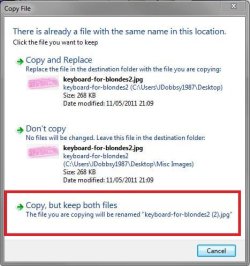
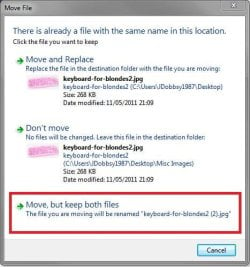
"Move, but keep both files" ~ Any way to rename original file instead?
Hello, I'm wondering if there is a way to alter this functionality a bit. When I copy and overwrite a file, I'd love an option that basically did this:
"Move, but keep both files - The file you are overwriting will be renamed filenamehere(1).jpg"
Is there any way to do this?
Hello, I'm wondering if there is a way to alter this functionality a bit. When I copy and overwrite a file, I'd love an option that basically did this:
"Move, but keep both files - The file you are overwriting will be renamed filenamehere(1).jpg"
Is there any way to do this?
My Computer
At a glance
Windows 7 Ultimate x64Intel Core i7 920 OC'd to 3.6GHz (3.78 w/Turbo)3x2GB G.Skill Pi DDR3-1600 7-8-7-24-1T (runni...XFX ATI Radeon 5870 1GB (No OC)
- Computer Manufacturer/Model Number
- Parts ordered from Newegg.com
- OS
- Windows 7 Ultimate x64
- CPU
- Intel Core i7 920 OC'd to 3.6GHz (3.78 w/Turbo)
- Motherboard
- Asrock X58 Extreme Rev. 2 (P2.70 BIOS)
- Memory
- 3x2GB G.Skill Pi DDR3-1600 7-8-7-24-1T (running at 1440MHz)
- Graphics Card(s)
- XFX ATI Radeon 5870 1GB (No OC)
- Sound Card
- Integrated Realtek HD 5.1 Audio
- Monitor(s) Displays
- Asus VH242H 24" Widescreen Monitor
- Screen Resolution
- 1920x1080 @60Hz
- Hard Drives
- Main Drive: WDC Black 1TB 7200 w/32mb cache
Storage: Samsung Spinpoint F4 2TB 5400 w/32mb cache
- PSU
- SeaSonic S12D 850w Silver
- Case
- Cooler Master HAF 922
- Cooling
- 3x 200mm Red LED case fans, 1x 120mm case fan, Corsair H50
- Keyboard
- Logitech G15 (Second Edition Orange)
- Mouse
- Logitech G500 Wired Laser Mouse
- Internet Speed
- 6.51mbps Down / 0.71mbps Up



 but better than making a new thread. I dreadfully need a solution to the problem the OP has explained. Any help would be appreciated!
