I Islander New member Local time 2:52 AM Messages 2 Jan 5, 2014 #1 When the screen "There is already a file with the same name in this location windows 7" pops up, I no longer have the third option: "Move, but keep both files" How can I restore this option? Attachments Capture.JPG 104.4 KB · Views: 17 My Computer My Computer Computer typePC/DesktopOSBritish Columbia
When the screen "There is already a file with the same name in this location windows 7" pops up, I no longer have the third option: "Move, but keep both files" How can I restore this option?
Roderunner Exterminator Guru Gold Member VIP Local time 8:52 AM Messages 2,362 Location Scotland Jan 5, 2014 #2 Use the right mouse button to hold & drag the file to the new location. My Computer My Computer Computer Manufacturer/Model NumberLook in my Signature.OSWin7 H.Prem. 32bit+SP1
bigmck Very Senior Member Guru Gold Member VIP Local time 2:52 AM Messages 4,745 Location Houston, Texas Jan 5, 2014 #3 You can't keep two files with the same name in the same location. My Computer My Computer Computer typePC/DesktopComputer Manufacturer/Model NumberCustom BuildOSWindows 7 Home Premium 32-Bit - Build 7600 SP1CPUIntel Core i3-2120 3.30GhzMotherboardAsus P8Z68-V LX Intel Z68 Socket H2 ATXMemoryKingston 4 GB DDR3 1333 mhzGraphics Card(s)AMD Radeon HD6670Sound CardSound Blaster Audigy SE 24-BitMonitor(s) DisplaysAsus VE228Screen Resolution1440 X 900Hard DrivesOCZ Vertex 3 120 GB Sata 3 SSD == Kingston SH103/S3 120 G Hyper X 120 GB SSD == Western Digital 500 GB Caviar Green 7200 RPM ==PSUCorsair CX600M == 600 WattCaseNZXT Apollo - Silver with Clear Side PanelCoolingThree 120 mm FansKeyboardMicrosoft Natural 4000MouseMicrosoft Custom Optical 3000Internet SpeedAT&T Fiber Optic Wireless NetworkAntivirusMicrosoft Security EssentialsBrowserChromeOther Info120 mm Blue LED Fan -- Three Blue LED Lazer Light Sticks
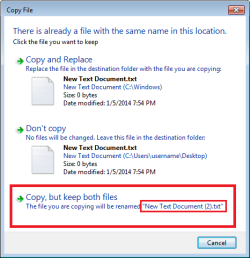
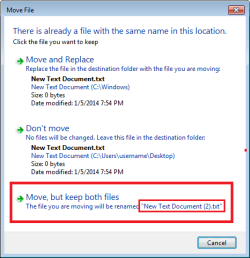
U UsernameIssues a.k.a. UNI Guru Gold Member Local time 1:52 AM Messages 8,138 Jan 5, 2014 #4 Roderunner said: Use the right mouse button to hold & drag the file to the new location. Click to expand... Doing that should get the OP the same flawed "Copy File" dialog box. bigmck said: You can't keep two files with the same name in the same location. Click to expand... You are correct, but Windows should offer to rename the file being copied (or moved). The OP's problem is: Windows is not making that offer. Compare the first image below with the image in the OP. The thread's title mentions moving a file - but the issue is the same: I'm not sure how to fix the issue... ...I'm only attempting to restate the issue. My Computer My Computer Computer typeLaptopComputer Manufacturer/Model NumberEmployer provided Dell LatitudeOSW7 Pro SP1 64bitCPUi7Memory8GBGraphics Card(s)Intel HD GraphicsHard Drivescrappy SSDAntivirusEmployer mandated Symantec Endpoint ProtectionBrowserPale Moon 64bit, IE11 64bit & Chrome 64bit
Roderunner said: Use the right mouse button to hold & drag the file to the new location. Click to expand... Doing that should get the OP the same flawed "Copy File" dialog box. bigmck said: You can't keep two files with the same name in the same location. Click to expand... You are correct, but Windows should offer to rename the file being copied (or moved). The OP's problem is: Windows is not making that offer. Compare the first image below with the image in the OP. The thread's title mentions moving a file - but the issue is the same: I'm not sure how to fix the issue... ...I'm only attempting to restate the issue.
I Islander New member Thread Starter Local time 2:52 AM Messages 2 Jan 5, 2014 #5 You have restated the issue accurately. I had the third option (ie auto rename the file then save), and now it's gone. My current fis is to save the file in a different location than the one preferred. Very annoying http://www.sevenforums.com/images/smilies/sad.gif My Computer My Computer Computer typePC/DesktopOSBritish Columbia
You have restated the issue accurately. I had the third option (ie auto rename the file then save), and now it's gone. My current fis is to save the file in a different location than the one preferred. Very annoying http://www.sevenforums.com/images/smilies/sad.gif