Solved move/copy file option priority

taxea

New member
Local time
7:36 AM
Messages
9
Location
Hawaii
When I select several files from one folder to move to a different folder will the most currently dated file automatically remain in the "moving" to file if the a file I am moving is older than the existing file? Or do I have to audit the move and select "skip" everytime there is a file conflict?
 

My Computer

OS
WIN 7 pro 32BIT
Hi,

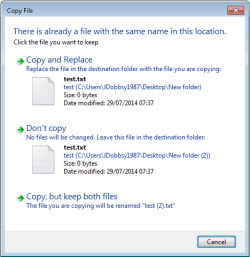
I think you will have to tell Windows to either Copy and Replace, Don't Copy or Copy, but keep both files.

2014-07-29 07_38_23-jdsvr03 - Remote Desktop Connection.png

I believe you would need to use command line or 3rd party software if you always wanted the 'newest' file to copy without a prompt.

Regards,
Jamie
 

My Computer

Computer type
PC/Desktop
Computer Manufacturer/Model Number
Self Built
OS
Windows 8.1 Pro x64
CPU
Intel Core i5-2500K @ 3.30GHz - S1155
Motherboard
Asus P8P67 LE Rev3, Intel P67, S115
Memory
8GB Corsair DDR3 XMS3, PC3-12800
Graphics Card(s)
NVIDIA GeForce GTX 650
Sound Card
On-Board
Monitor(s) Displays
3 x 24" {Extended Display}
Screen Resolution
1920 x 1080
Hard Drives
300GB Seagate Barracuda 7200
PSU
550W Coolermaster GX550
Case
Silverstone Precision PS04B
Cooling
Stock
Keyboard
Logitech K120
Mouse
World of Warcraft Cataclysm MMO Gaming Mouse
Internet Speed
80 MB
Antivirus
MSE / Windows Defender
Browser
Chrome
Bummer...guess I will move and keep both then go in and delete the older file...what a waste of time.
Thanks
 

My Computer

OS
WIN 7 pro 32BIT
Back
Top