Solved Move from 150 GB HD to a new 488 GB HD

koolkat77

New member
Guru
VIP
Local time
2:44 AM
Messages
14,164
So I got a new 500 GB HD (actually 488 GB HD). My question here is, I already have my windows 7 setup on the 150 GB HD and I don’t want to do a clean install BUT just move the OS and my saved files etc to the new one WITHOUT having to format. Is it possible to do this? If yes, I would like to know the steps to follow, thanks for the help :(
 

My Computer My Computer

At a glance

Windows 10 Home 64BitIntel Core i5 10400 @ 2.90GHz8.00GB Single-Channel Unknown @ 1329MHz (16-2...
Computer type
PC/Desktop
Computer Manufacturer/Model Number
Self assembled
OS
Windows 10 Home 64Bit
CPU
Intel Core i5 10400 @ 2.90GHz
Motherboard
Intel Corporation DG41WV (PROCESSOR)
Memory
8.00GB Single-Channel Unknown @ 1329MHz (16-20-20-38)
Sound Card
Realtek High Definition Audio
Monitor(s) Displays
DELL E170S
Screen Resolution
1280x1024 pixels
Hard Drives
931GB TOSHIBA DT01ACA100 (SATA)
238GB TEAM TM8PS7256G (SATA SSD)
Case
Nothing Fancy
Cooling
Fans
Keyboard
A4 Tech Co LTD
Mouse
A4 Tech Co Ltd/Logitech
Internet Speed
25 Mbps
Possible, yes.

Preferable? Maybe not. All you can do is try it and see if it works.

The two general methods would be cloning and imaging.

The image method would require you to make an "image file" of 1 or more partitions and save that file on another drive---typically external. And then "restore" that image file to the new hard drive.

A clone is a direct transfer in real time from the old drive to the new drive without an intervening image.

You can investigate tutorials on this site for greater detail.

But a screen shot of your Disk Management would help to visualize your current partition setup.

You say "saved files". Are these saved files on C?

Do you have an external drive or some other proper location to save an image file?
 

My Computer My Computer

At a glance

Windows 7 Home Premium SP1, 64-bitIntel Skylake i5-6600K, not overclocked8 GB HyperX DDR4-2666 (2 x 4 GB)none; graphics are integrated on CPU
Computer type
PC/Desktop
Computer Manufacturer/Model Number
Ignatz Special; 4 speed manual gearbox; factory air conditioning; one of one
OS
Windows 7 Home Premium SP1, 64-bit
CPU
Intel Skylake i5-6600K, not overclocked
Motherboard
AsRock Z170M Extreme 4, micro ATX
Memory
8 GB HyperX DDR4-2666 (2 x 4 GB)
Graphics Card(s)
none; graphics are integrated on CPU
Sound Card
onboard: Realtek ALC1150; external: USB Behringer UF0-202
Monitor(s) Displays
Dell S2340M 23 inch IPS
Screen Resolution
1600 x 900
Hard Drives
System: Crucial MX100 series SSD, 128 GB;
Data: Samsung Spinpoint 103SJ, 1 TB;
Backup: WD Caviar Green WD30EZRX-00D8PB0, 3 TB
PSU
Rosewill SilentNight 500 watt fanless, semi-modular
Case
Antec Solo II
Cooling
Noctua NH-U12S; Noctua F12 intake, Noctua S12A exhaust
Keyboard
Microsoft 200 6JH-00001 USB
Mouse
Dell or Microsoft optical wired; USB
Antivirus
Microsoft Security Essentials and Malwarebytes Premium
Browser
Pale Moon
Other Info
All fans PWM; speeds at idle: CPU circa 500 rpm; intake circa 600 rpm; exhaust circa 600 rpm; CPU temps 27 idle and 47 C load in a warm room (27 C/81 F) when running Intel Extreme Tuning Utility stress test.
Possible, yes.
Hi Iggy :), thanks for the reply. let me tell you, i have never watched a video, read a tutorial or an article on cloning/imaging ever. im completely new to this, so please bear with me:o
Preferable? Maybe not. All you can do is try it and see if it works.
if i tend to "try and see if it works" it is still important for me to keep a back up of my personal stuff right?
The two general methods would be cloning and imaging.
The image method would require you to make an "image file" of 1 or more partitions and save that file on another drive---typically external. And then "restore" that image file to the new hard drive.A clone is a direct transfer in real time from the old drive to the new drive without an intervening image.
could you elaborate a little more? or i'll look at wiki for imaging and cloning of a HD.
You can investigate tutorials on this site for greater detail.
i didn't look at any tutorial yet, google or here, but i will soon take a look at the ones from here. i don't wanna google cause, different links show different methods and in the end i am confused :confused:
But a screen shot of your Disk Management would help to visualize your current partition setup.
in one of my other post Gregrocker had said that my system reserved is supposed to be partitioned normally as first one on the drive followed by the Windows C partition. so don't be surprised :o
You say "saved files". Are these saved files on C?
I meant saved files as in my personal stuff on the other drives :)
Do you have an external drive or some other proper location to save an image file?
we do have an external hard drive, i forgot.. it might be 70gb or something. (i'll confirm this later)

hmmm :)
 
Last edited:

My Computer My Computer

At a glance

Windows 10 Home 64BitIntel Core i5 10400 @ 2.90GHz8.00GB Single-Channel Unknown @ 1329MHz (16-2...
Computer type
PC/Desktop
Computer Manufacturer/Model Number
Self assembled
OS
Windows 10 Home 64Bit
CPU
Intel Core i5 10400 @ 2.90GHz
Motherboard
Intel Corporation DG41WV (PROCESSOR)
Memory
8.00GB Single-Channel Unknown @ 1329MHz (16-20-20-38)
Sound Card
Realtek High Definition Audio
Monitor(s) Displays
DELL E170S
Screen Resolution
1280x1024 pixels
Hard Drives
931GB TOSHIBA DT01ACA100 (SATA)
238GB TEAM TM8PS7256G (SATA SSD)
Case
Nothing Fancy
Cooling
Fans
Keyboard
A4 Tech Co LTD
Mouse
A4 Tech Co Ltd/Logitech
Internet Speed
25 Mbps
if i tend to "try and see if it works" it is still important for me to keep a back up of my personal stuff right?

Yes, you should keep backups of all personal data at all times--you can't assume your imaging or cloning will work.

Since you have an external drive of 70 GB, I would probably lean toward imaging rather than cloning. Imaging is more commonly done on these forums and there are more applications that will do it. You might have to buy a cloning application, but you shouldn't have to spend anything on an imaging application.

Windows 7 includes an imaging application. It works, but isn't very intuitive and is a bit fussy. I'd recommend you use Macrium Reflect Free Edition, a free download. The free version will image. If you wanted to clone, I think you would have to buy the paid version of Macrium.

Member WHS has a good tutorial on this site on how to use Macrium Reflect Free to make and restore an image. He may jump into this thread.

Looking at your Disk Management, I think I would just make an image of C and your system reserved partitions. Probably separately. An image file of each. WHS's tutorial may have more ideas on that---he may recommend that you include System Reserved and C in the same image, rather than in separate images? I'm not sure. I do use Macrium, but I don't use a System Reserved partition and therefore don't have to consider that question.

Back up the files in the other partitions in the standard manner--drag and drop without an image. And then just drag them back to the desired location after the new drive is up and running. You should also be able to just reconnect your old hard drive and drag personal files to the new drive if you choose to do it that way, rather than back them up to an external.

The size of your saved image file that you put on the external will be roughly half of the size of the occupied space on C---so you should have plenty of room.

After you restore the saved image file to the new drive, you should be able to resize the new C partition as needed. It probably won't be the size you prefer by default, but that's no problem.

After you have C up and running on the new drive, you can then use Disk Management to make new D, E, F, or whatever you want in your chosen sizes.

I wouldn't absolutely rule out cloning. Others may have ideas on it.

Bottom line: know what you will do if the imaging or cloning fails--you would have to reinstall Windows and all applications. Be sure all personal data is backed up independently.

Here is WHS's tutorial. Speak up about anything you don't understand:


http://www.sevenforums.com/tutorials/73828-imaging-free-macrium.html

 

My Computer My Computer

At a glance

Windows 7 Home Premium SP1, 64-bitIntel Skylake i5-6600K, not overclocked8 GB HyperX DDR4-2666 (2 x 4 GB)none; graphics are integrated on CPU
Computer type
PC/Desktop
Computer Manufacturer/Model Number
Ignatz Special; 4 speed manual gearbox; factory air conditioning; one of one
OS
Windows 7 Home Premium SP1, 64-bit
CPU
Intel Skylake i5-6600K, not overclocked
Motherboard
AsRock Z170M Extreme 4, micro ATX
Memory
8 GB HyperX DDR4-2666 (2 x 4 GB)
Graphics Card(s)
none; graphics are integrated on CPU
Sound Card
onboard: Realtek ALC1150; external: USB Behringer UF0-202
Monitor(s) Displays
Dell S2340M 23 inch IPS
Screen Resolution
1600 x 900
Hard Drives
System: Crucial MX100 series SSD, 128 GB;
Data: Samsung Spinpoint 103SJ, 1 TB;
Backup: WD Caviar Green WD30EZRX-00D8PB0, 3 TB
PSU
Rosewill SilentNight 500 watt fanless, semi-modular
Case
Antec Solo II
Cooling
Noctua NH-U12S; Noctua F12 intake, Noctua S12A exhaust
Keyboard
Microsoft 200 6JH-00001 USB
Mouse
Dell or Microsoft optical wired; USB
Antivirus
Microsoft Security Essentials and Malwarebytes Premium
Browser
Pale Moon
Other Info
All fans PWM; speeds at idle: CPU circa 500 rpm; intake circa 600 rpm; exhaust circa 600 rpm; CPU temps 27 idle and 47 C load in a warm room (27 C/81 F) when running Intel Extreme Tuning Utility stress test.
Windows 7 includes an imaging application. It works, but isn't very intuitive and is a bit fussy. I'd recommend you use Macrium Reflect Free Edition, a free download. The free version will image. If you wanted to clone, I think you would have to buy the paid version of Macrium.
thanks for the information on "buy cloning software' & 'free imaging software'. I would prefer using a free software than having to spend more $$.
the software macrium: thanks to W7Forums, looking at some threads on here I already downloaded it :) so now i just got to install. It will take me some time and attention to read those tutorials, cause when i don't as natural it is, i end up screwing up rather than fixing. i'm planing to try it at the end of this week maybe, so when thursday comes i'll give it a go, in case i messed up i have friday as a weekend to sit and fix both the HDS :(
 

My Computer My Computer

At a glance

Windows 10 Home 64BitIntel Core i5 10400 @ 2.90GHz8.00GB Single-Channel Unknown @ 1329MHz (16-2...
Computer type
PC/Desktop
Computer Manufacturer/Model Number
Self assembled
OS
Windows 10 Home 64Bit
CPU
Intel Core i5 10400 @ 2.90GHz
Motherboard
Intel Corporation DG41WV (PROCESSOR)
Memory
8.00GB Single-Channel Unknown @ 1329MHz (16-20-20-38)
Sound Card
Realtek High Definition Audio
Monitor(s) Displays
DELL E170S
Screen Resolution
1280x1024 pixels
Hard Drives
931GB TOSHIBA DT01ACA100 (SATA)
238GB TEAM TM8PS7256G (SATA SSD)
Case
Nothing Fancy
Cooling
Fans
Keyboard
A4 Tech Co LTD
Mouse
A4 Tech Co Ltd/Logitech
Internet Speed
25 Mbps
Free Macrium has the option to clone a drive as well as imaging it.
 

My Computer My Computer

At a glance

Microsoft Windows 7 Home Premium 64-bit Servi...Intel(R) Core(TM) i3 CPU M 330 @ 2.13GHz8 GB DDR3Intel(R) HD Graphics
Computer type
Laptop
Computer Manufacturer/Model Number
Hewlett-Packard/G62-107SA Notebook
OS
Microsoft Windows 7 Home Premium 64-bit Service Pack 1
CPU
Intel(R) Core(TM) i3 CPU M 330 @ 2.13GHz
Motherboard
Hewlett-Packard 1425
Memory
8 GB DDR3
Graphics Card(s)
Intel(R) HD Graphics
Sound Card
Realtek High Definition Audio
Monitor(s) Displays
Builtin
Screen Resolution
1366 x 768 x 32 bits (4294967296 colors) @ 60 Hz
Hard Drives
250 GB SATA Hard Disk Drive 7200 rpm
2TB Seagate GoFlex USB 2 Drive
1TB Iomega Prestige USB 2 Drive
1.5TB Iomega Prestige USB 2 Drive (Samsung)
2TB WD MyBook Live NAS.
Mouse
Logitech Anywhere MX
Internet Speed
152 Mbs download 10 Mbs upload
Antivirus
Norton 360
Browser
Chrome

My Computer My Computer

At a glance

Windows 10 Home 64BitIntel Core i5 10400 @ 2.90GHz8.00GB Single-Channel Unknown @ 1329MHz (16-2...
Computer type
PC/Desktop
Computer Manufacturer/Model Number
Self assembled
OS
Windows 10 Home 64Bit
CPU
Intel Core i5 10400 @ 2.90GHz
Motherboard
Intel Corporation DG41WV (PROCESSOR)
Memory
8.00GB Single-Channel Unknown @ 1329MHz (16-20-20-38)
Sound Card
Realtek High Definition Audio
Monitor(s) Displays
DELL E170S
Screen Resolution
1280x1024 pixels
Hard Drives
931GB TOSHIBA DT01ACA100 (SATA)
238GB TEAM TM8PS7256G (SATA SSD)
Case
Nothing Fancy
Cooling
Fans
Keyboard
A4 Tech Co LTD
Mouse
A4 Tech Co Ltd/Logitech
Internet Speed
25 Mbps
Yes it has the ability to do either an intelligent copy (Only used sectors and also drops things like the page file which are recreated automatically) or a sector by sector copy which of course is slower.
 

My Computer My Computer

At a glance

Microsoft Windows 7 Home Premium 64-bit Servi...Intel(R) Core(TM) i3 CPU M 330 @ 2.13GHz8 GB DDR3Intel(R) HD Graphics
Computer type
Laptop
Computer Manufacturer/Model Number
Hewlett-Packard/G62-107SA Notebook
OS
Microsoft Windows 7 Home Premium 64-bit Service Pack 1
CPU
Intel(R) Core(TM) i3 CPU M 330 @ 2.13GHz
Motherboard
Hewlett-Packard 1425
Memory
8 GB DDR3
Graphics Card(s)
Intel(R) HD Graphics
Sound Card
Realtek High Definition Audio
Monitor(s) Displays
Builtin
Screen Resolution
1366 x 768 x 32 bits (4294967296 colors) @ 60 Hz
Hard Drives
250 GB SATA Hard Disk Drive 7200 rpm
2TB Seagate GoFlex USB 2 Drive
1TB Iomega Prestige USB 2 Drive
1.5TB Iomega Prestige USB 2 Drive (Samsung)
2TB WD MyBook Live NAS.
Mouse
Logitech Anywhere MX
Internet Speed
152 Mbs download 10 Mbs upload
Antivirus
Norton 360
Browser
Chrome
Yes it has the ability to do either an intelligent copy (Only used sectors and also drops things like the page file which are recreated automatically) or a sector by sector copy which of course is slower.

hmmm: this makes me think how long will imaging take?
and is the cloning feature available in the free version or purchased?
 

My Computer My Computer

At a glance

Windows 10 Home 64BitIntel Core i5 10400 @ 2.90GHz8.00GB Single-Channel Unknown @ 1329MHz (16-2...
Computer type
PC/Desktop
Computer Manufacturer/Model Number
Self assembled
OS
Windows 10 Home 64Bit
CPU
Intel Core i5 10400 @ 2.90GHz
Motherboard
Intel Corporation DG41WV (PROCESSOR)
Memory
8.00GB Single-Channel Unknown @ 1329MHz (16-20-20-38)
Sound Card
Realtek High Definition Audio
Monitor(s) Displays
DELL E170S
Screen Resolution
1280x1024 pixels
Hard Drives
931GB TOSHIBA DT01ACA100 (SATA)
238GB TEAM TM8PS7256G (SATA SSD)
Case
Nothing Fancy
Cooling
Fans
Keyboard
A4 Tech Co LTD
Mouse
A4 Tech Co Ltd/Logitech
Internet Speed
25 Mbps
Yes it has the ability to do either an intelligent copy (Only used sectors and also drops things like the page file which are recreated automatically) or a sector by sector copy which of course is slower.

hmmm: this makes me think how long will imaging take?
and is the cloning feature available in the free version or purchased?

It's available in the free version. The speed very much depends on what sort of disk it is. I've only used it on USB2 attached disks and it took about 12 hours to clone 350GB of data off a 1GB USB disk to another USB disk.
 

My Computer My Computer

At a glance

Microsoft Windows 7 Home Premium 64-bit Servi...Intel(R) Core(TM) i3 CPU M 330 @ 2.13GHz8 GB DDR3Intel(R) HD Graphics
Computer type
Laptop
Computer Manufacturer/Model Number
Hewlett-Packard/G62-107SA Notebook
OS
Microsoft Windows 7 Home Premium 64-bit Service Pack 1
CPU
Intel(R) Core(TM) i3 CPU M 330 @ 2.13GHz
Motherboard
Hewlett-Packard 1425
Memory
8 GB DDR3
Graphics Card(s)
Intel(R) HD Graphics
Sound Card
Realtek High Definition Audio
Monitor(s) Displays
Builtin
Screen Resolution
1366 x 768 x 32 bits (4294967296 colors) @ 60 Hz
Hard Drives
250 GB SATA Hard Disk Drive 7200 rpm
2TB Seagate GoFlex USB 2 Drive
1TB Iomega Prestige USB 2 Drive
1.5TB Iomega Prestige USB 2 Drive (Samsung)
2TB WD MyBook Live NAS.
Mouse
Logitech Anywhere MX
Internet Speed
152 Mbs download 10 Mbs upload
Antivirus
Norton 360
Browser
Chrome
Yes it has the ability to do either an intelligent copy (Only used sectors and also drops things like the page file which are recreated automatically) or a sector by sector copy which of course is slower.

hmmm: this makes me think how long will imaging take?
and is the cloning feature available in the free version or purchased?

It's available in the free version. The speed very much depends on what sort of disk it is. I've only used it on USB2 attached disks and it took about 12 hours to clone 350GB of data off a 1GB USB disk to another USB disk.

omygosh.thats long.. :cry:
but will let you guys know what i plan on doing so :(
 

My Computer My Computer

At a glance

Windows 10 Home 64BitIntel Core i5 10400 @ 2.90GHz8.00GB Single-Channel Unknown @ 1329MHz (16-2...
Computer type
PC/Desktop
Computer Manufacturer/Model Number
Self assembled
OS
Windows 10 Home 64Bit
CPU
Intel Core i5 10400 @ 2.90GHz
Motherboard
Intel Corporation DG41WV (PROCESSOR)
Memory
8.00GB Single-Channel Unknown @ 1329MHz (16-20-20-38)
Sound Card
Realtek High Definition Audio
Monitor(s) Displays
DELL E170S
Screen Resolution
1280x1024 pixels
Hard Drives
931GB TOSHIBA DT01ACA100 (SATA)
238GB TEAM TM8PS7256G (SATA SSD)
Case
Nothing Fancy
Cooling
Fans
Keyboard
A4 Tech Co LTD
Mouse
A4 Tech Co Ltd/Logitech
Internet Speed
25 Mbps
You may as well at least try a clone. If it fails, you can always try the image method.

Cloning saves you from having to deal with a recovery boot disk that imaging requires. They usually work, but aren't foolproof.
 

My Computer My Computer

At a glance

Windows 7 Home Premium SP1, 64-bitIntel Skylake i5-6600K, not overclocked8 GB HyperX DDR4-2666 (2 x 4 GB)none; graphics are integrated on CPU
Computer type
PC/Desktop
Computer Manufacturer/Model Number
Ignatz Special; 4 speed manual gearbox; factory air conditioning; one of one
OS
Windows 7 Home Premium SP1, 64-bit
CPU
Intel Skylake i5-6600K, not overclocked
Motherboard
AsRock Z170M Extreme 4, micro ATX
Memory
8 GB HyperX DDR4-2666 (2 x 4 GB)
Graphics Card(s)
none; graphics are integrated on CPU
Sound Card
onboard: Realtek ALC1150; external: USB Behringer UF0-202
Monitor(s) Displays
Dell S2340M 23 inch IPS
Screen Resolution
1600 x 900
Hard Drives
System: Crucial MX100 series SSD, 128 GB;
Data: Samsung Spinpoint 103SJ, 1 TB;
Backup: WD Caviar Green WD30EZRX-00D8PB0, 3 TB
PSU
Rosewill SilentNight 500 watt fanless, semi-modular
Case
Antec Solo II
Cooling
Noctua NH-U12S; Noctua F12 intake, Noctua S12A exhaust
Keyboard
Microsoft 200 6JH-00001 USB
Mouse
Dell or Microsoft optical wired; USB
Antivirus
Microsoft Security Essentials and Malwarebytes Premium
Browser
Pale Moon
Other Info
All fans PWM; speeds at idle: CPU circa 500 rpm; intake circa 600 rpm; exhaust circa 600 rpm; CPU temps 27 idle and 47 C load in a warm room (27 C/81 F) when running Intel Extreme Tuning Utility stress test.
I think that restoring an image to a new disk could be done from within Windows although I have never tried it.
 

My Computer My Computer

At a glance

Microsoft Windows 7 Home Premium 64-bit Servi...Intel(R) Core(TM) i3 CPU M 330 @ 2.13GHz8 GB DDR3Intel(R) HD Graphics
Computer type
Laptop
Computer Manufacturer/Model Number
Hewlett-Packard/G62-107SA Notebook
OS
Microsoft Windows 7 Home Premium 64-bit Service Pack 1
CPU
Intel(R) Core(TM) i3 CPU M 330 @ 2.13GHz
Motherboard
Hewlett-Packard 1425
Memory
8 GB DDR3
Graphics Card(s)
Intel(R) HD Graphics
Sound Card
Realtek High Definition Audio
Monitor(s) Displays
Builtin
Screen Resolution
1366 x 768 x 32 bits (4294967296 colors) @ 60 Hz
Hard Drives
250 GB SATA Hard Disk Drive 7200 rpm
2TB Seagate GoFlex USB 2 Drive
1TB Iomega Prestige USB 2 Drive
1.5TB Iomega Prestige USB 2 Drive (Samsung)
2TB WD MyBook Live NAS.
Mouse
Logitech Anywhere MX
Internet Speed
152 Mbs download 10 Mbs upload
Antivirus
Norton 360
Browser
Chrome
For starters, I suggest you watch this Macrium tutorial. It is a piece of cake to transfer the OS. You can temporarily define a partition on your new disk where you park the image (should be about 60% of the amount of data you have on your current C: partition). then you define a partition on your new drive and dump the image into there (this partition must be at least the size of the original total C: partition). Change the BIOS boot sequence and off you go.

PS: Just checked you Disk Management snip and saw that you have a system reserved partition. That one we have to transfer too - as primary, active.

Once you digested the video tutorial I suggest you come back and we will discuss this step by step.
 

My Computer My Computer

At a glance

Vista, Windows7, Mint Mate, Zorin, Windows 8from 1.6GHz Duo to i7
Computer Manufacturer/Model Number
HP, Dell, Gateway, Toshiba - 4 laptops and 2 desktops
OS
Vista, Windows7, Mint Mate, Zorin, Windows 8
CPU
from 1.6GHz Duo to i7
Monitor(s) Displays
2x HP w2207
Hard Drives
5x HDD, 7x SSD, 12x Externals
Keyboard
with trackball - no mices
Mouse
Trackball mice
Internet Speed
DSL 6000
PS: Just checked you Disk Management snip and saw that you have a system reserved partition. That one we have to transfer too - as primary, active.

Once you digested the video tutorial I suggest you come back and we will discuss this step by step.

thank you sir :) :)
i will keep you updated with my learning

edit: the video is for around 30 minutes, can i have a link to where i can download it?
my connection speed isn't enough i need to download it :(
 
Last edited:

My Computer My Computer

At a glance

Windows 10 Home 64BitIntel Core i5 10400 @ 2.90GHz8.00GB Single-Channel Unknown @ 1329MHz (16-2...
Computer type
PC/Desktop
Computer Manufacturer/Model Number
Self assembled
OS
Windows 10 Home 64Bit
CPU
Intel Core i5 10400 @ 2.90GHz
Motherboard
Intel Corporation DG41WV (PROCESSOR)
Memory
8.00GB Single-Channel Unknown @ 1329MHz (16-20-20-38)
Sound Card
Realtek High Definition Audio
Monitor(s) Displays
DELL E170S
Screen Resolution
1280x1024 pixels
Hard Drives
931GB TOSHIBA DT01ACA100 (SATA)
238GB TEAM TM8PS7256G (SATA SSD)
Case
Nothing Fancy
Cooling
Fans
Keyboard
A4 Tech Co LTD
Mouse
A4 Tech Co Ltd/Logitech
Internet Speed
25 Mbps
In this case since you have WD HD in the mix, I'd use the free WD Acronis premium imaging app to clone the smaller HD over to the larger one.

Use the automated cloning method shown in the manual which is downloaded next to the app: WD Acronis free cloning app
 
You may as well at least try a clone. If it fails, you can always try the image method.

Cloning saves you from having to deal with a recovery boot disk that imaging requires. They usually work, but aren't foolproof.

iggy :( have you tried for yourself this imaging and stuff :(?
like kado said
It's available in the free version. The speed very much depends on what sort of disk it is. I've only used it on USB2 attached disks and it took about 12 hours to clone 350GB of data off a 1GB USB disk to another USB disk.
its gonna take me around 12 hours too right :(?
 

My Computer My Computer

At a glance

Windows 10 Home 64BitIntel Core i5 10400 @ 2.90GHz8.00GB Single-Channel Unknown @ 1329MHz (16-2...
Computer type
PC/Desktop
Computer Manufacturer/Model Number
Self assembled
OS
Windows 10 Home 64Bit
CPU
Intel Core i5 10400 @ 2.90GHz
Motherboard
Intel Corporation DG41WV (PROCESSOR)
Memory
8.00GB Single-Channel Unknown @ 1329MHz (16-20-20-38)
Sound Card
Realtek High Definition Audio
Monitor(s) Displays
DELL E170S
Screen Resolution
1280x1024 pixels
Hard Drives
931GB TOSHIBA DT01ACA100 (SATA)
238GB TEAM TM8PS7256G (SATA SSD)
Case
Nothing Fancy
Cooling
Fans
Keyboard
A4 Tech Co LTD
Mouse
A4 Tech Co Ltd/Logitech
Internet Speed
25 Mbps
In this case since you have WD HD in the mix, I'd use the free WD Acronis premium imaging app to clone the smaller HD over to the larger one.

Use the automated cloning method shown in the manual which is downloaded next to the app: WD Acronis free cloning app

thanks greg, i will check it. need some time this week. although
now somehow i feel i will just do a reinstall of the OS
this seems very lengthy with the kind of impatient person i am :cry::(
 
Last edited:

My Computer My Computer

At a glance

Windows 10 Home 64BitIntel Core i5 10400 @ 2.90GHz8.00GB Single-Channel Unknown @ 1329MHz (16-2...
Computer type
PC/Desktop
Computer Manufacturer/Model Number
Self assembled
OS
Windows 10 Home 64Bit
CPU
Intel Core i5 10400 @ 2.90GHz
Motherboard
Intel Corporation DG41WV (PROCESSOR)
Memory
8.00GB Single-Channel Unknown @ 1329MHz (16-20-20-38)
Sound Card
Realtek High Definition Audio
Monitor(s) Displays
DELL E170S
Screen Resolution
1280x1024 pixels
Hard Drives
931GB TOSHIBA DT01ACA100 (SATA)
238GB TEAM TM8PS7256G (SATA SSD)
Case
Nothing Fancy
Cooling
Fans
Keyboard
A4 Tech Co LTD
Mouse
A4 Tech Co Ltd/Logitech
Internet Speed
25 Mbps
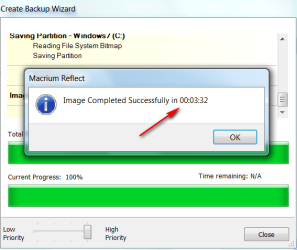
What is this 12 hour discussion. I can make an image of my system at best in a few minutes (SSD to internal HDD) or 25 minutes to a slow external disk.
 

Attachments

  • 2010-08-25_144413.png
    2010-08-25_144413.png
    20.4 KB · Views: 4

My Computer My Computer

At a glance

Vista, Windows7, Mint Mate, Zorin, Windows 8from 1.6GHz Duo to i7
Computer Manufacturer/Model Number
HP, Dell, Gateway, Toshiba - 4 laptops and 2 desktops
OS
Vista, Windows7, Mint Mate, Zorin, Windows 8
CPU
from 1.6GHz Duo to i7
Monitor(s) Displays
2x HP w2207
Hard Drives
5x HDD, 7x SSD, 12x Externals
Keyboard
with trackball - no mices
Mouse
Trackball mice
Internet Speed
DSL 6000
You may as well at least try a clone. If it fails, you can always try the image method.

Cloning saves you from having to deal with a recovery boot disk that imaging requires. They usually work, but aren't foolproof.

iggy :( have you tried for yourself this imaging and stuff :(?
like kado said
It's available in the free version. The speed very much depends on what sort of disk it is. I've only used it on USB2 attached disks and it took about 12 hours to clone 350GB of data off a 1GB USB disk to another USB disk.
its gonna take me around 12 hours too right :(?

I make an image every month. Takes less than 10 minutes to make the image file and store it on an internal drive. It would take a bit longer to put it on an external.

I have not restored an image in over 5 years and never with Macrium, so I can't say how long the restoration process takes. Externals will be slower because of the USB connection.

I wouldn't particularly worry about the time it takes. You can let it run overnight if needed. I'd worry more about if it will work properly and as expected at all.

Cloning and imaging are different processes and for all I know cloning may take a lot longer. I have never cloned a disk.
 

My Computer My Computer

At a glance

Windows 7 Home Premium SP1, 64-bitIntel Skylake i5-6600K, not overclocked8 GB HyperX DDR4-2666 (2 x 4 GB)none; graphics are integrated on CPU
Computer type
PC/Desktop
Computer Manufacturer/Model Number
Ignatz Special; 4 speed manual gearbox; factory air conditioning; one of one
OS
Windows 7 Home Premium SP1, 64-bit
CPU
Intel Skylake i5-6600K, not overclocked
Motherboard
AsRock Z170M Extreme 4, micro ATX
Memory
8 GB HyperX DDR4-2666 (2 x 4 GB)
Graphics Card(s)
none; graphics are integrated on CPU
Sound Card
onboard: Realtek ALC1150; external: USB Behringer UF0-202
Monitor(s) Displays
Dell S2340M 23 inch IPS
Screen Resolution
1600 x 900
Hard Drives
System: Crucial MX100 series SSD, 128 GB;
Data: Samsung Spinpoint 103SJ, 1 TB;
Backup: WD Caviar Green WD30EZRX-00D8PB0, 3 TB
PSU
Rosewill SilentNight 500 watt fanless, semi-modular
Case
Antec Solo II
Cooling
Noctua NH-U12S; Noctua F12 intake, Noctua S12A exhaust
Keyboard
Microsoft 200 6JH-00001 USB
Mouse
Dell or Microsoft optical wired; USB
Antivirus
Microsoft Security Essentials and Malwarebytes Premium
Browser
Pale Moon
Other Info
All fans PWM; speeds at idle: CPU circa 500 rpm; intake circa 600 rpm; exhaust circa 600 rpm; CPU temps 27 idle and 47 C load in a warm room (27 C/81 F) when running Intel Extreme Tuning Utility stress test.
Back
Top