Movie Maker — problems with burning in 4:3 aspect ratio

BRUUUUCE

New member
Local time
6:08 AM
Messages
4
Movie Maker — problems with burning in 4:3 aspect ratio

i've searched eveywhere online for a solution to this problem — all I've found is a handful of people who have the same problem as me and no answer.

When i use Movie Maker, I select the 4:3 aspect ratio, but everytime it takes my footage (shot in 4:3) and put bars all around the image. (think of it like "shrinking" the 4:3 image smaller than you TV screen and and floating in a black background.)

Is this a bug? How can I get it to recognize the fact that I'm choosing 4:3? Or am I overlooking something else here? Please! I don't know what else to do. My panasonic software is not compatible with Windows 7 and the panasonic rep told me their suggestion is to use Movie Maker.

:(
 

My Computer My Computer

At a glance

windows 7 home ultimate x64
OS
windows 7 home ultimate x64
Hi Bruuuce and welcolm to the Forum
First off it sounds like you are getting the "letterbox effect"
Can you post the full properties of your video clips, particularly the pixel size. You mention Panasonic, does this mean the clips come from a panasonic Camcorder? If so what model. Please post as much detail as you can.
 

My Computer My Computer

At a glance

Microsoft Windows 7 Home Premium 64-bit 7601 ...Intel(R) Core(TM) i7-3770 CPU @ 3.40GHz8.00 GBIntel(R) HD Graphics 4000
Computer type
PC/Desktop
OS
Microsoft Windows 7 Home Premium 64-bit 7601 Multiprocessor Free Service Pack 1
CPU
Intel(R) Core(TM) i7-3770 CPU @ 3.40GHz
Motherboard
ASUSTeK COMPUTER INC. P8H77-M
Memory
8.00 GB
Graphics Card(s)
Intel(R) HD Graphics 4000
Sound Card
On Board
Monitor(s) Displays
Dell 24"
Screen Resolution
1920 x 1080
Hard Drives
(1) INTEL SSDSC2CT180A3 ATA Device (2) ST500DM002-1BD142 ATA Device (3) WDC WD3200AAKS-75L9A0 ATA Device (4) Generic- Compact Flash USB Device (5) Generic- MS/MS-Pro USB Device (6) Generic- SD/MMC USB Device (7) Generic- SM/xD-Picture USB
PSU
500w Corsair
Case
Cooler Master
Cooling
3 Fans
Keyboard
Logitech MK300
Mouse
Logitech WOM
Internet Speed
75Mb
Antivirus
Norton 360
Browser
Firefox, Opera, IE
Helolo BRUUUUCE, I'll try to help you.

Couple Questions:

What exactly is your goal with your video clips?
Just getting them straight to a DVD or Author a complete video with special effects, text etc?

Are you using a codec pack of any kind? I/E Shark 007s?
(Movie Maker will use use FFDshow)

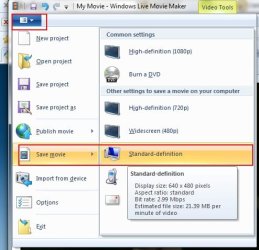
You have set it to use 4:3 resolution in the View Tab, correct?


When you have finished are you saving your movie with this option?

**Edit** Mitchell beat mer to the post. And as suggested, the more info you can give about the camcorders file the better. :)
 

Attachments

  • snip1.jpg
    snip1.jpg
    35.3 KB · Views: 5

My Computer My Computer

At a glance

Windows 7 Home Premium 64bitIntel Core i7 2700k8GB Mushkin Redline Ridgebacks @1866EVGA GTX570 SC
Computer Manufacturer/Model Number
Custom (Self Build)
OS
Windows 7 Home Premium 64bit
CPU
Intel Core i7 2700k
Motherboard
eVGA P67 SLI
Memory
8GB Mushkin Redline Ridgebacks @1866
Graphics Card(s)
EVGA GTX570 SC
Sound Card
XiFi Titanium HD
Monitor(s) Displays
LG W2453V
Screen Resolution
1920x1080
Hard Drives
Intel 320 80GB -- Intel X25-V 40GB --WD Black 1TB x2 -- WD Blue 640GB
PSU
Seasonic x750
Case
Corsair 600T SE White
Cooling
eVGA Superclocked CPU Cooler
Keyboard
Saitek Cyborg
Antivirus
Kaspersky
Browser
IE
Other Info
LG BD/DVD
Hi!
yes, it looks like letterbox, but there are also bars on the sides, too. kinda odd if you aske me

No, I don't remember seeing a screen like that. How do I get to it? When do I save the movie? I only selected the 4:3 tab using the button at the top.

yes it is a panasonic camcorder. PV-GS320. it's a dv, not high-def.

how do i give you the properties of the file? where do i find that info? sorry for being dumb with this stuff

yes, i just want to transfer the footage from the camcorder to a dvd that will play in my player. i don't need anything fancy. though i may want to cut out some footage at some (do some elementary editing) down the road.

thanks in advance for your time and patience

john

EDIT: also, i'm not sure about the codec. i have some kind of codec pack installed

when i got the dell, i downloaded a codec pack that i read was recommended in an article on CNET i believe. I don't know more than that. How would i determine this? Should I download a different one?
 
Last edited:

My Computer My Computer

At a glance

windows 7 home ultimate x64
OS
windows 7 home ultimate x64
Hi!
No, I don't remember seeing a screen like that. How do I get to it? When do I save the movie? I only selected the 4:3 tab using the button at the top.

It is in the top left corner of Movie Maker. See my little snip.
Little Pull Down Tab, just left of the HOME tab.
 

My Computer My Computer

At a glance

Windows 7 Home Premium 64bitIntel Core i7 2700k8GB Mushkin Redline Ridgebacks @1866EVGA GTX570 SC
Computer Manufacturer/Model Number
Custom (Self Build)
OS
Windows 7 Home Premium 64bit
CPU
Intel Core i7 2700k
Motherboard
eVGA P67 SLI
Memory
8GB Mushkin Redline Ridgebacks @1866
Graphics Card(s)
EVGA GTX570 SC
Sound Card
XiFi Titanium HD
Monitor(s) Displays
LG W2453V
Screen Resolution
1920x1080
Hard Drives
Intel 320 80GB -- Intel X25-V 40GB --WD Black 1TB x2 -- WD Blue 640GB
PSU
Seasonic x750
Case
Corsair 600T SE White
Cooling
eVGA Superclocked CPU Cooler
Keyboard
Saitek Cyborg
Antivirus
Kaspersky
Browser
IE
Other Info
LG BD/DVD
when during the process do i do that?

EDIT:

actually, i may have done that. i was up to 2 last night trying to figure it out, so I'm sorry that I'm a little fuzzy on the details. i remember those icons ... but i thought they were clustered somewhere near the top of the page, and I selected the standard 4:3 option.
 
Last edited:

My Computer My Computer

At a glance

windows 7 home ultimate x64
OS
windows 7 home ultimate x64
To find the properties of a clip, right click the file in the folder where it is stored and click "Properties" then click the "Details" tab. There you will see the size etc.
As far as codecs are concerned, dont download just for the sake of it as they cause more problems with video editing that almost anything else. You shouldn't need to download any. Best left until you really must have a special codec then just install the one you need not the whole pack!
I've been video editing using standard and high def footage for a number of years. Admittedly I use third party editing software as I need a timeline for most of my work and for some unknown reason Microsoft have not included a timeline in the latest version of WMM but I never needed to download any extra codecs!
 

My Computer My Computer

At a glance

Microsoft Windows 7 Home Premium 64-bit 7601 ...Intel(R) Core(TM) i7-3770 CPU @ 3.40GHz8.00 GBIntel(R) HD Graphics 4000
Computer type
PC/Desktop
OS
Microsoft Windows 7 Home Premium 64-bit 7601 Multiprocessor Free Service Pack 1
CPU
Intel(R) Core(TM) i7-3770 CPU @ 3.40GHz
Motherboard
ASUSTeK COMPUTER INC. P8H77-M
Memory
8.00 GB
Graphics Card(s)
Intel(R) HD Graphics 4000
Sound Card
On Board
Monitor(s) Displays
Dell 24"
Screen Resolution
1920 x 1080
Hard Drives
(1) INTEL SSDSC2CT180A3 ATA Device (2) ST500DM002-1BD142 ATA Device (3) WDC WD3200AAKS-75L9A0 ATA Device (4) Generic- Compact Flash USB Device (5) Generic- MS/MS-Pro USB Device (6) Generic- SD/MMC USB Device (7) Generic- SM/xD-Picture USB
PSU
500w Corsair
Case
Cooler Master
Cooling
3 Fans
Keyboard
Logitech MK300
Mouse
Logitech WOM
Internet Speed
75Mb
Antivirus
Norton 360
Browser
Firefox, Opera, IE
Hi Bruuuce
Have just had a quick look at your camcorder and would say that you have a very good one here capable of high quality video work.
I presume you download the clips to your PC via a Firewire connection?
For this quality of camcorder, I would consider investing in a good third party software package especially as your Panasonic software is not compatible with Win 7. What was the software by the way?
EDIT
Have just read up a bit more and here's an interesting quote from Panasonic on their supplied software:
"Neither of these software packages can take you from DV on tape to MPEG2 on DVD. If you want to edit the video and make a DVD, you will have to purchase one of the many video editing and DVD authoring applications on the market."
Also I see that your camera records to either 4:3 or 19:9 widescreen. If you have a widescreen monitor or a widescreen TV why not record in 16:9?
 

My Computer My Computer

At a glance

Microsoft Windows 7 Home Premium 64-bit 7601 ...Intel(R) Core(TM) i7-3770 CPU @ 3.40GHz8.00 GBIntel(R) HD Graphics 4000
Computer type
PC/Desktop
OS
Microsoft Windows 7 Home Premium 64-bit 7601 Multiprocessor Free Service Pack 1
CPU
Intel(R) Core(TM) i7-3770 CPU @ 3.40GHz
Motherboard
ASUSTeK COMPUTER INC. P8H77-M
Memory
8.00 GB
Graphics Card(s)
Intel(R) HD Graphics 4000
Sound Card
On Board
Monitor(s) Displays
Dell 24"
Screen Resolution
1920 x 1080
Hard Drives
(1) INTEL SSDSC2CT180A3 ATA Device (2) ST500DM002-1BD142 ATA Device (3) WDC WD3200AAKS-75L9A0 ATA Device (4) Generic- Compact Flash USB Device (5) Generic- MS/MS-Pro USB Device (6) Generic- SD/MMC USB Device (7) Generic- SM/xD-Picture USB
PSU
500w Corsair
Case
Cooler Master
Cooling
3 Fans
Keyboard
Logitech MK300
Mouse
Logitech WOM
Internet Speed
75Mb
Antivirus
Norton 360
Browser
Firefox, Opera, IE
I understand many like Movie Maker.

But for authoring a dvd from home video clips, I have Nero Vision to be a very good, although there are a few others.
 

My Computer My Computer

At a glance

Windows 7 Home Premium 64bitIntel Core i7 2700k8GB Mushkin Redline Ridgebacks @1866EVGA GTX570 SC
Computer Manufacturer/Model Number
Custom (Self Build)
OS
Windows 7 Home Premium 64bit
CPU
Intel Core i7 2700k
Motherboard
eVGA P67 SLI
Memory
8GB Mushkin Redline Ridgebacks @1866
Graphics Card(s)
EVGA GTX570 SC
Sound Card
XiFi Titanium HD
Monitor(s) Displays
LG W2453V
Screen Resolution
1920x1080
Hard Drives
Intel 320 80GB -- Intel X25-V 40GB --WD Black 1TB x2 -- WD Blue 640GB
PSU
Seasonic x750
Case
Corsair 600T SE White
Cooling
eVGA Superclocked CPU Cooler
Keyboard
Saitek Cyborg
Antivirus
Kaspersky
Browser
IE
Other Info
LG BD/DVD
i don't have a widescreen tv, unfortunately

i don't necessarily like windows movie maker -- i'm just looking for a solution. a free solution would be even better.

i have nero vision 7, but for some reason it does recognize the camera


i put a firewire card in on my own, but the computer does not recognize the camcorder when i plug it in. i have been using the usb connection in the meantime


do i need a driver or something for the firewire card i put in or should it just work fine on its own. maybe i didn't push it in correctly.
 

My Computer My Computer

At a glance

windows 7 home ultimate x64
OS
windows 7 home ultimate x64
I think it a good idea if we start at the beginning. There are three main parts to video editing.
1. Capture
2. Editing
3. Authoring (Converting to final video, DVD etc.)

The preferred method of capture from a DV camcorder is Firewire. Capturing via a USB connection with something like Eazycap can and probably will lead to all sorts of problems in the editing and authoring stages.
You say you fitted a Firewire card!
Did you take the appropriate static electricity precautions before tinkering with the innards of your PC?
Are you absolutely certain that your card is Windows 7 compatible. Many of the cheaper cards are NOT. Did the card come with a instructions on the connection procedure. It is important to open your software and turn the camcorder on in the correct sequence otherwise the camcorder wil not be recognised!
Whilst you are looking at the above go to one of the clips you have downloaded and just double click on it. Your default player should auto play the clip. If it is showing the letterbox borders then the chances are the capture was at fault. This happens a lot with USB connections.
All this looks a bit daunting. Video editing is one of the most demanding processes you can take on both in terms of PC resources and your patience but it is well worth pursuing.
You are lucky, you have potentially the very best setup. A good camera and a Firewire connection that will probably download to the AVI format which is acknowledged as the easiest and most reliable format to edit, so success is just around the corner.
Final bit of advice, forget using the USB connection, concentrate on getting the firewire working. You won't regret it, guaranteed.
Check with any good Forum dealing with Video Editing and I'm sure this will be confirmed amongst the real and acknowledged experts!
More help here whenever you are ready;)
 

My Computer My Computer

At a glance

Microsoft Windows 7 Home Premium 64-bit 7601 ...Intel(R) Core(TM) i7-3770 CPU @ 3.40GHz8.00 GBIntel(R) HD Graphics 4000
Computer type
PC/Desktop
OS
Microsoft Windows 7 Home Premium 64-bit 7601 Multiprocessor Free Service Pack 1
CPU
Intel(R) Core(TM) i7-3770 CPU @ 3.40GHz
Motherboard
ASUSTeK COMPUTER INC. P8H77-M
Memory
8.00 GB
Graphics Card(s)
Intel(R) HD Graphics 4000
Sound Card
On Board
Monitor(s) Displays
Dell 24"
Screen Resolution
1920 x 1080
Hard Drives
(1) INTEL SSDSC2CT180A3 ATA Device (2) ST500DM002-1BD142 ATA Device (3) WDC WD3200AAKS-75L9A0 ATA Device (4) Generic- Compact Flash USB Device (5) Generic- MS/MS-Pro USB Device (6) Generic- SD/MMC USB Device (7) Generic- SM/xD-Picture USB
PSU
500w Corsair
Case
Cooler Master
Cooling
3 Fans
Keyboard
Logitech MK300
Mouse
Logitech WOM
Internet Speed
75Mb
Antivirus
Norton 360
Browser
Firefox, Opera, IE
Back
Top