Movies thumbnails

seedmaster

New member
Local time
5:36 AM
Messages
7
My video library thumbnails look great, including the MKV's and X264's

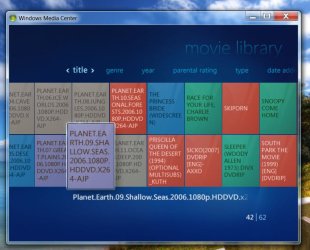
My movie library thumbnails look like this

Untitled-2.jpg
Untitled-2.jpg


Cant figure out what to do except put them all in the video lib folder
 

My Computer

Computer Manufacturer/Model Number
AMD
OS
windows 7 ultimate 64
CPU
AMD phenom II x4 940
Motherboard
gigabyte GA-MA790GP-UD4H
Memory
8GB
Graphics Card(s)
ATI 3300
Sound Card
realtek
Monitor(s) Displays
1.Microtek 2.smasung LED
Hard Drives
WD caviar black 1TB
It may look like this :.
Capture.JPG

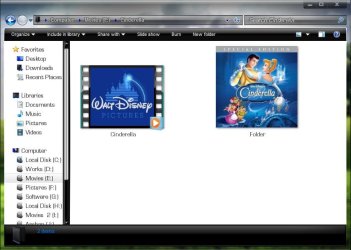
If you put every movie in a separate folder , get the album art , place it in the folder , and name it Folder.jpg . Like this :
Capture1.JPG

How to get the album art? you may scan your DVD cover inlay card , you may download it from google image search , or there are some Media Center extentions that can obtain metadata online .... I am not that familiar with the last option . I do it manually .

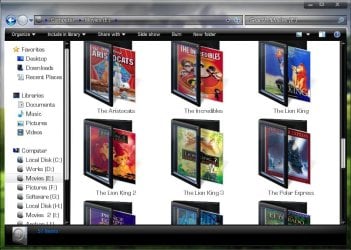
EDIT : I do one more thing . I edit the album art size to a square resolution , so that it look even cool in explorer, too :)
Capture2.JPG
 

My Computer

Computer type
PC/Desktop
Computer Manufacturer/Model Number
Self Assembled
OS
Microsoft Windows 10 Pro Insider Preview 64-bit
CPU
Intel(R) Core(TM) i3-4130 CPU @ 3.40GHz
Motherboard
Gigabyte Technology Co., Ltd. B85M-D3H
Memory
Corsair Vengence 4GB x2 (8.00GB Dual-Channel DDR3 @ 798MHz)
Graphics Card(s)
2047MB GeForce GTS 450 (ZOTAC International)
Sound Card
Onboard (Realtek High Definition Audio)
Monitor(s) Displays
LG Flatron E2040T
Screen Resolution
1600x900
Hard Drives
Western Digital 1 TB
Seagate 500 GB
PSU
Corsair VS550
Case
Cooler Master K380
Cooling
Cooler Master Seidon 120V Plus
Keyboard
Logitech MK260r
Mouse
Logitech MK260r
Internet Speed
PMPL Broadband
Antivirus
Windows Defender + MBAM
Browser
Firefox
Other Info
Dell Studio 15" Laptop
Follow the guide here
http://www.sevenforums.com/tutorials/11232-media-center-setup-movie-library.html?ltr=M

You will end up with synopsis and info on your films as well as cover art for your movies - i expect in videos the view you have of each file is just a screen shot of something within the movie. Follow that guide and you'll get proper dvd style film art for your thumbnails.

Not sure it'll do TV programmes but give it a try
 

My Computer

OS
Windows 7 Professional 64 bit
CPU
Atom 330
Motherboard
Asus AT3N7A
Memory
2gb Corsair DDR2 800mhz
Graphics Card(s)
Nvidia ION
Hard Drives
1TB Samsung F1
Back
Top