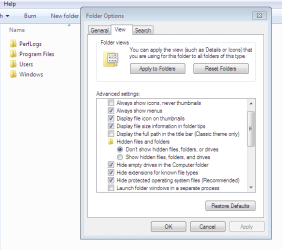
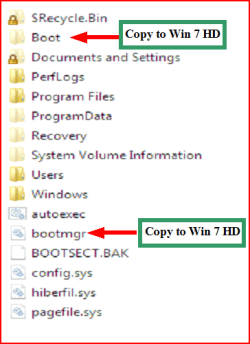
I was reading this thread and instead of necro'ing it i decided i would make my own.
I'm having trouble with the whole "BootMGR is missing" error.
I was going to try use my SATA cable for a diffrent device for about 20-30 mins but after unplugging my storage HDD i got the Bootmgr is missing error and apparently my boot folder is on my storage HDD
So reading that thread stated above i tried moving the files from the boot folder over to my C drive and using the elevated command prompt to try fix it. The command prompt said it had done it correctly and i restarted windows and tried booting from my C drive but no, it didn't work.
This is my Disk management screen.
I'm unsure on how to move the boot folder to the C drive so it can boot without my storage HDD (X drive)
If you know how to move it please post!
My Computer
OS
Windows 7 Ultimate x64
CPU
Intell e8400 OC'ed @ 3.6GHz
Motherboard
GA-EP45T-UD3LR
Memory
6GM 1333MHz Ripjaws / Corsair
Graphics Card(s)
Power Color HD6870
Sound Card
None
Monitor(s) Displays
22" Asus LCD / 32" LED HD TV
Screen Resolution
1680x1050 / 1920 x 1080
Hard Drives
250GB Hitachi
1TB WD Clavier Black
640GB WD External
Once you can boot into the c: drive, plug back in the ext. hdd and click start and type in the search box "msconfig" (Without quotes)
Go to the boot tab and make sure C: drive is the default boot OS, if not, just click on the C: Drive and then click "Make Default", click apply and then click ok and click restart.
Creative SB X-Fi Titanium Fatal1ty Professional Series
Monitor(s) Displays
Samsung SM2433BW 24" Widescreen Monitor
Screen Resolution
1920x1200
Hard Drives
Western Digital Caviar Black 500GB 32Mb Buffer SATA II
Western Digital Caviar Black 750GB 32Mb Buffer SATA II
Western Digital Caviar Blue 500GB 16Mb Buffer SATA II
Western Digital My Book Essential Edition 750GB USB
Samsung Spinpoint 2TB SATA II
PSU
Thermaltake Toughpower 1200w (Modular)
Case
CoolerMaster HAF-932
Cooling
Zalman Reserator XT and ZM-WB5 Plus - GPU uses Stock coolers
Keyboard
Logitech G510
Mouse
Logitech G9 Gaming Mouse
Internet Speed
3MB Profile - 350-400kbs (Real-Speed)
Other Info
IcyBox Hot-Swap Bay,
Logitech G27 Steering Wheel,
Xbox 360 Wirless Elite Controller with Microsoft Reciever and
Play & Charge Kit,
Belkin USB Wireless Adaptor,
GAME Generic Controller (Playstation Looky-Likey),
Epson SX125 All-in-One.
Creative SB X-Fi Titanium Fatal1ty Professional Series
Monitor(s) Displays
Samsung SM2433BW 24" Widescreen Monitor
Screen Resolution
1920x1200
Hard Drives
Western Digital Caviar Black 500GB 32Mb Buffer SATA II
Western Digital Caviar Black 750GB 32Mb Buffer SATA II
Western Digital Caviar Blue 500GB 16Mb Buffer SATA II
Western Digital My Book Essential Edition 750GB USB
Samsung Spinpoint 2TB SATA II
PSU
Thermaltake Toughpower 1200w (Modular)
Case
CoolerMaster HAF-932
Cooling
Zalman Reserator XT and ZM-WB5 Plus - GPU uses Stock coolers
Keyboard
Logitech G510
Mouse
Logitech G9 Gaming Mouse
Internet Speed
3MB Profile - 350-400kbs (Real-Speed)
Other Info
IcyBox Hot-Swap Bay,
Logitech G27 Steering Wheel,
Xbox 360 Wirless Elite Controller with Microsoft Reciever and
Play & Charge Kit,
Belkin USB Wireless Adaptor,
GAME Generic Controller (Playstation Looky-Likey),
Epson SX125 All-in-One.
You'll need to mark C Active first to get the Repairs to write the boot-critical files to Win7 partition. Copying the files is automated in Startup Repair.