Moving files within a folder

pietro99

New member
Local time
7:57 AM
Messages
12
This seems crazy to me. I have a folder with a lot of TV shows labelled with the date of showing. When I sort them by "date" they end up all over the place, not in chronological order due to the way the files have been named.

So I want to drag them into correct order. With Vista this was fine, you could move a file within a folder. But with W7 (mine at least) if I try to move the file it just springs back into the same place.

I have tried changing security settings and enabling sharing, but it makes no difference.

Can other people move files within a folder? This is the same for all my folders.
 

My Computer

OS
Window s 32 bit
CPU
Intel Core2 Duo E6600
Motherboard
Gigabyte GA-965P-DS3 Pro Rev.3
Memory
Corsair Twin2X 2048MB 240-pin DDR2 XMS2-6400
Graphics Card(s)
Gigabyte 8600GTS
Sound Card
inbuilt
Monitor(s) Displays
Sony SXRD 70"
Hard Drives
WD 320gb
PSU
Antec TruePower Trio 430W ATX Power Supply
Case
Silverstone LC17
7 would move the file depending on the way they are arranged.
 

My Computer

Computer Manufacturer/Model Number
Sony Vaio Z46GDU
OS
Windows 7 Ultimate x86-64
CPU
[email protected] 1066MHz FSB
Motherboard
Sony branded
Memory
6GB DDR3 1066MHz
Graphics Card(s)
9300M GS 256MB Dedicated (Speed) + Intel4500MHD (Stamina)
Sound Card
Realtek HD Audio
Monitor(s) Displays
13.1' WXGA
Screen Resolution
1600x900
Hard Drives
320GB 7200RPM w/ 16MB cache
Internet Speed
1MB/s
This seems crazy to me. I have a folder with a lot of TV shows labelled with the date of showing. When I sort them by "date" they end up all over the place, not in chronological order due to the way the files have been named.

So I want to drag them into correct order. With Vista this was fine, you could move a file within a folder. But with W7 (mine at least) if I try to move the file it just springs back into the same place.

I have tried changing security settings and enabling sharing, but it makes no difference.

Can other people move files within a folder? This is the same for all my folders.

Go to the files in question. Click on view on the top of the screen. Then choose the order that is best for you.
 
Last edited:

My Computer

Computer type
PC/Desktop
Computer Manufacturer/Model Number
Dell XPS 420
OS
Windows 10, Home Clean Install
CPU
Intel Core2 processsor Q8200(2.33Ghz 1333FSB) Quad Core Tech
Motherboard
Dell
Memory
6 gb
Graphics Card(s)
ATI Radeon 256MB HD3650
Sound Card
Intergrated 7.1 Channel Audio
Monitor(s) Displays
Dell SP2009W 20"
Hard Drives
640 GB Serial ATA Hard drive
Cooling
Fan
Keyboard
Dell USB Keyboard
Mouse
Dell Premium Optical USB
Internet Speed
DSL 2.85
View only changes the type of icon. Right-clicking changes the order but there is no setting that puts them in the order I want.

With XP and Vista the files can be dragged to another position in the folder but not with Windows 7. I can't make any sense of it.
 

My Computer

OS
Window s 32 bit
CPU
Intel Core2 Duo E6600
Motherboard
Gigabyte GA-965P-DS3 Pro Rev.3
Memory
Corsair Twin2X 2048MB 240-pin DDR2 XMS2-6400
Graphics Card(s)
Gigabyte 8600GTS
Sound Card
inbuilt
Monitor(s) Displays
Sony SXRD 70"
Hard Drives
WD 320gb
PSU
Antec TruePower Trio 430W ATX Power Supply
Case
Silverstone LC17
Again, go to view in my documents, got to sort by. You have a very large choice of options. I have Home Premium, I suggest you look again you will be happy with what you find


View only changes the type of icon. Right-clicking changes the order but there is no setting that puts them in the order I want.

With XP and Vista the files can be dragged to another position in the folder but not with Windows 7. I can't make any sense of it.
 

My Computer

Computer type
PC/Desktop
Computer Manufacturer/Model Number
Dell XPS 420
OS
Windows 10, Home Clean Install
CPU
Intel Core2 processsor Q8200(2.33Ghz 1333FSB) Quad Core Tech
Motherboard
Dell
Memory
6 gb
Graphics Card(s)
ATI Radeon 256MB HD3650
Sound Card
Intergrated 7.1 Channel Audio
Monitor(s) Displays
Dell SP2009W 20"
Hard Drives
640 GB Serial ATA Hard drive
Cooling
Fan
Keyboard
Dell USB Keyboard
Mouse
Dell Premium Optical USB
Internet Speed
DSL 2.85
I'm wondering if I am misunderstanding you. There are many ways to sort but not one of them allows me to move the files manually. eg if I want to drag the last file to the position of first file I can't do it. In Vista and XP I could.
 

My Computer

OS
Window s 32 bit
CPU
Intel Core2 Duo E6600
Motherboard
Gigabyte GA-965P-DS3 Pro Rev.3
Memory
Corsair Twin2X 2048MB 240-pin DDR2 XMS2-6400
Graphics Card(s)
Gigabyte 8600GTS
Sound Card
inbuilt
Monitor(s) Displays
Sony SXRD 70"
Hard Drives
WD 320gb
PSU
Antec TruePower Trio 430W ATX Power Supply
Case
Silverstone LC17
I'm wondering if I am misunderstanding you. There are many ways to sort but not one of them allows me to move the files manually. eg if I want to drag the last file to the position of first file I can't do it. In Vista and XP I could.

Ok glad you asked, we are not having a meeting of the minds. What I am saying is that if you have folders in documents, and you go to view and then click on sort, you have many, many ways of sorting them. I was not understanding you, since I do not think you can just move them and have them keep that location.

But, you can cheat a bit. There are at least 2 dozen ways to sort them. One of course is by name. What I do with my pics, if I have pics of, lets say Maine, I can call them Maine 1, Maine 2 and they will keep that order.
 
Last edited:

My Computer

Computer type
PC/Desktop
Computer Manufacturer/Model Number
Dell XPS 420
OS
Windows 10, Home Clean Install
CPU
Intel Core2 processsor Q8200(2.33Ghz 1333FSB) Quad Core Tech
Motherboard
Dell
Memory
6 gb
Graphics Card(s)
ATI Radeon 256MB HD3650
Sound Card
Intergrated 7.1 Channel Audio
Monitor(s) Displays
Dell SP2009W 20"
Hard Drives
640 GB Serial ATA Hard drive
Cooling
Fan
Keyboard
Dell USB Keyboard
Mouse
Dell Premium Optical USB
Internet Speed
DSL 2.85
Isn't there any other way? I don't want to rename all my files but I want to keep them in the particular order. Isn't there any way? It's Windows 7... it's just awesome but how is it possible Microsoft to remove this function?
 

My Computer

Computer Manufacturer/Model Number
Dell Vostro 1700
OS
Windows 7 Ultimate x64
CPU
Intel Core2Duo T9300 @2.5 GHz, 6 MB L2 cache
Motherboard
Dell
Memory
2x2048 DDR2 800 MHz
Graphics Card(s)
nVidia GeForce 8600M GT 256 MB DDR2
Screen Resolution
1440x900
Hard Drives
Samsung 470 Series 128GB SSD;
Western Digital Scorpio 250GB SATA 5400RPM 8 MB Cache

My Computer

OS
XP / Win7 x64 Pro
CPU
Intel Quad-Core Q9450 @ 3.2GHz
Motherboard
Asus P5-E
Memory
2x2GB GSkill DDR2
Graphics Card(s)
NVIDIA GeForce 8600 GTS (EVGA)
Monitor(s) Displays
Dell 2408WFP
Screen Resolution
1920x1200
I feel your pain I've noticed the same thing and have not yet found a work around. I would love to move my files and folders around to arrange (group them) them as I woked on them, Like to know the name of the morron programer that thought that was not a + feature
 

My Computer

Computer Manufacturer/Model Number
Built
OS
Windows 7 64Bit Ultimate
CPU
3.2 Ghz i7 970
Motherboard
Asus P6X58D-E
Memory
24GB DDR 3/PC3 1333/10666
Graphics Card(s)
Ati Radeon HD5670 GDDR5 1Gig PCIe
Sound Card
Sound Blaster Audigy ZS 7.1
Monitor(s) Displays
24in LG WD
Hard Drives
1 TB WD Black Sata 3/6MB 64 Cache
1 TB Seagate Barracuda Sata 2
1.5 TB Seatgate Barracuda Sata 2
2 TB Seagate Barracuda Sata 2
Other Info
Why???........ Because I could
This is a real pain - come on Microsoft this is definitely a bug. Why reduce the options in the program in comparison with previous programs? In Windows XP I could put my files in any order I wanted. I have been having to go through and trying to rename all my files to reorder them as I need them!! It's a very longwinded process I can assure you and a totally unnecessary thing to have to do for an advanced program like Windows 7.

It should have the option of moving things as you want them without this hassle.
 

My Computer

OS
Windows 7
Do you think anybody from Microsoft will actually hear our pleas on this?
 

My Computer

OS
Windows 7

My Computer

Computer Manufacturer/Model Number
Acer 7738G
OS
Windows 7 Home Premium X64 SP1
CPU
Intel Core2 duo T6600
Memory
4gb
Graphics Card(s)
Nvidia GeForce GT 1gb
Hard Drives
2 X 500 gb
Many thanks for this - I downloaded and ran it but it didn't work unfortunately. I've now run the 'undo' one to be on the safe side. Thanks anyway.
 
Last edited:

My Computer

OS
Windows 7
Strange. Did you click on 'View' and then take the tick out of 'Auto Arrange' ?
 

My Computer

Computer Manufacturer/Model Number
Acer 7738G
OS
Windows 7 Home Premium X64 SP1
CPU
Intel Core2 duo T6600
Memory
4gb
Graphics Card(s)
Nvidia GeForce GT 1gb
Hard Drives
2 X 500 gb
MS has left out the ability to kill auto-arrange in Windows 7. There is no fix. I still can't believe they made this monumental blunder.
 

My Computer

OS
windows 7
Reg edit Fix

Thanks ............ It looks like the reg edit fix might do the trick. I tried it on my laptop (Win7 64bit)and gave it a 2 minute test run, it appeared to do the trick... I'll test it more later and also on my Desktop (Ultimate 64bit).
To the fellow that said it didn't work, did right click in the body of the window to access you view feature's or the tool bar. Try right clicking in the body of your window.

~Cheers~
 

My Computer

Computer Manufacturer/Model Number
Built
OS
Windows 7 64Bit Ultimate
CPU
3.2 Ghz i7 970
Motherboard
Asus P6X58D-E
Memory
24GB DDR 3/PC3 1333/10666
Graphics Card(s)
Ati Radeon HD5670 GDDR5 1Gig PCIe
Sound Card
Sound Blaster Audigy ZS 7.1
Monitor(s) Displays
24in LG WD
Hard Drives
1 TB WD Black Sata 3/6MB 64 Cache
1 TB Seagate Barracuda Sata 2
1.5 TB Seatgate Barracuda Sata 2
2 TB Seagate Barracuda Sata 2
Other Info
Why???........ Because I could
I can't get this fix to work either. The auto arrange option is now back in the menu but it is grayed out. Anyone?
 
Last edited:

My Computer

OS
windows 7
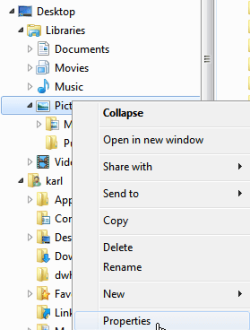
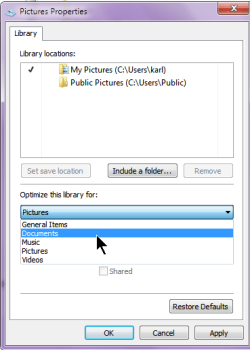
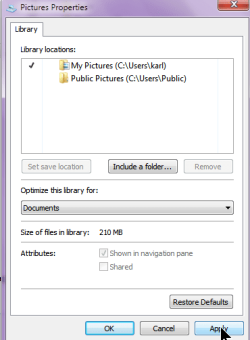
Here's another approach which may give you what you want.

The idea is to select the way you would like to have the files considered-perhaps as documents rather than pictures. You change the "properties" of the Pictures library.

I've included a couple of snapshots to show the procedure.
 

Attachments

  • SelectPicLibraryProperties.png
    SelectPicLibraryProperties.png
    7.1 KB · Views: 17
  • ChoosingDocumentsOrganization.png
    ChoosingDocumentsOrganization.png
    11 KB · Views: 25
  • ApplyingPicOrganizationChange.png
    ApplyingPicOrganizationChange.png
    10.7 KB · Views: 18

My Computer

Computer Manufacturer/Model Number
Toshiba Satellite S875D-S7239 laptop
OS
MS Windows 7 Ultimate SP1 64-bit
CPU
AMD A10-4600M
Motherboard
AMD Pumori (Socket FT1)
Memory
6.00 GB Dual-Channel DDR3 @ 798MHz (11-11-12-28)
Graphics Card(s)
AMD Radeon HD 7660G
Sound Card
High Definition Audio Device
Monitor(s) Displays
Generic PnP Monitor (1600x900@60Hz)
Screen Resolution
1600x900@60Hz
Hard Drives
SSD 119GB Corsair CSSD-V128GB2 ATA Device
Keyboard
Standard PS/2 Keyboard
Mouse
HP Wireless Optical Mobile Mouse Model FHA-3410
Internet Speed
What the local pub, local coffee shop offers.
Other Info
Optical Drive:MATSHITA BD-CMB UJ160B ATA Device


Also have an Asus ha1002xp netbook with Win 7 Ultimate installed.
Yes - I had the auto arrange greyed out as well. I did right click view in the main window and in the menu bar. It's there but unfortunately greyed out. (Btw I'm a fellowess :))
 

My Computer

OS
Windows 7
Back
Top