Moving installed software

DarkFilip

New member
Member
Local time
3:56 AM
Messages
32
Location
Croatia
I just got a new hdd and my system C disk is now getting in the "red zone" i have software like eclipse and visual studio and a couple of more "big programs" i was wondering is there any software or utility or maybe a way of moving those files from my C disk to any other partition. I know the best way is just to reinstall them to a another partition but it will take me a couple of days to reinstall them since eclipse and visual studio have like tons of plugins and updates that will need redownloading and reinstalling.

Thank you for your help in advance :)

P.S. Im using windows 7 pro x64
 

My Computer

Computer Manufacturer/Model Number
Home
OS
windows 7 x64
CPU
Intel Core 2 Quad Q6600
Motherboard
Gigabyte EP45-DS3L
Memory
OCZ DDR2 2x2GB 800MHz
Graphics Card(s)
Asus Nvidia GTX260
Monitor(s) Displays
Samsung SyncMaster 923nw
Screen Resolution
1440x900
There is a rather roundabout way of moving those programs to another directory in a separate drive without reinstalling them.. but it'll require some commandline usage with the command mklink which involves junctioning.

I often do this myself with certain space consuming folders in the C drive that have been unceremoniously dumped there by a program often designed to save settings and files in the hidden ProgramData folder.

The procedure is as follows.

For this example, we will consider a hypothetical program called Microsoft Bob which is installed in a folder called C:\Programs\BOB.

1. Copy the folder and all it's contents into your destination drive and directory (say D:\Programs\BOB). It has to be a 1:1 copy, all hidden files included.

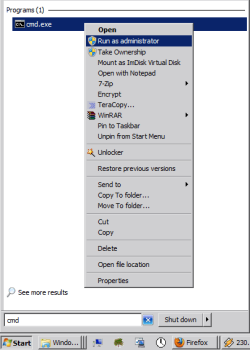
2. Next open an elevated command prompt (Start|cmd|right click on cmd.exe|run as administrator|)
Capture1.PNG

3. With the command prompt open, you need to DELETE (yes delete) the folder called BOB in the original location you installed it from (just BOB). (Don't worry I'll explain why later, you have that backup in D:\ remember?)

4. Go back to the command prompt and type in mklink /j "C:\Programs\BOB" "D:\Programs\BOB" and press enter.

(the first folder the one you want to create the virtual folder to fool windows at, the the second one is where you want the virtual folder to point to, i.e. the real location of the files in the folder)

Capture3.PNG

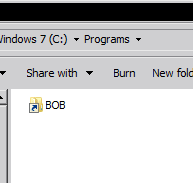
6. If all goes well, in the folder Programs on your C drive you would actually see the folder BOB appear magically now with a shortcut on it, try clicking on it and you'll find all the contents you copied to the D:\Programs\BOB.

This "folder" is now a junction of the contents you copied to D:\Programs\BOB and consumes no space whatsoever !
Capture2.PNG

7. Try running the program like usual, you'll find that everything should work, the system thinks that the program Microsoft BOB is still in the C: drive!

Hope that helps you out!

EDIT:- If you're worried about anything breaking, please try what i've written above using a dummy folder and files 1st

 
Last edited:

My Computer

Computer Manufacturer/Model Number
DELL SXPS 1640
OS
Windows 7 x64 Professional SP1
CPU
Intel C2D T9550 2.66 GHz @ 2.793 GHz (Thanks ThrottleStop!!)
Motherboard
Intel PM45
Memory
8 GB DDR3
Graphics Card(s)
ATI MOBILITY RADEON 4670
Sound Card
CREATIVE XFI AUDIO NOTEBOOK
Monitor(s) Displays
16.1 WLED
Screen Resolution
1920x1080
Hard Drives
Seagate ST9500420AS 500GB (465GiBi) 7200 RPM Drive

External Drives:-
2 TB WD Essentials x 3
1 TB WD Mybook Gen 1
1 TB WD Mybook Gen 2
1 TB Seagate
1 TB Seagate
320 GB WD Scorpio Black (enclosed)
PSU
90W Dell Power Brick
Case
Dell Chassis
Cooling
Coolermaster Cooling Pad
Keyboard
Built-in backlighted Keyboard
Mouse
Logitech Wireless Mini Mouse
Internet Speed
4/0.5

My Computer

Computer type
PC/Desktop
OS
Windows 10 Home x64
CPU
INTEL Core i5-750 Quad-Core 3.37GHz
Motherboard
ASUS P7P55D
Memory
HyperX Fury Black Series 8GB (2 x 4GB) 1866Mhz
Graphics Card(s)
EVGA GeForce GTX 750 Superclocked 1GB 128-Bit GDDR5
Monitor(s) Displays
LG 32MA68HY 32" IPS
Screen Resolution
1920 x 1080
Hard Drives
Samsung 840 Evo 120GB, SEAGATE 500GB Barracuda® 7200.12, SATA 3 Gb/s, 7200 RPM, 16MB cache
PSU
ANTEC TruePower New TP-550, 80 PLUS, 550W
Case
ANTEC Three Hundred Illusion
Cooling
COOLER MASTER Hyper 212 Plus, 4 x 120mm 1 x 140mm Noctua's
Internet Speed
85 + Mbps
Antivirus
Avast
Browser
Vivaldi
As an addendum to my post above (which admittedly has to be repeated as many times as the number of applications you have), there is an alteration to the procedure you can perform for multiple programs.

At step one, instead of just copying one program installed in the subfolder of the main folder 'Programs', if your 'Programs' folder theoretically contained every single Program you've got installed on C drive, you could just make a 1:1 copy of the entire folder (which would of course include all your subfolders containing all the programs), making sure that none of the applications are in use or in the background tasks of course.

Following that you'd just have to delete the entire 'Programs' folder from C Drive, and then at the admin command prompt you opened earlier you'd just type in:-

mklink /j "C:\Programs" "D:\Programs"

and hit enter...

The virtual folder/junction 'Programs' will now appear on the root of C:, and every single application that was installed in subfolders in the main folder called 'Programs' would be considered by system to still reside in C: , but is now actually in 'D:\Programs'

Just wanted to add on that little bit.
 
Last edited:

My Computer

Computer Manufacturer/Model Number
DELL SXPS 1640
OS
Windows 7 x64 Professional SP1
CPU
Intel C2D T9550 2.66 GHz @ 2.793 GHz (Thanks ThrottleStop!!)
Motherboard
Intel PM45
Memory
8 GB DDR3
Graphics Card(s)
ATI MOBILITY RADEON 4670
Sound Card
CREATIVE XFI AUDIO NOTEBOOK
Monitor(s) Displays
16.1 WLED
Screen Resolution
1920x1080
Hard Drives
Seagate ST9500420AS 500GB (465GiBi) 7200 RPM Drive

External Drives:-
2 TB WD Essentials x 3
1 TB WD Mybook Gen 1
1 TB WD Mybook Gen 2
1 TB Seagate
1 TB Seagate
320 GB WD Scorpio Black (enclosed)
PSU
90W Dell Power Brick
Case
Dell Chassis
Cooling
Coolermaster Cooling Pad
Keyboard
Built-in backlighted Keyboard
Mouse
Logitech Wireless Mini Mouse
Internet Speed
4/0.5
Thank you all for the great responses :)
I love the way to make a junction but the only problem is that some programs like visual studio and eclipse have like a couple of folders in the program files folder and I'm scared to move them because I don't know if thats all of them because they tend to create a couple so I looked in the other post and the aplication symMover looks great it shows your aplications right away I'm doing it right now so thank you for your help :) I'll post back the results :D
 

My Computer

Computer Manufacturer/Model Number
Home
OS
windows 7 x64
CPU
Intel Core 2 Quad Q6600
Motherboard
Gigabyte EP45-DS3L
Memory
OCZ DDR2 2x2GB 800MHz
Graphics Card(s)
Asus Nvidia GTX260
Monitor(s) Displays
Samsung SyncMaster 923nw
Screen Resolution
1440x900
Whatever method you picked, make sure it works best for the relevant application that you're using it for.

Juctioning works best if the program has no file dependencies present in any preset system made folder like Program Files <x86>.

Although I will say for the record, I've moved applications successfully using the juctioning method for Programs installed in the native Program Files folder in Windows...
 

My Computer

Computer Manufacturer/Model Number
DELL SXPS 1640
OS
Windows 7 x64 Professional SP1
CPU
Intel C2D T9550 2.66 GHz @ 2.793 GHz (Thanks ThrottleStop!!)
Motherboard
Intel PM45
Memory
8 GB DDR3
Graphics Card(s)
ATI MOBILITY RADEON 4670
Sound Card
CREATIVE XFI AUDIO NOTEBOOK
Monitor(s) Displays
16.1 WLED
Screen Resolution
1920x1080
Hard Drives
Seagate ST9500420AS 500GB (465GiBi) 7200 RPM Drive

External Drives:-
2 TB WD Essentials x 3
1 TB WD Mybook Gen 1
1 TB WD Mybook Gen 2
1 TB Seagate
1 TB Seagate
320 GB WD Scorpio Black (enclosed)
PSU
90W Dell Power Brick
Case
Dell Chassis
Cooling
Coolermaster Cooling Pad
Keyboard
Built-in backlighted Keyboard
Mouse
Logitech Wireless Mini Mouse
Internet Speed
4/0.5
Let us know how it works out ;)

A Guy
 

My Computer

Computer type
PC/Desktop
OS
Windows 10 Home x64
CPU
INTEL Core i5-750 Quad-Core 3.37GHz
Motherboard
ASUS P7P55D
Memory
HyperX Fury Black Series 8GB (2 x 4GB) 1866Mhz
Graphics Card(s)
EVGA GeForce GTX 750 Superclocked 1GB 128-Bit GDDR5
Monitor(s) Displays
LG 32MA68HY 32" IPS
Screen Resolution
1920 x 1080
Hard Drives
Samsung 840 Evo 120GB, SEAGATE 500GB Barracuda® 7200.12, SATA 3 Gb/s, 7200 RPM, 16MB cache
PSU
ANTEC TruePower New TP-550, 80 PLUS, 550W
Case
ANTEC Three Hundred Illusion
Cooling
COOLER MASTER Hyper 212 Plus, 4 x 120mm 1 x 140mm Noctua's
Internet Speed
85 + Mbps
Antivirus
Avast
Browser
Vivaldi
Back
Top