MP3 album art embedded but not showing in W.Explorer

Nishiio

New member
Local time
2:44 AM
Messages
4
Location
New York State
This is kinda irking me, haha.

I've been on vacation for the past couple weeks and took some time to organizing my music. I used MP3Tag to add album art to all the MP3 files.

Just yesterday, I was editing a certain album. Like usual, I highlighted all the files and drag+dropped a JPG file into the slot for album art. It saved and MP3 Tag shows all of the files with an image file.

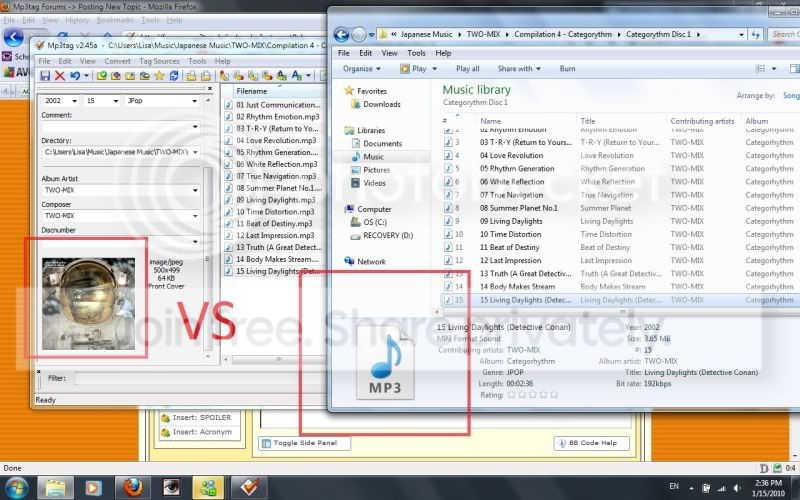
However, NONE of these images show up in the music folder in Windows Explorer ie. it still shows the default MP3 file icon.

Here's an image to illustrate:
cap1.jpg


Thanks in advance for any advice. =)
 

My Computer My Computer

At a glance

Windows 7Intel® Core™ 2 Duo T5800 (2.0GHz/800Mhz FSB/2...3GB Shared Dual Channel DDR2 SDRAM at 667MHz ...256MB NVIDIA® GeForce® 8600M GT
Computer Manufacturer/Model Number
Dell XPS M1530
OS
Windows 7
CPU
Intel® Core™ 2 Duo T5800 (2.0GHz/800Mhz FSB/2MB cache)
Memory
3GB Shared Dual Channel DDR2 SDRAM at 667MHz (2 Dimms)
Graphics Card(s)
256MB NVIDIA® GeForce® 8600M GT
Screen Resolution
1200x800
Hard Drives
320GB 5400rpm SATA Hard Drive
Same here

HI,
I have the same problem.... Plz help me to solve it.... tnx
 

My Computer My Computer

At a glance

Windows 7
OS
Windows 7
What? I use the same program, you are really saving the files? If yes, try changing the view to something else, or in folder options under the view tab uncheck this option "Always show icons, never thumbnails", if is checked.
If none of this work, use CCleaner (mark all boxes) and restart your computer. Or delete the covers (in mp3tag) and put them again. Here is what you need to do:
mp3tag: Tag Sources > Cover Art > Amazon.com (or .de) and select the correct cover! Save (if the program not automatically save), remember to highlight all files before you do that. :)
 

My Computer My Computer

At a glance

Windows 7 Ultimate x64Intel Core i7 2600KG.Skill RipJawsX 8GB (2x4GB) DDR3 PC3-12800AMD/ATI XFX Radeon HD 6970
Computer Manufacturer/Model Number
Desktop
OS
Windows 7 Ultimate x64
CPU
Intel Core i7 2600K
Motherboard
ASRock Fatal1ty P67 Professional
Memory
G.Skill RipJawsX 8GB (2x4GB) DDR3 PC3-12800
Graphics Card(s)
AMD/ATI XFX Radeon HD 6970
Screen Resolution
1920x1080
Hard Drives
WD Caviar Black 1TB
WD Caviar Blue 500GB
Crucial C300 64GB (SSD)
PSU
CM Silent Pro Gold 1000W
Case
CM HAF X
Cooling
Corsair A70
Keyboard
Thermaltake Tt eSPORTS Challenger Pro
Mouse
Thermaltake Tt eSPORTS Black
I somehow faced the same problem, the difference is that they're available on windows media player while being played & MP3tag too, but not in windows explorer. and this happened to me right after I used 'tuneup 2010'. I think the problem is related to registry.
 

My Computer My Computer

At a glance

Windows 7 Ultimate N
OS
Windows 7 Ultimate N
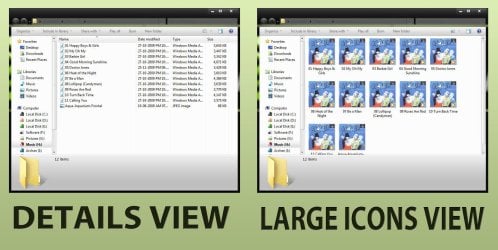
In Details and list view... album art not usually displayed . Change it to anything other.
 

Attachments

  • Untitled-2.jpg
    Untitled-2.jpg
    191.6 KB · Views: 429

My Computer My Computer

At a glance

Microsoft Windows 10 Pro Insider Preview 64-bitIntel(R) Core(TM) i3-4130 CPU @ 3.40GHzCorsair Vengence 4GB x2 (8.00GB Dual-Channel ...2047MB GeForce GTS 450 (ZOTAC International)
Computer type
PC/Desktop
Computer Manufacturer/Model Number
Self Assembled
OS
Microsoft Windows 10 Pro Insider Preview 64-bit
CPU
Intel(R) Core(TM) i3-4130 CPU @ 3.40GHz
Motherboard
Gigabyte Technology Co., Ltd. B85M-D3H
Memory
Corsair Vengence 4GB x2 (8.00GB Dual-Channel DDR3 @ 798MHz)
Graphics Card(s)
2047MB GeForce GTS 450 (ZOTAC International)
Sound Card
Onboard (Realtek High Definition Audio)
Monitor(s) Displays
LG Flatron E2040T
Screen Resolution
1600x900
Hard Drives
Western Digital 1 TB
Seagate 500 GB
PSU
Corsair VS550
Case
Cooler Master K380
Cooling
Cooler Master Seidon 120V Plus
Keyboard
Logitech MK260r
Mouse
Logitech MK260r
Internet Speed
PMPL Broadband
Antivirus
Windows Defender + MBAM
Browser
Firefox
Other Info
Dell Studio 15" Laptop
OK, same problem with my win!!! I'm sure that this problem appeared when I installed Service pack 1! I believe that the problem have no relations with some kind of settings or properties. Just the album art is not viewable in explorer after the SP1 and I don't know which registry is f**ked up, so I can't resolve this problem. Someone... ideas?

P.S: Sorry if my English is bad! :(
 

My Computer My Computer

At a glance

Windows 7 Ultimate x64
OS
Windows 7 Ultimate x64
In Details and list view... album art not usually displayed . Change it to anything other.

The OP clearly marked the position on the screenshot that he has an issue with. The details view has nothing to do with it :rolleyes:

I have been experiencing the same issues recently. Ripping CDs to MP3 then applying tags through MP3tag would produce the described issue, but ripping to aac/aacPlus and then applying album art would produce the correct result, which is weird.
Nishiio, in MP3tag, make sure you're writing both v1 and v2 of ID3 tags. For v2 I use the 2.3 UTF-16 format and everything looks fine. Also, since I see WMP12 on your taskbar, make sure your libraries in WMP are not corrupted. Can you see the album art in WMP?
 

My Computer My Computer

At a glance

Windows 7 Home Premium x64Intel Core i5 2500K8GB DDR3nVidia GeForce GTX650 Ti BOOST
Computer type
Laptop
Computer Manufacturer/Model Number
Custom
OS
Windows 7 Home Premium x64
CPU
Intel Core i5 2500K
Motherboard
MSI MS-7750
Memory
8GB DDR3
Graphics Card(s)
nVidia GeForce GTX650 Ti BOOST
Sound Card
Realtek
Monitor(s) Displays
21' Philips
Screen Resolution
Full HD
Hard Drives
1TB
PSU
500W

My Computer My Computer

At a glance

Windows 7 Home Premium x64 OEM --> RTM clean ...Intel T44004Gb? - Mobile Intel(R) 4 Series Express Chipset ...
Computer Manufacturer/Model Number
Toshiba Satellite L500
OS
Windows 7 Home Premium x64 OEM --> RTM clean install
CPU
Intel T4400
Motherboard
? - laptop inbuilt ?
Memory
4Gb
Graphics Card(s)
? - Mobile Intel(R) 4 Series Express Chipset Family ?
Sound Card
Realtek
Monitor(s) Displays
? + extended to a 42" LG55PC plasma tele!
Screen Resolution
1366 * 768
Hard Drives
320Gb 5500rpm
PSU
?
Case
?
Cooling
?
Internet Speed
3Meg, when it works.
Other Info
A LOWLY LAPTOP!
What'0s wrong with MP3tag all of a sudden, been using it for years.
 

My Computer My Computer

At a glance

Windows 7 Home Premium x64Intel Core i5 2500K8GB DDR3nVidia GeForce GTX650 Ti BOOST
Computer type
Laptop
Computer Manufacturer/Model Number
Custom
OS
Windows 7 Home Premium x64
CPU
Intel Core i5 2500K
Motherboard
MSI MS-7750
Memory
8GB DDR3
Graphics Card(s)
nVidia GeForce GTX650 Ti BOOST
Sound Card
Realtek
Monitor(s) Displays
21' Philips
Screen Resolution
Full HD
Hard Drives
1TB
PSU
500W
Not sure about MP3 tag, as I do not use it so can not really comment much on it.

But, I just use Media Monkey to edit all my MP3 tags and album art. I havent had any issue with Album art or tags using its tagging abilities.

Even though I do not use it as my primary playback software, it still does a very good job in that department as well.
 

My Computer My Computer

At a glance

Windows 7 Home Premium 64bitIntel Core i7 2700k8GB Mushkin Redline Ridgebacks @1866EVGA GTX570 SC
Computer Manufacturer/Model Number
Custom (Self Build)
OS
Windows 7 Home Premium 64bit
CPU
Intel Core i7 2700k
Motherboard
eVGA P67 SLI
Memory
8GB Mushkin Redline Ridgebacks @1866
Graphics Card(s)
EVGA GTX570 SC
Sound Card
XiFi Titanium HD
Monitor(s) Displays
LG W2453V
Screen Resolution
1920x1080
Hard Drives
Intel 320 80GB -- Intel X25-V 40GB --WD Black 1TB x2 -- WD Blue 640GB
PSU
Seasonic x750
Case
Corsair 600T SE White
Cooling
eVGA Superclocked CPU Cooler
Keyboard
Saitek Cyborg
Antivirus
Kaspersky
Browser
IE
Other Info
LG BD/DVD
Solved?

Hi!
Wow, I didn't think people were posting in this thread.

I'm not sure if this will work for you but I managed to "solve" this in a really weird, roundabout way.

So say you have an entire album of MP3's where none of the album art is showing. I Ctrl+A to select all of them and then right click>Properties. Then I switched to the "Details" tab. There, make ANY chance to the details. I think I just erase the year and retype it again - it's not important what you type, you just need to change the file so that the "Apply" button becomes available.
After that, I hit Apply and for some miraculous reason, all the thumbnails start to show.

Let me know if this works! It's been working for me so far.
 

My Computer My Computer

At a glance

Windows 7Intel® Core™ 2 Duo T5800 (2.0GHz/800Mhz FSB/2...3GB Shared Dual Channel DDR2 SDRAM at 667MHz ...256MB NVIDIA® GeForce® 8600M GT
Computer Manufacturer/Model Number
Dell XPS M1530
OS
Windows 7
CPU
Intel® Core™ 2 Duo T5800 (2.0GHz/800Mhz FSB/2MB cache)
Memory
3GB Shared Dual Channel DDR2 SDRAM at 667MHz (2 Dimms)
Graphics Card(s)
256MB NVIDIA® GeForce® 8600M GT
Screen Resolution
1200x800
Hard Drives
320GB 5400rpm SATA Hard Drive
Glad you sorted it out :)
 

My Computer My Computer

At a glance

Windows 7 Home Premium x64Intel Core i5 2500K8GB DDR3nVidia GeForce GTX650 Ti BOOST
Computer type
Laptop
Computer Manufacturer/Model Number
Custom
OS
Windows 7 Home Premium x64
CPU
Intel Core i5 2500K
Motherboard
MSI MS-7750
Memory
8GB DDR3
Graphics Card(s)
nVidia GeForce GTX650 Ti BOOST
Sound Card
Realtek
Monitor(s) Displays
21' Philips
Screen Resolution
Full HD
Hard Drives
1TB
PSU
500W
Bump

This is kinda irking me, haha.

I've been on vacation for the past couple weeks and took some time to organizing my music. I used MP3Tag to add album art to all the MP3 files.

Just yesterday, I was editing a certain album. Like usual, I highlighted all the files and drag+dropped a JPG file into the slot for album art. It saved and MP3 Tag shows all of the files with an image file.

However, NONE of these images show up in the music folder in Windows Explorer ie. it still shows the default MP3 file icon.

Here's an image to illustrate:

cap1.jpg


Thanks in advance for any advice. =)


Having the same problem, wondering if any solutions have come about. I know the tags are correct. WMP12 sees them. Media Monkey sees them. I tag editor sees them.

Also noticed if you highlite several files and drag them, the icon is a default icon instead of the album art like it was in the past. Been doing this for a while, just now having time to work on it.

Thanks in advance for any and all help.

twosteper
 

My Computer My Computer

At a glance

windows 7 professional
OS
windows 7 professional
Hi twosteper, and welcome to the forums.

If I were you I'd ditch your current id3 editor and install the excellent, and free, Tagscanner. Then I check in Tagscanner that you have the album artwork embedded, if so then I'd rebuild your search index database.

Regards
Post back with updates...
 

Attachments

  • untitled.JPG
    untitled.JPG
    59.1 KB · Views: 63

My Computer My Computer

At a glance

Windows 7 Home Premium x64 OEM --> RTM clean ...Intel T44004Gb? - Mobile Intel(R) 4 Series Express Chipset ...
Computer Manufacturer/Model Number
Toshiba Satellite L500
OS
Windows 7 Home Premium x64 OEM --> RTM clean install
CPU
Intel T4400
Motherboard
? - laptop inbuilt ?
Memory
4Gb
Graphics Card(s)
? - Mobile Intel(R) 4 Series Express Chipset Family ?
Sound Card
Realtek
Monitor(s) Displays
? + extended to a 42" LG55PC plasma tele!
Screen Resolution
1366 * 768
Hard Drives
320Gb 5500rpm
PSU
?
Case
?
Cooling
?
Internet Speed
3Meg, when it works.
Other Info
A LOWLY LAPTOP!

My Computer My Computer

At a glance

Win 7 Ultimate 64-bit SP1 (desktop)Intel Core 2 Duo E84002x 2GB OCZ DDR II SDRAM PC2-6400NVIDIA GeForce 9400GT
Computer type
PC/Desktop
Computer Manufacturer/Model Number
Gigabyte Technology Co., Ltd.
OS
Win 7 Ultimate 64-bit SP1 (desktop)
CPU
Intel Core 2 Duo E8400
Motherboard
Gigabyte GA-EP35-DS3R
Memory
2x 2GB OCZ DDR II SDRAM PC2-6400
Graphics Card(s)
NVIDIA GeForce 9400GT
Monitor(s) Displays
HP 2009m(primary), Acer P191W
Screen Resolution
1600x900, 1440x900
Hard Drives
Internal:WD Caviar Black 640GB 32MB cache 7200RPM
External:Samsung Story Station 1TB HDD desktop drive
500GB Toshiba portable drive
PSU
Antec Earthwatts EA500D
Case
Antec Sonata III
Cooling
4 fans
Keyboard
Logitech Wave
Mouse
Logitech M-SBF90
Internet Speed
Slow due to home Wireless-G router
Antivirus
MSE, Hitman Pro, Malwarebytes
Browser
Chrome and Palemoon
Other Info
Laptop....Acer 5750Z-4835
15.6" HD Widescreen CineCrystal™ LED-backlit LCD Display: (1366x768 resolution, 16:9 aspect ratio)
Intel® Pentium® Processor B940 (2.0GHz, 2MB L3 cache)
Windows® 7 Home Premium,500GB Hard Drive,4GB DDR3 RAM, Intel® HD Graphics,8X DVD-Super Multi Double-Layer Drive
Multi-in-1 Digital Media Card Reader,802.11b/g/n Wi-Fi
Chrome and Palemoon, MSE, Hitman Pro
More information.

loaded a tagged album on a usb drive and took it to a friends house. His system shows the tags correctly when a single mp3 files is highlighted. The problem is not in the tagged files it is somewhere in the system that reads them.
I have also rebuild search database. I have also removed the files from wmp directory and re-installed the files to the library. Still no luck
Thanks again for any help.
twosteper
 

My Computer My Computer

At a glance

windows 7 professional
OS
windows 7 professional
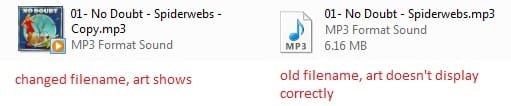
I'm having this problem too on certain files. I embed the album art using MediaMonkey. The art shows correctly in mediamonkey and on my computer. But when I copy/move it to a network drive, it doesn't display or only show the art that was previously embedded. However when I change the filename the updated art appears and when I revert to the previous filename the problem appears again. Am I explaining this clearly? Even cleaning the tags doesn't help.


Update: NEVERMIND! I tried Nishiio's suggestion. Had to manually edit the file in the properties>details field through explorer rather than the player. The art shows correctly now.
 

Attachments

  • Untitled.jpg
    Untitled.jpg
    9.6 KB · Views: 161
Last edited:

My Computer My Computer

At a glance

Windows 7 32 bit
OS
Windows 7 32 bit
I am still having this problem and have not found a solution either.. Im about to just wipe and reinstall.
 

My Computer My Computer

At a glance

Windows 7 Ultimate Signature Edition // Windo...AMD Athlon II X2 240 Regor 2.8GHz // AMD Athl...4GB DDR2 800 // 4GB DDR29500GT 512MB // 9100M G
Computer Manufacturer/Model Number
My Custom Desktop // Acer Aspire 4530 Notebook
OS
Windows 7 Ultimate Signature Edition // Windows 7 Home Premium
CPU
AMD Athlon II X2 240 Regor 2.8GHz // AMD Athlon DC X2 QL-62
Motherboard
GIGABYTE GA-MA785G-UD3H //
Memory
4GB DDR2 800 // 4GB DDR2
Graphics Card(s)
9500GT 512MB // 9100M G
Sound Card
Onboard // Onboard
Monitor(s) Displays
19'' Vtech LCD // Built in
Screen Resolution
1440 x 900 // 1280 x 800
Hard Drives
Western Digital Caviar Blue WD6400AAKS 640GB 7200 RPM SATA 3.0Gb/s 3.5" Internal Hard Drive
PSU
Rosewill Green Series RG630-2 630W Continuous
Case
RAIDMAX SMILODON ATX-612WB Black 1.0mm
Sometimes that's the only thing one can do at all. Next time you install the OS, make sure you DON'T use multiple programs of the same kind i.e. Winamp and iTunes. Some media players have a habit of fighting each other over file allocations; as a result, the aforementioned problem arises that can sometimes be fixed, sometimes not. It depends on a lot of things...
 

My Computer My Computer

At a glance

Windows 7 Home Premium x64Intel Core i5 2500K8GB DDR3nVidia GeForce GTX650 Ti BOOST
Computer type
Laptop
Computer Manufacturer/Model Number
Custom
OS
Windows 7 Home Premium x64
CPU
Intel Core i5 2500K
Motherboard
MSI MS-7750
Memory
8GB DDR3
Graphics Card(s)
nVidia GeForce GTX650 Ti BOOST
Sound Card
Realtek
Monitor(s) Displays
21' Philips
Screen Resolution
Full HD
Hard Drives
1TB
PSU
500W
Solved!!

The problem arises when your registry becomes corrupt or maybe some registry cleaner program deletes it thinking it's useless.
I copied this registry file from a friend's PC and imported it on mine. Magically, all MP3 files having album art (whether embedded or not) started showing thumbnails...
Issue Solved!! :) :cool:
 

Attachments

My Computer My Computer

At a glance

Windows 7 Ultimate x64
OS
Windows 7 Ultimate x64
Back
Top