Nishiio
New member
This is kinda irking me, haha.
I've been on vacation for the past couple weeks and took some time to organizing my music. I used MP3Tag to add album art to all the MP3 files.
Just yesterday, I was editing a certain album. Like usual, I highlighted all the files and drag+dropped a JPG file into the slot for album art. It saved and MP3 Tag shows all of the files with an image file.
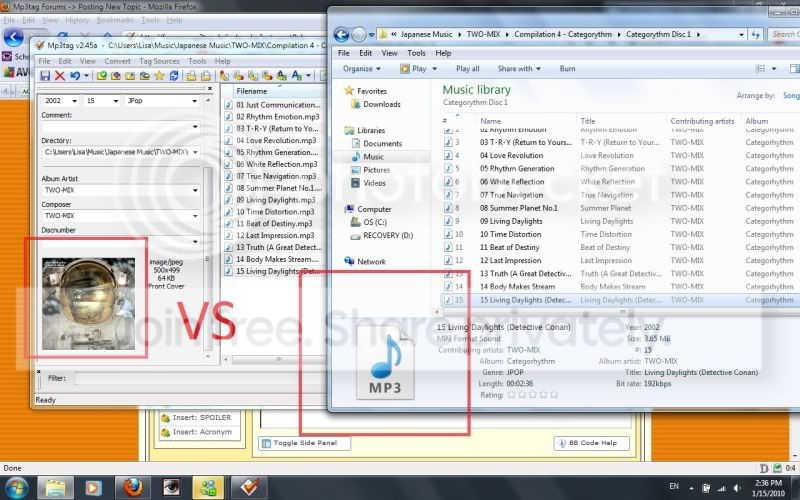
However, NONE of these images show up in the music folder in Windows Explorer ie. it still shows the default MP3 file icon.
Here's an image to illustrate:
Thanks in advance for any advice. =)
I've been on vacation for the past couple weeks and took some time to organizing my music. I used MP3Tag to add album art to all the MP3 files.
Just yesterday, I was editing a certain album. Like usual, I highlighted all the files and drag+dropped a JPG file into the slot for album art. It saved and MP3 Tag shows all of the files with an image file.
However, NONE of these images show up in the music folder in Windows Explorer ie. it still shows the default MP3 file icon.
Here's an image to illustrate:
Thanks in advance for any advice. =)
My Computer
At a glance
Windows 7Intel® Core™ 2 Duo T5800 (2.0GHz/800Mhz FSB/2...3GB Shared Dual Channel DDR2 SDRAM at 667MHz ...256MB NVIDIA® GeForce® 8600M GT
- Computer Manufacturer/Model Number
- Dell XPS M1530
- OS
- Windows 7
- CPU
- Intel® Core™ 2 Duo T5800 (2.0GHz/800Mhz FSB/2MB cache)
- Memory
- 3GB Shared Dual Channel DDR2 SDRAM at 667MHz (2 Dimms)
- Graphics Card(s)
- 256MB NVIDIA® GeForce® 8600M GT
- Screen Resolution
- 1200x800
- Hard Drives
- 320GB 5400rpm SATA Hard Drive