I have an MP4 movie on my laptop HDD.
I copied the MP4 file to a thumb drive (NTFS format)
. . . to test MP4 result on my Smart TV -- before loading the MP4 file on a 2TB HDD
- The file name can be easily edited in Windows Explorer
- But when the movie plays in VLC the MP4 Title is not the same as the file Name.
- editing the MP4 File "Title" (then [Apply]) freezes the File Properties Window
On thumb drive:-
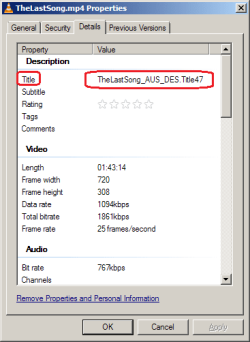
In File Properties > Details (tab) > Description > Title ...
... when the "Title" is altered the [Apply] btn is enabled.
When I click [Apply] the File Properties (dlg) locks up/freezes -- and can only be closed/abandoned with "Task Manager" > end task
On C:\MyMovies:-
In File Properties > Details (tab) > Description > Title ...
... when the "Title" is altered the [Apply] btn is enabled.
When I click [Apply] the File Properties (dlg) locks up/freezes -- and can only be closed/abandoned with "Task Manager" > end task
What am I doing wrong ?
I would appreciate any help
I copied the MP4 file to a thumb drive (NTFS format)
. . . to test MP4 result on my Smart TV -- before loading the MP4 file on a 2TB HDD
- The file name can be easily edited in Windows Explorer
- But when the movie plays in VLC the MP4 Title is not the same as the file Name.
- editing the MP4 File "Title" (then [Apply]) freezes the File Properties Window
On thumb drive:-
In File Properties > Details (tab) > Description > Title ...
... when the "Title" is altered the [Apply] btn is enabled.
When I click [Apply] the File Properties (dlg) locks up/freezes -- and can only be closed/abandoned with "Task Manager" > end task
On C:\MyMovies:-
In File Properties > Details (tab) > Description > Title ...
... when the "Title" is altered the [Apply] btn is enabled.
When I click [Apply] the File Properties (dlg) locks up/freezes -- and can only be closed/abandoned with "Task Manager" > end task
What am I doing wrong ?
I would appreciate any help
Last edited:
My Computer
At a glance
XP Pro (x86) | 7 HP (x86) & (x64) | 7 Pro (x64)
- Computer type
- PC/Desktop
- Computer Manufacturer/Model Number
- Toshiba, Lenovo (laptops) + 4 rigs
- OS
- XP Pro (x86) | 7 HP (x86) & (x64) | 7 Pro (x64)