MS-DOS Bootable Flash Drive - Create

How to Make a MS-DOS Bootable Flash Drive

   Information
This will show you how to create a flash drive that is able to boot your computer into a MS-DOS environment. This will be accomplished by using the HP Flash Utility and the Windows 98 MS-DOS System Files
   Warning
The flash drive being used in this process will be formatted. Please backup all of your data on the drive beforehand!


Here's How:
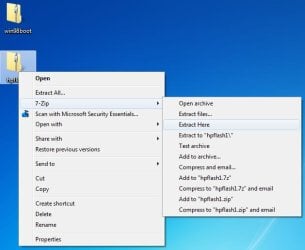
1. Download the HP Flash Utility View attachment hpflash1.zip and also download the Windows 98 MS-DOS System Files View attachment win98boot.zip. Extract hpflash1 to a location readily accessible
Pic1.jpg
Pic1-1.jpg
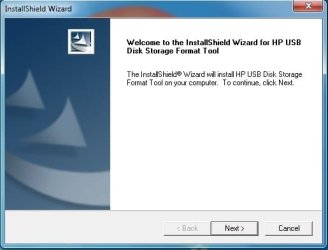
2. Run the installer and follow the simple on-screen instructions
Pic2.jpg


Pic3.jpg
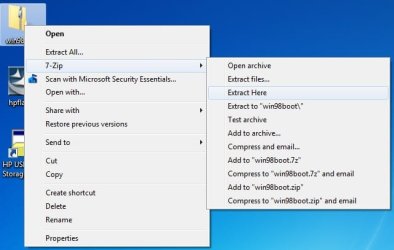
3. Extract the contents of "win98boot" to a location readily accessible
Pic4.jpg
4. Run the HP USB Disk Storage Format Tool that was just installed. Choose your flash drive from the drop down list at the top. Also make sure that the file system is set to FAT32.
Pic5.jpg
5. Under Format Options tick the "Create a DOS startup disk" option. Click the "..." button near the empty text box to browse to the location of where you extracted the Windows 98 MS-DOS System Files (see step 3).

   Tip
Tick "Quick Format" under Format Options to speed the process up (if you don't want a comprehensive format). You may also want to give the drive a label by typing one in the Volume Label text field
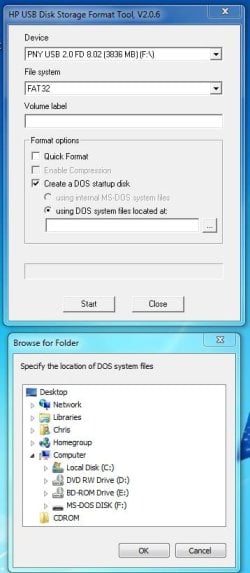
Pic6.jpg
6. Click the "Start" button.

   Warning
After you click the "Start" button , you will be given one final prompt that warns you that the flash drive selected will be formatted. This is your last chance to backup data on the drive; after you click yes it will be too late
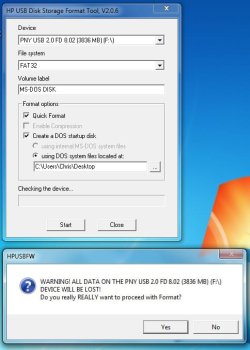
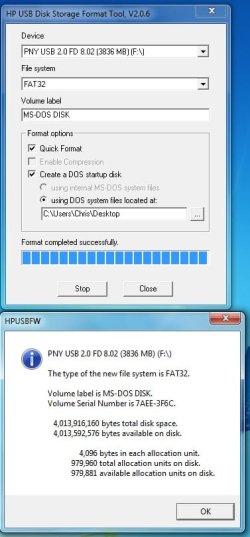
Pic7.jpg
Pic8.jpg

   Tip
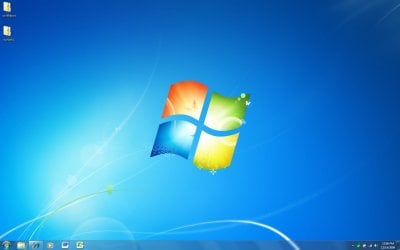
You may remove the files extracted from the archive "win98boot", they are not needed anymore

Frequently Asked Questions

Q: Why would a MS-DOS USB Drive be useful today? Wasn't that included in older Operating Systems?
A: MS-DOS was the underlying layer of the Windows 9x series of Operating Systems (Windows 1-ME) that was the "functionality" of the system. A MS-DOS bootable disc can be used to run many recovery tools (still used today) and also update the BIOS of the computer. If you are running an x64 system with no floppy drive and a manufactuer who only provides a 16-bit BIOS updater, this method is the only way to update your BIOS.

Q: I checked my flash drive after applying the steps above and it is empty? What gives?!
A: Unless the option to show protected operating system files is checked in folder options, Windows will hide these files due to their attributes matching that of system files. Don't worry, the relevant files are still there

Q: Alright I successfully completed the steps above, now what do I do?
A: Now you can download the tool you wanted to run (such as CHKDSK) or your BIOS update application (from the manufactuer) and place the files on to the root of the flash drive. You can find most tools by doing a simple google search

   Tip
The Windows 98 MS-DOS System Files archive (win98boot) above has some system tools already included (ex. FORMAT, FDISK, SYS). Just drag and drop these files onto your flash drive


Q: My flash drive has been converted to the MS-DOS System Disc and I have some tools/BIOS revisions on the drive as well, how do I boot up MS-DOS?
A: This will largely depend on your model of computer but you will need to restart you computer with the flash drive plugged in and boot to the drive by means of a boot menu or by modifying your BIOS to boot to the flash drive first. Consult the manual of your computer or the respective manufactuer's website for further details.

Q: I have no further need for the MS-DOS System Disc, how can I remove it from my flash drive?
A: You may format the flash drive with the built in Windows format utility or you may format it by using the HP USB Disk Storage Format Tool that was used above.

Hope it helps,
Chris


Last edited by a moderator:
Alright, I just wanted to make sure that the USB would not replace Windows 7.

I sure won't be doing anything to that degree. I'm assuming that MS-DOS running from a USB stick could see the C drive; is that correct?
 

My Computer

Computer Manufacturer/Model Number
HP Mini 210-1100
OS
Windows 7 Starter 32bit
CPU
Intel Atom
Memory
1024
Monitor(s) Displays
Acer
Screen Resolution
1600x900
Hard Drives
250GB
Keyboard
Logitech MK320
Mouse
Logitech
Internet Speed
802.11 b/g/n
Correct, it will be able to see any drive connected to the computer.
 

My Computer

Computer type
PC/Desktop
Computer Manufacturer/Model Number
Self built custom
OS
64-bit Windows 11 Pro for Workstations
CPU
Intel i7-8700K OC'd to 5 GHz
Motherboard
ASUS ROG Maximus XI Formula Z390
Memory
64 GB (4x16GB) G.SKILL TridentZ RGB DDR4 3600 MHz
Graphics Card(s)
ASUS ROG-STRIX-GTX1080TI-O11G-GAMING
Sound Card
Integrated
Monitor(s) Displays
2 x Samsung Odyssey G7 27"
Screen Resolution
2560x1440
Hard Drives
1TB Samsung 990 PRO M.2,
4TB Samsung 990 PRO PRO M.2,
TerraMaster F8 SSD Plus NAS
PSU
Seasonic Prime Titanium 850W
Case
Thermaltake Core P3
Cooling
Corsair Hydro H115i
Keyboard
Logitech wireless K800
Mouse
Logitech MX Master 4
Internet Speed
2 Gb/s Download and 100 Mb/s Upload
Antivirus
Malwarebyte Anti-Malware Premium
Browser
Google Chrome
Other Info
Logitech Z625 speaker system,
Logitech BRIO 4K Pro webcam,
HP Color LaserJet Pro MFP M477fdn,
APC SMART-UPS RT 1000 XL - SURT1000XLI,
Galaxy S23 Plus phone
Thanks for the responses! Off to try MS-DOS, then.
 

My Computer

Computer Manufacturer/Model Number
HP Mini 210-1100
OS
Windows 7 Starter 32bit
CPU
Intel Atom
Memory
1024
Monitor(s) Displays
Acer
Screen Resolution
1600x900
Hard Drives
250GB
Keyboard
Logitech MK320
Mouse
Logitech
Internet Speed
802.11 b/g/n
You're welcome. :)
 

My Computer

Computer type
PC/Desktop
Computer Manufacturer/Model Number
Self built custom
OS
64-bit Windows 11 Pro for Workstations
CPU
Intel i7-8700K OC'd to 5 GHz
Motherboard
ASUS ROG Maximus XI Formula Z390
Memory
64 GB (4x16GB) G.SKILL TridentZ RGB DDR4 3600 MHz
Graphics Card(s)
ASUS ROG-STRIX-GTX1080TI-O11G-GAMING
Sound Card
Integrated
Monitor(s) Displays
2 x Samsung Odyssey G7 27"
Screen Resolution
2560x1440
Hard Drives
1TB Samsung 990 PRO M.2,
4TB Samsung 990 PRO PRO M.2,
TerraMaster F8 SSD Plus NAS
PSU
Seasonic Prime Titanium 850W
Case
Thermaltake Core P3
Cooling
Corsair Hydro H115i
Keyboard
Logitech wireless K800
Mouse
Logitech MX Master 4
Internet Speed
2 Gb/s Download and 100 Mb/s Upload
Antivirus
Malwarebyte Anti-Malware Premium
Browser
Google Chrome
Other Info
Logitech Z625 speaker system,
Logitech BRIO 4K Pro webcam,
HP Color LaserJet Pro MFP M477fdn,
APC SMART-UPS RT 1000 XL - SURT1000XLI,
Galaxy S23 Plus phone
Getting this message when trying to boot from USB Key:
Remove disks or other media. Press any key to continue.

Any suggestions?
 

My Computer

OS
Windows 7 Ultimate & Windows 8 v.7989
Getting this message when trying to boot from USB Key:
Remove disks or other media. Press any key to continue.

Any suggestions?
Either that key is not bootable or the machine is incapable of booting from a usb key.
 

My Computer

Computer Manufacturer/Model Number
Too many to describe...
OS
Windows 7 x64 pro/ Windows 7 x86 Pro/ XP SP3 x86
Getting this message when trying to boot from USB Key:
Remove disks or other media. Press any key to continue.

Any suggestions?

It just depends on if your computer is capable of booting from a USB key or not, and if it's a bootable USB key or not as Bill posted above. If it's a newer model computer, then most likely it is able to.

My Gateway laptop does this to me. I have to keep tappping F8 at boot to open the boot menu, then select to boot from the USB key drive. You may have a different F key to press instead at boot to open the boot menu though depending on what brand your laptop or desktop is.


Hope this helps,
Shawn
 

My Computer

Computer type
PC/Desktop
Computer Manufacturer/Model Number
Self built custom
OS
64-bit Windows 11 Pro for Workstations
CPU
Intel i7-8700K OC'd to 5 GHz
Motherboard
ASUS ROG Maximus XI Formula Z390
Memory
64 GB (4x16GB) G.SKILL TridentZ RGB DDR4 3600 MHz
Graphics Card(s)
ASUS ROG-STRIX-GTX1080TI-O11G-GAMING
Sound Card
Integrated
Monitor(s) Displays
2 x Samsung Odyssey G7 27"
Screen Resolution
2560x1440
Hard Drives
1TB Samsung 990 PRO M.2,
4TB Samsung 990 PRO PRO M.2,
TerraMaster F8 SSD Plus NAS
PSU
Seasonic Prime Titanium 850W
Case
Thermaltake Core P3
Cooling
Corsair Hydro H115i
Keyboard
Logitech wireless K800
Mouse
Logitech MX Master 4
Internet Speed
2 Gb/s Download and 100 Mb/s Upload
Antivirus
Malwarebyte Anti-Malware Premium
Browser
Google Chrome
Other Info
Logitech Z625 speaker system,
Logitech BRIO 4K Pro webcam,
HP Color LaserJet Pro MFP M477fdn,
APC SMART-UPS RT 1000 XL - SURT1000XLI,
Galaxy S23 Plus phone
I just followed the steps and it works great. The only thing I would warn people is it takes a lot of room. I used a 500Gig USB Portable drive and it used up 380Gig. I have tried all kinds of tools to retrieve the space back but I believe it will probably make 3 quarters of any drive you use unusable. Just keep this in mind and don't use a big drive like I did.

UPDATE:
I just tried it again and instead of using the Quick Format option I just left the box unchecked for that and it worked just fine. It did not take up a lot of room. Hardly any. Good to go - Thanks.
 
Last edited by a moderator:

My Computer

OS
Windows 7 Ultimate 32bit
Sorry to dig up an old thread.

Why not use 'internal MS-DOS system files' in the HP utility?
 

My Computer

OS
Windows 7 Professional 64bit
Saved my bacon, AGAIN

Many thanks again to Brink. This tutorial helped me reflash the faulty F/W on Samsung 2Tb Spinpoint HDD.
 

My Computer

OS
Windows Home Premium 64bit
Hello, I tried to run the HP USB Disk Storage format tool but gives me an error:
What can I do?
 

Attachments

  • Error.jpg
    Error.jpg
    43.4 KB · Views: 1,149

My Computer

OS
windows 7
Hello, I tried to run the HP USB Disk Storage Format tool but gave me an error: "permission denied. The administrator rights are required to run this tool".

What Can I do?

Thanks.
 

My Computer

OS
windows 7
Hey-o. Quick'n for y'all. BIOS options all check out to boot, formatted the stick (A PNY 4GIG) with HP tool, PEbuild, and several others. All I get after selecting from the boot menu is a hanging curser, just blinking in the dark. Time goes by, nothing happens. Any suggestions?
 

My Computer

OS
Windows 7 Home Premium x64
Great tutorial, always wanted a handy MS-DOS bootable flash drive, is their any chance one can achieve the same for Winxp. Searched a few and although it loaded the recovery option,but couldn't run any commands like chkdsk, fixboot,fixmbr etc etc.
Is their a tutorial for bootable usb for Winxp, could someone redirect me their.

Great site:;)
 

My Computer

Computer type
PC/Desktop
Computer Manufacturer/Model Number
ECS: G31T-M7
OS
Dual boot: Win Xp and Win7 Pro
CPU
Intel
Motherboard
EliteGroup
Memory
2GB
Graphics Card(s)
Nvidia Geforece 210
Sound Card
Advik 6-Channel
Hard Drives
WD-320GB
Booting

Hello
I tried this on a gateway solo 2150 because i accidentally deleted my partition. I made sure removable devices load first, but I keep getting a message that says: Invalid system disk, replace disk and press any key". any suggestions?
 

My Computer

OS
Windows 7 (64-bit)
I am also getting the same error as reported by someone else:
Remove disks or other media. Press any key to continue.

I followed the (very clear) instructions in this tutorial and I know my laptop can boot from USB as I did so myself just yesterday (it was a Unix boot). Any suggestions?

(Just by the way: I am doing this in an attempt to access the C drive which has become invisible; no luck with Unix)

thanks!
 

My Computer

OS
Vista 32
I can boot up to DOS just fine but it doesn't see the hard drive that is installed. Any suggestions?

Edit: fdisk is not seeing the drive but for some reason presizer can see it.
 

My Computer

Computer type
Laptop
Computer Manufacturer/Model Number
Dell
OS
Windows 7

My Computer

Computer type
PC/Desktop
Computer Manufacturer/Model Number
Self built custom
OS
64-bit Windows 11 Pro for Workstations
CPU
Intel i7-8700K OC'd to 5 GHz
Motherboard
ASUS ROG Maximus XI Formula Z390
Memory
64 GB (4x16GB) G.SKILL TridentZ RGB DDR4 3600 MHz
Graphics Card(s)
ASUS ROG-STRIX-GTX1080TI-O11G-GAMING
Sound Card
Integrated
Monitor(s) Displays
2 x Samsung Odyssey G7 27"
Screen Resolution
2560x1440
Hard Drives
1TB Samsung 990 PRO M.2,
4TB Samsung 990 PRO PRO M.2,
TerraMaster F8 SSD Plus NAS
PSU
Seasonic Prime Titanium 850W
Case
Thermaltake Core P3
Cooling
Corsair Hydro H115i
Keyboard
Logitech wireless K800
Mouse
Logitech MX Master 4
Internet Speed
2 Gb/s Download and 100 Mb/s Upload
Antivirus
Malwarebyte Anti-Malware Premium
Browser
Google Chrome
Other Info
Logitech Z625 speaker system,
Logitech BRIO 4K Pro webcam,
HP Color LaserJet Pro MFP M477fdn,
APC SMART-UPS RT 1000 XL - SURT1000XLI,
Galaxy S23 Plus phone
Back
Top